Installation
Flash directly from your browser — no tools or command line required:
Requires Chrome, Edge, or Opera. Select your firmware variant (WiFi or Ethernet), click "Connect & Install", and follow the prompts. All supported chips (ESP32, ESP32-C3, ESP32-C6, ESP32-S3, WT32-ETH01) are detected automatically.
Get and install esptool:
cd ~
python3 -m pip install pyserial
git clone https://github.com/espressif/esptool
cd esptool
python3 setup.py install
Go to esp32_nat_router project directory and use the prebuild binary artifacts from the firmware_* directories.
esptool.py --chip esp32 \
--before default_reset --after hard_reset write_flash \
-z --flash_mode dio --flash_freq 40m --flash_size detect \
0x1000 firmware_esp32/bootloader.bin \
0x8000 firmware_esp32/partition-table.bin \
0xf000 firmware_esp32/ota_data_initial.bin \
0x20000 firmware_esp32/esp32_nat_router.binesptool.py --chip esp32c6 \
--before default_reset --after hard_reset write_flash \
-z --flash_size detect \
0x0 firmware_esp32c6/bootloader.bin \
0x8000 firmware_esp32c6/partition-table.bin \
0xf000 firmware_esp32c6/ota_data_initial.bin \
0x20000 firmware_esp32c6/esp32_nat_router.binesptool.py --chip esp32c3 \
--before default_reset --after hard_reset write_flash \
-z --flash_size detect \
0x0 firmware_esp32c3/bootloader.bin \
0x8000 firmware_esp32c3/partition-table.bin \
0xf000 firmware_esp32c3/ota_data_initial.bin \
0x20000 firmware_esp32c3/esp32_nat_router.binesptool.py --chip esp32 \
--before default_reset --after hard_reset write_flash \
-z --flash_mode dio --flash_freq 40m --flash_size detect \
0x1000 firmware_wt32_eth01/bootloader.bin \
0x8000 firmware_wt32_eth01/partition-table.bin \
0xf000 firmware_wt32_eth01/ota_data_initial.bin \
0x20000 firmware_wt32_eth01/esp32_nat_router.binIf especially the ESP32s with the JTAG-USB have problems during the flash process try the --no-stub option of esptool.
esptool.py --chip esp32s3 \
--before default_reset --after hard_reset write_flash \
-z --flash_size detect \
0x0 firmware_esp32s3/bootloader.bin \
0x8000 firmware_esp32s3/partition-table.bin \
0xf000 firmware_esp32s3/ota_data_initial.bin \
0x20000 firmware_esp32s3/esp32_nat_router.binEach firmware_* directory contains:
-
bootloader.bin- ESP32 bootloader -
partition-table.bin- Partition table -
ota_data_initial.bin- Initial OTA data (selects first OTA partition on boot) -
esp32_nat_router.bin- Main application firmware -
build_info.txt- Build metadata (timestamp, git hash, target)
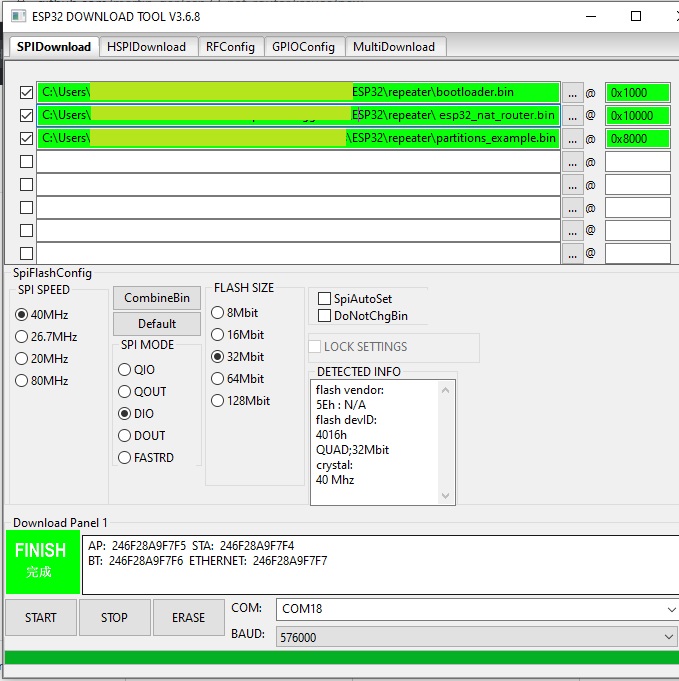
As an alternative you might use Espressif's Flash Download Tools with the parameters given in the figure below (thanks to mahesh2000), update the filenames accordingly: