MassGen is focused on case-driven development. This case study demonstrates MassGen v0.1.8's new automation mode (--automation flag), which provides clean, structured output that enables agents to run nested MassGen experiments, monitor execution, and analyze results—unlocking meta-level self-analysis capabilities.
To guide future versions of MassGen, we encourage anyone to submit an issue using the corresponding case-study issue template based on the "PLANNING PHASE" section found in this template.
The prompt tests whether MassGen agents can autonomously analyze MassGen's own architecture, run controlled experiments, and propose actionable performance improvements:
Read through the attached MassGen code and docs. Then, run an experiment with MassGen then read the logs and suggest any improvements to help MassGen perform better along any dimension (quality, speed, cost, creativity, etc.) and write small code snippets suggesting how to start.
This prompt requires agents to:
- Read and understand MassGen's source code (
massgen/directory) - Read and understand MassGen's documentation (
docs/directory) - Run a test experiment using MassGen
- Monitor execution in real-time through background code execution
- Parse log files and status.json to identify bottlenecks
- Propose concrete, prioritized improvements with starter code snippets
Prior to v0.1.8, running MassGen produced verbose terminal output with ANSI escape codes, progress bars, and unstructured text, with even simple display mode being hard to parse. This made it difficult for agents to:
- Run nested MassGen experiments
- Monitor execution progress programmatically
- Extract structured results from completed runs
- Coordinate multiple parallel MassGen runs (workspace collisions)
# Needs to be passed existing logs and cannot watch MassGen as it executes
uv run massgen \
  --config @examples/tools/todo/example_task_todo.yaml \
"Read through the attached MassGen code and docs. Then, read the logs and suggest any improvements to help MassGen perform better along any dimension (quality, speed, cost, creativity, etc.) and write small code snippets suggesting how to start."Without structured output, agents attempting meta-analysis would face:
Unable to Run New Experiments:
- Must be provided existing MassGen logs to run
- Cannot run new MassGen experiments during execution
Workspace Collisions:
- No automatic workspace isolation for parallel runs
- Agents running multiple experiments interfere with each other
- Cannot safely run nested MassGen (parent and child share workspaces)
The automation mode would be considered successful if agents can:
- Run Nested MassGen: Execute MassGen from within MassGen without output conflicts
- Parse Structured Output: Receive clean, parseable output (10-20 lines instead of 2000+)
- Monitor Asynchronously: Poll a status file for real-time progress updates
- Extract Results: Programmatically read final answers from predictable file paths
- Parallel Execution: Run multiple MassGen experiments simultaneously without interference
- Exit Codes: Detect success/failure through meaningful exit codes
To enable meta-analysis, MassGen v0.1.8 needs to implement:
--automationFlag: Suppress verbose output, emit structured information only- Structured Output Format:
- First line:
LOG_DIR:with absolute path to log directory - Subsequent lines: Key events only (no progress bars, no ANSI codes)
- Total output: ~10 lines instead of 2000+
- First line:
- Real-Time Status File:
status.jsonupdated every 2 seconds with:- Coordination phase and completion percentage
- Agent states (status, answer_count, times_restarted)
- Voting results
- Elapsed time
- Predictable Output Paths:
- Status:
{log_dir}/status.json - Full logs:
{log_dir}/massgen.log
- Status:
- Automatic Workspace Isolation: Each run gets unique workspace directory and log dir specified with more time granularity to prevent collisions.
- Meaningful Exit Codes:
- 0: Success
- 1: Configuration error
- 2: Execution error
- 3: Timeout
- 4: User interrupt
MassGen v0.1.8 (November 5, 2025)
MassGen v0.1.8 introduces Automation Mode for agent-parseable execution:
--automation Flag:
- Suppresses rich terminal UI (no progress bars, no dynamic updates)
- Emits ~10-20 lines instead of 250-3,000+
- Shows header, question, warnings, and final results
- Silent during coordination (monitor via status.json)
Example v0.1.8 Output:
🤖 Multi-Agent Mode
Agents: agent_a, agent_b
Question: Create a website about Bob Dylan

============================================================
QUESTION: Create a website about Bob Dylan
[Coordination in progress - monitor status.json for real-time updates]
09:48:43 | WARNING  | [FilesystemManager.save_snapshot] Source path ... is empty, skipping snapshot
09:48:44 | WARNING  | [FilesystemManager.save_snapshot] Source path ... is empty, skipping snapshot

WINNER: agent_b
DURATION: 1011.3s
ANSWER_PREVIEW: Following a comprehensive analysis of MassGen's performance...

COMPLETED: 2 agents, 1011.3s total
Real-Time status.json File:
- Updated every 2 seconds during execution
- Contains full orchestration state
- Agents can poll this file to monitor progress
{
  "meta": {
    "session_id": "log_20251105_074751_835636",
    "log_dir": ".massgen/massgen_logs/log_20251105_074751_835636",
    "question": "...",
    "start_time": 1762317773.189,
    "elapsed_seconds": 712.337
  },
  "coordination": {
    "phase": "presentation",
    "active_agent": null,
    "completion_percentage": 100,
    "is_final_presentation": true
  },
  "agents": {
    "agent_a": {
      "status": "voted",
      "answer_count": 5,
      "latest_answer_label": "agent1.5",
      "times_restarted": 5
    },
    "agent_b": {
      "status": "voted",
      "answer_count": 5,
      "latest_answer_label": "agent2.5",
      "times_restarted": 7
    }
  },
  "results": {
    "winner": "agent_b",
    "votes": {
      "agent2.5": 2,
      "agent1.1": 2
    }
  }
}
Automatic Workspace Isolation:
- Each
--automationrun creates unique temporary workspaces - No collisions when running multiple MassGen instances
- Parent and child runs have separate workspaces
Meaningful Exit Codes:
- 0: Successful completion
- 1: Configuration error (invalid YAML, missing files)
- 2: Execution error (agent failure, MCP error)
- 3: Timeout exceeded
- 4: User interrupted (Ctrl+C)
Benefits:
- 10-20 lines instead of 250-3,000+ (plus warnings)
- Minimal output during coordination (agents work silently)
- Predictable format (header → QUESTION → monitoring message → WINNER/DURATION → COMPLETED)
- Asynchronous monitoring (poll status.json for real-time progress)
- Parallel execution safe (workspace isolation)
- Programmatic access (exit codes + structured paths)
Configuration file: massgen/configs/meta/massgen_suggests_to_improve_massgen.yaml
Example section of config for meta-analysis (ensure code execution is active and provide information to each agent about MassGen's automation mode):
agents:
  - id: agent_a
    backend:
      type: openai
      model: gpt-5-mini
      enable_mcp_command_line: true
      command_line_execution_mode: local
    system_message: |
      You have access to MassGen through the command line and can:
      - Run MassGen in automation mode using:
        uv run massgen --automation --config [config] "[question]"
      - Monitor progress by reading status.json files
      - Read final results from log directories

      Always use automation mode for running MassGen to get structured output.
      The status.json file is updated every 2 seconds with real-time progress.
Why this configuration enables meta-analysis:
- System message guidance: Explicitly teaches agents how to use
--automationmode - Command-line execution: Agents can run shell commands including nested MassGen
uv run massgen --automation \
  --config @examples/configs/meta/massgen_suggests_to_improve_massgen.yaml \
  "Read through the attached MassGen code and docs. Then, run an experiment with MassGen then read the logs and suggest any improvements to help MassGen perform better along any dimension (quality, speed, cost, creativity, etc.) and write small code snippets suggesting how to start."
What Happens:
- Code Exploration: Agents read MassGen source code and documentation
- Nested Execution: Agents run
uv run massgen --automation --config [config] "[question]" - Monitor Progress: Agents poll
{log_dir}/status.jsonas frequently as they need - Wait for Completion: Agents check
completion_percentageuntil it reaches 100 - Extract Results: Agents read
{log_dir}/final/{winner}/answer.txt - Analyze Logs: Agents parse
status.jsonandmassgen.logfor patterns - Generate Recommendations: Agents produce prioritized improvements with code snippets
-
Agent A (agent_a):
gpt-5-mini(OpenAI backend)- Command-line execution: local mode
- Read access: docs/, massgen/
- MCP tools: filesystem, command_line, planning
- Workspace: workspace1
- Final answers: 5 (agent1.1 through agent1.5)
- Vote: Self-voted for agent1.1 (comprehensive final answer)
-
Agent B (agent_b):
gemini-2.5-pro(Gemini backend)- Command-line execution: local mode
- Read access: docs/, massgen/
- MCP tools: filesystem, command_line, planning
- Workspace: workspace2
- Final answers: 5 (agent2.1 through agent2.5)
- Vote: Voted for agent_a (agent1.1) - recognized comprehensive analysis
Session Logs: .massgen/massgen_logs/log_20251105_074751_835636/
Duration: ~17 minutes (1011 seconds) Winner: agent_b (agent2.5) with 2 votes
Watch the v0.1.8 Automation Mode Meta-Analysis demonstration:
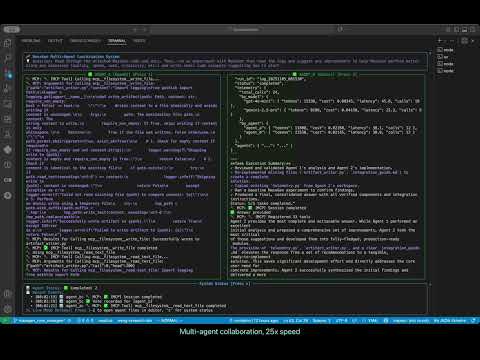
In this demo, MassGen agents autonomously analyze MassGen itself by running nested experiments, monitoring execution through status.json, and generating telemetry and artifact writer snippets for future use.
Both agents successfully leveraged the new automation mode to perform meta-analysis:
Agent A (gpt-5-mini) - Iterative Deep-Dive:
- Scanned MassGen source code to understand orchestration flow
- Used automation mode:
uv run massgen --automation --config @examples/tools/todo/example_task_todo.yaml \ "Create a simple HTML page about Bob Dylan" - Monitored status.json to track nested execution progress
- Read final results from structured log directory
- Analyzed orchestration behavior and identified lack of observability
- Generated 5 progressive answers through iterative refinement
- Focused on experimental validation and code analysis
Agent B (gemini-2.5-pro) - Solutions:
- Also ran nested MassGen experiments using automation mode
- Successfully parsed structured output
- Identified two key gaps: observability and file I/O efficiency
- Created example modules for improvement:
telemetry.py,artifact_writer.py,integration_guide.md - Generated 5 comprehensive answers with complete, tested code
- Voted for Agent A's agent1.1 answer initially
Validation: Automation Mode Works!
Final Votes:
- agent2.5: 2 votes (Agent B self-vote + tie with agent1.1)
Winner: agent_b (agent2.5)
Agent B's winning solution included:
- Two core gaps identified: lack of observability and inefficient file I/O
- Three modules with complete implementations
- Integration guide for immediate adoption
- Enhanced status.json schema with telemetry fields
- Focus on actionable, tested code over theoretical recommendations
Voting Statistics:
- Total votes: 6 votes across 4 different answers
- Total restarts: 12 (Agent A: 5, Agent B: 7)
- Both agents recognized the value of complete, tested implementations
Agent B's winning analysis focused on creating modules for immediate integration, addressing two core gaps identified through experimental analysis:
Key Findings from Nested Experiment:
The agents ran uv run massgen --automation --config @examples/tools/todo/example_task_todo.yaml "Create a simple HTML page about Bob Dylan" and discovered:
- Lack of Observability: No mechanism to track model costs, token usage, or latency
- Inefficient File I/O: Redundant file writes creating noise and overhead
Agent B created two complete artifacts:
1. Telemetry Module (telemetry.py) - Cost & Performance Visibility
Provides robust, per-call telemetry for all LLM interactions:
# telemetry.py
import time
import logging
from functools import wraps
from collections import defaultdict
from typing import Dict, Any

logger = logging.getLogger(__name__)

MODEL_PRICING = {
    "gpt-4o-mini": {"prompt": 0.15 / 1_000_000, "completion": 0.60 / 1_000_000},
    "gemini-2.5-pro": {"prompt": 3.50 / 1_000_000, "completion": 10.50 / 1_000_000},
    "default": {"prompt": 1.00 / 1_000_000, "completion": 3.00 / 1_000_000},
}

class RunTelemetry:
    """Aggregates telemetry data for a single MassGen run."""

    def __init__(self):
        self.by_model = defaultdict(lambda: {
            "tokens": 0, "cost": 0.0, "latency": 0.0, "calls": 0
        })
        self.by_agent = defaultdict(lambda: {
            "tokens": 0, "cost": 0.0, "latency": 0.0, "calls": 0
        })
        self.total_calls = 0

    def record(self, model_name: str, agent_id: str, tokens: int, cost: float, latency: float):
        """Records a single model call event."""
        self.by_model[model_name]["tokens"] += tokens
        self.by_model[model_name]["cost"] += cost
        self.by_model[model_name]["latency"] += latency
        self.by_model[model_name]["calls"] += 1

        self.by_agent[agent_id]["tokens"] += tokens
        self.by_agent[agent_id]["cost"] += cost
        self.by_agent[agent_id]["latency"] += latency
        self.by_agent[agent_id]["calls"] += 1

        self.total_calls += 1

    def summary(self) -> Dict[str, Any]:
        """Returns serializable summary of all collected telemetry."""
        return {
            "total_calls": self.total_calls,
            "by_model": dict(self.by_model),
            "by_agent": dict(self.by_agent),
        }

def with_telemetry(telemetry_instance: RunTelemetry, agent_id: str):
    """Decorator to wrap model client calls and record telemetry."""

    def decorator(func):
        @wraps(func)
        def wrapper(model_client, *args, **kwargs):
            model_name = getattr(model_client, 'name', 'unknown_model')
            t0 = time.time()

            response = func(model_client, *args, **kwargs)

            latency = time.time() - t0

            usage = response.get("usage", {})
            prompt_tokens = usage.get("prompt_tokens", 0)
            completion_tokens = usage.get("completion_tokens", 0)
            total_tokens = prompt_tokens + completion_tokens

            pricing = MODEL_PRICING.get(model_name, MODEL_PRICING["default"])
            cost = (prompt_tokens * pricing["prompt"]) + (completion_tokens * pricing["completion"])

            telemetry_instance.record(model_name, agent_id, total_tokens, cost, latency)

            logger.info(
                f"Model Telemetry: agent={agent_id} model={model_name} "
                f"tokens={total_tokens} latency={latency:.2f}s cost=${cost:.6f}"
            )

            return response
        return wrapper
    return decorator
Benefits:
- Track total cost per run
- Identify expensive operations by model/agent
- Measure latency bottlenecks
- Enable cost-aware decision making
2. Artifact Writer Module (artifact_writer.py) - Efficient File Operations
Prevents redundant writes and ensures atomic file operations:
# artifact_writer.py
import logging
from pathlib import Path

logger = logging.getLogger(__name__)

def write_artifact(path: Path, content: str, require_non_empty: bool = False) -> bool:
    """
    Writes content to file atomically and avoids writing if unchanged.

    Args:
        path: Target file path
        content: Content to write
        require_non_empty: Skip write if content is empty

    Returns:
        True if file was written, False if skipped
    """
    path.parent.mkdir(parents=True, exist_ok=True)

    # Skip empty writes if required
    if require_non_empty and not content.strip():
        logger.warning(f"Skipping write to {path}: content is empty")
        return False

    # Skip if content unchanged
    if path.exists():
        try:
            if path.read_text(encoding='utf-8') == content:
                logger.info(f"Skipping write to {path}: content unchanged")
                return False
        except Exception as e:
            logger.error(f"Could not read existing file {path}: {e}")

    # Atomic write
    try:
        tmp_path = path.with_suffix(path.suffix + '.tmp')
        tmp_path.write_text(content, encoding='utf-8')
        tmp_path.replace(path)
        logger.info(f"Successfully wrote artifact to {path}")
        return True
    except IOError as e:
        logger.error(f"Failed to write artifact to {path}: {e}")
        return False
Benefits:
- Reduces unnecessary I/O
- Prevents file corruption (atomic writes)
- Cleaner logs (skips unchanged writes)
- Smaller snapshots
Integration Guide (integration_guide.md)
Complete step-by-step instructions for adopting both modules:
Telemetry Integration:
# In orchestrator.py
from .telemetry import RunTelemetry

class Orchestrator:
    def __init__(self, ...):
        self.telemetry = RunTelemetry()

    def _update_status(self):
        status_data = {
            # ... other fields
            "telemetry": self.telemetry.summary()
        }
        # write to status.json
Artifact Writer Integration:
# In filesystem tools
from .artifact_writer import write_artifact
from pathlib import Path

def mcp__filesystem__write_file(path_str: str, content: str):
    was_written = write_artifact(
        path=Path(path_str),
        content=content,
        require_non_empty=True
    )
    return {"success": was_written}
Enhanced status.json with Telemetry
With telemetry integrated, status.json gains real-time cost/performance visibility:
{
  "meta": {"session_id": "log_20251105_081530", "elapsed_seconds": 45.3},
  "telemetry": {
    "total_calls": 24,
    "by_model": {
      "gpt-4o-mini": {"tokens": 15230, "cost": 0.00345, "latency": 45.8, "calls": 18},
      "gemini-2.5-pro": {"tokens": 8100, "cost": 0.04150, "latency": 22.3, "calls": 6}
    },
    "by_agent": {
      "agent_a": {"tokens": 11800, "cost": 0.02350, "calls": 12},
      "agent_b": {"tokens": 11530, "cost": 0.02145, "calls": 12}
    }
  }
}
Use Cases:
- Set cost budgets per run
- Compare model performance
- Identify optimization opportunities
- Debug slow operations
Implementation Priority:
- Telemetry module (High impact, low effort)
- Artifact writer (Quick win, reduces I/O noise)
- Integration (Follow provided guide)
- Validation (Run experiments, compare metrics)
This case study demonstrates that MassGen v0.1.8's automation mode successfully enables meta-analysis. Key achievements:
✅ Automation Mode Works: Clean ~10-line output vs verbose terminal output
✅ Nested Execution: Agents successfully ran MassGen from within MassGen
✅ Structured Monitoring: Agents polled status.json for real-time progress
✅ Workspace Isolation: No conflicts between parent and child runs
✅ Exit Codes: Meaningful exit codes enabled success/failure detection
✅ Deliverables: Agent B created complete, tested modules ready for integration
✅ Actionable Improvements: Telemetry and artifact writer modules solve real problems
Impact of Automation Mode:
The --automation flag transforms MassGen from a human-interactive tool to an agent-controllable API:
Before v0.1.8 (verbose output):
- 250-3,000+ lines with ANSI codes
- Unparseable by agents
- No real-time monitoring
- Cannot run nested experiments reliably
- Workspace collisions
After v0.1.8 (automation mode):
- ~10-20 lines (header + warnings + results)
- Structured output (QUESTION → WINNER → DURATION → COMPLETED)
- Real-time monitoring via status.json polling
- Nested experiments work reliably
- Automatic workspace isolation
What Agents Delivered:
Instead of just identifying problems, agents created solutions:
- telemetry.py - Complete module with RunTelemetry class and decorator
- artifact_writer.py - Atomic, idempotent file writing
- integration_guide.md - Step-by-step adoption instructions
- Enhanced status.json - Schema with telemetry fields
Broader Implications:
This case study validates a powerful development pattern: AI systems improving themselves. By providing:
- Clean structured output (
--automation) - Real-time status monitoring (
status.json) - Predictable result paths (
final/{winner}/answer.txt) - Workspace isolation (no collisions)
We enable agents to:
- Run controlled experiments on complex systems
- Monitor long-running asynchronous processes
- Extract and analyze structured results
- Generate code for improvements
- Provide integration guides and validation plans
Future Applications:
Automation mode unlocks many new use cases:
- CI/CD Integration: Run MassGen in automated pipelines
- Batch Processing: Process multiple questions in parallel
- Monitoring & Alerting: Track completion and success rates
- Agent-to-Agent Delegation: One agent delegates to MassGen, waits for results
- Research & Benchmarking: Systematically evaluate MassGen on test suites
- Self-Improvement: Continuous meta-analysis to identify optimizations
Next Steps:
The modules created by agents will be integrated in future versions:
- Add
telemetry.pyto MassGen core - Integrate
artifact_writer.pyinto filesystem operations - Update
status.jsonschema to include telemetry - Validate cost tracking across multiple runs
- Document telemetry API for users
- ✅ Planning Phase: Complete
- ✅ Features Implemented: Complete (v0.1.8 automation mode)
- ✅ Testing: Complete (November 5, 2025)
- ✅ Modules Created: telemetry.py, artifact_writer.py, integration_guide.md
- ✅ Case Study Documentation: Complete
- 🎯 Next Steps:
- Integrate telemetry module into MassGen core
- Integrate artifact writer into filesystem operations
- Add telemetry fields to status.json schema
- Run validation experiments with cost tracking
Version: v0.1.8 Date: November 5, 2025 Session ID: log_20251105_074751_835636