
The worst mesh generator you'll ever use.





Inspired by distmesh, dmsh can be slow, requires a lot of memory, and isn't terribly robust either.
On the plus side,
- it's got a user-friendly interface,
- is pure Python (and hence easily installable on any system), and
- it produces pretty high-quality meshes.
Combined with optimesh, dmsh produces the highest-quality 2D meshes in the west.
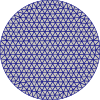 |
 |
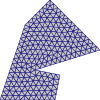 |
|---|
import dmsh
import meshio
import optimesh

geo = dmsh.Circle([0.0, 0.0], 1.0)
X, cells = dmsh.generate(geo, 0.1)

# optionally optimize the mesh
X, cells = optimesh.optimize_points_cells(X, cells, "CVT (full)", 1.0e-10, 100)

# visualize the mesh
dmsh.show(X, cells, geo)

# and write it to a file
meshio.Mesh(X, {"triangle": cells}).write("circle.vtk")
import dmsh
geo = dmsh.Rectangle(-1.0, +2.0, -1.0, +1.0)
X, cells = dmsh.generate(geo, 0.1)import dmsh
geo = dmsh.Polygon(
[
[0.0, 0.0],
[1.1, 0.0],
[1.2, 0.5],
[0.7, 0.6],
[2.0, 1.0],
[1.0, 2.0],
[0.5, 1.5],
]
)
X, cells = dmsh.generate(geo, 0.1)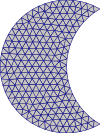 |
 |
 |
|---|
import dmsh

geo = dmsh.Circle([-0.5, 0.0], 1.0) - dmsh.Circle([+0.5, 0.0], 1.0)
X, cells = dmsh.generate(geo, 0.1)
import dmsh
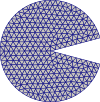
geo = dmsh.Circle([0.0, 0.0], 1.0) - dmsh.Polygon([[0.0, 0.0], [1.5, 0.4], [1.5, -0.4]])
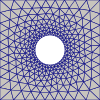
X, cells = dmsh.generate(geo, 0.1, tol=1.0e-10)The following example uses a nonconstant edge length; it depends on the distance to the
circle c.
import dmsh
import numpy as np

r = dmsh.Rectangle(-1.0, +1.0, -1.0, +1.0)
c = dmsh.Circle([0.0, 0.0], 0.3)
geo = r - c

X, cells = dmsh.generate(geo, lambda pts: np.abs(c.dist(pts)) / 5 + 0.05, tol=1.0e-10)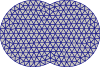 |
 |
 |
|---|
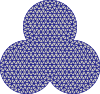
import dmsh

geo = dmsh.Circle([-0.5, 0.0], 1.0) + dmsh.Circle([+0.5, 0.0], 1.0)
X, cells = dmsh.generate(geo, 0.15)
import dmsh
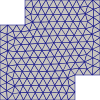
geo = dmsh.Rectangle(-1.0, +0.5, -1.0, +0.5) + dmsh.Rectangle(-0.5, +1.0, -0.5, +1.0)
X, cells = dmsh.generate(geo, 0.15)import dmsh
import numpy as np
angles = np.pi * np.array([3.0 / 6.0, 7.0 / 6.0, 11.0 / 6.0])
geo = dmsh.Union(
[
dmsh.Circle([np.cos(angles[0]), np.sin(angles[0])], 1.0),
dmsh.Circle([np.cos(angles[1]), np.sin(angles[1])], 1.0),
dmsh.Circle([np.cos(angles[2]), np.sin(angles[2])], 1.0),
]
)
X, cells = dmsh.generate(geo, 0.15)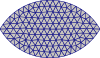 |
 |
 |
|---|
import dmsh

geo = dmsh.Circle([0.0, -0.5], 1.0) & dmsh.Circle([0.0, +0.5], 1.0)
X, cells = dmsh.generate(geo, 0.1, tol=1.0e-10)
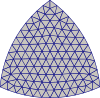
import dmsh
import numpy as np
angles = np.pi * np.array([3.0 / 6.0, 7.0 / 6.0, 11.0 / 6.0])
geo = dmsh.Intersection(
[
dmsh.Circle([np.cos(angles[0]), np.sin(angles[0])], 1.5),
dmsh.Circle([np.cos(angles[1]), np.sin(angles[1])], 1.5),
dmsh.Circle([np.cos(angles[2]), np.sin(angles[2])], 1.5),
]
)
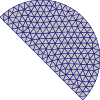
X, cells = dmsh.generate(geo, 0.1, tol=1.0e-10)The following uses the HalfSpace primtive for cutting off a circle.
import dmsh

geo = dmsh.HalfSpace([1.0, 1.0]) & dmsh.Circle([0.0, 0.0], 1.0)
X, cells = dmsh.generate(geo, 0.1)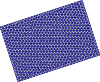 |
 |
|---|
import dmsh
import numpy as np

geo = dmsh.Rotation(dmsh.Rectangle(-1.0, +2.0, -1.0, +1.0), 0.1 * np.pi)
X, cells = dmsh.generate(geo, 0.1, tol=1.0e-10)
import dmsh
geo = dmsh.Rectangle(-1.0, +2.0, -1.0, +1.0) + [1.0, 1.0]
X, cells = dmsh.generate(geo, 0.1)import dmsh
geo = dmsh.Rectangle(-1.0, +2.0, -1.0, +1.0) * 2.0
X, cells = dmsh.generate(geo, 0.1, tol=1.0e-5)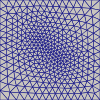
All objects can be used to refine the mesh according to the distance to the object;
e.g. a Path:
import dmsh

geo = dmsh.Rectangle(0.0, 1.0, 0.0, 1.0)

p1 = dmsh.Path([[0.4, 0.6], [0.6, 0.4]])


def target_edge_length(x):
    return 0.03 + 0.1 * p1.dist(x)


X, cells = dmsh.generate(geo, target_edge_length, tol=1.0e-10)It is also possible to define your own geometry. Simply create a class derived from
dmsh.Geometry that contains a dist method and a method to project points onto the
boundary.
import dmsh
import numpy as np


class MyDisk(dmsh.Geometry):
    def __init__(self):
        self.r = 1.0
        self.x0 = [0.0, 0.0]
        bounding_box = [-1.0, 1.0, -1.0, 1.0]
        feature_points = np.array([[], []]).T
        super().__init__(bounding_box, feature_points)

    def dist(self, x):
        assert x.shape[0] == 2
        y = (x.T - self.x0).T
        return np.sqrt(np.einsum("i...,i...->...", y, y)) - self.r

    def boundary_step(self, x):
        # project onto the circle
        y = (x.T - self.x0).T
        r = np.sqrt(np.einsum("ij,ij->j", y, y))
        return ((y / r * self.r).T + self.x0).T


geo = MyDisk()
X, cells = dmsh.generate(geo, 0.1)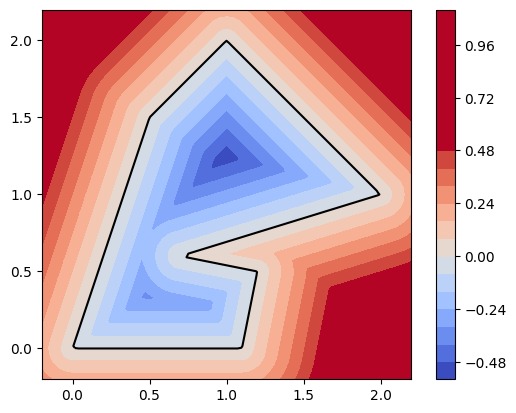 |
 |
|---|
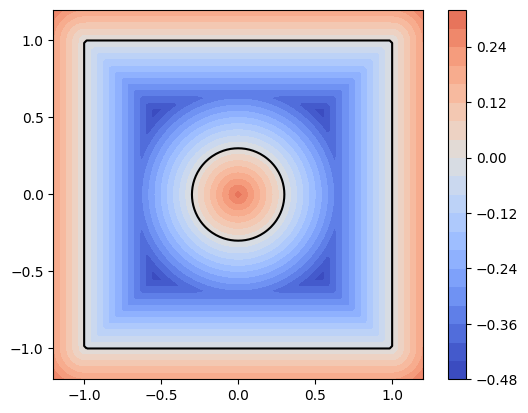
dmsh is rather fragile, but sometimes the break-downs are due to an incorrectly defined geometry. Use
geo.show()
to inspect the level set function of your domain. (It must be negative inside the domain and positive outside. The 0-level set forms the domain boundary.)
dmsh is available from the Python Package Index, so simply type
pip install dmsh
to install.