The open-source reference implementation. From conversation to production, every phase powered by 12 intelligent agents working alongside humans.
Self-hosted on your hardware. Your data stays local. Inference engine is your choice — Claude Code today, Ollama and OpenAI next.
🌳 bodhiorchard.ai — the methodology, the videos, the screenshots.







Website | Getting Started | How It Runs | AI Engines | AI Agents | Manifesto | API | FAQ | License
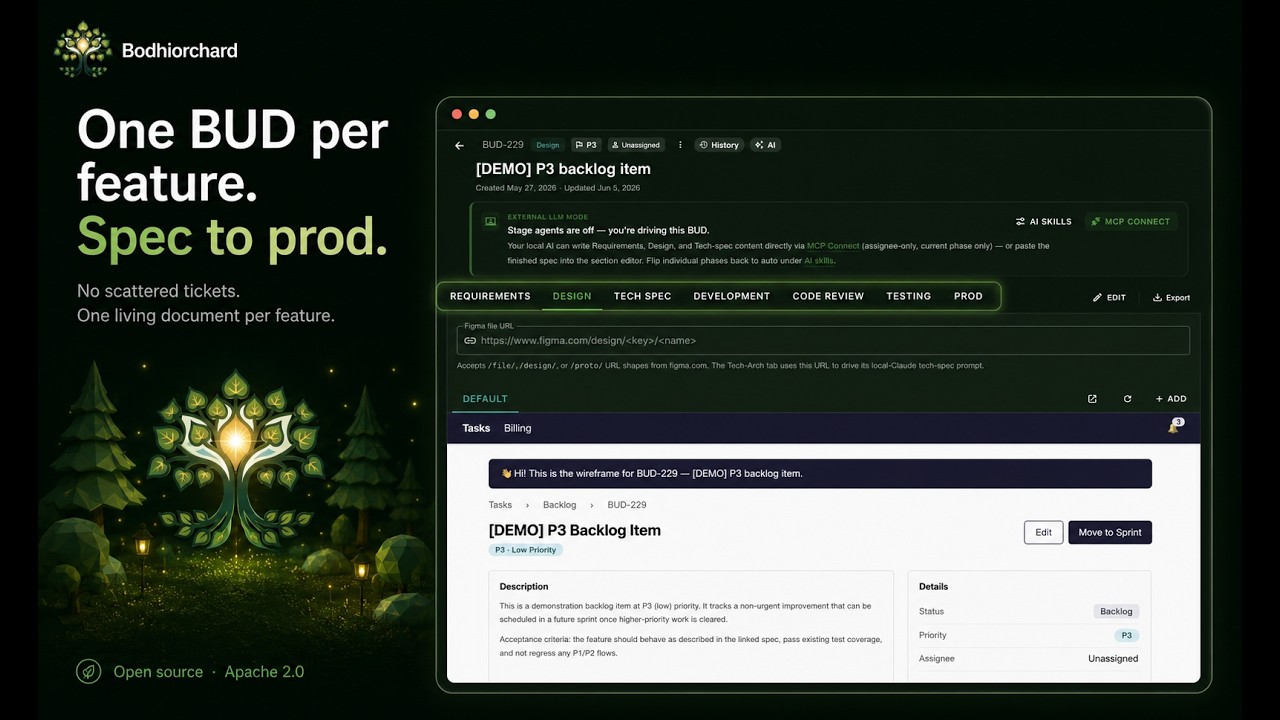
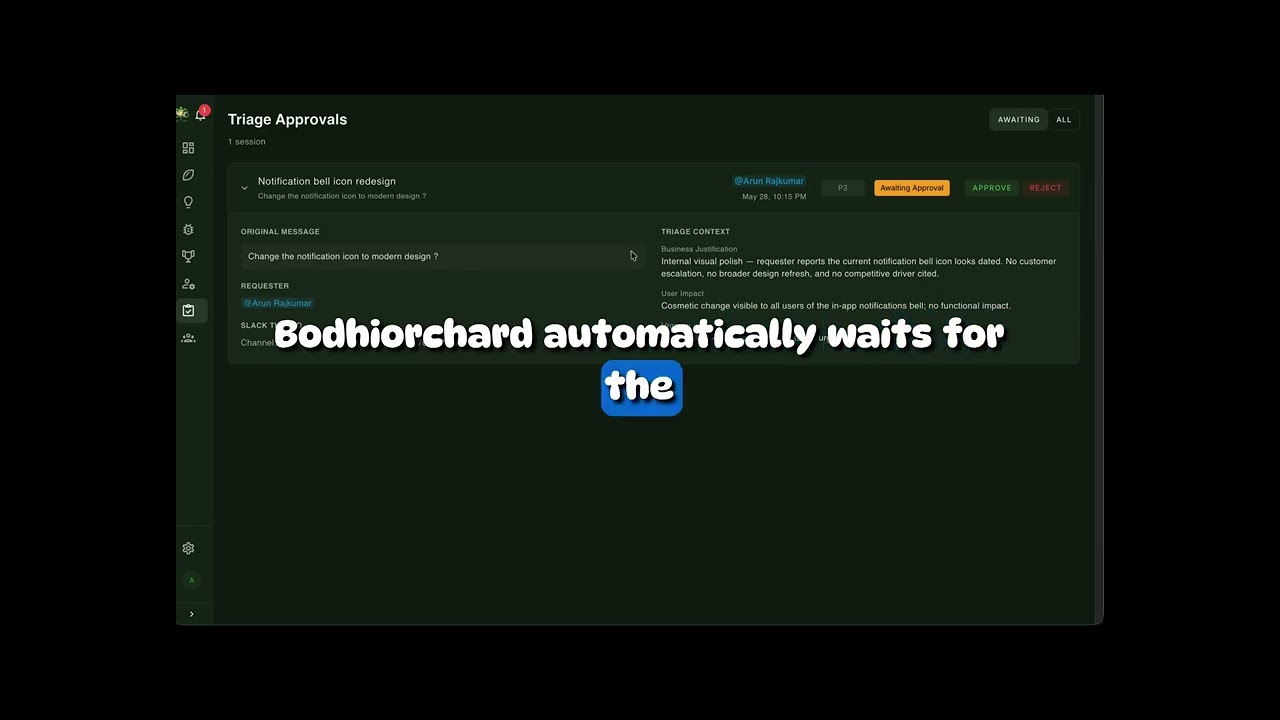
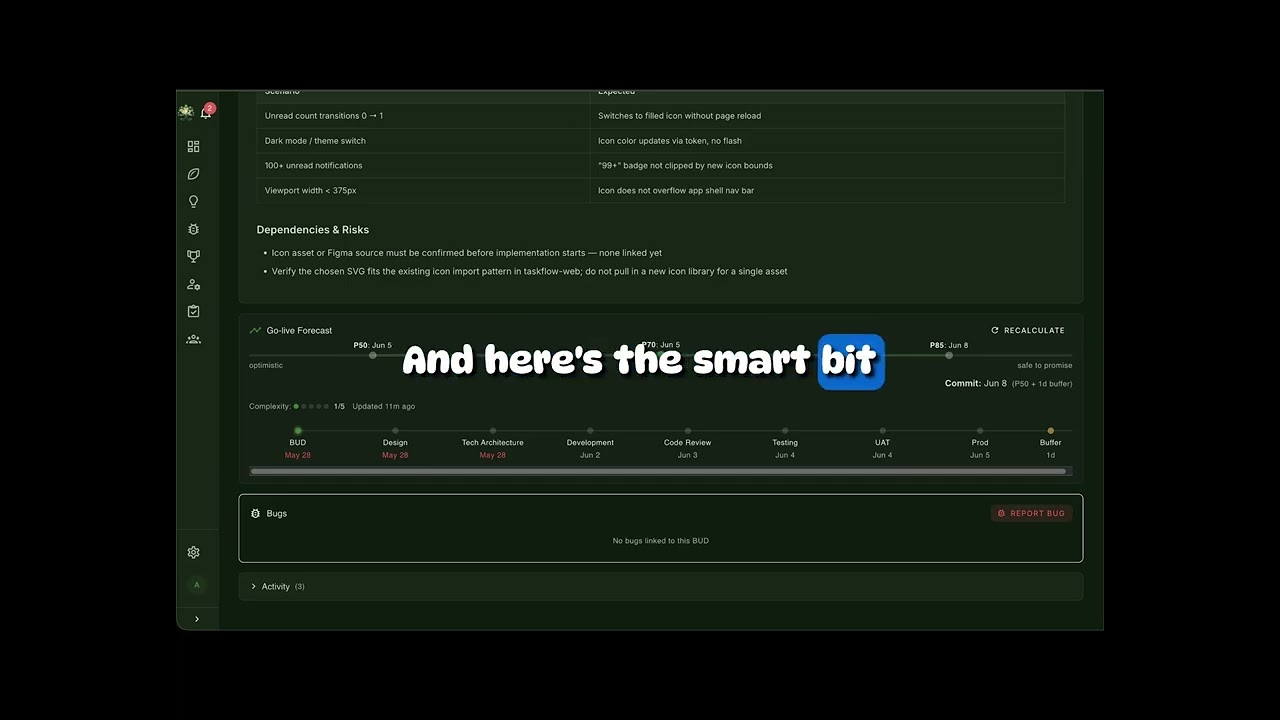
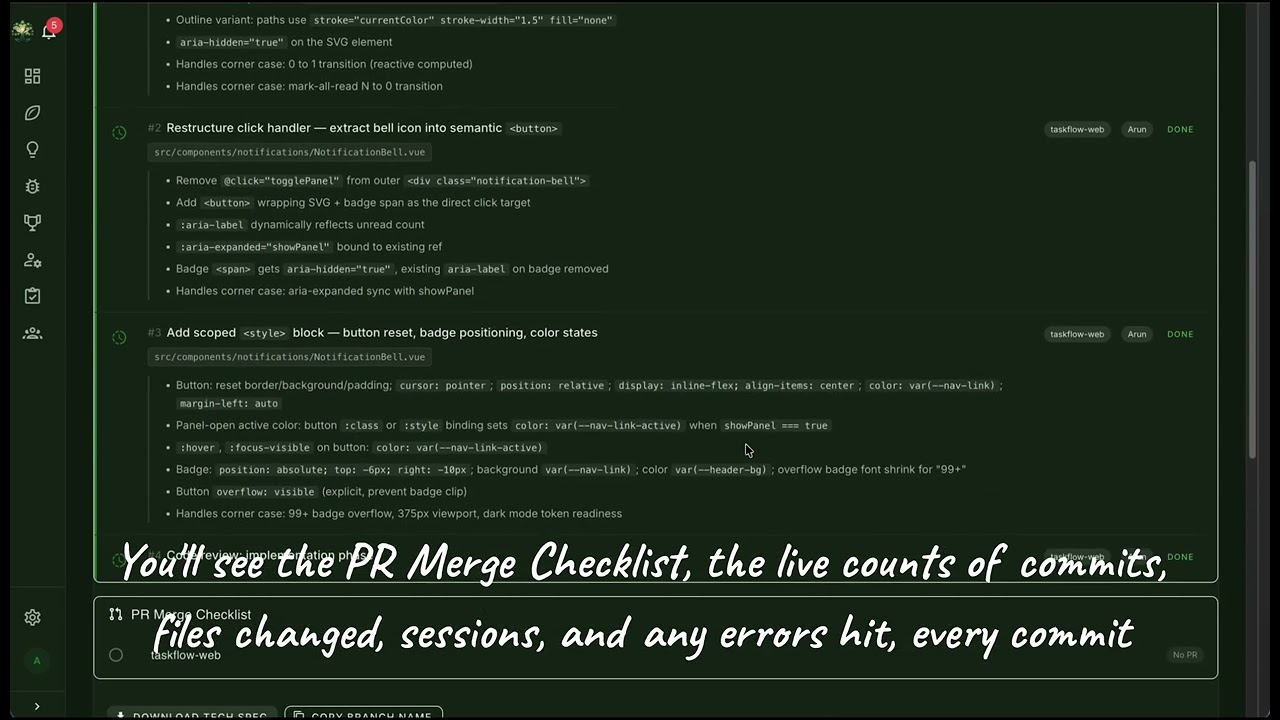
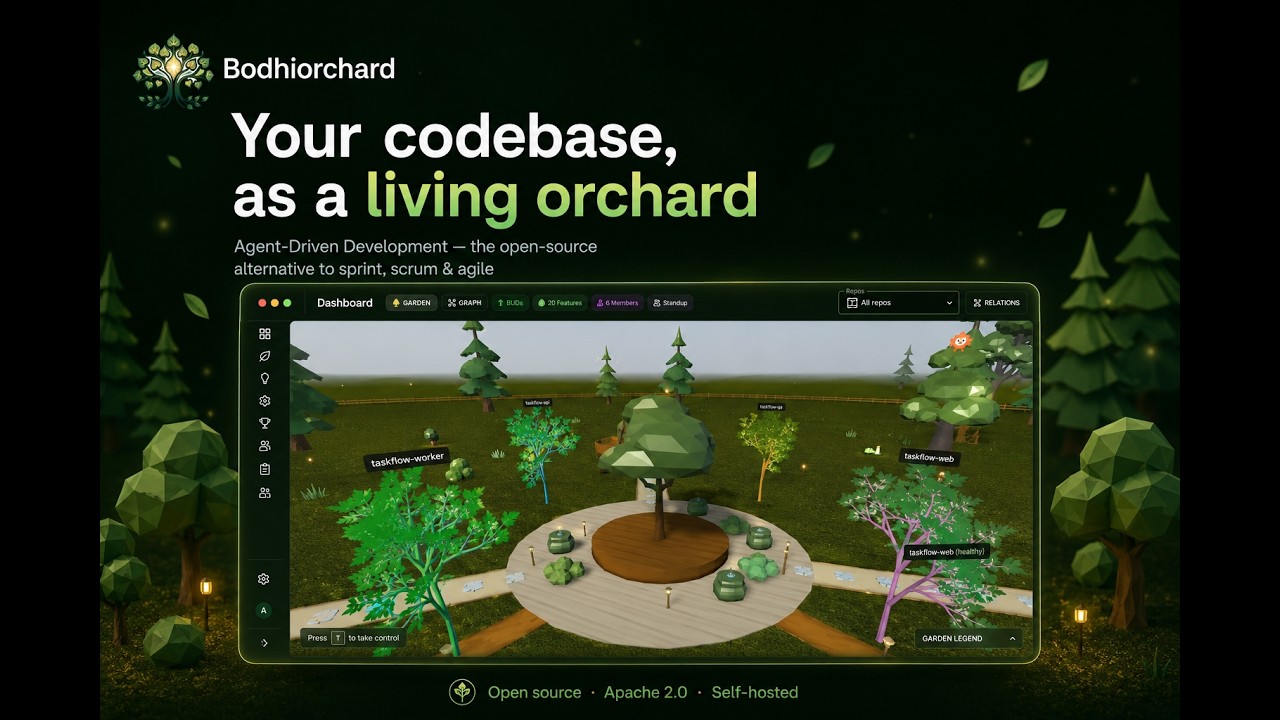
Setup walkthrough · Slack triage & MCP tools · Requirements & estimation · Design phase & agent prompts · Development & retrospective · Inside the virtual world

Bodhiorchard is the open-source reference implementation of Agent-Driven Development — a modern way to build software that replaces sprint planning, scrum ceremonies, and agile ritual with twelve specialised AI agents working alongside humans across every phase of the lifecycle. The methodology drops what was meant to help but became the work (story points, planning poker, status meetings, retrospective theatre) and keeps what actually matters (clear specs, codebase context, accurate cycle-time predictions, real-time learning). Bodhiorchard runs self-hosted on your hardware so the data plane never leaves your machine; the agents run today on Claude Code for codebase-aware reasoning and the Anthropic direct API for lightweight non-codebase calls, with Ollama (fully air-gapped), the OpenAI direct API, and OpenAI Codex on the near-term roadmap.
Traditional Agile tools create busywork: manual ticket creation, estimation poker, status updates, retrospective meetings, and scattered documentation across Jira, Confluence, Notion, and Slack. Developers spend more time managing work than doing work.
Bodhiorchard replaces human busywork with AI automation while keeping humans in control of decisions that matter:
| Phase | Agile / Scrum | Agent-Driven Development (Bodhiorchard) |
|---|---|---|
| Intake | Ticket in Jira, manual triage, sprint planning | Chat message → Triage Agent analyses, finds duplicates, estimates capacity |
| Estimation | Story points, planning poker, team debate | AI-PERT + Monte Carlo simulation — per-phase dates with P50 / P70 / P85 confidence, factoring developer skill profiles, backlog depth, and workload |
| Specification | PM writes BUD manually, reviews in meetings | BUD Agent drafts spec with codebase context, enterprise rules, prior art |
| Design | Designer creates in Figma, hands off specs | AI generates wireframes; Designer reviews, edits, and advances to Tech Architecture |
| Tech Arch | Architect writes design doc, reviews in meetings | AI generates tech plan; Tech Lead reviews; Smart Assignment Agent suggests developer |
| Development | Dev picks up ticket, starts from scratch | Best-fit dev assigned by AI, implements from tech plan, human reviews code |
| Testing | QA writes test cases manually, runs regression | Auto-generated test plan (unit, integration, e2e, perf, security, UAT) |
| QA & UAT | QA writes test cases, manual handoff | QA approves / refines automation plan, executes manual tests, signs off for UAT |
| Deployment | Release train, manual status updates | Status Agent auto-detects PR merges; BUD becomes a Feature on deploy |
| Bug Mgmt | Manual triage, reassign in standup | External bugs reopen Features, auto-classified, restart flow from triage |
| Knowledge | Confluence pages go stale, tribal knowledge | Learning Agent captures patterns; knowledge auto-syncs from code |
| Skills | Manager intuition, annual reviews | Skill Agent rebuilds daily from git / BUD / bug history, recommends assignments |
| Retrospective | Biweekly meeting, action items forgotten | Learning Agent auto-generates retrospective on every deployment |
Agent-Driven Development has its own manifesto. Eight principles, deliberately echoing the Agile Manifesto's "X over Y" structure — these are what an agent-driven team chooses when the trade-off is real.
| We value… | …over |
|---|---|
| AI-generated first drafts | blank-page paralysis |
| Cycle time predictions | story points & planning poker |
| Continuous learning | post-mortems after the damage |
| Human decisions | human busywork |
| Living knowledge | stale Confluence pages |
| BUD as single source of truth | scattered tickets & docs |
| Skills that grow with the team | static role assignments |
| Auto-healing quality loops | manual bug triage |
The full methodology — phase-by-phase flow, AI-vs-Human role split, knowledge architecture — lives at bodhiorchard.ai.
Every feature lives in one BUD — spec, tech spec, test plan, acceptance criteria, and full history. Replaces scattered Jira tickets, Google Docs, and Notion pages.
BUD Lifecycle: bud -> design -> tech_arch -> development -> testing -> uat -> prod -> closed
                                                                                |
                                                                      discarded (any time)
- Markdown-based with separate sections for spec, tech spec, and test plan
- Vector-indexed for semantic search by all agents
- Full history: stage transitions, assignees, reopens, linked bugs
- Auto-numbered per organization (BUD-001, BUD-002, ...)
A 3D interactive visualization of your organization rendered as a living tree:
- Trunk = Organization
- Limbs = Repositories
- Branches = Code communities (auto-detected)
- Leaves = Recent files (color = "freshness" from git activity)
Hover for developer details, click for drill-down, watch the tree grow as your codebase evolves.
Story points and planning poker replaced with probabilistic, per-phase delivery dates.
- AI generates optimistic, likely, and pessimistic estimates (PERT) for each BUD phase.
- 10,000 Monte Carlo simulations produce P50 / P70 / P85 confidence dates.
- Estimates factor in developer skill profiles, current backlog depth, and team workload.
Example prediction. Feature: Notification Redesign (complexity 3/5). Developer: Alice (backend 0.92, frontend 0.35). Go-live: 70% by Apr 25 · 85% by May 2.
Auto-healing bug management that prevents quality debt from accumulating.
- Bug threshold — complexity × multiplier, configurable per org; when exceeded, auto-reassignment fires.
- Auto-reassignment — original dev moves to bug review, QA rotates to the next waiting BUD.
- Feature reopening — production bugs reopen the originating Feature and restart the flow from triage.
- Auto-classification — each bug is tagged "missed feature" vs "development bug", driving different fix paths.
- Knowledge capture — every fix adds to the knowledge base so the same bug class doesn't recur.
Smart backlog management driven by data, not gut feelings.
- Capacity-aware triage deprioritises or defers items based on real-time team capacity.
- Dynamic reassignment shuffles work as business demand shifts.
- Customer priority scoring — ARR + severity + tier drives ordering automatically.
- Best-fit developer recommendations from the Skill Agent.
- Real-time utilisation — per-developer capacity tracking keeps workloads balanced.
A 4-layer knowledge architecture replaces stale wikis with living, auto-synced knowledge.
| Layer | Source | Sync cadence |
|---|---|---|
| 1. Git repos | Source code + per-repo CLAUDE.md |
Every 15 minutes |
| 2. Agent skills | Org standards, design guidelines, API patterns | On change |
| 3. Central DB | BUDs, enterprise rules, architecture decisions | Real-time |
| 4. Vector search | Semantic search across all of the above | Auto-indexed |
Why this beats Confluence: auto-synced from source (not hand-maintained), semantically searchable (not keyword search), always current (daily staleness detection), and integrated into every agent prompt so agents always have the latest context.
Automatic skill tracking from git history — no manual profile updates:
- Per-developer, per-module expertise scores (0-1.0)
- Bus factor alerts — modules touched by only one person, flagging knowledge concentration risk
- Intelligent task routing based on expertise match + capacity
- Daily profile rebuilds from git commits, BUD assignments, and bug fixes
Submit features directly from Slack. The Triage Agent conducts a structured interview:
- User posts in
#feature-requests - AI asks clarifying questions in a thread
- Checks for duplicates via vector search
- Estimates complexity from codebase analysis
- Suggests priority with capacity check
- PM approves in the Bodhiorchard UI
- BUD Agent generates the full specification
Powered by an in-tree code-graph indexer (backend/app/services/code_indexer/)
built on the MIT-licensed graphify
library — tree-sitter parsing → NetworkX graph → Leiden community detection:
- Scan repositories to build a per-repo knowledge graph of code relationships
- Auto-synthesize feature descriptions from code clusters
- Cross-repo feature deduplication and merging
- Semantic search across all indexed code and documentation
- Impact / blast-radius queries via the
code_*MCP tool group
Bodhiorchard runs an MCP server that exposes BUD-lifecycle writes (create_bud, update_bud, write_bud_design), feature-registry reads/writes, team-context queries, design-system metadata, the code-graph impact tool group, and granular TODO claim/complete — all to Claude Code and any MCP-compatible client. Today's flagship engine is Claude Code; the Anthropic direct API handles lightweight non-codebase agents; Ollama, OpenAI, and OpenAI Codex are next. See AI Engines for the full tool list, auth modes, and the ~/.claude.json registration snippet.
Prefer to draft your PRD / design / tech spec with your own local AI? Toggle "Auto-generate" off when creating a BUD, then connect Claude Desktop / Cursor / Continue to the read-only remote MCP endpoint and paste the finished spec back into the section editors. Tokens are scoped, expiring, individually revocable, rate-limited, and audited. See MCP-REMOTE.md for the full setup, client config snippets, and threat model.
- Multi-tenant isolation — all queries scoped to organization
- RBAC with 9 built-in roles and granular permissions
- AES encryption at rest for GitHub PATs, Slack tokens, and secrets
- JWT authentication with refresh tokens
- Audit trail — every agent action logged with full context
The point of the agents is not to replace human judgement — it's to absorb the busywork so humans can focus on the calls that actually matter.
| 🤖 AI handles | 🧑 Humans handle |
|---|---|
| Intake analysis & duplicate detection | Review and advance decisions at every phase |
| BUD drafting with codebase context | Code review & architecture choices |
| Design scope & tech plan generation | Visual design in preferred tools |
| Test case generation (automation + manual) | Business trade-offs & prioritisation |
| Bug-to-BUD linking & threshold monitoring | Quality validation & UAT sign-off |
| Status tracking & stakeholder updates | Reassignment review & override |
| Pattern recognition & retrospectives | Knowledge curation & enterprise rules |
| Skill profiling & assignment recommendations | |
| Knowledge sync (code → docs → vector DB) | |
| AI-PERT estimation with Monte Carlo intervals | |
| Smart developer assignment based on skills & capacity |
Bodhiorchard splits cleanly into two planes so you can pick how much of it lives on your hardware.
Postgres + pgvector, every BUD, the embeddings index, the scanned repos, the agent skills, and the audit log all sit on your machine. Nothing in this plane ever calls home — even when you choose cloud inference, the data the agents reason over stays on your hardware.
Three first-class modes, three reasons to pick each:
- Local Claude Code — point Bodhiorchard at a host
claude loginsession. Pro / Max flat-rate, no per-token bills, codebase-aware. - Cloud Claude via API key — paste an
sk-ant-…into Settings → AI Configuration → Claude Code. Pay-per-token, recommended for evaluators and CI. - Anthropic direct API — for the lightweight non-codebase agents (Triage, Bug-Linker, Standup). Lower latency and lower per-call cost than going through Claude Code.
See AI Engines for the engine-by-engine breakdown.
A single laptop or Mac Mini runs the whole platform — frontend, backend, multiplayer, Postgres, Redis. A Cloudflare Tunnel optionally exposes just the Slack / GitHub webhook endpoints without putting the rest of the stack online. This makes Bodhiorchard a credible self-hosted Jira alternative for teams that don't want to live on per-seat SaaS.
- Lower cost than per-seat SaaS — no platform-compute bills; pay only for whichever inference engine you wire up (or flat-rate if you're on a Claude subscription).
- Lower energy footprint — a Mac Mini idles around 10W vs hundreds of watts for cloud VMs.
- Data residency by default — code, BUDs, embeddings, and knowledge stay on your hardware even when inference is in the cloud.
  Your Machine (Laptop / Mac Mini)
  ┌────────────────────────────────────────────────────────────┐
  │                                                            │
  │  ┌──────────────┐  ┌──────────────┐  ┌─────────────────┐  │
  │  │  Vue 3 SPA   │  │  FastAPI     │  │  Claude Code    │  │
  │  │  (Frontend)   │──│  (Backend)   │──│  (AI Engine)    │  │
  │  └──────────────┘  └──┬───┬───┬───┘  └────────┬────────┘  │
  │                       │   │   │                │           │
  │          ┌────────────┘   │   └──────────┐     │ MCP       │
  │          │                │              │     │ (MCP tools)│
  │  ┌───────▼────┐  ┌────────▼──┐  ┌────────▼──────┐ │         │
  │  │ PostgreSQL │  │  Redis    │  │ Ollama / OpenAI│ │         │
  │  │ + pgvector │  │  Cache    │  │ (coming soon)  │ │         │
  │  └────────────┘  └───────────┘  └────────────────┘ │         │
  │                                                            │
  └──────────────────────┬─────────────────────────────────────┘
                         │ Cloudflare Tunnel (optional)
                         │
             ┌───────────▼───────────┐
             │  Internet             │
             │  ├─ Slack webhooks    │
             │  ├─ GitHub webhooks   │
             │  └─ Cloud LLM APIs   │
             └───────────────────────┘
Bodhiorchard is AI-engine-agnostic. The agent layer is engine-independent — adding a new engine is API rewiring only, no deployment changes. Today: Claude Code + the Anthropic direct API. Next: Ollama (air-gapped), OpenAI, OpenAI Codex.
Codebase-aware agent runs (BUD spec, Tech Plan, Implementation, Code Review) are executed by the Claude Code CLI, which gives agents file access, shell tool-use, and direct access to Bodhiorchard's MCP server.
Why Claude Code (and not just the raw API):
- Codebase awareness out of the box — Claude Code already knows how to read files, run shell commands, and edit code; Bodhiorchard reuses that surface area instead of re-implementing it.
- Token-efficient by default — agent prompts use Anthropic prompt caching, structured tool-use, and incremental context loading. The cost per BUD stays low even on long sessions.
- One runtime, two billing models — point Bodhiorchard at an Anthropic API key (pay-per-token) or at a host
claude loginsession backed by a Claude Pro / Max subscription (flat-rate). Same agents either way.
Authentication modes:
| Mode | When the org uses this | Where the credential lives |
|---|---|---|
api_key |
Full Docker deployments, or any host that doesn't have a Claude subscription | sk-ant-… key encrypted in Postgres (Fernet AES-128) and pushed into the backend's process env on save |
hybrid_host |
Hybrid deployments where the developer already runs claude interactively |
Host's existing claude login session — nothing stored in the database |
The backend auto-detects which mode is available (via /.dockerenv) and the Settings page only surfaces the option that actually works for that deployment.
Triage, Bug-Linker, and Standup don't need to read files — they reason over chat messages, bug reports, and aggregated activity. For those, Bodhiorchard skips Claude Code and calls the Anthropic API directly. Lower latency, lower per-call cost, same sk-ant-… key (configured at Settings → AI Configuration → Anthropic API).
| Engine | Status |
|---|---|
| Ollama (fully local, free, air-gapped) | Planned |
| OpenAI API (GPT-4o / 4 / 3.5) | Planned |
| OpenAI Codex | In development |
These will appear as additional presets in the AI Configuration page — API rewiring only, no deployment changes.
Bodhiorchard runs an MCP server on :8001 (HTTP) with a stdio bridge for desktop clients. The tools split into six groups. Every call is JWT-scoped to the calling user's organisation, audited, and rate-limited.
BUD lifecycle (write path) — how agents and the UI create and advance BUDs:
| Tool | Purpose | Typical caller |
|---|---|---|
create_bud |
Create a new BUD from a chat request, intake interview, or external trigger. Returns the BUD id + slug used by every later call. | Triage Agent (Slack/Teams intake), UI "New BUD" button, external MCP clients drafting their own spec |
update_bud |
Patch any field on an existing BUD — status transitions, assignee changes, priority bumps, spec edits. | BUD Agent (spec generation), Status Agent (PR-merge → status), human reviewers |
write_bud |
Replace a full BUD markdown section (spec / tech spec / test plan / acceptance criteria). | BUD Agent, Tech Plan Agent, Test Plan Agent — each owns a section |
get_bud_by_id |
Fetch a single BUD by id with all sections + full history. | Anywhere a deep-link lands an agent on a specific BUD |
get_bud_context |
Retrieve nearby / related BUDs for codebase-aware drafting (vector search + same-repo siblings). | BUD Agent during draft, agents avoiding duplicate work |
write_bud_design |
Save Design Agent output — wireframes, design notes, Figma links. | Design Agent, Designer reviewing/editing |
get_bud_designs |
List the design artefacts already attached to a BUD. | Design Agent (avoid re-generating), Tech Plan Agent (read design intent) |
get_bud_plan |
Fetch the implementation plan + file-level TODOs for a BUD. | Implementation runs, Smart Assignment Agent, developers via claude |
takeover_todo / complete_todo |
Claim a specific TODO item and mark it done. Enables a developer (or AI) to atomically pick up granular work. | Implementation Agent, IDE-side coding assistants pairing with Bodhiorchard |
Feature registry (post-deploy) — what shipped, deduplicated, knowledge-base searchable:
| Tool | Purpose |
|---|---|
get_features |
List shipped features across the org with filters (repo, area, owner, recency). |
get_pending_features |
Next batch of code-cluster candidates waiting for synthesis into Features. |
write_synthesis_feature |
Save a feature description synthesised from a code-cluster. |
write_feature_registry |
Promote a BUD to a permanent Feature on deploy. |
check_feature_exists |
Dedup check before creating — vector + name lookup. |
search_bugs |
Find related bugs for a feature (powers the bug-linker threshold path). |
Team & design system context — what agents need to know about people and projects:
| Tool | Purpose |
|---|---|
get_team_context |
Per-org team snapshot: people, skill profiles, capacity, current assignments. Used by Triage, Smart Assignment, Standup. |
list_design_systems / get_design_system |
Project design-system metadata (Vuetify theme, tokens, component patterns) that Design Agent consumes when drafting wireframes. |
post_slack_message |
Send a thread reply or DM from an agent run. Used by Triage during intake interviews and by Status / Standup for stakeholder updates. |
get_prompt |
Fetch a versioned agent prompt template from the org's prompt registry. Lets agents stay in sync when prompts are tuned. |
Code graph (code_* tool group) — impact / blast-radius queries powered by the in-tree code-graph indexer (backend/app/services/code_indexer/):
| Tool | Purpose |
|---|---|
code_impact |
Upstream / downstream BFS from a symbol — what breaks if I change this? |
code_query |
Substring search across symbol labels + file paths. |
code_context |
360° on a single symbol: attributes, callers, callees, file. |
code_community |
List nodes/files in one auto-detected cluster. |
code_god_nodes |
Top-N highest-degree hubs — refactoring candidates. |
code_stats |
Graph stats + language extension distribution. |
Hooks & activity — dev_activity ingests Claude Code hook events for the Standup Agent's daily aggregation, and agent_activity records when an agent run starts/ends for the audit trail.
The full MCP server is in
backend/app/mcp/. Each handler lives inhandlers_*.py; the JSON-schema for every tool is defined alongside it. Auth, rate-limiting, and the audit pipeline are inbackend/app/mcp/{auth,audit,streamable}.py.
Add an entry to ~/.claude.json (or use claude mcp add):
{
  "mcpServers": {
    "bodhiorchard": {
      "type": "http",
      "url": "http://localhost:8001/mcp"
    }
  }
}
Restart Claude Code and the bodhiorchard__* tools will appear in tool-use. Pair this with the Claude Code skills that ship in backend/app/agents/skills/ to drive Bodhiorchard's agents from a regular claude session on your laptop.
Bodhiorchard ships with 12 specialized agents, each triggered automatically and connected to each other:
| Agent | Trigger | What It Does |
|---|---|---|
| Triage Agent | Chat / Slack event | Interviews users, checks capacity, finds duplicates, estimates complexity, suggests priority |
| BUD Agent | PM approval | Generates full BUD with codebase context, enterprise rules, prior art, and competitor analysis |
| Agent | Trigger | What It Does |
|---|---|---|
| Design Agent | BUD approved | Scopes UI/UX requirements, generates component breakdowns and interaction specs |
| Tech Plan Agent | BUD enters Tech Arch | Creates file-level implementation TODOs with architecture analysis and dependency mapping |
| Smart Assignment Agent | Tech plan approved | Suggests best-fit developer from per-module skill profiles (0–1.0) and real-time capacity; manager reviews if present, otherwise auto-assigns |
| Status Agent | GitHub webhook | Detects PR merges, infers status from branches, moves BUD folders, notifies stakeholders |
| Standup Agent | Daily cron (08:30) | Aggregates git/PR/bug/chat activity into daily summaries with risk flag detection |
| Agent | Trigger | What It Does |
|---|---|---|
| Test Plan Agent | Dev complete | Auto-generates Playwright e2e, unit/integration tests, manual UAT cases, and security tests |
| Bug Linker Agent | New bug filed | Links bugs to BUDs via vector search, monitors thresholds, triggers reassignment |
| Reassignment Agent | Bug threshold exceeded | Reassigns devs to bug review, rotates QA |
| Yield-offer flow | Higher-priority BUD has no free slot | Offers the developer holding a lower-priority BUD a chance to yield it; rebalancing is always opt-in (Accept / Reject). No background rebalancer. |
| Agent | Trigger | What It Does |
|---|---|---|
| Learning Agent | BUD deployed | Cycle time analysis, estimate vs actual comparison, pattern matching, retrospective generation |
| Skill Agent | Daily cron (02:00) | Rebuilds skill profiles from git/BUD/bug history, scores 0-1.0, detects bus factor risks |
Every agent logs actions to an audit trail, uses the organization's configured LLM provider, and can be monitored in the UI.
Backend
- Python 3.12+ / FastAPI / SQLAlchemy 2.0 (async)
- PostgreSQL 16 with pgvector for vector search
- Redis for caching and job queues
- fastembed for local embeddings (BAAI/bge-small-en-v1.5 by default)
- Alembic for database migrations
- structlog for structured JSON logging
Frontend
- Vue 3 (Composition API) / TypeScript 5.3
- Vuetify 3 (Material Design component library)
- Pinia for state management
- PlayCanvas for the 3D Living Tree dashboard and multiplayer world (Rapier3D physics)
- Axios with auth interceptor
AI & Infrastructure
- Claude Code as the sole AI engine today (authenticated via API key in Full Docker, or host
claude loginin Hybrid) - Docker + Docker Compose on a local machine or Mac Mini
- Cloudflare Tunnel for exposing webhooks to Slack / GitHub / internet
- Anthropic direct API live for non-codebase agents; Ollama / OpenAI / Codex integrations planned (see AI Engines → Coming soon)
bodhiorchard/
├── backend/
│   ├── app/
│   │   ├── api/v1/          # REST API endpoints
│   │   ├── agents/          # AI agent orchestration & skill definitions
│   │   ├── core/            # Auth, security, dependencies
│   │   ├── mcp/             # Model Context Protocol server
│   │   ├── models/          # SQLAlchemy ORM models
│   │   ├── repositories/    # Data access layer (org-scoped)
│   │   ├── schemas/         # Pydantic request/response DTOs
│   │   └── services/        # Business logic (LLM, scanning, synthesis)
│   ├── alembic/             # Database migrations
│   ├── entrypoint.sh        # Runs migrations then uvicorn
│   └── Dockerfile           # Multi-stage production build
│
├── frontend/
│   ├── src/
│   │   ├── views/           # Page components
│   │   ├── components/      # Reusable UI (tree visualization, cards)
│   │   ├── stores/          # Pinia state management
│   │   ├── types/           # TypeScript interfaces
│   │   └── data/            # Shared data (agent definitions)
│   └── package.json
│
├── multiplayer/             # Colyseus multiplayer server (TypeScript)
├── scripts/                 # setup.sh, wait-for-postgres.sh
├── docker-compose.yml       # Full stack: postgres + redis + backend + fe + mp
├── docker-compose.infra.yml # Contributor infra only: postgres + redis
├── package.json             # npm workspaces + dev scripts (root)
├── BODHIORCHARD-ARCHITECTURE.md  # Comprehensive architecture spec (8400+ lines)
├── AGENTS.md                # Agent capabilities documentation
├── CHANGELOG.md             # Release notes
└── LICENSE                  # Apache-2.0
Bodhiorchard ships in two deployment modes. Pick the one that matches how you want to run it — the product is identical, only the process boundary between your host and the containers changes.
| Mode | What runs in Docker | What runs on your host | Claude auth |
|---|---|---|---|
| Full Docker | postgres, redis, backend, multiplayer, frontend | nothing | Anthropic API key (entered in Settings → AI Configuration) |
| Hybrid | postgres, redis only (infra) | backend, multiplayer, frontend via npm run dev |
The host's existing claude login session (Claude Pro/Max subscription) |
Pick Full Docker for a one-command "evaluator" setup, a dedicated Mac-mini deployment, or any case where you'd rather pay-per-token via Anthropic's API than wire up a Claude subscription. Pick Hybrid if you already run claude interactively on your laptop and want agents to use that same flat-rate subscription, or you want hot-reload for development.
- Full Docker: Docker Desktop ≥ 4.20 (everything else is in containers)
- Hybrid: Docker + Node.js 18+ + Python 3.12+ + a host-installed, already-logged-in Claude Code CLI
- Windows: use WSL2 for either mode
- (Optional) Cloudflare account for tunnel — needed for Slack/GitHub webhooks
git clone https://github.com/mickyarun/bodhiorchard.git
cd bodhiorchard
docker compose up
Open http://localhost:3000. Postgres, Redis, backend, multiplayer, and frontend all start together. Migrations run automatically on backend startup. First build takes ~5 min (the backend image installs git, Node.js 20, and the @anthropic-ai/claude-code npm package); subsequent runs are instant.
Once the UI is up:
- Complete first-time setup (org name, admin user, source repo path).
- Go to Settings → AI Configuration → Claude Code.
- Choose API key (Full Docker), paste an
sk-ant-…key from console.anthropic.com, and Save. - Click Test connection — it should report the CLI version and a successful round-trip.
The key is encrypted (Fernet AES-128) in Postgres and pushed into the backend's process env on save, so every subsequent agent run inherits it. No compose-level env var required.
git clone https://github.com/mickyarun/bodhiorchard.git
cd bodhiorchard
npm install        # frontend + multiplayer deps via workspaces
npm run setup      # Python venv, .env files, infra, migrations
npm run dev # backend + frontend + multiplayer, one terminal- Frontend: http://localhost:3000 (Vite, hot reload)
- Backend: http://localhost:8000/docs (FastAPI,
--reload) - Multiplayer: ws://localhost:2567 (Colyseus)
Only postgres and redis run in Docker (via docker-compose.infra.yml). The backend process inherits your shell environment — including whatever claude login has authenticated on your host — so agent runs use your Claude subscription automatically. In Settings → AI Configuration → Claude Code, leave the auth mode on Hybrid / host login (the default).
All three host processes run in a single terminal with color-coded logs. Ctrl-C stops them; npm run stop tears down the infra containers.
The database is the same shape either way, so you can swap modes against the same data. Stop the current mode first (Ctrl-C + npm run stop for Hybrid, docker compose down for Full Docker), then start the other. The stored claude_auth_mode on your organization determines which path agent runs take — update it in Settings when you switch.
Bodhiorchard pairs with TaskFlow — four deliberately wired-together sample repos that exercise cross-repo feature detection, skill profiling, BUD generation, and PR-merge feature reconciliation without you needing to wire up your own codebase:
taskflow-api— FastAPI backend (auth, tasks, notifications, billing)taskflow-web— Vue + Vuetify frontend that calls into the APItaskflow-worker— async job worker (reminders, invoice generation)taskflow-qa— Playwright BDD test suite
The four repos share four features (Auth, Tasks, Notifications, Billing) implemented across them by four fictional developers, so the very first scan produces cross-repo features rather than four disconnected copies.
The example repos are tracked independently at github.com/mickyarun/taskflow-* — they are NOT bundled into this repo. (The PR-merge testing flow merges PRs into them constantly, which would otherwise pollute the parent repo's git status.) The bootstrap script clones them on first run.
1. Bootstrap (one-time, ~1 min — clones the four repos from GitHub and rebuilds their synthetic per-author commit history):
cd examples
bash setup-git-history.sh
The script uses gh repo clone when available, falling back to git clone over SSH. To clone from a fork instead, export BODHIORCHARD_EXAMPLES_OWNER=<your-username> before running.
2. In the Bodhiorchard UI, add the four repos under Settings → Repositories:
/absolute/path/to/examples/taskflow-api
/absolute/path/to/examples/taskflow-web
/absolute/path/to/examples/taskflow-worker
/absolute/path/to/examples/taskflow-qa
Map each to its main branch.
3. Click "Full Rescan" in the Repositories settings. The scan finishes in ~1–2 minutes on a Mac Mini and you should see:
- ~4–6 cross-repo features in the Feature Registry (Authentication, Tasks, Notifications, Billing, Reminders) — each one linked to the repos that actually implement it, not four separate copies per repo.
- Skill profiles for 4 developers under Settings → Developers, with per-module scores derived from the synthetic git history.
- A populated Living Tree dashboard — one limb per repo, branches per feature, leaves coloured by git freshness.
- A pre-written
BUD-001-tech-spec.mdalongside the example repos you can paste into a new BUD via the UI to watch a realistic spec drive Tech Plan → Implementation.
The TaskFlow repos are intentionally small (Vue 3 frontend, FastAPI + worker backends; ~6 commits per author) so the whole loop completes fast enough to demo. Read examples/README.md for the full feature map, SQL verification queries, and author-to-skill mapping.
You can also use the example repos to exercise the PR-merge feature-reconcile flow: open a PR on (e.g.) mickyarun/taskflow-web, merge it, and watch the backend's webhook_logs row transition from pending to running to done as the Redis-stream consumer processes the merge. The affected feature's last_seen_sha advances to the merge SHA and any new fetch calls materialise as BACKEND junctions in feature_to_repo.
| Variable | Description | Default |
|---|---|---|
DATABASE_URL |
PostgreSQL connection | postgresql+asyncpg://bodhiorchard:bodhiorchard@localhost:5432/bodhiorchard |
SECRET_KEY |
JWT signing key | change-me-in-production |
ENCRYPTION_KEY |
AES key for secrets at rest (used to encrypt the Claude API key, Slack tokens, GitHub private keys) | (generated) |
ANTHROPIC_API_KEY |
Optional process-level fallback for Claude auth. Ignored when an org-level key is configured in Settings. | (unset) |
EMBEDDING_PROVIDER |
Embedding provider (local ONNX via fastembed) | fastembed |
EMBEDDING_MODEL |
Embedding model | BAAI/bge-small-en-v1.5 (384-d) |
EMBEDDING_DIMENSIONS |
Vector dimensions (must match EMBEDDING_MODEL) |
384 |
REDIS_URL |
Redis connection | redis://localhost:6379 |
SLACK_BOT_TOKEN |
Slack bot token | (optional) |
GITHUB_PAT |
GitHub personal access token | (optional) |
Bodhiorchard exposes three programmable surfaces. All three run on the same host as the backend.
| Surface | Port | What it's for |
|---|---|---|
| REST | :8000/api/v1 |
Day-to-day CRUD: BUDs, orgs, repos, skills, triage, Slack/GitHub webhooks. FastAPI; interactive docs at /docs (Swagger) and /redoc. |
| MCP | :8001/mcp |
Tools for Claude Code and other MCP clients — BUD lifecycle writes, feature registry, code graph, team context. Full list under AI Engines. |
| WebSocket | :8000/ws/jobs/{job_id} |
Live progress for async jobs (repo scans, BUD generation, etc.). Frontend uses useJobSocket; CLI consumers can use wscat. |
| Endpoint | Description |
|---|---|
POST /api/v1/auth/login |
JWT authentication |
GET /api/v1/buds |
List BUD documents |
POST /api/v1/buds |
Create a new BUD |
GET /api/v1/dashboard/tree-data |
3D Living-Tree visualization data |
GET /api/v1/skills/profiles |
Developer skill profiles |
POST /api/v1/skills/scan |
Trigger repository scan (returns 202 + job_id) |
GET /api/v1/triage-sessions |
Triage approval queue |
POST /api/v1/slack/events |
Slack webhook handler |
curl -X POST http://localhost:8000/api/v1/buds \
  -H "Authorization: Bearer $TOKEN" \
  -H "Content-Type: application/json" \
  -d '{
    "title": "Add export-to-PDF on the dashboard",
    "stage": "bud",
    "summary": "Users want to share weekly dashboard snapshots with leadership."
}'Long-running operations (repo scans, embedding builds, BUD generation) return 202 Accepted with a job_id. Subscribe to ws://localhost:8000/ws/jobs/{job_id} for progress events instead of polling the REST endpoint.
The platform — what AI agents drive end-to-end:
| Living Tree dashboard | BUD board | Feature registry |
|---|---|---|
|
 |
 |
The gamification layer — the Skill Agent rebuilds developer profiles nightly. Skills compound, badges unlock, and the leaderboard reflects shipped value, not ticket count:
| Skill profile | XP progression | Leaderboard | Unlocks |
|---|---|---|---|
 |
 |
 |
 |
Agent-Driven Development (ADD) is a way of building software where specialised AI agents — not humans running status meetings — drive every phase of the lifecycle: intake, spec, design, tech architecture, implementation, testing, UAT, deployment, retrospective. Humans review, decide, and steer; agents do the drafting, the cross-referencing, the routine analysis, and the busywork. ADD positions itself in the same slot Agile occupied in 2001: a methodology that absorbs the lessons of the previous era (Waterfall's rigidity for Agile; Agile's ceremony overhead for ADD) and reorganises the work around the new capabilities available — in this case, capable AI agents. Bodhiorchard is the open-source reference implementation; the methodology itself is described in detail at bodhiorchard.ai and is free to adopt with or without Bodhiorchard.
Yes — for the workflow layer (intake → spec → design → tech arch → development → testing → UAT → deploy → retrospective). Bodhiorchard is the open-source reference implementation of Agent-Driven Development, which sits between IDE-side AI coding assistants (Tabby, Continue, Cursor) and traditional PM tools (Jira, Linear, Plane). It is especially relevant to teams looking for an Atlassian DC alternative — Atlassian is sunsetting new self-hosted Jira licences in March 2026 with full shutdown in 2029.
The data plane is always local — Postgres, embeddings, BUDs, scanned repos, and the audit log all sit on your hardware. Only the LLM prompts leave your machine, and only when you choose a cloud inference mode (Anthropic API key or Anthropic direct API). For fully air-gapped operation, wait for the planned Ollama preset.
Yes — paste an Anthropic API key (pay-per-token, billed by Anthropic) into Settings and the agents run via Claude Code's CLI plus the Anthropic direct API. If you already have a Claude Pro / Max subscription on your host, the Hybrid deployment mode inherits that claude login session and you pay the flat subscription rate, no per-token bills.
Those are IDE-side AI coding assistants — they help an individual developer write code. Bodhiorchard is the orchestration + project-management layer above them: it ingests requests, drafts BUDs, predicts cycle time with AI-PERT, routes work to the best-fit developer, generates test plans, links bugs back to the originating BUD, and runs the retrospective. You can pair them — write code with Tabby / Cursor in your IDE while Bodhiorchard runs the lifecycle around it.
Copilot Workspace is cloud-only and GitHub-bound — your code, planning artefacts, and history live in GitHub's cloud. Bodhiorchard is self-hosted, repo-agnostic, and AI-engine-agnostic. You can point it at GitHub, GitLab, or a self-hosted Git server, and you can swap inference engines without re-deploying.
Yes — via WSL2 for both deployment modes. Full Docker mode runs the whole stack inside WSL2 with no Windows host dependencies; Hybrid mode runs the host processes inside WSL2 with the infra containers backing them.
BUD = Business Understanding Document. Every feature lives in one BUD — spec, tech spec, test plan, acceptance criteria, and full history, all in markdown. It replaces the scattered combination of Jira tickets + Confluence pages + Google Docs + Notion that most teams end up with.
Apache License 2.0 — yes, commercial use is allowed, including embedding in proprietary products. Contributions require DCO sign-off (git commit -s); see CONTRIBUTING.md. For deeper commercial-licence terms with proprietary integrations and support, reach out to the maintainer.
| Integration | Status | Description |
|---|---|---|
| Claude Code | Core | AI backbone — runs codebase-aware agents via MCP (BUD lifecycle writes, feature registry, code graph). API key in Full Docker, host claude login in Hybrid. |
| Slack | Supported | Feature intake, triage conversations, notifications (via Cloudflare Tunnel) |
| GitHub | Supported | PR merge detection, branch status, deploy-key cloning of private repos |
| Ollama | Coming soon | Local LLM inference — free, private, no API keys needed |
| Anthropic API | Supported | Direct Claude API for non-codebase agents (bypasses Claude Code MCP) |
| OpenAI API | Coming soon | Alternative cloud LLM provider |
| OpenAI Codex | In development | Code-specialized agent tasks |
| Figma | Planned | Design review capture via MCP |
| Linear | Planned | Bidirectional sync |
- Core platform (auth, multi-tenant, RBAC)
- BUD lifecycle management
- Feature registry with vector search
- Repository scanning and code intelligence
- Developer skill profiling
- 3D tree dashboard visualization
- Slack-native triage intake
- MCP server with BUD-lifecycle writes, feature registry, code-graph tools
- 12 AI agent definitions
- Agent execution engine (autonomous agent runs)
- Real-time Slack bot conversations
- GitHub webhook processing pipeline
- Automated test generation from BUDs
- CI/CD integration
- Multi-org marketplace
- Custom agent builder
- Analytics and reporting dashboards
- Mobile companion app
- Plugin ecosystem
We welcome contributions! Please read our contributing guidelines before submitting a pull request.
- Fork the repository
- Create a feature branch (
git checkout -b feature/amazing-feature) - Make your changes
- Run linting:
ruff check . --fix && ruff format .(backend) /npm run lint(frontend) - Run type checking:
mypy app/(backend) /npx vue-tsc --noEmit(frontend) - Commit your changes
- Push to your branch and open a Pull Request
By contributing to this project, you agree to license your contribution under the Apache License, Version 2.0, and you certify your right to do so under the Developer Certificate of Origin. All commits must be signed off with git commit -s — see CONTRIBUTING.md.
Bodhiorchard™ is licensed under the Apache License, Version 2.0. See LICENSE for the full text and NOTICE for attribution and independence declarations.
Commercial licenses with additional support and proprietary integrations may be made available separately — contact the maintainer.
Bodhi (Sanskrit/Pali: "awakening, enlightenment") is the state of understanding that the Buddha attained under the Bodhi tree. Orchard is a cultivated grove — trees tended with intention so they can bear fruit.
The name carries a deeper belief about what AI should do for us.
The software industry has a paradox: we build tools to make life better, but the process of building them consumes our lives. Developers work late nights. PMs spend weekends writing specs. Teams sit through hours of ceremonies — standups, sprint planning, retrospectives, estimation poker — rituals that were meant to help but became the work itself.
Bodhiorchard exists because AI should give humans their time back.
Not to write more code. Not to ship faster. But to reclaim the hours lost to busywork — so a developer can leave at 5pm and take their kid to the park. So a PM can spend their morning thinking deeply about what users need instead of copy-pasting Jira tickets. So a team lead can mentor junior engineers instead of chasing status updates across five tools.
The 3D tree dashboard isn't just a visualization — it's the philosophy made visible. Your organization is a living orchard. Each repository is a tree. Each feature is a branch. The AI agents are the orchardists: they water, they prune, they tend the soil. They do the repetitive labor so the trees can grow naturally and bear fruit, and the humans who planted them can step back, breathe, and enjoy the harvest they've built.
The Bodhi tree is where awakening happened — not through more effort, but through stillness and clarity. Bodhiorchard is an invitation to build software the same way: let the machines handle the noise, so humans can focus on what actually matters.
Build well. Then go outside.
Built by Arun Rajkumar
If Bodhiorchard helps your team, give it a star and spread the word.
© 2025-2026 Arun Rajkumar. Bodhiorchard™ is a trademark of Arun Rajkumar.
Independent open-source project — not affiliated with any employer or client.