How do you get data to show in the DetailsList? #109


-
|
Greetings! I want to show data from a collection in the new DetailList component, but no matter what I do, I can't data or columns to show up. I've read all the guides I can find, but I still can't get data to show. Anyone have an idea/direction? My collection has the columns "Title" and "Value". |
Beta Was this translation helpful? Give feedback.
Replies: 1 comment 1 reply

-
|
Hi @arpost1, There are 3 steps to get data to show up in the Fluent DetailsList:
I suspect that maybe step 2 is the one that you are missing? Hope this helps! |
Beta Was this translation helpful? Give feedback.

-
|
That did it! Thanks, @scottdurow. |
Beta Was this translation helpful? Give feedback.


Hi @arpost1,
Let's say you had a collection that was initialized as :
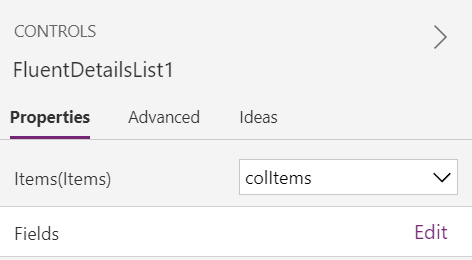
There are 3 steps to get data to show up in the Fluent DetailsList:
Set the Items collection to
colItemsAdd the Title and Value columns using the Edit link below the Items dataset in the Control Properties side panel:
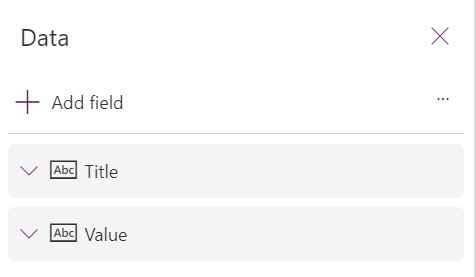
This would result in the the fields panel looking similar to:
Set the columns dataset to be something similar to:
I suspect that maybe step 2 is the one that you are missing?
Hope this helps!
…