Releases: mob-sakai/UIEffect
Releases · mob-sakai/UIEffect
v2.4.0

v2.3.2
v2.3.1
v2.3.0
v2.2.0
Implemented enhancements:
- Feature: Customize shader/material. You can create a custom ui shader and control it with UIEffct. #46
- Feature: UIEffectCapturedImage supports keep canvas size. #54
- Feature: UIEffectCapturedImage supports
Quality Typeto easy setup. #53
Fixed bugs:
- Bug: Color effect on shadow is incorrect. #55
Closed issues:
- Change: Reduce the pixelation effect when tone level = 1. #57
v2.1.0
v2.0.0
- Feature: Switch separate/combine materials by script symbol "UIEFFECT_SEPARATE".
- Combined mode (default)
- The effect materials are sub-asset, and will be hidden in project view & object picker window.
- Unused shader variants and materials will be excluded from build, but they will be included in AssetBundle.
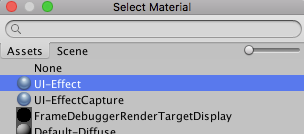
- Separated mode
- Use script define symbol
UIEFFECT_SEPARATE. - The effect materials are main-asset, and will be displayed in project view & object picker window.
- In Editor, the effect materials are generated as asset, on demand.
- Unused shader variants and materials will be excluded from build and AssetBundle.
- We recommend this mode only if you include prefabs / scenes containing UIEffect in AssetBundle.
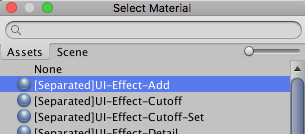
- Use script define symbol
- Combined mode (default)
- Changed: Default is "Combined mode".
- Changed: Change namespace to
Coffee.UIExtensions. - Changed: Unity 5.3.x & 5.4.x are no longer supported.
NOTE: Unity 5.3.x & 5.4.x are no longer supported.
Please use UIEffect ver.1.x for Unity 5.3.x & 5.4.x.