Core Finder not seeing moved core in 2.7.x? #14262

Description

Bug report
Summary
Installing fresh 2.7.x from stable recommended on the download page. Not able to lock down MODX core for security.
Step to reproduce
- Moved core to parent directory (public_html equivalent on my server)
- Get the screen for Core Finder
- Enter the new core path verbatim
- Click "Submit"
ERROR: Your MODX_CORE_PATH is invalid; please specify the correct path in the field above and click Submit. - Cleared cache in core directory
- Click "Submit" again...
ERROR: Your MODX_CORE_PATH is invalid; please specify the correct path in the field above and click Submit.
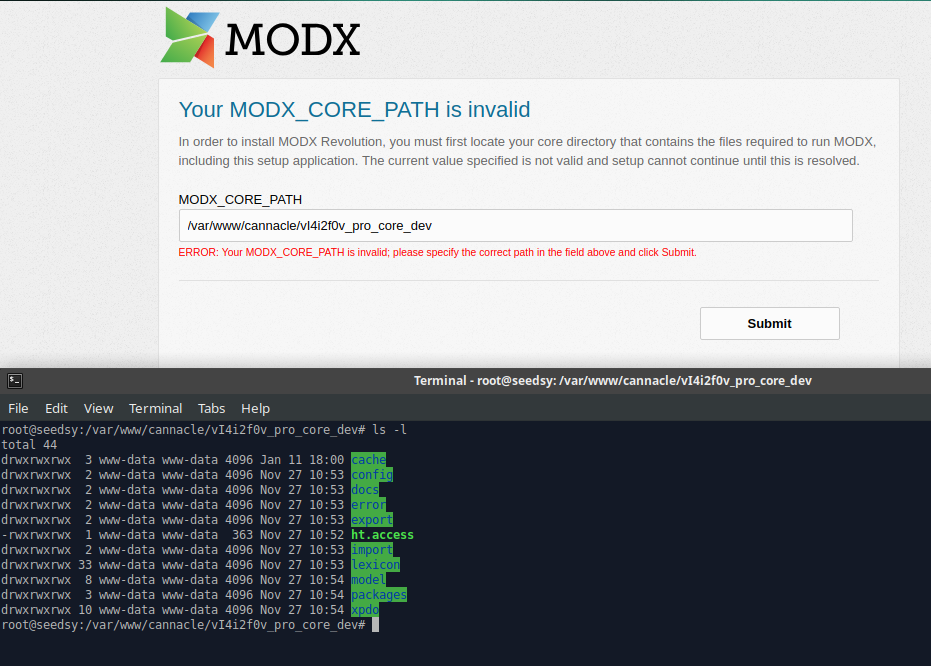
Observed behavior
Not recognizing the moved core when it's typed into Core Finder input field.
Still shows the error message; ERROR: Your MODX_CORE_PATH is invalid; please specify the correct path in the field above and click Submit.
I even chmod everything to 777 for now just to make sure it wasn't permissions issue.
Expected behavior
Should be setting the new core path in the config file and moving to the next setup screen.
Environment
MODX version 2.7.x, Apache/2.4.18, MySQL Ver 14.14 Distrib 5.7.24, Chrome