
As AI agents dey move from experimental prototypes go real-world applications, the ability to sabi dia behavior, monitor dia performance, and systematically evaluate dia outputs dey important.
After you don complete this lesson, you go sabi how to/understand:
- Main concepts about agent observability and evaluation
- Ways to improve how agents dey perform, cost, and effectiveness
- Wetin and how to evaluate your AI agents systematically
- How to control cost when you deploy AI agents go production
- How to instrument agents wey dem build with AutoGen
The goal na to give you the knowledge to transform your "black box" agents into transparent, manageable, and dependable systems.
Note: E important make you deploy AI Agents wey safe and trustworthy. Check out the How to build AI Agents wey you fit trust lesson as well.
Observability tools such as Langfuse or Microsoft Foundry usually represent agent runs as traces and spans.
- Trace mean a complete agent task from start to finish (like handling a user query).
- Spans na individual steps within the trace (like calling a language model or retrieving data).
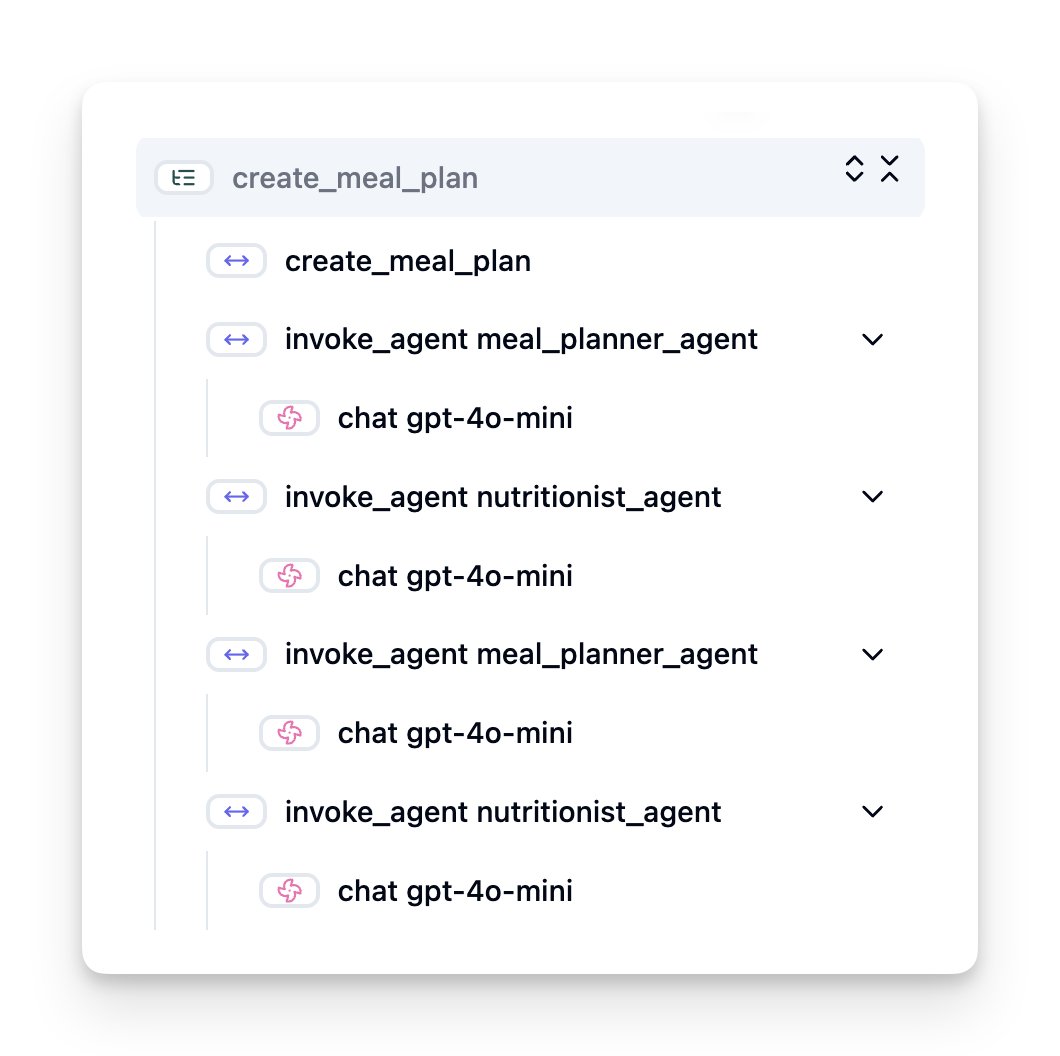
If no observability dey, an AI agent fit dey feel like "black box" - im internal state and reasoning dey opaque, e dey hard to diagnose issues or optimize performance. With observability, agents go turn "glass boxes," dem go give transparency wey important for building trust and to make sure dem dey operate as intended.
When you dey move AI agents go production, e dey bring new challenges and requirements. Observability no be "nice-to-have" again, na critical capability:
- Debugging and Root-Cause Analysis: When an agent fail or produce unexpected output, observability tools dey provide the traces wey you need to pinpoint the source of the error. Dis one especially important for complex agents wey fit involve multiple LLM calls, tool interactions, and conditional logic.
- Latency and Cost Management: AI agents dey rely on LLMs and other external APIs wey dem dey bill per token or per call. Observability make you fit track these calls precisely, e go help identify operations wey dey excessively slow or expensive. E allow teams to optimize prompts, choose more efficient models, or redesign workflows to manage operational costs and make user experience better.
- Trust, Safety, and Compliance: For many applications, e important make sure agents dey behave safely and ethically. Observability dey provide audit trail of agent actions and decisions. You fit use am to detect and mitigate issues like prompt injection, generation of harmful content, or wrong handling of personally identifiable information (PII). For example, you fit review traces to sabi why an agent give a certain response or why e use specific tool.
- Continuous Improvement Loops: Observability data na foundation for iterative development. By monitoring how agents dey perform for real world, teams fit identify areas for improvement, gather data for fine-tuning models, and validate the impact of changes. This create feedback loop where production insights from online evaluation inform offline experimentation and refinement, e go lead to progressively better agent performance.
To monitor and understand agent behavior, you suppose track plenty metrics and signals. Specific metrics fit vary based on the agent's purpose, but some ones de universally important.
Below na some of the most common metrics wey observability tools dey monitor:
Latency: How quick the agent dey respond? Long waiting times dey affect user experience. You suppose measure latency for tasks and individual steps by tracing agent runs. For example, if an agent dey take 20 seconds for all model calls, you fit make am faster by using a quicker model or by running model calls in parallel.
Costs: How much e dey cost per agent run? AI agents dey rely on LLM calls wey dem bill per token or external APIs. Plenty tool usage or multiple prompts fit quickly increase costs. For instance, if an agent calls an LLM five times for small quality improvement, you need check if the cost worth am or if you fit reduce the number of calls or use a cheaper model. Real-time monitoring fit also help identify unexpected spikes (e.g., bugs wey dey cause excessive API loops).
Request Errors: How many requests the agent fail? This fit include API errors or failed tool calls. To make your agent more robust for production, you fit set up fallbacks or retries. E.g. if LLM provider A down, you fit switch to LLM provider B as backup.
User Feedback: Direct user evaluations dey give valuable insights. This fit include explicit ratings (👍thumbs-up/👎down, ⭐1-5 stars) or textual comments. If consistent negative feedback show, e suppose alert you say the agent no dey work as expected.
Implicit User Feedback: User behavior fit give indirect feedback even if dem no give explicit ratings. This fit include immediate question rephrasing, repeated queries or clicking a retry button. E.g. if you see users dey ask the same question again and again, na sign say the agent no dey work as expected.
Accuracy: How often the agent produce correct or desirable outputs? Accuracy definitions fit vary (e.g., problem-solving correctness, information retrieval accuracy, user satisfaction). The first step na to define wetin success look like for your agent. You fit track accuracy via automated checks, evaluation scores, or task completion labels. For example, marking traces as "succeeded" or "failed".
Automated Evaluation Metrics: You fit also set up automated evals. For instance, you fit use an LLM to score the output of the agent — whether e helpful, accurate, or not. There are also several open source libraries wey go help you score different aspects of the agent. E.g. RAGAS for RAG agents or LLM Guard to detect harmful language or prompt injection.
For practice, combination of these metrics dey give the best coverage of an AI agent’s health. In this chapter's example notebook, we go show you how these metrics dey look for real examples but first, we go learn how a typical evaluation workflow dey look like.
To gather tracing data, you go need to instrument your code. The goal na to instrument the agent code to emit traces and metrics wey an observability platform fit capture, process, and visualize.
OpenTelemetry (OTel): OpenTelemetry don emerge as an industry standard for LLM observability. E provide a set of APIs, SDKs, and tools for generating, collecting, and exporting telemetry data.
There are many instrumentation libraries wey wrap existing agent frameworks and make am easy to export OpenTelemetry spans to an observability tool. Below na an example on instrumenting an AutoGen agent with the OpenLit instrumentation library:
import openlit

openlit.init(tracer = langfuse._otel_tracer, disable_batch = True)
The example notebook for this chapter go demonstrate how to instrument your AutoGen agent.
Manual Span Creation: Even though instrumentation libraries dey give a good baseline, plenty times you go need more detailed or custom information. You fit manually create spans to add custom application logic. More importantly, dem fit enrich automatically or manually created spans with custom attributes (also known as tags or metadata). These attributes fit include business-specific data, intermediate computations, or any context wey fit be useful for debugging or analysis, such as user_id, session_id, or model_version.
Example on creating traces and spans manually with the Langfuse Python SDK:
from langfuse import get_client

langfuse = get_client()

span = langfuse.start_span(name="my-span")

span.end()Observability dey give us metrics, but evaluation na the process of analyzing that data (and performing tests) to determine how well an AI agent dey perform and how e fit improve. In other words, once you get those traces and metrics, how you go use them to judge the agent and make decisions?
Regular evaluation dey important because AI agents often dey non-deterministic and fit evolve (through updates or drifting model behavior) – without evaluation, you no go know if your “smart agent” dey actually do im job well or if e don regress.
There are two categories of evaluations for AI agents: online evaluation and offline evaluation. Both dey valuable, and dem complement each other. We usually begin with offline evaluation, as this one na the minimum necessary step before deploying any agent.
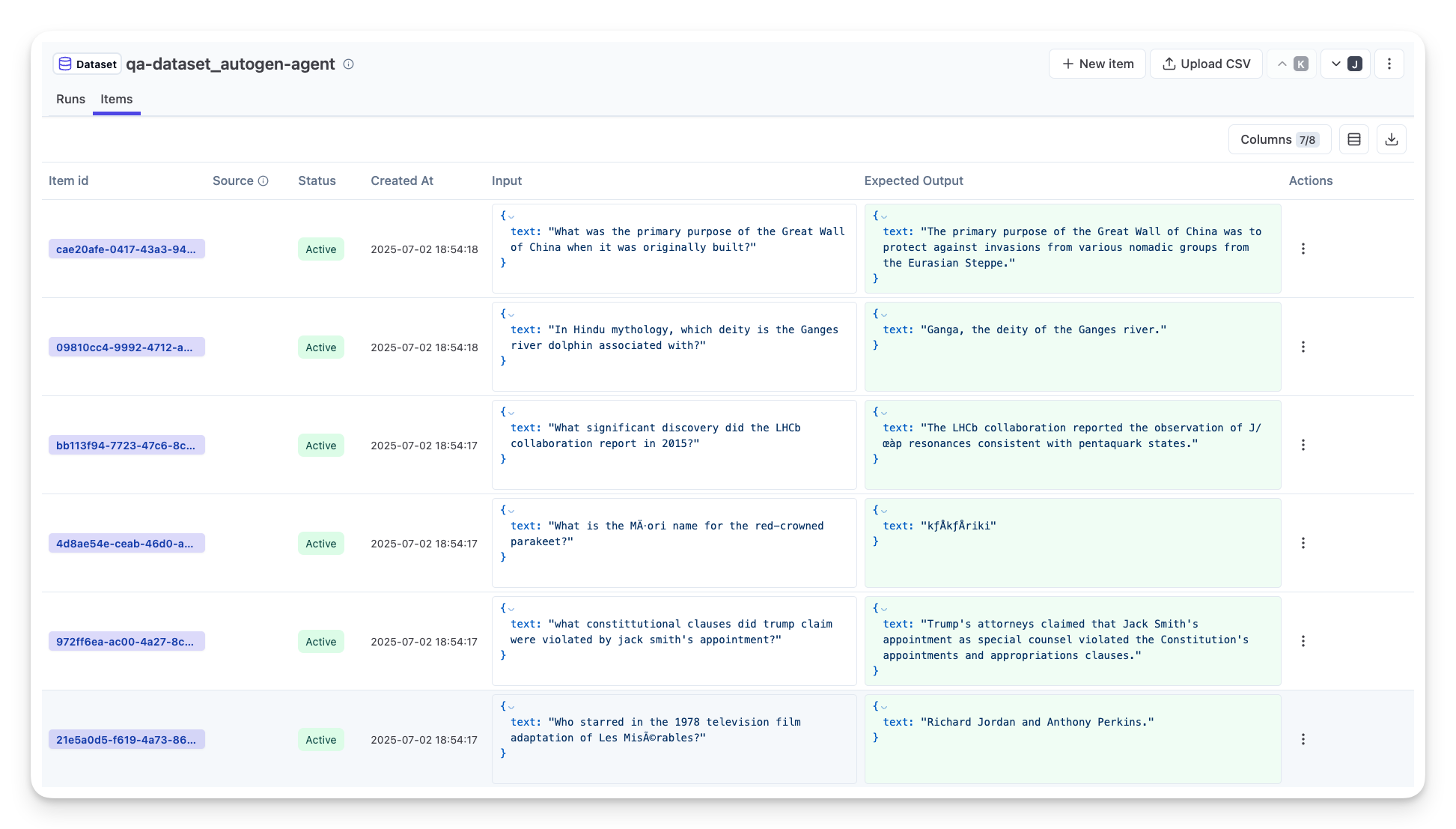
This one involve evaluating the agent for controlled setting, typically using test datasets, no be live user queries. You go use curated datasets wey you sabi wetin the expected output or correct behavior be, then run your agent on those.
For instance, if you build a math word-problem agent, you fit get a test dataset of 100 problems with known answers. Offline evaluation dey often do during development (and fit be part of CI/CD pipelines) to check improvements or guard against regressions. The benefit na say e repeatable and you fit get clear accuracy metrics since you get ground truth. You fit also simulate user queries and measure the agent’s responses against ideal answers or use automated metrics as we describe above.
The key challenge with offline eval na to make sure your test dataset comprehensive and stay relevant – the agent fit perform well on fixed test set but encounter very different queries in production. Therefore, you suppose keep test sets updated with new edge cases and examples wey reflect real-world scenarios. A mix of small “smoke test” cases and larger evaluation sets dey useful: small sets for quick checks and larger ones for broader performance metrics.
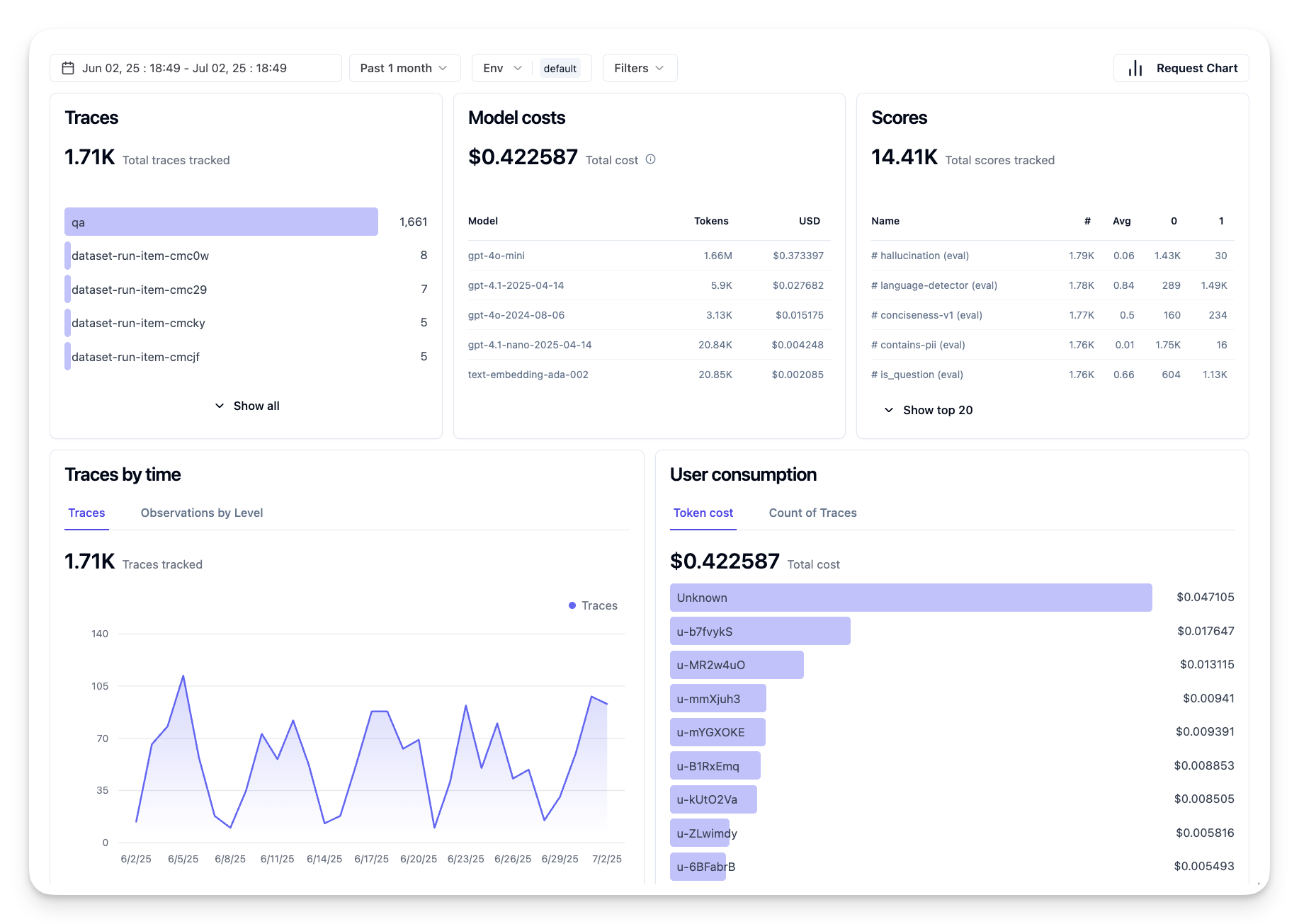
This one mean evaluating the agent for live, real-world environment, i.e. during actual usage for production. Online evaluation involve monitoring the agent’s performance on real user interactions and analyzing outcomes continuously.
For example, you fit track success rates, user satisfaction scores, or other metrics on live traffic. The advantage of online evaluation na say e capture things wey you no fit anticipate in lab setting – you fit observe model drift over time (if the agent’s effectiveness dey degrade as input patterns shift) and catch unexpected queries or situations wey no dey your test data. E give true picture of how the agent dey behave for the wild.
Online evaluation often involve collecting implicit and explicit user feedback, as discussed, and possibly running shadow tests or A/B tests (where new version of the agent run in parallel to compare against the old). The challenge be say e fit tricky to get reliable labels or scores for live interactions – you fit rely on user feedback or downstream metrics (like whether the user click the result).
Online and offline evaluations no be mutually exclusive; dem dey highly complementary. Insights from online monitoring (e.g., new types of user queries where the agent perform poorly) fit be used to augment and improve offline test datasets. Conversely, agents wey perform well on offline tests fit then be more confidently deployed and monitored online.
In fact, many teams adopt a loop:
evaluate offline -> deploy -> monitor online -> collect new failure cases -> add to offline dataset -> refine agent -> repeat.
As you deploy AI agents to production, you fit encounter various challenges. Here are some common issues and their potential solutions:
| Problem | Possible Solution |
|---|---|
| AI Agent not performing tasks consistently | - Refine the prompt wey you give the AI Agent; make objectives clear. - Find places where you fit divide the tasks into subtasks and make multiple agents handle dem. |
| AI Agent running into continuous loops | - Make sure you get clear termination terms and conditions so the Agent sabi when to stop the process. - For complex tasks wey require reasoning and planning, use a larger model wey specialize for reasoning tasks. |
| AI Agent tool calls are not performing well | - Test and validate the tool output outside of the agent system. - Refine the defined parameters, prompts, and names of tools. |
| Multi-Agent system not performing consistently | - Refine prompts given to each agent to make sure dem specific and distinct from one another. - Build a hierarchical system using a "routing" or controller agent to determine which agent be the correct one. |
Many of these issues you fit identify more effectively if observability dey. The traces and metrics wey we discuss earlier go help pinpoint exactly where for the agent workflow problems dey occur, making debugging and optimization much more efficient.
Below na some strategies to manage the costs of deploying AI agents to production:
Using Smaller Models: Small Language Models (SLMs) fit do well for some agentic use-cases and dem go reduce cost wella. Like we talk before, to build an evaluation system wey go determine and compare performance with larger models na the best way to sabi how well an SLM go perform for your use case. Think about to use SLMs for simpler tasks like intent classification or parameter extraction, and keep larger models for complex reasoning.
Using a Router Model: Similar strategy na to use different models and sizes. You fit use an LLM/SLM or serverless function to route requests based on complexity to the models wey best for dem. Dis go still help reduce cost and at the same time make sure say performance dey for the correct tasks. For example, send simple queries to smaller, faster models, and only use expensive large models for complex reasoning tasks.
Caching Responses: Identify common requests and tasks and give the responses before dem enter your agentic system na beta way to reduce the number of similar requests. You fit even implement a flow wey go check how similar one request be to wetin dey your cache using more basic AI models. Dis strategy fit sharply reduce cost for frequently asked questions or common workflows.
In the example notebook of this section, we go see examples of how we fit use observability tools to monitor and evaluate our agent.
Join the Microsoft Foundry Discord make you meet other learners, attend office hours and make dem answer your AI Agents questions.
Disclaimer:
Dis dokument don translate by AI translation service Co-op Translator (https://github.com/Azure/co-op-translator). Even though we dey try make everything correct, make you sabi say automatic translations fit get mistakes or no too correct. The original dokument wey dey im own language na im you suppose take as the correct/main source. If na important information, we recommend make professional human translator check am. We no go be liable for any misunderstanding or wrong interpretation wey fit arise from using this translation.