Idea, Features, Architecture
Currently, a freelance artist has two options for rendering his video files, either purchase enough hardware to complete the work in house, or outsource the work to somebody like Amazon. Neither of these solutions are cheap, thus creating high quality art is a challenge for freelance artists. Commpute introduces a third option for the freelance artist: find and connect with other freelance artists using Commpute and build your own network that each member can use to render artistic material. Unlike the first two options, Commpute is free. Commpute connects interested parties together and the only cost to each member of the network is time on their machines.
Commpute will store information for artists who wish to build a render network. We will connect users together that want to share their resources. Each user of Commpute is allowed to accept or reject any request to be a member of his/her network. When a user is ready to have their work rendered compute will distribute the job throughout the network and monitor the progress of the job. When the job is complete Commpute will alert the user. In time Commpute will be extended to service a more broad range of applications that benefit from distributed computing. Additionally, cloud storage will allow for ease of use for all types of applications.
Ideal feature list (Features for this semester are italicized)
##Global web server
- Large community of people willing to share their computing power
- Facebook integration to find friends and post contributions or give thanks
- Create an account
- Connect with collaborators
- Set up projects and recruit volunteers
- Display profile pages for each member that shows statistics:
- Total computing time donated so far
- users are rewarded with virtual points for contributions
- Computing resources available to donate
- number of machines
- For each machine:
- clock speed
- network bandwidth
- physical location
- availability schedule
- Utilization percentage (time busy / time available averaged over the past few days)
- Total computing time donated so far
- View jobs remotely
- Manage jobs remotely
- Configure cloud storage for data transfer
- Configure desired images
- Allow businesses to build on top of the service to add more features and elect their machines for rendering for a minimal fee
##Local server application (Node)
- Installed when the user signs up for the service
- Runs at computer start-up
- Accepts work requests from other users (project leaders) and queues them for execution
- Only accepts jobs from pre-approved projects or users
- Create jobs to distribute
- View job progress
- Manage running jobs (cancel, retry, skip, pause new tasks)
- Allows users to go “Unavailable” for a while if they are using the computer for other things and don’t want to sacrifice the CPU
- Reports to project leaders on job status
- Sends results back to project leaders when done
- Sandboxes all downloaded programs to prevent security breaches (Docker container)
- Manages virtualization
- Starting up virtual machines
- Downloads needed images from connections
- Stores images for future use
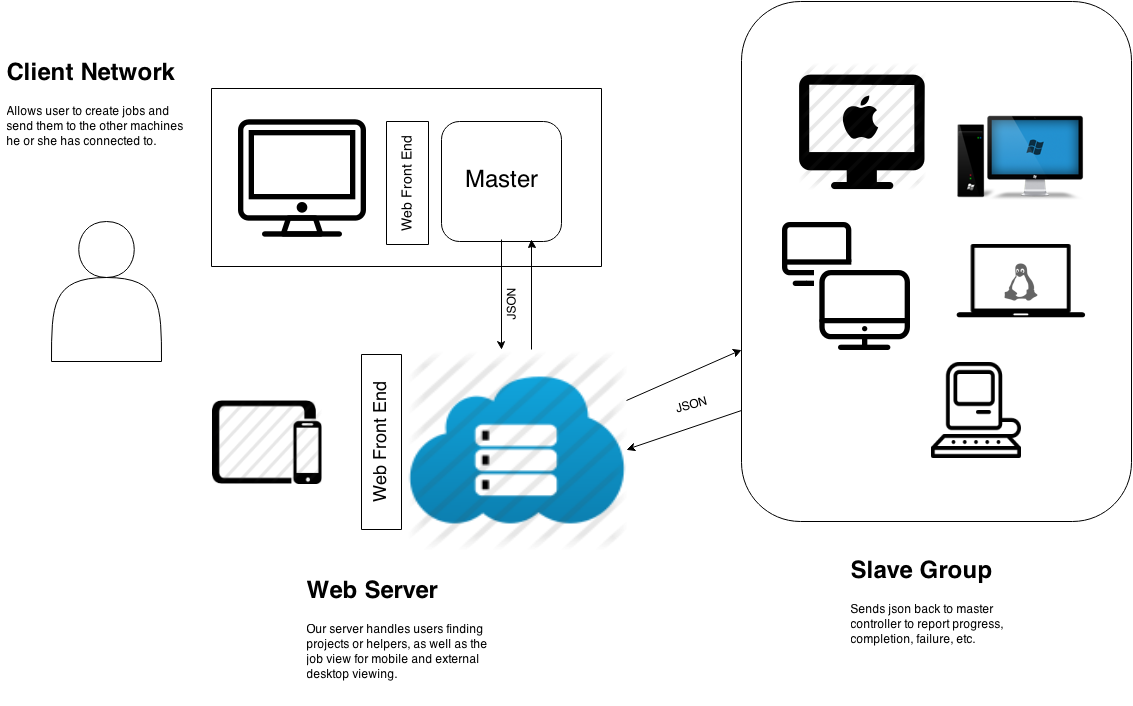
Provides a web site front end that allows the user to log in, connect with friends, and manage their jobs remotely. On the back end it stores user information and profiles for each if their computers they have elected for rendering.
Node servers are in charge of starting up and manage processes being sent from master nodes and report back progress, task completion/failure, and other useful information. They also track up-time, helpful usage statistics, and a profile of the machine. It is responsible for storing and tracking data regarding the current jobs and keeps the global web server profiles updated. Master nodes will also run a second web server to display a web page that shows job progress and manages its setup and execution. This web front end will be a more feature rich version of the page they would view via smartphone on the global web server. This front end web server collects its data from the node server that is actually tracking and distributing tasks.
- Routing: Python using Flask
- Templates: HTML with embedded python
- Database: MongoDB using pymongo
- Python XML-RPC server (for now, may change server to something faster, such as node.js)
- Communication between nodes done using json, as well as between the master controller and the global web server.