 OrchardCMS

Replies: 8 comments 15 replies

|
You can override the 404 by adding a NotFound.cshtml or .liquid file in Views/Shared: |

|
That still doens't work. I have put \Views\Shared\NotFound.cshtml then browse to https://localhost:44360/test , still got the default asp.net not found error.
I see there are reponse referencing to OrchardCore.Diagnostics, but how to make it work?? Maybe added to Nuget and then ? Many thanks! |


|
So you defined the not found page from the app, normally that's okay as an application behaves as a module and as a super theme. We already set an higher precedence for the shape template views defined at the app level, but not for pure mvc views Already fixed locally on my machine, i will do a PR soon, good catch. |

|
PR #8043 done ;) |
|
Thanks @jtkech , any idea how can I get this change into my code? |
|
You need to use the cloudsmith feed to get the last dev packages |

|
Hi @jtkech , I can't install the latest version 15648 with the following error. Severity Code Description Project File Line Suppression State
But I can install 15647 ; however the custom error still doesnt' work. Have you merged your change into 15647 or 15648 ? |
|
Yes, just saw on cloudsmith that there is a problem with this package for version 15648 But i think my change is included in 15647 Did you put your NotFound views under Try a rebuild Check if under your bin folder you have a Show me your app project file |
|
Package issue fixed, you can now use 15650 or higher |
|
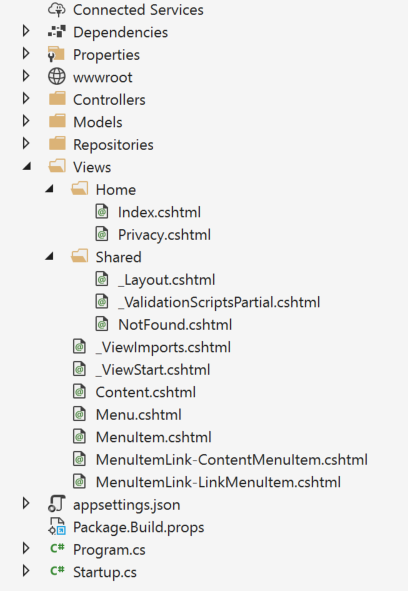
Hi @jtkech I also put the NotFound view under View/Shared folder, it also contains 1 line of code:
Is there anything else need to modify based on the out of box / standard MVC website project? Here's the startup.cs Here's the program.cs |
|
Looks good I tried it with the full source code, tomorrow i will try it by using package references Hmm, show me your Are the other views discovered? |
|
|
the other views only discoverable with a [Route("/")] tag, for example for the /home to be used, I have to put the following code: |
|
The landing page is empty: Without the [Route] tag, it will only work if browse to: https://localhost:12345/MyApp/Home/Index |
|
Aha, the NotFound works propertly if I specify a Theme from here: /Admin/Themes |
|
Some remarks after a quick look Don't use route in razor view, only if using razor page (see below) Normally to render a "page" it is through one of our custom controller that display a content item that was created through the admin UI, and whose content type includes an When we define a route in a razor file, usually we use razor pages (with a Not sure you need the Not related but you call twice Not good to reference Anyway you just need to reference Try also by referencing Which setup recipe did you use on setup? I assume the blank site, right?
Just saw this comment, yes you need at least one selected theme, so that the theming engine is used and the app can override the current theme views Hmm, but normally it should still work as the notfound is a mvc view, as i remember i tried it and it was working, hmm maybe because i had a selected front end theme just before, i will retry it |
|
So many way to define routes ;) So usually we use the content item autoroute part through the admin UI, e.g. if you use the blog recipe on setup, then go to the admin in content definition to see how types / parts are defined, then see e.g. that the Then yes for controllers you can use e.g. Then yes you can decorate your controller with a route attribute to target mvc views (not shape template views), but doing this mean that you don't use our display management but a kind of decoupled mode where you grab data and you manage the rendering. In that case, in place of using razor views, we usually use razor |
|
Hi @jtkech , the MapAraController has problem using the latest Orchard's Code Generation Templates System.Exception: 'Could not resolve a service of type 'Microsoft.AspNetCore.Routing.IEndpointRouteBuilder' for the parameter 'routes' of method 'Configure' on type 'MySite2.Startup'.' startup.cs - I added IEndpointRouteBuilder program.cs |
|
When using OrchardCore most of the things are executed in a tenant container, we do this for multi tenancy and modularity, meaning that an application can serves multiple isolated tenants / sites, each one composed of different modules / features. So, normally most of services registrations and pipeline configurations are done through the modules startups, not from the application startup, e.g. here you can't map routes as we didn't call So, normally you would need to create modules / themes (that are specific modules), but as said, the app is also a module, so you can register / configure things as done by a regular module, but you need to use custom helpers on our |
|
Perfect, thanks a lot!! |
|
Cool, so mark it as answered if that's okay ;) |


Uh oh!
There was an error while loading. Please reload this page.
I am using the latest version of orchard core cms and have defined all pages within the Pages folder as displayed below.
I am unable to find any documentation on how I can set up a custom error page to deal with 404 NotFound and internal 500 errors.
Would appreciate any help.
Thank you
All reactions