 Marp
Mermaid Integration #207


|
Is there an integration with mermaid? Or is there another way of making flowcharts with a language that is markdown like? |
Replies: 9 comments 21 replies

|
Note Marp Core v5 will finally support some of Mermaid diagrams, powered by Legacy answerMarp has no built-in integrations for any diagrams like mermaid.js, but you can try to extend Marp engine via compatible markdown-it plugins via if you are using Marp CLI. // engine.js
module.exports = ({ marp }) => marp.use(require('markdown-it-mermaid'))marp --engine ./engine.js your-markdown.mdBut even if could render, the diagram may not become a reliable one because mermaid.js will misdetect font size in Marp slide (inside SVG
That is still a blocker for mermaid integration for Marp Core. The most reliable way to place a mermaid.js diagram to Marp slide is using Markdown snippet generated by mermaid.live. It puts a diagram as pre-rendered SVG image so there is no broken texts. You also can use another "Diagrams as a Service" like kroki, that covers many diagram libraries including mermaid.js. Related |

|
Hi @yhatt if I have two custom package to load for example one is const { Marp } = require('@marp-team/marp-core')
const markdownItAdmon = require('markdown-it-admon')
const markdownItMermaid = require('markdown-it-mermaid')
module.exports = (opts) => new Marp(opts).use(markdownItAdmon)
module.exports = ({ marp }) => marp.use(markdownItMermaid)any advice? |

|
Chain const markdownItAdmon = require('markdown-it-admon')
const markdownItMermaid = require('markdown-it-mermaid')
module.exports = ({ marp }) => marp.use(markdownItMermaid).use(markdownItAdmon)Refer to https://github.com/markdown-it/markdown-it#plugins-load or https://github.com/marp-team/marp-cli#spec. |
|
thank you so much |
|
I've made the basic plugin example to render various diagrams at Currently we have no plan to integrate as the default feature of Marp to prevent wasting kroki.io instance by free riding. |

|
Please excuse my ignorance... I am using marp via VsCode and it i use it daily to document the Process in many DataScience Projects i am involved in. Could you explain to me, how i get this functionality in VsCode such that the images are also rendered when i export my presentation?` Could you give me some instructuins? Thank you in advance |
|
Marp for VS Code has no ability to extend Marp engine due to security reason. VS Code extension (GUI interface) has designed for beginners like you, and we have to save from that beginners who do not know techinal details catch in the malicious trap that comes from extending the engine. See details in #164 (reply in thread):
If you do not want to leave from VS Code, you just have to use Marp CLI in VS Code integrated terminal! |

Is it possible if I folk and add this plugin to marp vscode plugin for my own use? -- I haven't went through the code yet. |
This comment was marked as duplicate.
This comment was marked as duplicate.

|
@yhatt given the basic example that you linked, how would one go about setting a background color for the exported images? |
|
A one of solution is using inline style to - return `<p><marp-auto-scaling data-downscale-only><img src="${entrypoint}${lang}/svg/${data}"/></marp-auto-scaling></p>`
+ return `<p><marp-auto-scaling data-downscale-only><img src="${entrypoint}${lang}/svg/${data}" style="background-color: white;"/></marp-auto-scaling></p>`It seems that kroki has no option for setting a background color of the image. Refer to yuzutech/kroki#1281. |

|
Amazing. Thank you so much! Considering how useful this gist is, I wonder if it should be part of the official marp docs. |

|
FYI: I've released markdown-it-plugin on npm, embed kroki image. |

|
thanks a lot !!! |
|
Thank you! |

|
I wrote my own way to render mermaid diagrams without using kroki.
class PostprocessMarpitEngine extends Marp {
    /*
    Custom Marp engine with async post-processing
    Useful for async rendering
    https://github.com/markdown-it/markdown-it/issues/248
    */
    constructor(options, postprocess) {
        super(options)
        this.postprocess = postprocess
    }

    withPostprocess(postprocess) {
        this.postprocess = postprocess
        return this
    }

    async render(markdown, env = {}) {
        const { html, css, comments } = super.render(markdown, env)
        if (this.postprocess) {
            return await this.postprocess(markdown, env, html, css, comments)
        }
        return { html, css, comments }
    }
}
async function marpMermaidPlugin(md) {
    /* Render mermaid fenced code block to a placeholder for post-processing */

    // super fence block rule
    const { fence } = md.renderer.rules
    // final fence block rule
    md.renderer.rules.fence = (tokens, idx, options, env, self) => {
        const info = md.utils.unescapeAll(tokens[idx].info).trim()
        if (info) {
            const [_, lang, divOptions] = info.match(/(\w+)\s*(?:\{\s*(.+)\s*\})?/)
            if (lang == "mermaid") {
                const graphDefinition = tokens[idx].content
                return `<div class="__mermaid" ${divOptions}>${graphDefinition}</div>`
            }
        }

        return fence.call(self, tokens, idx, options, env, self)
    }
}
async function renderSvgMermaid(graphDefinition) {
    /*
    Render mermaid graph to svg using puppeteer
    */

    // don't forget to set PUPPETEER_EXECUTABLE_PATH
    const browser = await puppeteer.launch({
        headless: "new",
        ignoreHTTPSErrors: true,
        args: [
            "--no-sandbox",
            "--disable-setuid-sandbox",
            '--disable-gpu',
            '--full-memory-crash-report',
            '--unlimited-storage',
        ],
        // uncomment for advanced debugging
        // dumpio: true,
    })
    const page = await browser.newPage()
    page.on('console', (msg) => {
        console.log(msg.text())
    })
    // add container to page
    await page.evaluate(() => {
        const graphDiv = document.createElement("div")
        graphDiv.id = "graphDiv"
        document.body.appendChild(graphDiv)
    });
    // add mermaid script to page
    await page.addScriptTag({
        path: path.join(__dirname, "vendor/mermaid.min.js"),
    })
    // render graph
    const svg = await page.evaluate(async (graphDefinition) => {
        const { svg } = await mermaid.render("graphDiv", graphDefinition);
        return svg
    }, graphDefinition)
    await browser.close()
    return svg;
}

async function processMermaidDiv(div) {
    const graphDefinition = div.textContent
    const svg = await renderSvgMermaid(graphDefinition)
    div.innerHTML = svg
    div.children[0].setAttribute("width", "100%")
    div.children[0].setAttribute("height", "100%")
}

async function syncProcessMermaidDivs(mermaidDivs) {
    /* Process mermaid div, one at a time */
    for (let i = 0; i < mermaidDivs.length; i++) {
        const div = mermaidDivs[i]
        await processMermaidDiv(div)
        console.log(`${i + 1}/${mermaidDivs.length}`)
    }
}
export default {
    engine: async (constructorOptions) =>
        new PostprocessMarpitEngine(constructorOptions)
            .use(marpMermaidPlugin)
            .withPostprocess(async (markdown, env, html, css, comments) => {
                // parse html to DOM
                const doc = new jsdom.JSDOM(html)
                // turn div elements with class "__mermaid" into processed svgs
                const mermaidDivs = doc.window.document.querySelectorAll("div.__mermaid")
                console.log(`Processing ${mermaidDivs.length} mermaid divs...`)
                await syncProcessMermaidDivs(mermaidDivs)
                const processedHtml = doc.window.document.documentElement.outerHTML
                return { html: processedHtml, css, comments }
            }),
}
see my whole config here: https://github.com/GuillaumeDesforges/git-teaching-material/tree/5204102acaca9385d6fc0fbf7fb4f859d77e1021/presentation Unfortunately I cannot sandbox this still. It seems like the headless chromium instance crashes when trying to run mermaid without internet. |

|
@codingluke thanks for the appreciation 😄 The reason I used puppeteer is because... this is what mermaid-cli does 😉 |

|
Ok, I totally see your point and it will be good enough for sure. In using mermaid-cli I can imagine that it could be easyer to maintain (dependabot). Anyway, keep on hacking 🚀 |
|
Very nice! it works :) I will now try to add a version where I do not have to copy mermaid.min.js but can maintain it with dependencies. One other thing. I encountered the same bug like in kroki. yuzutech/kroki#1345. Does anybody know which font I should use? |
Mermaid Marp Pluginedit: I just added a cache option so that the graph is only generated once per definition :D, removed some nesting and invalidate the cache @GuillaumeDesforges This plugin is based on your code, mermaid-cli and temp. Why to use the cli?
Available Options:
```mermaid width=80% align=center type=svg
flowchart TD;
    Kontrollstrukturen---Verzweigungen
    Kontrollstrukturen---Schleifen
    subgraph verz [ ]
        Verzweigungen---if[if-Anweisung]
        if---ifels[if-else-Anweisung]
        Verzweigungen---switch[switch-Anweisung]
    end
    Schleifen---while[while-Anweisung]
    Schleifen---dowhile[do-while-Anweisung]
    Schleifen---for[for-Anweisung]
    style verz fill:#00A17020,stroke:#00A17080,stroke-width:2px
```
Live Example: Filesimport path from "path";
import { run } from "@mermaid-js/mermaid-cli";
import temp from "temp";
import fs from "fs/promises";
import jsdom from "jsdom";
temp.track();
let cache = {};
let cleanupInterval = 2; // minutes
let cleanupTreshold = 30; // minimum cache size
setInterval(() => {
if (Object.keys(cache).length < cleanupTreshold) return;
console.log("clear mermaid cache!");
cache = {};
}, cleanupInterval * 60000);
export default async function marpMermaid(md) {
const { fence } = md.renderer.rules; // super fence block rule
md.renderer.rules.fence = (tokens, idx, options, env, self) => {
const info = md.utils.unescapeAll(tokens[idx].info).trim();
const graphDefinition = tokens[idx].content;
const cssClassName = `mermaid-${idx}`;
const [_, lang, userOptions] = info?.match(/(\w+)\s*(?:\s*(.+)\s*)?/) || {};
if (lang !== "mermaid")
return fence.call(self, tokens, idx, options, env, self);
let opts = { width: "100%", type: "png", align: "center" };
userOptions
?.replaceAll(" = ", "=")
.split(" ")
.forEach((pair) => {
const [key, value] = pair.split("=");
opts[key] = value;
});
return `
<style>
.${cssClassName} {
text-align: ${opts.align};
}
.${cssClassName} img,
.${cssClassName} svg {
width: ${opts.width};
}
</style>
<div class="__mermaid ${cssClassName}"
data-type="${opts.type}"
data-idx=${idx}>
${graphDefinition}
</div>
`;
};
}
export async function postProcessor(_markdown, _env, html, css, comments) {
const doc = new jsdom.JSDOM(html); // parse html to DOM
const mermaidDivs = doc.window.document.querySelectorAll("div.__mermaid");
for (const element of mermaidDivs) await processMermaidDivCli(element);
const processedHtml = doc.window.document.documentElement.outerHTML;
return { html: processedHtml, css, comments };
}
async function processMermaidDivCli(div) {
const graphDefinition = div.textContent;
const cacheKey = btoa(graphDefinition) + div.dataset.type;
// Return cached Image
if (cache[cacheKey]) {
if (div.dataset.type === "png")
div.innerHTML = `<img src="data:image/png;base64,${cache[cacheKey]}" alt="" />`;
else div.innerHTML = cache[cacheKey];
return;
}
const dirPath = await temp.mkdir("mermaid");
let inputFile = path.join(dirPath, "input.mmd");
let outputFile = path.join(dirPath, "output");
await fs.writeFile(inputFile, graphDefinition);
await run(inputFile, outputFile, {
outputFormat: div.dataset.type || "png",
puppeteerConfig: {
headless: "new",
args: [
"--no-sandbox",
"--disable-web-security",
"--disable-features=IsolateOrigins,site-per-process",
"--force-color-profile=srgb",
"--font-render-hinting=none",
],
ignoreHTTPSErrors: true,
},
parseMMDOptions: {
viewport: { height: 600, width: 800, deviceScaleFactor: 2 },
},
});
if (div.dataset.type === "png") {
cache[cacheKey] = await fs.readFile(outputFile, {
encoding: "base64",
});
div.innerHTML = `<img src="data:image/png;base64,${cache[cacheKey]}" alt="" />`;
} else {
cache[cacheKey] = await fs.readFile(outputFile);
div.innerHTML = cache[cacheKey];
}
}Usage in a async engineimport { Marp } from "@marp-team/marp-core";
import marpMermaid, { postProcessor } from "./marp-mermaid-plugin.mjs";
/*
* Custom Marp engine with async post-processing
* Useful for async rendering
* https://github.com/markdown-it/markdown-it/issues/248
*/
class PostprocessMarpitEngine extends Marp {
constructor(options, postprocess) {
super(options);
this.postprocess = postprocess;
}
withPostprocess(postprocess) {
this.postprocess = postprocess;
return this;
}
async render(markdown, env = {}) {
const { html, css, comments } = super.render(markdown, env);
if (this.postprocess) {
return await this.postprocess(markdown, env, html, css, comments);
}
return { html, css, comments };
}
}
export default async (constructorOptions) => {
return new PostprocessMarpitEngine(constructorOptions)
.use(marpMermaid)
.withPostprocess(postProcessor);
}; |
|
with the cache it is very, very fast :) |

|
Just to add another option to mix, I ended us using this snippet at the top of my markdown file: <script src="https://unpkg.com/pako@1.0.10/dist/pako_deflate.min.js" async></script>
<script>
document.addEventListener('DOMContentLoaded', function() {
setTimeout(function() {
Array.from(document.querySelectorAll('.language-mermaid')).map(function(pre) {
const encoded = new TextEncoder('utf-8').encode(pre.textContent);
const compressed = window.pako.deflate(encoded, { level: 9, to: 'string' });
const urlencoded = btoa(compressed).replace(/\+/g, '-').replace(/\//g, '_');
const url = `https://kroki.io/mermaid/svg/${urlencoded}`;
const img = document.createElement('img');
img.src = url;
pre.replaceWith(img);
});
// Give marp some time to load itself etc...
}, 1000);
});
</script>I can then use code blocks tagged with mermaid to render diagrams (using kroki): ---
# Slide with diagram
This will render a `mermaid` diagram:
```mermaid
classDiagram
class Container {
__contains__()
} |

|
I've set it so show up after 1 second. So, with the 1s wait plus the time it takes to generate the image, should appear after ~2-3 seconds. |
|
I had a kroki implementation in place. The problems were:
The downside of my solution is the startup rendering time when having many diagramms. Fortunately they are cached. |
|
Hi,
I've seen it also and was unable to find a fix for it.
This does add some time to the startup (even though it's executed async) and I haven't taken the time to do it lazily. For me however it's fine because I usually end up producing a PDF anyways. |
The rendering is async yes. But the rendering of a single file in marp is in-sync, so it waits until the chart is rendered |

|
This works when I compile using This also works Technical presentations with Marp and Mermaid - DEV Community ---
marp: true
theme: default
---
# Title Page
<script type="module">
import mermaid from 'https://cdn.jsdelivr.net/npm/mermaid@10/dist/mermaid.esm.min.mjs';
mermaid.initialize({ startOnLoad: true });
</script>
---
# Diagram
<div class="mermaid">
graph LR;
a --> b;
b --> c;
c --> a;
</div>
And allow insecure content
|

|
UPDATE: Marp Core v5 will finally support some of Mermaid diagrams, powered by ```mermaid
graph LR
M[Marpit framework] --> C{Marp Core}
C --> CLI[Marp CLI]
C --> VS[Marp for VS Code]
C --> O[[Your own app]]
```
|
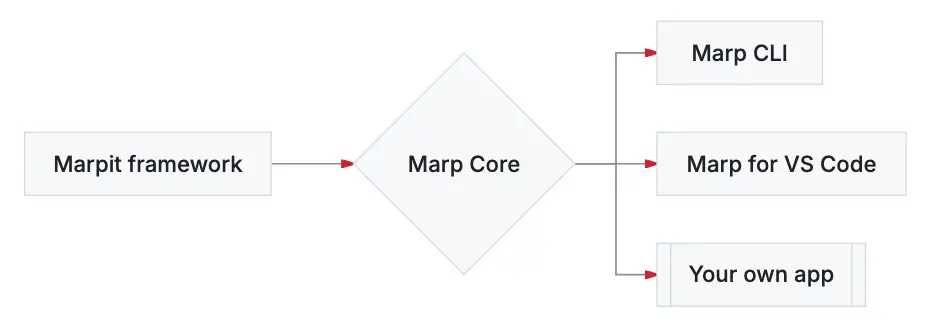


UPDATE: Marp Core v5 will finally support some of Mermaid diagrams, powered by
beautiful-mermaidthat provides consistent and deterministic rendering across different JS environments. For details, check out the official announcement #625.→ 📢 Release Candidate: Marp Core v5