 Portainer.io

Replies: 15 comments

-
|
This issue has been marked as stale as it has not had recent activity, it will be closed if no further activity occurs in the next 7 days. If you believe that it has been incorrectly labelled as stale, leave a comment and the label will be removed. |
Beta Was this translation helpful? Give feedback.

-
|
Was this reviewed? |
Beta Was this translation helpful? Give feedback.
-
|
This issue has been marked as stale as it has not had recent activity, it will be closed if no further activity occurs in the next 7 days. If you believe that it has been incorrectly labelled as stale, leave a comment and the label will be removed. |
Beta Was this translation helpful? Give feedback.

-
|
I don't think you can upload a Dockerfile to a stack. That button in your screenshot is for a docker-compose.yaml, not a Dockerfile. |
Beta Was this translation helpful? Give feedback.
-
|
@paulens12 Screenshots to compare. When I just create Container, there is not such buttons as they are for stack. |
Beta Was this translation helpful? Give feedback.
-
I know. I'm saying you CANNOT upload a Dockerfile using those buttons. |
Beta Was this translation helpful? Give feedback.
-
|
@paulens12 |
Beta Was this translation helpful? Give feedback.
-
|
@KES777 I honestly don't think that makes sense. If you want to build and run your own Docker image without publishing it to a registry, you can set up a private registry just for yourself and publish the image there. Or you could request a feature to upload a .tar file with the image exported from the machine that built it. Either way, building images and running containers are two completely different concepts and I don't think Portainer should bother with both of them when it's clearly made only for running containers. |
Beta Was this translation helpful? Give feedback.
-
|
@paulens12 Hm... Portainer already builds images if I provide link to repository with docker-compose.yaml which refers Dockerfile. Why it is not possible to build and run when I just upload single Dockerfile? |
Beta Was this translation helpful? Give feedback.
-
|
that's interesting, I didn't know you could do that... anyway, it can't just build a Dockerfile if you upload it as a single file because it lacks the build context. That workflow would also prevent you from updating the container when you make updates to your Dockerfile and/or build context. Providing a git repo with a Dockerfile and the right build context is more feasible, but even then it feels like a weird corner case. |
Beta Was this translation helpful? Give feedback.
-
|
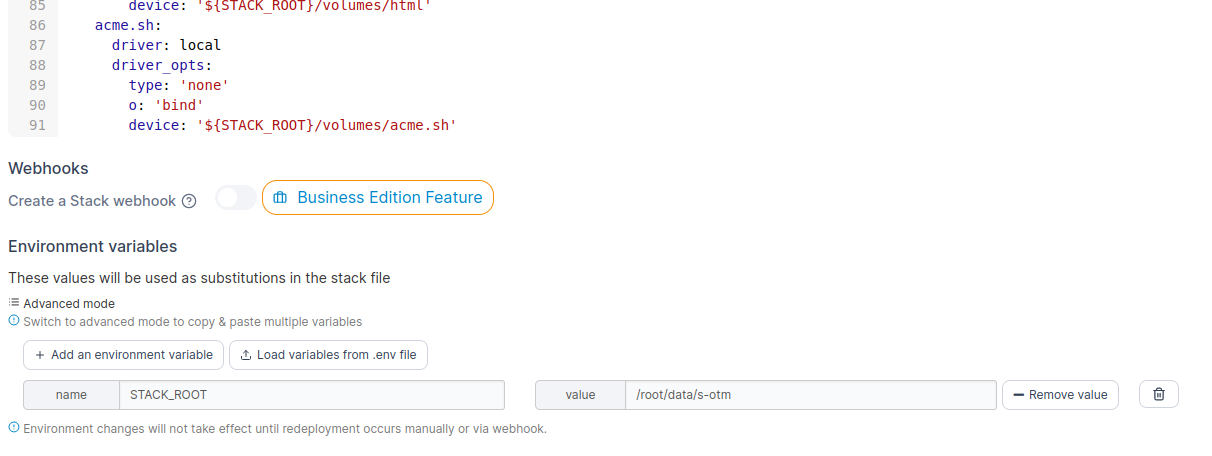
With Dockerfile it could be possible to build in empty context, eg. some folder created by portainer. There is no much differences for portainer: run Anyway it could be implemented via setting up environment variable, like it was done for stack: Technically this is not complex to implement, but it is very handy and opens wide range of perspectives. |
Beta Was this translation helpful? Give feedback.
-
|
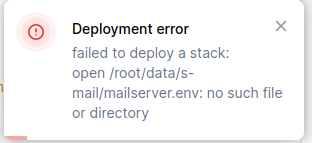
Error related to this issue: docker-compose.yaml File exists: |
Beta Was this translation helpful? Give feedback.
-
|
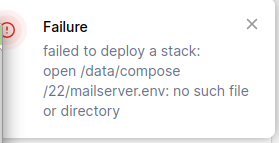
Hm... Ok. I checked on host machine, but portainer is looking for that path inside container.
So I put this Where Would be nice if portainer extracts |
Beta Was this translation helpful? Give feedback.
-
|
Seems related: #7796 |
Beta Was this translation helpful? Give feedback.

-
|
I'm not sure if I fully understand this issue as you've outlined it here, but if you want to build an image from a Dockerfile in Portainer you can do so through the Images page - click Images then Build a new image. Our documentation goes into more detail. As another commenter has mentioned, the Dockerfile on it's own doesn't provide the context needed to create a container. We can process it when it is included in a compose file from a registry because that compose file is what is providing the context for the image that will be built from the Dockerfile in order to create a running container from that image. For your pathing issues, our relative path volumes feature may help here. |
Beta Was this translation helpful? Give feedback.


Uh oh!
There was an error while loading. Please reload this page.
-
Is your feature request related to a problem? Please describe.
Want to add container and can not upload Dockerfile like I can do that with
Add stackDescribe the solution you'd like

Beta Was this translation helpful? Give feedback.
All reactions