
(ഈ പാഠത്തിന്റെ വീഡിയോ കാണാൻ മുകളിൽ ചിത്രത്തിൽ ക്ലിക്ക് ചെയ്യുക)
ഈ പാഠ്യപദ്ധതിയിൽ ഇതുവരെ നിങ്ങൾ കണ്ടത് പോലെ പ്രോംപ്റ്റുകൾ പോലുള്ള അടിസ്ഥാന ആശയങ്ങളും "പ്രോംപ്റ്റ് എഞ്ചിനീയറിംഗ്" എന്ന മുഴുവൻ ശാഖയും ഉണ്ട്. ChatGPT, Office 365, Microsoft Power Platform തുടങ്ങിയ പല ഉപകരണങ്ങളും നിങ്ങൾ പ്രോംപ്റ്റുകൾ ഉപയോഗിച്ച് എന്തെങ്കിലും നേടാൻ സഹായിക്കുന്നു.
ഒരു ആപ്പിൽ ഇത്തരമൊരു അനുഭവം ചേർക്കാൻ, പ്രോംപ്റ്റുകൾ, പൂർത്തീകരണങ്ങൾ എന്നിവ പോലുള്ള ആശയങ്ങൾ മനസ്സിലാക്കുകയും പ്രവർത്തിക്കാൻ ഒരു ലൈബ്രറി തിരഞ്ഞെടുക്കുകയും വേണം. ഇതാണ് ഈ അധ്യായത്തിൽ നിങ്ങൾ പഠിക്കാനിരിക്കുന്നതും.
ഈ അധ്യായത്തിൽ, നിങ്ങൾ:
- openai ലൈബ്രറിയെയും അതിന്റെ അടിസ്ഥാന ആശയങ്ങളെയും പഠിക്കും.
- openai ഉപയോഗിച്ച് ഒരു ടെക്സ്റ്റ് ജനറേഷൻ ആപ്പ് നിർമ്മിക്കും.
- പ്രോംപ്റ്റ്, താപനില, ടോക്കണുകൾ പോലുള്ള ആശയങ്ങൾ ഉപയോഗിച്ച് ടെക്സ്റ്റ് ജനറേഷൻ ആപ്പ് എങ്ങനെ നിർമ്മിക്കാമെന്ന് മനസ്സിലാക്കും.
ഈ പാഠം അവസാനിക്കുമ്പോൾ, നിങ്ങൾക്ക് കഴിയും:
- ടെക്സ്റ്റ് ജനറേഷൻ ആപ്പ് എന്താണെന്ന് വിശദീകരിക്കാൻ.
- openai ഉപയോഗിച്ച് ടെക്സ്റ്റ് ജനറേഷൻ ആപ്പ് നിർമ്മിക്കാൻ.
- നിങ്ങളുടെ ആപ്പ് കൂടുതൽ അല്ലെങ്കിൽ കുറവ് ടോക്കണുകൾ ഉപയോഗിച്ച്, താപനില മാറ്റി വ്യത്യസ്ത ഔട്ട്പുട്ടുകൾ ലഭ്യമാക്കാൻ ക്രമീകരിക്കാൻ.
സാധാരണയായി ഒരു ആപ്പ് നിർമ്മിക്കുമ്പോൾ അതിന് താഴെപ്പറയുന്ന പോലുള്ള ഇന്റർഫേസ് ഉണ്ടാകും:
- കമാൻഡ് അടിസ്ഥാനമാക്കിയുള്ളത്. കൺസോൾ ആപ്പുകൾ സാധാരണയായി കമാൻഡ് ടൈപ്പ് ചെയ്ത് ഒരു ജോലി നിർവഹിക്കുന്ന ആപ്പുകളാണ്. ഉദാഹരണത്തിന്,
gitഒരു കമാൻഡ് അടിസ്ഥാനമാക്കിയുള്ള ആപ്പ് ആണ്. - ഉപയോക്തൃ ഇന്റർഫേസ് (UI). ചില ആപ്പുകൾക്ക് ഗ്രാഫിക്കൽ യൂസർ ഇന്റർഫേസുകൾ (GUIs) ഉണ്ട്, അവിടെ നിങ്ങൾ ബട്ടണുകൾ ക്ലിക്ക് ചെയ്യുകയും, ടെക്സ്റ്റ് നൽകുകയും, ഓപ്ഷനുകൾ തിരഞ്ഞെടുക്കുകയും ചെയ്യുന്നു.
ഒരു കമാൻഡ് ടൈപ്പ് ചെയ്യുന്ന കമാൻഡ് അടിസ്ഥാനമാക്കിയുള്ള ആപ്പുമായി താരതമ്യം ചെയ്യുക:
- പരിധിയുള്ളതാണ്. നിങ്ങൾക്ക് ഏതൊരു കമാൻഡും ടൈപ്പ് ചെയ്യാൻ കഴിയില്ല, ആപ്പ് പിന്തുണയ്ക്കുന്നവ മാത്രമേ ഉപയോഗിക്കാനാകൂ.
- ഭാഷാ പ്രത്യേകമാണ്. ചില ആപ്പുകൾ പല ഭാഷകളും പിന്തുണയ്ക്കുന്നു, പക്ഷേ സാധാരണയായി ആപ്പ് ഒരു പ്രത്യേക ഭാഷക്കായി നിർമ്മിച്ചിരിക്കുന്നു, കൂടുതൽ ഭാഷാ പിന്തുണ ചേർക്കാൻ കഴിയും എങ്കിലും.
അപ്പോൾ ടെക്സ്റ്റ് ജനറേഷൻ ആപ്പ് എങ്ങനെ വ്യത്യസ്തമാണ്?
ടെക്സ്റ്റ് ജനറേഷൻ ആപ്പിൽ നിങ്ങൾക്ക് കൂടുതൽ സ്വാതന്ത്ര്യമുണ്ട്, കമാൻഡുകളുടെ ഒരു സെറ്റിലോ പ്രത്യേക ഇൻപുട്ട് ഭാഷയിലോ പരിമിതരാകേണ്ടതില്ല. പകരം, നിങ്ങൾ സ്വാഭാവിക ഭാഷ ഉപയോഗിച്ച് ആപ്പുമായി ഇടപഴകാം. മറ്റൊരു ഗുണം, നിങ്ങൾ ഇതിനകം വലിയ വിവരശേഖരത്തിൽ പരിശീലനം നേടിയ ഡാറ്റാ സ്രോതസ്സുമായി ഇടപഴകുകയാണ്, പരമ്പരാഗത ആപ്പുകൾക്ക് ഡാറ്റാബേസിൽ ഉള്ളതിൽ പരിമിതമായിരിക്കും.
നിങ്ങൾക്ക് നിരവധി കാര്യങ്ങൾ നിർമ്മിക്കാം. ഉദാഹരണത്തിന്:
- ചാറ്റ്ബോട്ട്. നിങ്ങളുടെ കമ്പനി, അതിന്റെ ഉൽപ്പന്നങ്ങൾ എന്നിവയെക്കുറിച്ച് ചോദ്യങ്ങൾക്ക് മറുപടി നൽകുന്ന ചാറ്റ്ബോട്ട് നല്ല അനുയോജ്യമായിരിക്കും.
- സഹായി. LLMകൾ ടെക്സ്റ്റ് സംഗ്രഹിക്കൽ, ടെക്സ്റ്റിൽ നിന്നുള്ള洞察ങ്ങൾ നേടൽ, റിസ്യൂമുകൾ പോലുള്ള ടെക്സ്റ്റ് നിർമ്മിക്കൽ എന്നിവയിൽ മികച്ചവയാണ്.
- കോഡ് അസിസ്റ്റന്റ്. നിങ്ങൾ ഉപയോഗിക്കുന്ന ഭാഷാ മോഡലിന്റെ അടിസ്ഥാനത്തിൽ, കോഡ് എഴുതാൻ സഹായിക്കുന്ന കോഡ് അസിസ്റ്റന്റ് നിർമ്മിക്കാം. ഉദാഹരണത്തിന്, GitHub Copilot പോലുള്ള ഉൽപ്പന്നവും ChatGPTയും കോഡ് എഴുതാൻ സഹായിക്കാൻ ഉപയോഗിക്കാം.
നിങ്ങൾക്ക് LLM-നുമായി ഇന്റഗ്രേറ്റ് ചെയ്യാനുള്ള മാർഗം കണ്ടെത്തണം, സാധാരണയായി രണ്ട് സമീപനങ്ങളുണ്ട്:
- API ഉപയോഗിക്കുക. ഇവിടെ നിങ്ങൾ പ്രോംപ്റ്റ് ഉൾപ്പെടുത്തി വെബ് അഭ്യർത്ഥനകൾ നിർമ്മിച്ച് ജനറേറ്റഡ് ടെക്സ്റ്റ് തിരികെ ലഭിക്കും.
- ലൈബ്രറി ഉപയോഗിക്കുക. ലൈബ്രറികൾ API കോൾസ് ഉൾക്കൊള്ളിച്ച് ഉപയോഗിക്കാൻ എളുപ്പമാക്കുന്നു.
LLM-കളുമായി പ്രവർത്തിക്കാൻ ചില പ്രശസ്തമായ ലൈബ്രറികൾ ഉണ്ട്:
- openai, ഈ ലൈബ്രറി നിങ്ങളുടെ മോഡലുമായി ബന്ധപ്പെടാനും പ്രോംപ്റ്റുകൾ അയയ്ക്കാനും എളുപ്പമാക്കുന്നു.
പിന്നീട് ഉയർന്ന തലത്തിൽ പ്രവർത്തിക്കുന്ന ലൈബ്രറികളും ഉണ്ട്:
- Langchain. Langchain പ്രശസ്തമാണ്, Python പിന്തുണയ്ക്കുന്നു.
- Semantic Kernel. Semantic Kernel മൈക്രോസോഫ്റ്റിന്റെ ലൈബ്രറിയാണ്, C#, Python, Java ഭാഷകൾ പിന്തുണയ്ക്കുന്നു.
നമുക്ക് ആദ്യ ആപ്പ് എങ്ങനെ നിർമ്മിക്കാമെന്ന്, എന്ത് ലൈബ്രറികൾ വേണമെന്ന്, എത്രം ആവശ്യമാണ് തുടങ്ങിയവ നോക്കാം.
OpenAI അല്ലെങ്കിൽ Azure OpenAI-യുമായി ഇടപഴകാൻ നിരവധി ലൈബ്രറികൾ ഉണ്ട്. C#, Python, JavaScript, Java തുടങ്ങിയ പല പ്രോഗ്രാമിംഗ് ഭാഷകളും ഉപയോഗിക്കാം. നാം openai Python ലൈബ്രറി തിരഞ്ഞെടുക്കുന്നു, അതിനാൽ pip ഉപയോഗിച്ച് ഇൻസ്റ്റാൾ ചെയ്യാം.
pip install openaiതാഴെപ്പറയുന്ന ഘട്ടങ്ങൾ ചെയ്യണം:
-
Azure-യിൽ ഒരു അക്കൗണ്ട് സൃഷ്ടിക്കുക https://azure.microsoft.com/free/.
-
Azure OpenAI-യിലേക്ക് ആക്സസ് നേടുക. https://learn.microsoft.com/azure/ai-services/openai/overview#how-do-i-get-access-to-azure-openai സന്ദർശിച്ച് ആക്സസ് അഭ്യർത്ഥിക്കുക.
[!NOTE] എഴുതുമ്പോൾ, Azure OpenAI-യിലേക്ക് ആക്സസ് ലഭിക്കാൻ അപേക്ഷിക്കേണ്ടതാണ്.
-
Python ഇൻസ്റ്റാൾ ചെയ്യുക https://www.python.org/
-
Azure OpenAI സർവീസ് റിസോഴ്സ് സൃഷ്ടിച്ചിരിക്കണം. create a resource എന്ന ഗൈഡ് കാണുക.
ഇപ്പോൾ, നിങ്ങളുടെ openai ലൈബ്രറിയെ ഏത് API കീ ഉപയോഗിക്കണമെന്ന് അറിയിക്കണം. API കീ കണ്ടെത്താൻ, Azure OpenAI റിസോഴ്സിന്റെ "Keys and Endpoint" വിഭാഗത്തിലേക്ക് പോയി "Key 1" മൂല്യം പകർത്തുക.
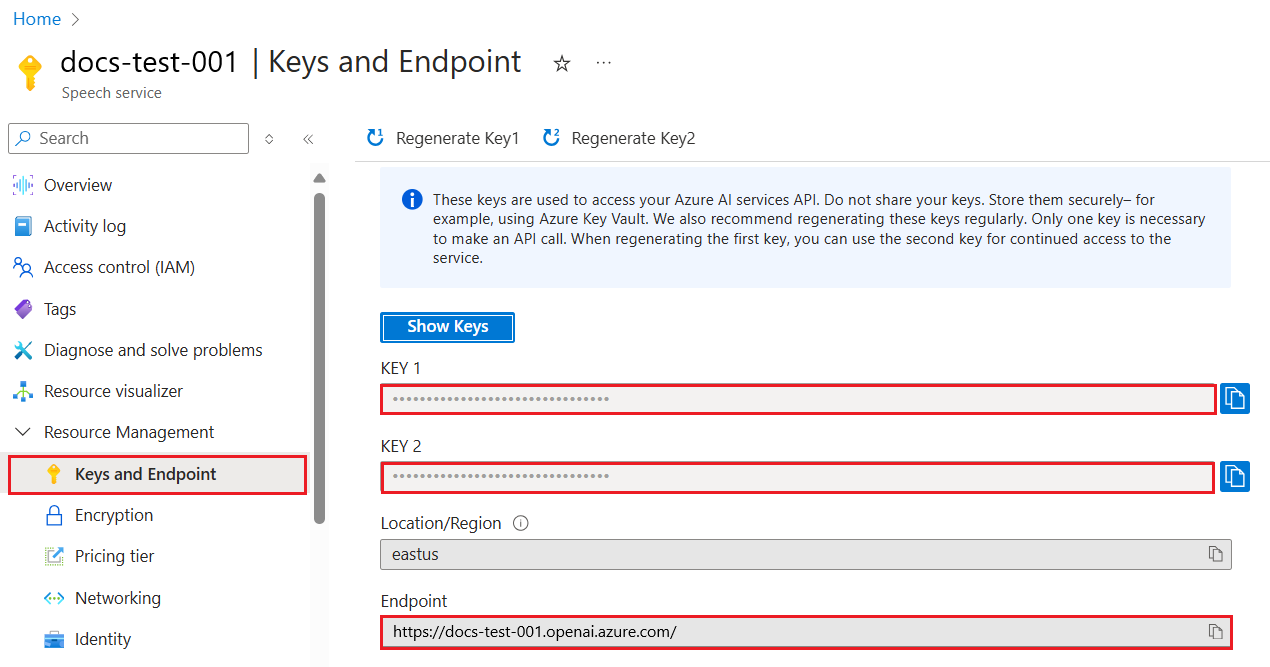
ഇപ്പോൾ ഈ വിവരങ്ങൾ പകർത്തിയതിനുശേഷം, ലൈബ്രറികൾക്ക് ഇത് ഉപയോഗിക്കാൻ നിർദ്ദേശിക്കാം.
Note
നിങ്ങളുടെ API കീ കോഡിൽ നിന്ന് വേർതിരിക്കാൻ ഇത് നല്ലതാണ്. ഇത് പരിസ്ഥിതി ചാരങ്ങളിലൂടെ ചെയ്യാം.
- പരിസ്ഥിതി ചാരമായ
OPENAI_API_KEYനിങ്ങളുടെ API കീ ആയി സജ്ജമാക്കുക.export OPENAI_API_KEY='sk-...'
നിങ്ങൾ Azure OpenAI ഉപയോഗിക്കുന്നുവെങ്കിൽ, കോൺഫിഗറേഷൻ ഇങ്ങനെ സജ്ജമാക്കാം:
openai.api_type = 'azure'
openai.api_key = os.environ["OPENAI_API_KEY"]
openai.api_version = '2023-05-15'
openai.api_base = os.getenv("API_BASE")
മുകളിൽ നാം താഴെപ്പറയുന്നവ സജ്ജമാക്കുന്നു:
api_type-നെazureആയി സജ്ജമാക്കുന്നു. ഇത് ലൈബ്രറിയെ Azure OpenAI ഉപയോഗിക്കാൻ പറയുന്നു, OpenAI അല്ല.api_key, ഇത് Azure പോർട്ടലിൽ നിന്നുള്ള API കീ ആണ്.api_version, നിങ്ങൾ ഉപയോഗിക്കാൻ ആഗ്രഹിക്കുന്ന API പതിപ്പ്. എഴുതുമ്പോൾ ഏറ്റവും പുതിയ പതിപ്പ്2023-05-15ആണ്.api_base, API എൻഡ്പോയിന്റ്. Azure പോർട്ടലിൽ API കീയുടെ അടുത്ത് കാണാം.
[!NOTE] >
os.getenvപരിസ്ഥിതി ചാരങ്ങൾ വായിക്കുന്ന ഫംഗ്ഷനാണ്. ഇത്OPENAI_API_KEY,API_BASEപോലുള്ള പരിസ്ഥിതി ചാരങ്ങൾ വായിക്കാൻ ഉപയോഗിക്കാം. ഈ പരിസ്ഥിതി ചാരങ്ങൾ നിങ്ങളുടെ ടെർമിനലിൽ അല്ലെങ്കിൽdotenvപോലുള്ള ലൈബ്രറി ഉപയോഗിച്ച് സജ്ജമാക്കുക.
ടെക്സ്റ്റ് ജനറേറ്റ് ചെയ്യാനുള്ള മാർഗം Completion ക്ലാസ് ഉപയോഗിക്കുകയാണ്. ഉദാഹരണം:
prompt = "Complete the following: Once upon a time there was a"

completion = openai.Completion.create(model="davinci-002", prompt=prompt)
print(completion.choices[0].text)
മുകളിൽ കൊടുത്ത കോഡിൽ, നാം ഒരു completion ഒബ്ജക്റ്റ് സൃഷ്ടിച്ച് ഉപയോഗിക്കാൻ ആഗ്രഹിക്കുന്ന മോഡലും പ്രോംപ്റ്റും നൽകുന്നു. തുടർന്ന് ജനറേറ്റുചെയ്ത ടെക്സ്റ്റ് പ്രിന്റ് ചെയ്യുന്നു.
ഇതുവരെ, Completion ഉപയോഗിച്ച് ടെക്സ്റ്റ് ജനറേറ്റ് ചെയ്യുന്നത് കണ്ടു. പക്ഷേ, ChatCompletion എന്ന മറ്റൊരു ക്ലാസ് ഉണ്ട്, ഇത് ചാറ്റ്ബോട്ടുകൾക്ക് കൂടുതൽ അനുയോജ്യമാണ്. ഉദാഹരണം:
import openai

openai.api_key = "sk-..."

completion = openai.ChatCompletion.create(model="gpt-3.5-turbo", messages=[{"role": "user", "content": "Hello world"}])
print(completion.choices[0].message.content)
ഈ ഫംഗ്ഷണാലിറ്റിയെക്കുറിച്ച് അടുത്ത അധ്യായത്തിൽ കൂടുതൽ.
ഇപ്പോൾ openai സജ്ജമാക്കാനും ക്രമീകരിക്കാനും പഠിച്ചപ്പോൾ, നിങ്ങളുടെ ആദ്യ ടെക്സ്റ്റ് ജനറേഷൻ ആപ്പ് നിർമ്മിക്കാം. ആപ്പ് നിർമ്മിക്കാൻ താഴെപ്പറയുന്ന ഘട്ടങ്ങൾ പിന്തുടരുക:
-
ഒരു വെർച്വൽ എൻവയോൺമെന്റ് സൃഷ്ടിച്ച് openai ഇൻസ്റ്റാൾ ചെയ്യുക:
python -m venv venv
source venv/bin/activate
pip install openai
[!NOTE] Windows ഉപയോഗിക്കുന്നുവെങ്കിൽ
source venv/bin/activateപകരംvenv\Scripts\activateടൈപ്പ് ചെയ്യുക.[!NOTE] Azure OpenAI കീ കണ്ടെത്താൻ https://portal.azure.com/ സന്ദർശിച്ച്
Open AIതിരയുക,Open AI resourceതിരഞ്ഞെടുക്കുക, തുടർന്ന്Keys and Endpoint-ൽ നിന്ന്Key 1പകർത്തുക. -
app.py ഫയൽ സൃഷ്ടിച്ച് താഴെ കൊടുത്ത കോഡ് നൽകുക:
import openai

openai.api_key = "<replace this value with your open ai key or Azure OpenAI key>"

openai.api_type = 'azure'
openai.api_version = '2023-05-15'
openai.api_base = "<endpoint found in Azure Portal where your API key is>"
deployment_name = "<deployment name>"

# നിങ്ങളുടെ പൂർത്തീകരണ കോഡ് ചേർക്കുക
prompt = "Complete the following: Once upon a time there was a"
messages = [{"role": "user", "content": prompt}]

# പൂർത്തീകരണം നടത്തുക
completion = openai.chat.completions.create(model=deployment_name, messages=messages)

# പ്രതികരണം പ്രിന്റ് ചെയ്യുക
print(completion.choices[0].message.content)
[!NOTE] Azure OpenAI ഉപയോഗിക്കുന്നുവെങ്കിൽ,
api_type-നെazureആയി സജ്ജമാക്കുകയുംapi_keyനിങ്ങളുടെ Azure OpenAI കീ ആയി സജ്ജമാക്കുകയും ചെയ്യണം.നിങ്ങൾക്ക് താഴെപോലൊരു ഔട്ട്പുട്ട് കാണാം:
 very unhappy _____.

Once upon a time there was a very unhappy mermaid.
ഇപ്പോൾ നിങ്ങൾ പ്രോംപ്റ്റ് ഉപയോഗിച്ച് ടെക്സ്റ്റ് എങ്ങനെ ജനറേറ്റ് ചെയ്യാമെന്ന് കണ്ടു. നിങ്ങൾക്ക് ഒരു പ്രോഗ്രാം ഉണ്ടായി, അത് മാറ്റി വ്യത്യസ്ത തരത്തിലുള്ള ടെക്സ്റ്റ് ജനറേറ്റ് ചെയ്യാം.
പ്രോംപ്റ്റുകൾ പല തരത്തിലുള്ള ജോലികൾക്ക് ഉപയോഗിക്കാം. ഉദാഹരണത്തിന്:
- ഒരു ടെക്സ്റ്റ് തരം ജനറേറ്റ് ചെയ്യുക. ഉദാഹരണത്തിന്, കവിത, ക്വിസ് ചോദ്യങ്ങൾ തുടങ്ങിയവ.
- വിവരം അന്വേഷിക്കുക. ഉദാഹരണത്തിന്, 'വെബ് ഡെവലപ്പ്മെന്റിൽ CORS എന്താണെന്ന്' പോലുള്ള വിവരങ്ങൾ അന്വേഷിക്കാൻ.
- കോഡ് ജനറേറ്റ് ചെയ്യുക. ഉദാഹരണത്തിന്, ഇമെയിൽ സാധുത പരിശോധിക്കാൻ റെഗുലർ എക്സ്പ്രഷൻ നിർമ്മിക്കുക, അല്ലെങ്കിൽ ഒരു വെബ് ആപ്പ് പോലുള്ള മുഴുവൻ പ്രോഗ്രാം ജനറേറ്റ് ചെയ്യുക.
നിങ്ങൾക്ക് വീട്ടിൽ ചില ചേരുവകൾ ഉണ്ടെന്ന് കരുതുക, നിങ്ങൾ എന്തെങ്കിലും പാചകം ചെയ്യാൻ ആഗ്രഹിക്കുന്നു. അതിനായി ഒരു റെസിപ്പി വേണം. റെസിപ്പികൾ കണ്ടെത്താൻ സെർച്ച് എഞ്ചിൻ ഉപയോഗിക്കാം, അല്ലെങ്കിൽ LLM ഉപയോഗിക്കാം.
നിങ്ങൾ ഇങ്ങനെ ഒരു പ്രോംപ്റ്റ് എഴുതാം:
"Show me 5 recipes for a dish with the following ingredients: chicken, potatoes, and carrots. Per recipe, list all the ingredients used"
മുകളിൽ കൊടുത്ത പ്രോംപ്റ്റ് പ്രകാരം, നിങ്ങൾക്ക് താഴെപോലൊരു മറുപടി ലഭിക്കാം:
1. Roasted Chicken and Vegetables:
Ingredients:
- 4 chicken thighs
- 2 potatoes, cut into cubes
- 2 carrots, cut into cubes
- 2 tablespoons olive oil
- 2 cloves garlic, minced
- 1 teaspoon dried thyme
- 1 teaspoon dried oregano
- Salt and pepper, to taste

2. Chicken and Potato Stew:
Ingredients:
- 2 tablespoons olive oil
- 1 onion, diced
- 2 cloves garlic, minced
- 2 chicken breasts, cut into cubes
- 2 potatoes, cut into cubes
- 2 carrots, cut into cubes
- 1 teaspoon dried oregano
- 1 teaspoon dried thyme
- 1 cup chicken broth
- Salt and pepper, to taste

3. Chicken and Potato Bake:
Ingredients:
- 2 tablespoons olive oil
- 2 chicken breasts, cut into cubes
- 2 potatoes, cut into cubes
- 2 carrots, cut into cubes
- 1 onion, diced
- 2 cloves garlic, minced
- 1 teaspoon dried oregano
- 1 teaspoon dried thyme
- 1 cup chicken broth
- Salt and pepper, to taste

4. Chicken and Potato Soup:
Ingredients:
- 2 tablespoons olive oil
- 1 onion, diced
- 2 cloves garlic, minced
- 2 chicken breasts, cut into cubes
- 2 potatoes, cut into cubes
- 2 carrots, cut into cubes
- 1 teaspoon dried oregano
- 1 teaspoon dried thyme
- 4 cups chicken broth
- Salt and pepper, to taste

5. Chicken and Potato Hash:
Ingredients:
- 2 tablespoons olive oil
- 2 chicken breasts, cut into cubes
- 2 potatoes, cut into cubes
- 2 carrots, cut into cubes
- 1 onion, diced
- 2 cloves garlic, minced
- 1 teaspoon dried oregano
ഈ ഫലം നല്ലതാണ്, ഞാൻ എന്ത് പാചകം ചെയ്യാമെന്ന് അറിയാം. ഈ ഘട്ടത്തിൽ, ഉപകാരപ്രദമായ മെച്ചപ്പെടുത്തലുകൾ:
- എനിക്ക് ഇഷ്ടമില്ലാത്ത അല്ലെങ്കിൽ അലർജി ഉള്ള ചേരുവകൾ ഫിൽട്ടർ ചെയ്യുക.
- എല്ലാ ചേരുവകളും വീട്ടിൽ ഇല്ലെങ്കിൽ ഷോപ്പിംഗ് ലിസ്റ്റ് ഉണ്ടാക്കുക.
മുകളിൽ പറഞ്ഞ സാഹചര്യങ്ങൾക്ക്, ഒരു അധിക പ്രോംപ്റ്റ് ചേർക്കാം:
"Please remove recipes with garlic as I'm allergic and replace it with something else. Also, please produce a shopping list for the recipes, considering I already have chicken, potatoes and carrots at home."
ഇപ്പോൾ നിങ്ങൾക്ക് പുതിയ ഫലം ലഭിക്കും, അതായത്:
1. Roasted Chicken and Vegetables:
Ingredients:
- 4 chicken thighs
- 2 potatoes, cut into cubes
- 2 carrots, cut into cubes
- 2 tablespoons olive oil
- 1 teaspoon dried thyme
- 1 teaspoon dried oregano
- Salt and pepper, to taste

2. Chicken and Potato Stew:
Ingredients:
- 2 tablespoons olive oil
- 1 onion, diced
- 2 chicken breasts, cut into cubes
- 2 potatoes, cut into cubes
- 2 carrots, cut into cubes
- 1 teaspoon dried oregano
- 1 teaspoon dried thyme
- 1 cup chicken broth
- Salt and pepper, to taste

3. Chicken and Potato Bake:
Ingredients:
- 2 tablespoons olive oil
- 2 chicken breasts, cut into cubes
- 2 potatoes, cut into cubes
- 2 carrots, cut into cubes
- 1 onion, diced
- 1 teaspoon dried oregano
- 1 teaspoon dried thyme
- 1 cup chicken broth
- Salt and pepper, to taste

4. Chicken and Potato Soup:
Ingredients:
- 2 tablespoons olive oil
- 1 onion, diced
- 2 chicken breasts, cut into cubes
- 2 potatoes, cut into cubes
- 2 carrots, cut into cubes
- 1 teaspoon dried oregano
- 1 teaspoon dried thyme
- 4 cups chicken broth
- Salt and pepper, to taste

5. Chicken and Potato Hash:
Ingredients:
- 2 tablespoons olive oil
- 2 chicken breasts, cut into cubes
- 2 potatoes, cut into cubes
- 2 carrots, cut into cubes
- 1 onion, diced
- 1 teaspoon dried oregano

Shopping List:
- Olive oil
- Onion
- Thyme
- Oregano
- Salt
- Pepper
ഇതാണ് നിങ്ങളുടെ അഞ്ച് റെസിപ്പികൾ, വെളുത്തുള്ളി ഇല്ലാതെ, കൂടാതെ വീട്ടിൽ ഉള്ള ചേരുവകൾ പരിഗണിച്ച് ഷോപ്പിംഗ് ലിസ്റ്റും.
ഇപ്പോൾ നാം ഒരു സീനാരിയോ കളിച്ചുകഴിഞ്ഞു, അതിനനുസരിച്ച് കോഡ് എഴുതാം. ചെയ്യേണ്ടത്:
-
നിലവിലുള്ള app.py ഫയൽ തുടക്കമായി ഉപയോഗിക്കുക
-
promptവേരിയബിൾ കണ്ടെത്തി അതിന്റെ കോഡ് താഴെപറയുന്ന പോലെ മാറ്റുക:prompt = "Show me 5 recipes for a dish with the following ingredients: chicken, potatoes, and carrots. Per recipe, list all the ingredients used"
ഇപ്പോൾ കോഡ് റൺ ചെയ്താൽ, താഴെപോലൊരു ഔട്ട്പുട്ട് കാണാം:
-Chicken Stew with Potatoes and Carrots: 3 tablespoons oil, 1 onion, chopped, 2 cloves garlic, minced, 1 carrot, peeled and chopped, 1 potato, peeled and chopped, 1 bay leaf, 1 thyme sprig, 1/2 teaspoon salt, 1/4 teaspoon black pepper, 1 1/2 cups chicken broth, 1/2 cup dry white wine, 2 tablespoons chopped fresh parsley, 2 tablespoons unsalted butter, 1 1/2 pounds boneless, skinless chicken thighs, cut into 1-inch pieces
-Oven-Roasted Chicken with Potatoes and Carrots: 3 tablespoons extra-virgin olive oil, 1 tablespoon Dijon mustard, 1 tablespoon chopped fresh rosemary, 1 tablespoon chopped fresh thyme, 4 cloves garlic, minced, 1 1/2 pounds small red potatoes, quartered, 1 1/2 pounds carrots, quartered lengthwise, 1/2 teaspoon salt, 1/4 teaspoon black pepper, 1 (4-pound) whole chicken
-Chicken, Potato, and Carrot Casserole: cooking spray, 1 large onion, chopped, 2 cloves garlic, minced, 1 carrot, peeled and shredded, 1 potato, peeled and shredded, 1/2 teaspoon dried thyme leaves, 1/4 teaspoon salt, 1/4 teaspoon black pepper, 2 cups fat-free, low-sodium chicken broth, 1 cup frozen peas, 1/4 cup all-purpose flour, 1 cup 2% reduced-fat milk, 1/4 cup grated Parmesan cheese

-One Pot Chicken and Potato Dinner: 2 tablespoons olive oil, 1 pound boneless, skinless chicken thighs, cut into 1-inch pieces, 1 large onion, chopped, 3 cloves garlic, minced, 1 carrot, peeled and chopped, 1 potato, peeled and chopped, 1 bay leaf, 1 thyme sprig, 1/2 teaspoon salt, 1/4 teaspoon black pepper, 2 cups chicken broth, 1/2 cup dry white wine

-Chicken, Potato, and Carrot Curry: 1 tablespoon vegetable oil, 1 large onion, chopped, 2 cloves garlic, minced, 1 carrot, peeled and chopped, 1 potato, peeled and chopped, 1 teaspoon ground coriander, 1 teaspoon ground cumin, 1/2 teaspoon ground turmeric, 1/2 teaspoon ground ginger, 1/4 teaspoon cayenne pepper, 2 cups chicken broth, 1/2 cup dry white wine, 1 (15-ounce) can chickpeas, drained and rinsed, 1/2 cup raisins, 1/2 cup chopped fresh cilantro
ശ്രദ്ധിക്കുക, നിങ്ങളുടെ LLM നിർണ്ണായകമല്ല, അതിനാൽ ഓരോ തവണയും വ്യത്യസ്ത ഫലങ്ങൾ ലഭിക്കാം.
നന്നായി, മെച്ചപ്പെടുത്താൻ നോക്കാം. മെച്ചപ്പെടുത്താൻ, കോഡ് ഫ്ലെക്സിബിൾ ആക്കണം, അതായത് ചേരുവകളും റെസിപ്പികളുടെ എണ്ണം മാറ്റാവുന്നതായിരിക്കണം.
-
കോഡ് താഴെപോലെ മാറ്റാം:
no_recipes = input("No of recipes (for example, 5): ")

ingredients = input("List of ingredients (for example, chicken, potatoes, and carrots): ")

# റെസിപ്പികളുടെ എണ്ണം പ്രോംപ്റ്റിലും ഘടകങ്ങളിലും ഇടുക
prompt = f"Show me {no_recipes} recipes for a dish with the following ingredients: {ingredients}. Per recipe, list all the ingredients used"
ടെസ്റ്റ് റൺ ചെയ്യാനുള്ള കോഡ് ഇങ്ങനെ കാണാം:
No of recipes (for example, 5): 3
List of ingredients (for example, chicken, potatoes, and carrots): milk,strawberries

-Strawberry milk shake: milk, strawberries, sugar, vanilla extract, ice cubes
-Strawberry shortcake: milk, flour, baking powder, sugar, salt, unsalted butter, strawberries, whipped cream
-Strawberry milk: milk, strawberries, sugar, vanilla extract
ഇപ്പോൾ നമുക്ക് റെസിപ്പികൾ നിർമ്മിക്കാൻ കഴിയുന്ന ഒരു പ്രവർത്തനക്ഷമമായ ആപ്പ് ഉണ്ട്, ഇത് ഉപയോക്താവിന്റെ ഇൻപുട്ടുകൾ (റെസിപ്പികളുടെ എണ്ണം, ചേരുവകൾ) ആശ്രയിച്ചിരിക്കുന്നു.
കൂടുതൽ മെച്ചപ്പെടുത്താൻ, താഴെപ്പറയുന്നവ ചേർക്കണം:
-
ചേരുവകൾ ഫിൽട്ടർ ചെയ്യുക. ഇഷ്ടമില്ലാത്ത അല്ലെങ്കിൽ അലർജി ഉള്ള ചേരുവകൾ ഫിൽട്ടർ ചെയ്യാൻ കഴിയും. ഇത് ചെയ്യാൻ നിലവിലുള്ള പ്രോംപ്റ്റ് എഡിറ്റ് ചെയ്ത് അതിന്റെ അവസാനം ഫിൽട്ടർ നിബന്ധന ചേർക്കാം:
filter = input("Filter (for example, vegetarian, vegan, or gluten-free): ")

prompt = f"Show me {no_recipes} recipes for a dish with the following ingredients: {ingredients}. Per recipe, list all the ingredients used, no {filter}"
മുകളിൽ, പ്രോംപ്റ്റിന്റെ അവസാനം
{filter}ചേർക്കുന്നു, കൂടാതെ ഉപയോക്താവിൽ നിന്ന് ഫിൽട്ടർ മൂല്യം പിടിക്കുന്നു.പ്രോഗ്രാം റൺ ചെയ്യുമ്പോൾ ഉദാഹരണ ഇൻപുട്ട് ഇങ്ങനെ കാണാം:
No of recipes (for example, 5): 3
List of ingredients (for example, chicken, potatoes, and carrots): onion,milk
Filter (for example, vegetarian, vegan, or gluten-free): no milk

1. French Onion Soup

Ingredients:

-1 large onion, sliced
-3 cups beef broth
-1 cup milk
-6 slices french bread
-1/4 cup shredded Parmesan cheese
-1 tablespoon butter
-1 teaspoon dried thyme
-1/4 teaspoon salt
-1/4 teaspoon black pepper

Instructions:

1. In a large pot, sauté onions in butter until golden brown.
2. Add beef broth, milk, thyme, salt, and pepper. Bring to a boil.
3. Reduce heat and simmer for 10 minutes.
4. Place french bread slices on soup bowls.
5. Ladle soup over bread.
6. Sprinkle with Parmesan cheese.

2. Onion and Potato Soup

Ingredients:

-1 large onion, chopped
-2 cups potatoes, diced
-3 cups vegetable broth
-1 cup milk
-1/4 teaspoon black pepper

Instructions:

1. In a large pot, sauté onions in butter until golden brown.
2. Add potatoes, vegetable broth, milk, and pepper. Bring to a boil.
3. Reduce heat and simmer for 10 minutes.
4. Serve hot.

3. Creamy Onion Soup

Ingredients:

-1 large onion, chopped
-3 cups vegetable broth
-1 cup milk
-1/4 teaspoon black pepper
-1/4 cup all-purpose flour
-1/2 cup shredded Parmesan cheese

Instructions:

1. In a large pot, sauté onions in butter until golden brown.
2. Add vegetable broth, milk, and pepper. Bring to a boil.
3. Reduce heat and simmer for 10 minutes.
4. In a small bowl, whisk together flour and Parmesan cheese until smooth.
5. Add to soup and simmer for an additional 5 minutes, or until soup has thickened.
കാണുന്നതുപോലെ, പാൽ ഉള്ള റെസിപ്പികൾ ഫിൽട്ടർ ചെയ്തിട്ടുണ്ട്. എന്നാൽ, നിങ്ങൾ ലാക്ടോസ് അസഹിഷ്ണുതയുള്ളവനാണെങ്കിൽ, പനീർ ഉള്ള റെസിപ്പികളും ഫിൽട്ടർ ചെയ്യണം, അതിനാൽ വ്യക്തത ആവശ്യമാണ്.
-
ഷോപ്പിംഗ് ലിസ്റ്റ് നിർമ്മിക്കുക. വീട്ടിൽ ഉള്ള ചേരുവകൾ പരിഗണിച്ച് ഷോപ്പിംഗ് ലിസ്റ്റ് നിർമ്മിക്കണം.
ഈ ഫംഗ്ഷണാലിറ്റി ഒരു പ്രോംപ്റ്റിൽ എല്ലാം പരിഹരിക്കാമോ, അല്ലെങ്കിൽ രണ്ട് പ്രോംപ്റ്റുകളായി വിഭജിക്കാമോ എന്ന് നോക്കാം. രണ്ടാമത്തെ സമീപനം പരീക്ഷിക്കാം. ഇതിന്, ആദ്യ പ്രോംപ്റ്റിന്റെ ഫലം രണ്ടാം പ്രോംപ്റ്റിന്റെ കോൺടെക്സ്റ്റായി ചേർക്കണം.
ആദ്യ പ്രോംപ്റ്റിന്റെ ഫലം പ്രിന്റ് ചെയ്യുന്ന ഭാഗം കണ്ടെത്തി താഴെ കൊടുത്ത കോഡ് ചേർക്കുക:
old_prompt_result = completion.choices[0].message.content
prompt = "Produce a shopping list for the generated recipes and please don't include ingredients that I already have."

new_prompt = f"{old_prompt_result} {prompt}"
messages = [{"role": "user", "content": new_prompt}]
completion = openai.Completion.create(engine=deployment_name, messages=messages, max_tokens=1200)

# പ്രതികരണം പ്രിന്റ് ചെയ്യുക
print("Shopping list:")
print(completion.choices[0].message.content)
താഴെ പറയുന്ന കാര്യങ്ങൾ ശ്രദ്ധിക്കുക:
-
ആദ്യ പ്രോംപ്റ്റിൽ നിന്നുള്ള ഫലം പുതിയ പ്രോംപ്റ്റിലേക്ക് ചേർത്ത് ഒരു പുതിയ പ്രോംപ്റ്റ് നിർമ്മിക്കുന്നു:
new_prompt = f"{old_prompt_result} {prompt}"
-
ഒരു പുതിയ അഭ്യർത്ഥന നടത്തുന്നു, എന്നാൽ ആദ്യ പ്രോംപ്റ്റിൽ ആവശ്യപ്പെട്ട ടോക്കൺ സംഖ്യയും പരിഗണിച്ച്, ഈ തവണ
max_tokens1200 ആണെന്ന് പറയുന്നു.completion = openai.Completion.create(engine=deployment_name, prompt=new_prompt, max_tokens=1200)
ഈ കോഡ് പരീക്ഷിച്ചപ്പോൾ, നമുക്ക് താഴെ കാണുന്ന ഔട്ട്പുട്ട് ലഭിച്ചു:
No of recipes (for example, 5): 2
List of ingredients (for example, chicken, potatoes, and carrots): apple,flour
Filter (for example, vegetarian, vegan, or gluten-free): sugar


-Apple and flour pancakes: 1 cup flour, 1/2 tsp baking powder, 1/2 tsp baking soda, 1/4 tsp salt, 1 tbsp sugar, 1 egg, 1 cup buttermilk or sour milk, 1/4 cup melted butter, 1 Granny Smith apple, peeled and grated
-Apple fritters: 1-1/2 cups flour, 1 tsp baking powder, 1/4 tsp salt, 1/4 tsp baking soda, 1/4 tsp nutmeg, 1/4 tsp cinnamon, 1/4 tsp allspice, 1/4 cup sugar, 1/4 cup vegetable shortening, 1/4 cup milk, 1 egg, 2 cups shredded, peeled apples
Shopping list:
-Flour, baking powder, baking soda, salt, sugar, egg, buttermilk, butter, apple, nutmeg, cinnamon, allspice
-
ഇതുവരെ ഞങ്ങൾക്ക് ഉള്ളത് പ്രവർത്തിക്കുന്ന കോഡാണ്, പക്ഷേ കാര്യങ്ങൾ കൂടുതൽ മെച്ചപ്പെടുത്താൻ ചില മാറ്റങ്ങൾ ചെയ്യേണ്ടതുണ്ട്. ചെയ്യേണ്ട ചില കാര്യങ്ങൾ:
-
രഹസ്യങ്ങൾ കോഡിൽ നിന്ന് വേർതിരിക്കുക, ഉദാഹരണത്തിന് API കീ. രഹസ്യങ്ങൾ കോഡിൽ ഉൾപ്പെടുത്തരുത്, അവ സുരക്ഷിതമായ സ്ഥലത്ത് സൂക്ഷിക്കണം. രഹസ്യങ്ങൾ കോഡിൽ നിന്ന് വേർതിരിക്കാൻ, പരിസ്ഥിതി വ്യത്യാസങ്ങൾ (environment variables) ഉപയോഗിച്ച്
python-dotenvപോലുള്ള ലൈബ്രറികൾ ഉപയോഗിച്ച് ഫയലിൽ നിന്ന് ലോഡ് ചെയ്യാം. കോഡിൽ ഇത് എങ്ങനെ കാണപ്പെടും:-
താഴെ കാണുന്ന ഉള്ളടക്കത്തോടെ
.envഫയൽ സൃഷ്ടിക്കുക:OPENAI_API_KEY=sk-...
ശ്രദ്ധിക്കുക, Azure-ക്കായി താഴെ പറയുന്ന പരിസ്ഥിതി വ്യത്യാസങ്ങൾ സജ്ജമാക്കേണ്ടതാണ്:
OPENAI_API_TYPE=azure
OPENAI_API_VERSION=2023-05-15
OPENAI_API_BASE=<replace>
കോഡിൽ, പരിസ്ഥിതി വ്യത്യാസങ്ങൾ ഇങ്ങനെ ലോഡ് ചെയ്യും:
from dotenv import load_dotenv

load_dotenv()

openai.api_key = os.environ["OPENAI_API_KEY"]
-
-
ടോക്കൺ നീളത്തെക്കുറിച്ച് ഒരു കുറിപ്പ്. നമുക്ക് ആവശ്യമുള്ള ടെക്സ്റ്റ് സൃഷ്ടിക്കാൻ എത്ര ടോക്കൺ വേണമെന്ന് പരിഗണിക്കണം. ടോക്കണുകൾക്ക് ചെലവ് ഉണ്ടാകുന്നു, അതിനാൽ സാധ്യമായിടത്ത് ടോക്കൺ ഉപയോഗം ലാഭകരമാക്കാൻ ശ്രമിക്കണം. ഉദാഹരണത്തിന്, പ്രോംപ്റ്റ് ഇങ്ങനെ രൂപപ്പെടുത്താമോ എന്ന് നോക്കുക, കുറവ് ടോക്കൺ ഉപയോഗിക്കാൻ?
ഉപയോഗിക്കുന്ന ടോക്കണുകൾ മാറ്റാൻ,
max_tokensപാരാമീറ്റർ ഉപയോഗിക്കാം. ഉദാഹരണത്തിന്, 100 ടോക്കൺ ഉപയോഗിക്കാൻ ആഗ്രഹിക്കുന്നുവെങ്കിൽ, ഇങ്ങനെ ചെയ്യും:completion = client.chat.completions.create(model=deployment, messages=messages, max_tokens=100)
-
താപനില (temperature) പരീക്ഷണം. ഇതുവരെ പരാമർശിക്കാത്ത ഒരു പ്രധാന ഘടകമാണ് താപനില, ഇത് പ്രോഗ്രാമിന്റെ പ്രവർത്തനത്തെ ബാധിക്കുന്നു. താപനില മൂല്യം ഉയർന്നാൽ ഔട്ട്പുട്ട് കൂടുതൽ യാദൃച്ഛികമാകും. താഴ്ന്ന താപനില മൂല്യം കൂടുതൽ പ്രവചിക്കാവുന്നതായ ഔട്ട്പുട്ട് നൽകും. നിങ്ങളുടെ ഔട്ട്പുട്ടിൽ വ്യത്യാസം വേണമോ എന്ന് പരിഗണിക്കുക.
താപനില മാറ്റാൻ,
temperatureപാരാമീറ്റർ ഉപയോഗിക്കാം. ഉദാഹരണത്തിന്, 0.5 താപനില ഉപയോഗിക്കാൻ ആഗ്രഹിക്കുന്നുവെങ്കിൽ, ഇങ്ങനെ ചെയ്യും:completion = client.chat.completions.create(model=deployment, messages=messages, temperature=0.5)
ശ്രദ്ധിക്കുക, 1.0-ന് അടുത്ത് വരുമ്പോൾ ഔട്ട്പുട്ട് കൂടുതൽ വ്യത്യസ്തമായിരിക്കും.
ഈ അസൈൻമെന്റിനായി, നിങ്ങൾ എന്ത് നിർമ്മിക്കാമെന്ന് തിരഞ്ഞെടുക്കാം.
ചില നിർദ്ദേശങ്ങൾ:
- റെസിപ്പി ജനറേറ്റർ ആപ്പ് കൂടുതൽ മെച്ചപ്പെടുത്താൻ പരീക്ഷിക്കുക. താപനില മൂല്യങ്ങൾ, പ്രോംപ്റ്റുകൾ എന്നിവയുമായി കളിച്ച് നോക്കുക.
- "സ്റ്റഡി ബഡി" നിർമ്മിക്കുക. ഈ ആപ്പ് ഒരു വിഷയത്തെക്കുറിച്ച് (ഉദാഹരണത്തിന് Python) ചോദ്യങ്ങൾക്ക് ഉത്തരം നൽകാൻ കഴിയണം, ഉദാഹരണത്തിന് "Python-ൽ ഒരു പ്രത്യേക വിഷയം എന്താണ്?" പോലുള്ള പ്രോംപ്റ്റുകൾ ഉണ്ടാകാം, അല്ലെങ്കിൽ "ഒരു പ്രത്യേക വിഷയം സംബന്ധിച്ച കോഡ് കാണിക്കൂ" എന്ന പ്രോംപ്റ്റ് ഉണ്ടാകാം.
- ചരിത്ര ബോട്ട്, ചരിത്രം ജീവൻമയമാക്കുക, ബോട്ടിനെ ഒരു ചരിത്ര കഥാപാത്രമായി നിർദ്ദേശിച്ച് അതിന്റെ ജീവിതവും കാലഘട്ടവും സംബന്ധിച്ച ചോദ്യങ്ങൾ ചോദിക്കുക.
താഴെ ഒരു സ്റ്റാർട്ടർ പ്രോംപ്റ്റ് നൽകിയിരിക്കുന്നു, നിങ്ങൾ എങ്ങനെ ഉപയോഗിക്കാമെന്നും ഇഷ്ടാനുസൃതമാക്കാമെന്നും നോക്കുക.
- "You're an expert on the Python language

    Suggest a beginner lesson for Python in the following format:

    Format:
    - concepts:
    - brief explanation of the lesson:
    - exercise in code with solutions"
നിങ്ങൾ ഉപയോഗിക്കാവുന്ന ചില പ്രോംപ്റ്റുകൾ:
- "You are Abe Lincoln, tell me about yourself in 3 sentences, and respond using grammar and words like Abe would have used"
- "You are Abe Lincoln, respond using grammar and words like Abe would have used:

   Tell me about your greatest accomplishments, in 300 words"
താപനില (temperature) എന്ന ആശയം എന്ത് ചെയ്യുന്നു?
- ഔട്ട്പുട്ട് എത്ര യാദൃച്ഛികമാണെന്ന് നിയന്ത്രിക്കുന്നു.
- പ്രതികരണത്തിന്റെ വലിപ്പം നിയന്ത്രിക്കുന്നു.
- എത്ര ടോക്കൺ ഉപയോഗിക്കപ്പെടുന്നു എന്ന് നിയന്ത്രിക്കുന്നു.
അസൈൻമെന്റിൽ പ്രവർത്തിക്കുമ്പോൾ, താപനില വ്യത്യാസപ്പെടുത്താൻ ശ്രമിക്കുക, 0, 0.5, 1 എന്നിങ്ങനെ സജ്ജമാക്കുക. 0 ഏറ്റവും കുറവായ വ്യത്യാസവും 1 ഏറ്റവും കൂടുതലായ വ്യത്യാസവുമാണ്. നിങ്ങളുടെ ആപ്പിന് ഏത് മൂല്യം ഏറ്റവും നല്ലതാണ്?
ഈ പാഠം പൂർത്തിയാക്കിയ ശേഷം, ഞങ്ങളുടെ Generative AI Learning collection പരിശോധിച്ച് നിങ്ങളുടെ Generative AI അറിവ് ഉയർത്തുക!
പാഠം 7-ലേക്ക് പോകൂ, അവിടെ നാം ചാറ്റ് ആപ്ലിക്കേഷനുകൾ നിർമ്മിക്കുന്നത് കാണും!
അസൂയാപത്രം:
ഈ രേഖ AI വിവർത്തന സേവനം Co-op Translator ഉപയോഗിച്ച് വിവർത്തനം ചെയ്തതാണ്. നാം കൃത്യതയ്ക്ക് ശ്രമിച്ചിട്ടുണ്ടെങ്കിലും, സ്വയം പ്രവർത്തിക്കുന്ന വിവർത്തനങ്ങളിൽ പിശകുകൾ അല്ലെങ്കിൽ തെറ്റുകൾ ഉണ്ടാകാമെന്ന് ദയവായി ശ്രദ്ധിക്കുക. അതിന്റെ മാതൃഭാഷയിലുള്ള യഥാർത്ഥ രേഖയാണ് പ്രാമാണികമായ ഉറവിടം എന്ന് പരിഗണിക്കേണ്ടതാണ്. നിർണായകമായ വിവരങ്ങൾക്ക്, പ്രൊഫഷണൽ മനുഷ്യ വിവർത്തനം ശുപാർശ ചെയ്യപ്പെടുന്നു. ഈ വിവർത്തനം ഉപയോഗിക്കുന്നതിൽ നിന്നുണ്ടാകുന്ന ഏതെങ്കിലും തെറ്റിദ്ധാരണകൾക്കോ തെറ്റായ വ്യാഖ്യാനങ്ങൾക്കോ ഞങ്ങൾ ഉത്തരവാദികളല്ല.