
(위 이미지를 클릭하면 이 강의의 동영상을 볼 수 있습니다)
이 커리큘럼을 통해 지금까지 프롬프트와 같은 핵심 개념과 "프롬프트 엔지니어링"이라는 전체 학문에 대해 배웠습니다. ChatGPT, Office 365, Microsoft Power Platform 등과 같은 다양한 도구를 사용하여 프롬프트를 활용해 작업을 수행할 수 있습니다.
이러한 경험을 애플리케이션에 추가하려면 프롬프트, 완성 및 작업할 라이브러리 선택과 같은 개념을 이해해야 합니다. 바로 이 장에서 이러한 내용을 배우게 됩니다.
이 장에서 여러분은 다음을 배우게 됩니다:
- openai 라이브러리와 그 핵심 개념에 대해 학습합니다.
- openai를 사용하여 텍스트 생성 애플리케이션을 구축합니다.
- 프롬프트, 온도, 토큰과 같은 개념을 사용하여 텍스트 생성 애플리케이션을 구축하는 방법을 이해합니다.
이 강의가 끝나면 다음을 할 수 있습니다:
- 텍스트 생성 애플리케이션이 무엇인지 설명할 수 있습니다.
- openai를 사용하여 텍스트 생성 애플리케이션을 구축할 수 있습니다.
- 애플리케이션을 구성하여 토큰 수를 조정하거나 온도를 변경하여 다양한 출력을 생성할 수 있습니다.
일반적으로 애플리케이션을 구축할 때 다음과 같은 인터페이스를 갖추고 있습니다:
- 명령 기반. 콘솔 애플리케이션은 명령을 입력하고 작업을 수행하는 일반적인 애플리케이션입니다. 예를 들어,
git은 명령 기반 애플리케이션입니다. - 사용자 인터페이스(UI). 일부 애플리케이션은 그래픽 사용자 인터페이스(GUI)를 가지고 있으며, 버튼을 클릭하거나 텍스트를 입력하거나 옵션을 선택하는 등의 작업을 수행할 수 있습니다.
명령 기반 애플리케이션과 비교해보면:
- 제한적이다. 애플리케이션이 지원하는 명령만 입력할 수 있습니다.
- 언어 특정적이다. 일부 애플리케이션은 여러 언어를 지원하지만 기본적으로 특정 언어를 위해 설계되었으며, 추가 언어 지원을 추가할 수 있습니다.
그렇다면 텍스트 생성 애플리케이션은 어떻게 다를까요?
텍스트 생성 애플리케이션에서는 더 많은 유연성을 제공하며, 특정 명령이나 입력 언어에 제한되지 않습니다. 대신 자연어를 사용하여 애플리케이션과 상호작용할 수 있습니다. 또 다른 장점은 이미 방대한 정보 코퍼스에서 학습된 데이터 소스와 상호작용하고 있다는 점입니다. 반면, 전통적인 애플리케이션은 데이터베이스에 있는 정보에 제한될 수 있습니다.
다양한 것을 만들 수 있습니다. 예를 들어:
- 챗봇. 회사와 제품에 대한 질문에 답변하는 챗봇은 좋은 선택이 될 수 있습니다.
- 도우미. LLM은 텍스트 요약, 텍스트에서 인사이트 얻기, 이력서 작성 등 텍스트 생성에 매우 유용합니다.
- 코드 어시스턴트. 사용하는 언어 모델에 따라 코드를 작성하는 데 도움을 주는 코드 어시스턴트를 만들 수 있습니다. 예를 들어, GitHub Copilot이나 ChatGPT와 같은 제품을 사용하여 코드를 작성할 수 있습니다.
LLM과 통합하는 방법을 찾아야 하며, 일반적으로 다음 두 가지 접근 방식이 필요합니다:
- API 사용. 프롬프트를 포함한 웹 요청을 구성하고 생성된 텍스트를 반환받습니다.
- 라이브러리 사용. 라이브러리는 API 호출을 캡슐화하여 사용하기 쉽게 만듭니다.
LLM을 다루기 위한 몇 가지 잘 알려진 라이브러리가 있습니다:
- openai, 이 라이브러리는 모델에 쉽게 연결하고 프롬프트를 보낼 수 있도록 합니다.
그 외에도 더 높은 수준에서 작동하는 라이브러리들이 있습니다:
- Langchain. Langchain은 잘 알려져 있으며 Python을 지원합니다.
- Semantic Kernel. Semantic Kernel은 Microsoft에서 제공하는 라이브러리로 C#, Python, Java를 지원합니다.
첫 번째 애플리케이션을 어떻게 구축할 수 있는지, 필요한 라이브러리와 요구 사항 등을 살펴보겠습니다.
OpenAI 또는 Azure OpenAI와 상호작용하기 위한 많은 라이브러리가 있습니다. C#, Python, JavaScript, Java 등 다양한 프로그래밍 언어를 사용할 수 있습니다. 우리는 openai Python 라이브러리를 선택했으며, pip을 사용하여 설치할 것입니다.
pip install openai다음 단계를 수행해야 합니다:
-
Azure 계정 생성 https://azure.microsoft.com/free/.
-
Azure OpenAI에 액세스 권한 얻기. https://learn.microsoft.com/azure/ai-services/openai/overview#how-do-i-get-access-to-azure-openai로 이동하여 액세스를 요청합니다.
[!NOTE] 작성 시점에서는 Azure OpenAI에 대한 액세스를 신청해야 합니다.
-
Python 설치 https://www.python.org/
-
Azure OpenAI 서비스 리소스를 생성합니다. 리소스 생성 방법을 참조하세요.
이 시점에서 openai 라이브러리에 사용할 API 키를 알려야 합니다. API 키를 찾으려면 Azure OpenAI 리소스의 "Keys and Endpoint" 섹션으로 이동하여 "Key 1" 값을 복사하세요.
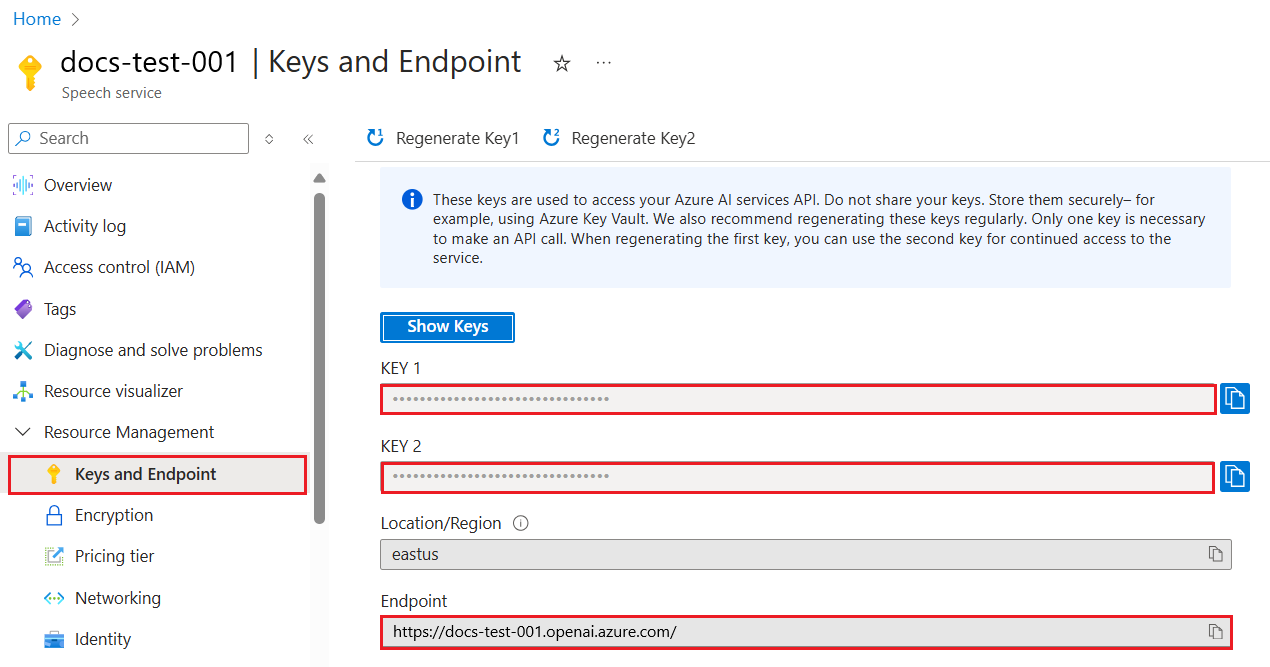
이 정보를 복사한 후, 라이브러리에 이를 사용하도록 지시합니다.
Note
API 키를 코드와 분리하는 것이 좋습니다. 환경 변수를 사용하여 이를 수행할 수 있습니다.
- 환경 변수
OPENAI_API_KEY를 API 키로 설정합니다.export OPENAI_API_KEY='sk-...'
Azure OpenAI를 사용하는 경우, 설정 방법은 다음과 같습니다:
openai.api_type = 'azure'
openai.api_key = os.environ["OPENAI_API_KEY"]
openai.api_version = '2023-05-15'
openai.api_base = os.getenv("API_BASE")
위에서 다음을 설정합니다:
api_type을azure로 설정합니다. 이는 라이브러리가 OpenAI가 아닌 Azure OpenAI를 사용하도록 지시합니다.api_key, 이는 Azure 포털에서 찾은 API 키입니다.api_version, 이는 사용하려는 API 버전입니다. 작성 시점에서 최신 버전은2023-05-15입니다.api_base, 이는 API의 엔드포인트입니다. Azure 포털에서 API 키 옆에 있습니다.
[!NOTE] >
os.getenv는 환경 변수를 읽는 함수입니다. 이를 사용하여OPENAI_API_KEY및API_BASE와 같은 환경 변수를 읽을 수 있습니다. 터미널에서 이러한 환경 변수를 설정하거나dotenv와 같은 라이브러리를 사용하여 설정할 수 있습니다.
텍스트를 생성하는 방법은 Completion 클래스를 사용하는 것입니다. 예시는 다음과 같습니다:
prompt = "Complete the following: Once upon a time there was a"

completion = openai.Completion.create(model="davinci-002", prompt=prompt)
print(completion.choices[0].text)
위 코드에서 우리는 완성 객체를 생성하고 사용하려는 모델과 프롬프트를 전달합니다. 그런 다음 생성된 텍스트를 출력합니다.
지금까지 Completion을 사용하여 텍스트를 생성하는 방법을 살펴보았습니다. 그러나 챗봇에 더 적합한 ChatCompletion이라는 클래스가 있습니다. 이를 사용하는 예시는 다음과 같습니다:
import openai

openai.api_key = "sk-..."

completion = openai.ChatCompletion.create(model="gpt-3.5-turbo", messages=[{"role": "user", "content": "Hello world"}])
print(completion.choices[0].message.content)
이 기능에 대한 자세한 내용은 다음 장에서 다룰 예정입니다.
이제 openai를 설정하고 구성하는 방법을 배웠으니, 첫 번째 텍스트 생성 애플리케이션을 만들어 보겠습니다. 애플리케이션을 만들려면 다음 단계를 따르세요:
-
가상 환경을 생성하고 openai를 설치합니다:
python -m venv venv
source venv/bin/activate
pip install openai
[!NOTE] Windows를 사용하는 경우
source venv/bin/activate대신venv\Scripts\activate를 입력하세요.[!NOTE] Azure OpenAI 키를 찾으려면 https://portal.azure.com/로 이동하여
Open AI를 검색한 후Open AI 리소스를 선택하고Keys and Endpoint를 선택하여Key 1값을 복사하세요. -
app.py 파일을 생성하고 다음 코드를 입력하세요:
import openai

openai.api_key = "<replace this value with your open ai key or Azure OpenAI key>"

openai.api_type = 'azure'
openai.api_version = '2023-05-15'
openai.api_base = "<endpoint found in Azure Portal where your API key is>"
deployment_name = "<deployment name>"

# add your completion code
prompt = "Complete the following: Once upon a time there was a"
messages = [{"role": "user", "content": prompt}]

# make completion
completion = openai.chat.completions.create(model=deployment_name, messages=messages)

# print response
print(completion.choices[0].message.content)
[!NOTE] Azure OpenAI를 사용하는 경우,
api_type을azure로 설정하고api_key를 Azure OpenAI 키로 설정해야 합니다.다음과 같은 출력이 표시될 것입니다:
 very unhappy _____.

Once upon a time there was a very unhappy mermaid.
이제 프롬프트를 사용하여 텍스트를 생성하는 방법을 보았습니다. 또한 수정하고 변경하여 다양한 유형의 텍스트를 생성할 수 있는 프로그램을 실행 중입니다.
프롬프트는 다양한 작업에 사용할 수 있습니다. 예를 들어:
- 특정 유형의 텍스트 생성. 예를 들어, 시를 생성하거나 퀴즈 질문을 생성할 수 있습니다.
- 정보 검색. 프롬프트를 사용하여 '웹 개발에서 CORS는 무엇을 의미하나요?'와 같은 정보를 검색할 수 있습니다.
- 코드 생성. 이메일을 검증하는 정규 표현식을 개발하거나 전체 프로그램(예: 웹 애플리케이션)을 생성하는 데 프롬프트를 사용할 수 있습니다.
집에 있는 재료를 가지고 요리를 하고 싶다고 상상해보세요. 이를 위해 레시피가 필요합니다. 레시피를 찾는 방법은 검색 엔진을 사용하는 것이거나 LLM을 사용하는 것입니다.
다음과 같은 프롬프트를 작성할 수 있습니다:
"다음 재료를 사용한 요리의 레시피 5개를 보여주세요: 닭고기, 감자, 당근. 각 레시피에 사용된 모든 재료를 나열해주세요."
위 프롬프트를 사용하면 다음과 같은 응답을 받을 수 있습니다:
1. Roasted Chicken and Vegetables:
Ingredients:
- 4 chicken thighs
- 2 potatoes, cut into cubes
- 2 carrots, cut into cubes
- 2 tablespoons olive oil
- 2 cloves garlic, minced
- 1 teaspoon dried thyme
- 1 teaspoon dried oregano
- Salt and pepper, to taste

2. Chicken and Potato Stew:
Ingredients:
- 2 tablespoons olive oil
- 1 onion, diced
- 2 cloves garlic, minced
- 2 chicken breasts, cut into cubes
- 2 potatoes, cut into cubes
- 2 carrots, cut into cubes
- 1 teaspoon dried oregano
- 1 teaspoon dried thyme
- 1 cup chicken broth
- Salt and pepper, to taste

3. Chicken and Potato Bake:
Ingredients:
- 2 tablespoons olive oil
- 2 chicken breasts, cut into cubes
- 2 potatoes, cut into cubes
- 2 carrots, cut into cubes
- 1 onion, diced
- 2 cloves garlic, minced
- 1 teaspoon dried oregano
- 1 teaspoon dried thyme
- 1 cup chicken broth
- Salt and pepper, to taste

4. Chicken and Potato Soup:
Ingredients:
- 2 tablespoons olive oil
- 1 onion, diced
- 2 cloves garlic, minced
- 2 chicken breasts, cut into cubes
- 2 potatoes, cut into cubes
- 2 carrots, cut into cubes
- 1 teaspoon dried oregano
- 1 teaspoon dried thyme
- 4 cups chicken broth
- Salt and pepper, to taste

5. Chicken and Potato Hash:
Ingredients:
- 2 tablespoons olive oil
- 2 chicken breasts, cut into cubes
- 2 potatoes, cut into cubes
- 2 carrots, cut into cubes
- 1 onion, diced
- 2 cloves garlic, minced
- 1 teaspoon dried oregano
이 결과는 훌륭합니다. 이제 무엇을 요리할지 알게 되었습니다. 이 시점에서 유용한 개선 사항은 다음과 같습니다:
- 내가 싫어하거나 알레르기가 있는 재료를 제외하는 것.
- 집에 없는 재료를 고려하여 쇼핑 목록을 생성하는 것.
위의 경우를 위해 추가 프롬프트를 작성해보겠습니다:
"마늘이 들어간 레시피는 알레르기가 있으니 제거하고 다른 것으로 대체해주세요. 또한, 집에 닭고기, 감자, 당근이 이미 있으니 이를 고려하여 쇼핑 목록을 생성해주세요."
이제 새로운 결과를 얻을 수 있습니다:
1. Roasted Chicken and Vegetables:
Ingredients:
- 4 chicken thighs
- 2 potatoes, cut into cubes
- 2 carrots, cut into cubes
- 2 tablespoons olive oil
- 1 teaspoon dried thyme
- 1 teaspoon dried oregano
- Salt and pepper, to taste

2. Chicken and Potato Stew:
Ingredients:
- 2 tablespoons olive oil
- 1 onion, diced
- 2 chicken breasts, cut into cubes
- 2 potatoes, cut into cubes
- 2 carrots, cut into cubes
- 1 teaspoon dried oregano
- 1 teaspoon dried thyme
- 1 cup chicken broth
- Salt and pepper, to taste

3. Chicken and Potato Bake:
Ingredients:
- 2 tablespoons olive oil
- 2 chicken breasts, cut into cubes
- 2 potatoes, cut into cubes
- 2 carrots, cut into cubes
- 1 onion, diced
- 1 teaspoon dried oregano
- 1 teaspoon dried thyme
- 1 cup chicken broth
- Salt and pepper, to taste

4. Chicken and Potato Soup:
Ingredients:
- 2 tablespoons olive oil
- 1 onion, diced
- 2 chicken breasts, cut into cubes
- 2 potatoes, cut into cubes
- 2 carrots, cut into cubes
- 1 teaspoon dried oregano
- 1 teaspoon dried thyme
- 4 cups chicken broth
- Salt and pepper, to taste

5. Chicken and Potato Hash:
Ingredients:
- 2 tablespoons olive oil
- 2 chicken breasts, cut into cubes
- 2 potatoes, cut into cubes
- 2 carrots, cut into cubes
- 1 onion, diced
- 1 teaspoon dried oregano

Shopping List:
- Olive oil
- Onion
- Thyme
- Oregano
- Salt
- Pepper
이제 마늘이 언급되지 않은 5개의 레시피와 집에 이미 있는 재료를 고려한 쇼핑 목록을 얻었습니다.
이제 시나리오를 실행해 보았으니, 시나리오에 맞는 코드를 작성해 보겠습니다. 이를 위해 다음 단계를 따르세요:
-
기존 app.py 파일을 시작점으로 사용하세요.
-
prompt변수를 찾아 다음 코드로 변경하세요:prompt = "Show me 5 recipes for a dish with the following ingredients: chicken, potatoes, and carrots. Per recipe, list all the ingredients used"
이제 코드를 실행하면 다음과 유사한 출력이 표시될 것입니다:
-Chicken Stew with Potatoes and Carrots: 3 tablespoons oil, 1 onion, chopped, 2 cloves garlic, minced, 1 carrot, peeled and chopped, 1 potato, peeled and chopped, 1 bay leaf, 1 thyme sprig, 1/2 teaspoon salt, 1/4 teaspoon black pepper, 1 1/2 cups chicken broth, 1/2 cup dry white wine, 2 tablespoons chopped fresh parsley, 2 tablespoons unsalted butter, 1 1/2 pounds boneless, skinless chicken thighs, cut into 1-inch pieces
-Oven-Roasted Chicken with Potatoes and Carrots: 3 tablespoons extra-virgin olive oil, 1 tablespoon Dijon mustard, 1 tablespoon chopped fresh rosemary, 1 tablespoon chopped fresh thyme, 4 cloves garlic, minced, 1 1/2 pounds small red potatoes, quartered, 1 1/2 pounds carrots, quartered lengthwise, 1/2 teaspoon salt, 1/4 teaspoon black pepper, 1 (4-pound) whole chicken
-Chicken, Potato, and Carrot Casserole: cooking spray, 1 large onion, chopped, 2 cloves garlic, minced, 1 carrot, peeled and shredded, 1 potato, peeled and shredded, 1/2 teaspoon dried thyme leaves, 1/4 teaspoon salt, 1/4 teaspoon black pepper, 2 cups fat-free, low-sodium chicken broth, 1 cup frozen peas, 1/4 cup all-purpose flour, 1 cup 2% reduced-fat milk, 1/4 cup grated Parmesan cheese

-One Pot Chicken and Potato Dinner: 2 tablespoons olive oil, 1 pound boneless, skinless chicken thighs, cut into 1-inch pieces, 1 large onion, chopped, 3 cloves garlic, minced, 1 carrot, peeled and chopped, 1 potato, peeled and chopped, 1 bay leaf, 1 thyme sprig, 1/2 teaspoon salt, 1/4 teaspoon black pepper, 2 cups chicken broth, 1/2 cup dry white wine

-Chicken, Potato, and Carrot Curry: 1 tablespoon vegetable oil, 1 large onion, chopped, 2 cloves garlic, minced, 1 carrot, peeled and chopped, 1 potato, peeled and chopped, 1 teaspoon ground coriander, 1 teaspoon ground cumin, 1/2 teaspoon ground turmeric, 1/2 teaspoon ground ginger, 1/4 teaspoon cayenne pepper, 2 cups chicken broth, 1/2 cup dry white wine, 1 (15-ounce) can chickpeas, drained and rinsed, 1/2 cup raisins, 1/2 cup chopped fresh cilantro
NOTE, LLM은 비결정적이므로 프로그램을 실행할 때마다 다른 결과를 얻을 수 있습니다.
훌륭합니다. 이제 개선 방법을 살펴보겠습니다. 개선을 위해 코드를 유연하게 만들어 재료와 레시피 수를 변경할 수 있도록 해야 합니다.
-
코드를 다음과 같이 변경하세요:
no_recipes = input("No of recipes (for example, 5): ")

ingredients = input("List of ingredients (for example, chicken, potatoes, and carrots): ")

# interpolate the number of recipes into the prompt an ingredients
prompt = f"Show me {no_recipes} recipes for a dish with the following ingredients: {ingredients}. Per recipe, list all the ingredients used"
코드를 테스트 실행하면 다음과 같이 보일 수 있습니다:
No of recipes (for example, 5): 3
List of ingredients (for example, chicken, potatoes, and carrots): milk,strawberries

-Strawberry milk shake: milk, strawberries, sugar, vanilla extract, ice cubes
-Strawberry shortcake: milk, flour, baking powder, sugar, salt, unsalted butter, strawberries, whipped cream
-Strawberry milk: milk, strawberries, sugar, vanilla extract
이제 레시피를 생성할 수 있는 작동하는 애플리케이션이 있으며, 사용자 입력에 따라 유연하게 작동합니다. 레시피 수와 사용된 재료 모두 사용자 입력에 따라 달라집니다.
이를 더욱 개선하기 위해 다음을 추가하고자 합니다:
-
재료 필터링. 좋아하지 않거나 알레르기가 있는 재료를 필터링할 수 있기를 원합니다. 이를 위해 기존 프롬프트를 수정하고 끝에 필터 조건을 추가할 수 있습니다:
filter = input("Filter (for example, vegetarian, vegan, or gluten-free): ")

prompt = f"Show me {no_recipes} recipes for a dish with the following ingredients: {ingredients}. Per recipe, list all the ingredients used, no {filter}"
위에서
{filter}를 프롬프트 끝에 추가하고 사용자로부터 필터 값을 캡처합니다.프로그램 실행 시 입력 예시는 다음과 같을 수 있습니다:
No of recipes (for example, 5): 3
List of ingredients (for example, chicken, potatoes, and carrots): onion,milk
Filter (for example, vegetarian, vegan, or gluten-free): no milk

1. French Onion Soup

Ingredients:

-1 large onion, sliced
-3 cups beef broth
-1 cup milk
-6 slices french bread
-1/4 cup shredded Parmesan cheese
-1 tablespoon butter
-1 teaspoon dried thyme
-1/4 teaspoon salt
-1/4 teaspoon black pepper

Instructions:

1. In a large pot, sauté onions in butter until golden brown.
2. Add beef broth, milk, thyme, salt, and pepper. Bring to a boil.
3. Reduce heat and simmer for 10 minutes.
4. Place french bread slices on soup bowls.
5. Ladle soup over bread.
6. Sprinkle with Parmesan cheese.

2. Onion and Potato Soup

Ingredients:

-1 large onion, chopped
-2 cups potatoes, diced
-3 cups vegetable broth
-1 cup milk
-1/4 teaspoon black pepper

Instructions:

1. In a large pot, sauté onions in butter until golden brown.
2. Add potatoes, vegetable broth, milk, and pepper. Bring to a boil.
3. Reduce heat and simmer for 10 minutes.
4. Serve hot.

3. Creamy Onion Soup

Ingredients:

-1 large onion, chopped
-3 cups vegetable broth
-1 cup milk
-1/4 teaspoon black pepper
-1/4 cup all-purpose flour
-1/2 cup shredded Parmesan cheese

Instructions:

1. In a large pot, sauté onions in butter until golden brown.
2. Add vegetable broth, milk, and pepper. Bring to a boil.
3. Reduce heat and simmer for 10 minutes.
4. In a small bowl, whisk together flour and Parmesan cheese until smooth.
5. Add to soup and simmer for an additional 5 minutes, or until soup has thickened.
보시다시피, 우유가 포함된 레시피는 필터링되었습니다. 하지만 유당 불내증이 있는 경우 치즈가 포함된 레시피도 필터링하고 싶을 수 있으므로 명확히 해야 할 필요가 있습니다.
-
쇼핑 목록 생성. 집에 이미 있는 재료를 고려하여 쇼핑 목록을 생성하고 싶습니다.
이 기능을 위해 모든 것을 하나의 프롬프트에서 해결하려고 시도하거나 두 개의 프롬프트로 나눌 수 있습니다. 후자의 접근 방식을 시도해 보겠습니다. 여기서는 추가 프롬프트를 추가하는 것을 제안하지만, 이를 위해 첫 번째 프롬프트의 결과를 두 번째 프롬프트의 컨텍스트로 추가해야 합니다.
첫 번째 프롬프트의 결과를 출력하는 코드 부분을 찾아 아래에 다음 코드를 추가하세요:
old_prompt_result = completion.choices[0].message.content
prompt = "Produce a shopping list for the generated recipes and please don't include ingredients that I already have."

new_prompt = f"{old_prompt_result} {prompt}"
messages = [{"role": "user", "content": new_prompt}]
completion = openai.Completion.create(engine=deployment_name, messages=messages, max_tokens=1200)

# print response
print("Shopping list:")
print(completion.choices[0].message.content)
다음 사항을 유의하세요:
-
첫 번째 프롬프트의 결과를 새로운 프롬프트에 추가하여 새로운 프롬프트를 구성합니다:
new_prompt = f"{old_prompt_result} {prompt}"
-
새로운 요청을 만드는데, 첫 번째 프롬프트에서 요청한 토큰 수를 고려하여 이번에는
max_tokens를 1200으로 설정합니다.completion = openai.Completion.create(engine=deployment_name, prompt=new_prompt, max_tokens=1200)
이 코드를 실행해 보면, 다음과 같은 결과를 얻을 수 있습니다:
 ```output
 No of recipes (for example, 5): 2
 List of ingredients (for example, chicken, potatoes, and carrots): apple,flour
 Filter (for example, vegetarian, vegan, or gluten-free): sugar


 -Apple and flour pancakes: 1 cup flour, 1/2 tsp baking powder, 1/2 tsp baking soda, 1/4 tsp salt, 1 tbsp sugar, 1 egg, 1 cup buttermilk or sour milk, 1/4 cup melted butter, 1 Granny Smith apple, peeled and grated
 -Apple fritters: 1-1/2 cups flour, 1 tsp baking powder, 1/4 tsp salt, 1/4 tsp baking soda, 1/4 tsp nutmeg, 1/4 tsp cinnamon, 1/4 tsp allspice, 1/4 cup sugar, 1/4 cup vegetable shortening, 1/4 cup milk, 1 egg, 2 cups shredded, peeled apples
 Shopping list:
 -Flour, baking powder, baking soda, salt, sugar, egg, buttermilk, butter, apple, nutmeg, cinnamon, allspice
 ```
현재까지 작성한 코드는 작동하지만, 더 나은 결과를 위해 몇 가지 조정을 해야 합니다. 우리가 해야 할 몇 가지는 다음과 같습니다:
-
코드에서 비밀 정보 분리하기: API 키와 같은 비밀 정보는 코드에 포함되지 않아야 하며, 안전한 위치에 저장되어야 합니다. 비밀 정보를 코드에서 분리하려면 환경 변수를 사용하거나
python-dotenv와 같은 라이브러리를 사용하여 파일에서 로드할 수 있습니다. 코드에서 이를 구현하는 방법은 다음과 같습니다:-
.env파일을 생성하고 다음 내용을 추가합니다:OPENAI_API_KEY=sk-...
참고로, Azure의 경우 다음 환경 변수를 설정해야 합니다:
OPENAI_API_TYPE=azure
OPENAI_API_VERSION=2023-05-15
OPENAI_API_BASE=<replace>
코드에서 환경 변수를 로드하는 방법은 다음과 같습니다:
from dotenv import load_dotenv

load_dotenv()

openai.api_key = os.environ["OPENAI_API_KEY"]
-
-
토큰 길이에 대한 고려: 원하는 텍스트를 생성하기 위해 필요한 토큰 수를 고려해야 합니다. 토큰은 비용이 발생하므로 가능한 한 적은 토큰을 사용하는 것이 경제적입니다. 예를 들어, 프롬프트를 재구성하여 더 적은 토큰을 사용할 수 있는지 고민해볼 수 있습니다.
사용되는 토큰 수를 변경하려면
max_tokens매개변수를 사용할 수 있습니다. 예를 들어, 100개의 토큰을 사용하고 싶다면 다음과 같이 설정합니다:completion = client.chat.completions.create(model=deployment, messages=messages, max_tokens=100)
-
온도 값 실험하기: 온도는 지금까지 언급하지 않았지만 프로그램의 성능에 중요한 영향을 미칩니다. 온도 값이 높을수록 출력이 더 랜덤해지고, 낮을수록 출력이 더 예측 가능해집니다. 출력에서 변화를 원하는지 여부를 고려해보세요.
온도를 변경하려면
temperature매개변수를 사용할 수 있습니다. 예를 들어, 온도를 0.5로 설정하고 싶다면 다음과 같이 설정합니다:completion = client.chat.completions.create(model=deployment, messages=messages, temperature=0.5)
참고로, 1.0에 가까울수록 출력이 더 다양해집니다.
이번 과제에서는 무엇을 만들지 선택할 수 있습니다.
다음은 몇 가지 제안입니다:
- 레시피 생성 앱을 더 개선해보세요. 온도 값과 프롬프트를 조정하며 어떤 결과를 얻을 수 있는지 확인하세요.
- "공부 도우미"를 만들어보세요. 이 앱은 특정 주제에 대한 질문에 답할 수 있어야 합니다. 예를 들어, Python에 대한 질문을 할 수 있고, "Python에서 특정 주제는 무엇인가요?" 또는 "특정 주제에 대한 코드를 보여주세요"와 같은 프롬프트를 사용할 수 있습니다.
- 역사 봇을 만들어보세요. 역사를 생생하게 만들어봅시다. 봇에게 특정 역사적 인물을 연기하도록 지시하고, 그 인물의 삶과 시대에 대해 질문해보세요.
아래는 시작 프롬프트입니다. 이를 사용하여 원하는 대로 조정해보세요.
- "You're an expert on the Python language

    Suggest a beginner lesson for Python in the following format:

    Format:
    - concepts:
    - brief explanation of the lesson:
    - exercise in code with solutions"
다음은 사용할 수 있는 프롬프트입니다:
- "You are Abe Lincoln, tell me about yourself in 3 sentences, and respond using grammar and words like Abe would have used"
- "You are Abe Lincoln, respond using grammar and words like Abe would have used:

   Tell me about your greatest accomplishments, in 300 words"
온도 개념은 무엇을 제어하나요?
- 출력의 랜덤성을 제어합니다.
- 응답의 크기를 제어합니다.
- 사용된 토큰 수를 제어합니다.
과제를 진행하면서 온도를 다양하게 설정해보세요. 0, 0.5, 1로 설정해보며 실험해보세요. 0은 가장 변동이 적고, 1은 가장 변동이 큽니다. 어떤 값이 앱에 가장 적합한지 확인해보세요.
이 강의를 완료한 후, Generative AI Learning collection을 확인하여 생성형 AI 지식을 계속 향상시켜보세요!
Lesson 7로 이동하여 채팅 애플리케이션 구축을 살펴보세요!
면책 조항:
이 문서는 AI 번역 서비스 Co-op Translator를 사용하여 번역되었습니다. 정확성을 위해 최선을 다하고 있지만, 자동 번역에는 오류나 부정확성이 포함될 수 있습니다. 원본 문서의 원어 버전을 권위 있는 출처로 간주해야 합니다. 중요한 정보의 경우, 전문적인 인간 번역을 권장합니다. 이 번역 사용으로 인해 발생하는 오해나 잘못된 해석에 대해 책임지지 않습니다.