Creating Release iOS builds can fail if the provisioning profile is missing capabilities. Capabilities are enabled via the Apple Developer Portal
Apple requires you register "capabilities" for an iOS app's bundle identifier via an Apple endpoint before you can create a production build of your app. Capabilities are related to the native iOS plist *.entitlements file in a project.
In Xcode, this can be done via the "Signing and Capabilities" tab, but because managed projects don't use Xcode we need some other way to register (otherwise the production build will crash).
Tools like eas-cli are able to register capabilities with Apple, but only if the entitlements are defined statically i.e. not in a modifier. Because of this we recommend you modify the ios.entitlements object directly rather than through the withEntitlements mod.
Do one of the following:
- Ensure you have the latest version of
eas-cliinstalled. - Ensure your entitlements are defined:
- Managed: Run
expo config --type prebuildand ensure theios.entitlementshas all of your capabilities defined. - Bare: Check that your
ios/*/*.entitlementsfile has all of the desired entitlements defined. Alternatively you can open Xcode, go to the "Signing & Capabilities" tab, and check there.
- Managed: Run
- Create a new iOS build with
eas build -p ios- You should see a step ✔ Synced capabilities which will automatically sync the entitlements with Apple Dev Portal.
If this doesn't work, please open an issue on
expo/eas-cli.
💡 Bare workflow, and Apple Mac users only
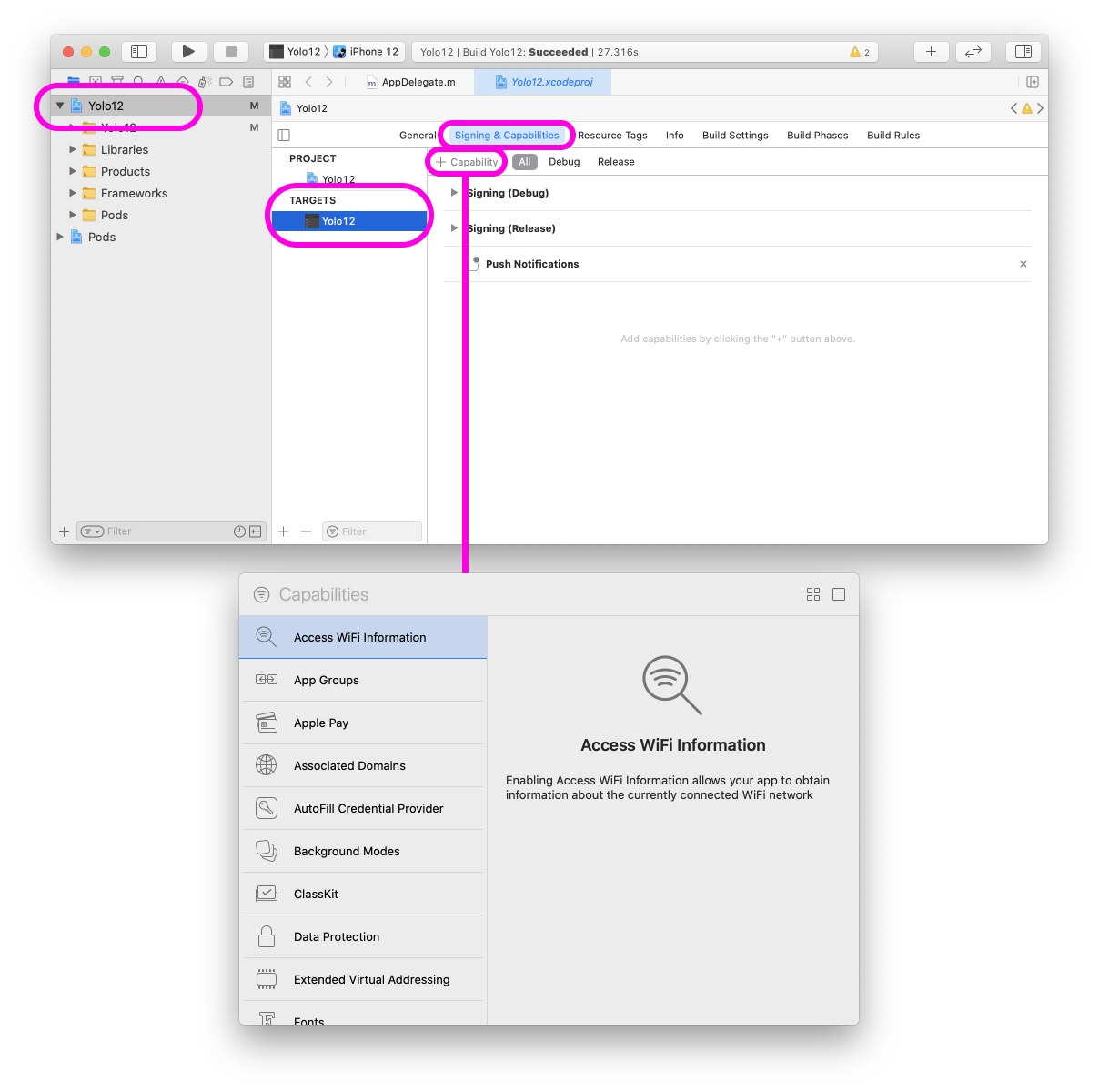
- Open the
iosproject in Xcode. - Go to the "Signing & Capabilities" tab.
- Press "+ Capability" in the corner to select capabilities.
- You can delete capabilities by pressing the "x" button in each capability's row.
- Adding capabilities will cause Xcode to regenerate the provisioning profile.
- Go to Apple Dev Portal > Bundle Identifiers
- Or
developer.apple.com> "Account" > "Certificates, IDs & Profiles" > "Identifiers"
- Or
- Find the "IDENTIFIER" matching your app's bundle identifer (defined in your
app.json(ios.bundleIdentifer) or Xcode project). - Add the missing capabilities (i.e. "Associated Domains") entitlement.
- Press "Save"
- Acknowledge the "Modify App Capabilities" (current provisioning profiles will be invalid).
- Rebuild your iOS app.
Here are some examples of what the Xcode build errors look like.
💡 If you built with EAS Build, you can download the build logs and run
cat xcode-build.log | xcprettyto make the results more readable.
The project has com.apple.developer.associated-domains in their *.entitlements, or ios.associatedDomains in their app.json or app.config.js.
❌  error: Provisioning profile "*[expo] com.bacon.myapp AppStore 2021-05-04T22:29:48.816Z" doesn't support the Associated Domains capability. (in target 'myapp' from project 'myapp')

❌  error: Provisioning profile "*[expo] com.bacon.myapp AppStore 2021-05-04T22:29:48.816Z" doesn't include the com.apple.developer.associated-domains entitlement. (in target 'myapp' from project 'myapp')
- Related PR: expo/eas-cli#384
❌  error: Provisioning profile "*[expo] com.bacon.myapp AppStore 2021-05-04T22:29:48.816Z" doesn't support the Apple Pay, HealthKit, Near Field Communication Tag Reading, and Sign in with Apple capability. (in target 'myapp' from project 'myapp')

❌  error: Provisioning profile "*[expo] com.bacon.myapp AppStore 2021-05-04T22:29:48.816Z" doesn't include the com.apple.developer.applesignin,