

-
|
Now that Node-RED MCU is configured and running (see #26), I would like the blink the built-in LED of the Raspberry Pi Pico W. How to address a GPIO? Which node should be used? The GPIO-out section doesn't say much.
Thank you! |
Beta Was this translation helpful? Give feedback.
Replies: 3 comments 8 replies

-
|
As you note, the Pico W doesn't connect the on-board LED directly to the MCU. Instead, it routes through the Wi-Fi part. To accommodate this hardware design, the Digital constructor supports that pin on GPIO bank 1. The LED is pin 0 of bank 1, so use 32 as the pin with the rpi-gpio out Node ((32 * 1) + 0). (I don't have a board with me to try, so this is based on reviewing the implementation!) |
Beta Was this translation helpful? Give feedback.
-
|
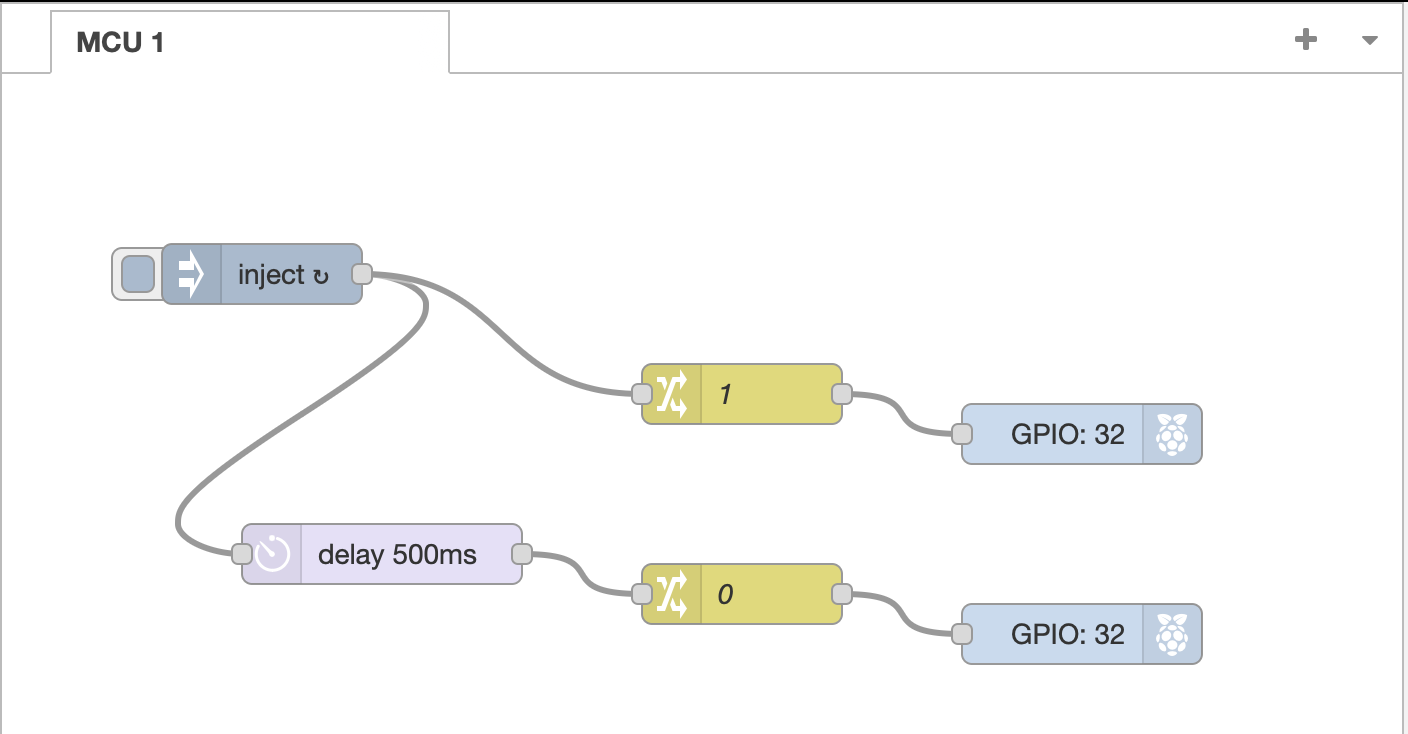
Using pin 32 doesn't seem to work.
Neither other standard pins, like GPIO15. |
Beta Was this translation helpful? Give feedback.

-
|
Thank you for the answer.
Unfortunately, it raises an error:
To be continued... |

Beta Was this translation helpful? Give feedback.

-
I was already impressed how both of you were able to build this flow - as the plugin creates an erroneous manifest for |
Beta Was this translation helpful? Give feedback.

-
|
Thanks, @ralphwetzel. I had no idea where the "child_process" module was coming from. That's not a Moddable SDK or Node-RED MCU Edition module! |
Beta Was this translation helpful? Give feedback.
-
|
@phoddie --
I thought about intercepting the message that the mcu sends to xsbug. Unfortunately this gives us only the error message - yet not the location of the error (== node id!). The best that can be done in this case is to display the message in the To get a behavior that mimics standard Node-RED demands to catch the error in the node, wrap "it" (error.message should be enough) in a trace container and send this to the editor: // Example: CompatibilityNode
onMessage(msg, done) {
try {
this.#events.input?.forEach(input => input.call(this, msg, this.#send, done));
} catch(err) {
trace.left(JSON.stringify({
"error": {
"error": err.toString(),
}
}), node.id);
// There should be a log / error message for xsbug as well...
}
}This will create a standard error indication in Node-RED's Debug pane. |
Beta Was this translation helpful? Give feedback.
-
|
Just FYI - I confirmed that the "rpi gpio" plugin allows several nodes to share a single GPIO, as long as they are all of the same type (input, output, PWM, etc). The MCU implementation now does the same, so that the flow @rei-vilo shared above (with two GPIO outputs connected to the same GPIO) now works without modification. |
Beta Was this translation helpful? Give feedback.
-
|
Thank you so much for your help. I can now turn the LED of the Raspberry Pi Pico W on and off through MQTT. To be continued... |
Beta Was this translation helpful? Give feedback.


Thank you so much for your help.
I can now turn the LED of the Raspberry Pi Pico W on and off through MQTT.
To be continued...