Pieces Copilot uses Long-Term Memory (LTM) to remember your work throughout the day. As you work across different applications, Pieces passively captures context from what you're doing—creating a searchable memory you can query anytime.
Think of it like having a perfect memory of everything you've worked on, researched, or discussed—ready to help you find exactly what you need.
The best part? You don't need to remember anything special. Just ask naturally, like you're talking to a colleague who was there with you.
LTM captures context from the applications you use every day:
- Code editors and IDEs (VS Code, IntelliJ, etc.)
- Web browsers (Chrome, Firefox, Safari)
- Communication tools (Teams, Slack, Discord)
- Documentation platforms (Notion, Confluence, GitHub)
- Terminal and command line
You can access your captured context in two ways:
- Browse through your work history in the Pieces Desktop app
- Ask Pieces Copilot questions using natural language—just like asking a colleague
The best way to get what you need from LTM is to combine these elements in your questions:
- Time — When did it happen?
- Source — Where did it happen? (which app or platform)
- Gestures — What were you doing? (copying, searching, creating, etc.)
- Topic — What project, theme, or subject were you working on?
- People — Who were you interacting with? (colleagues, team members, etc.)
The more of these you include, the better your results will be. But don't overthink it—start with what you remember, and Pieces will help you find the rest.
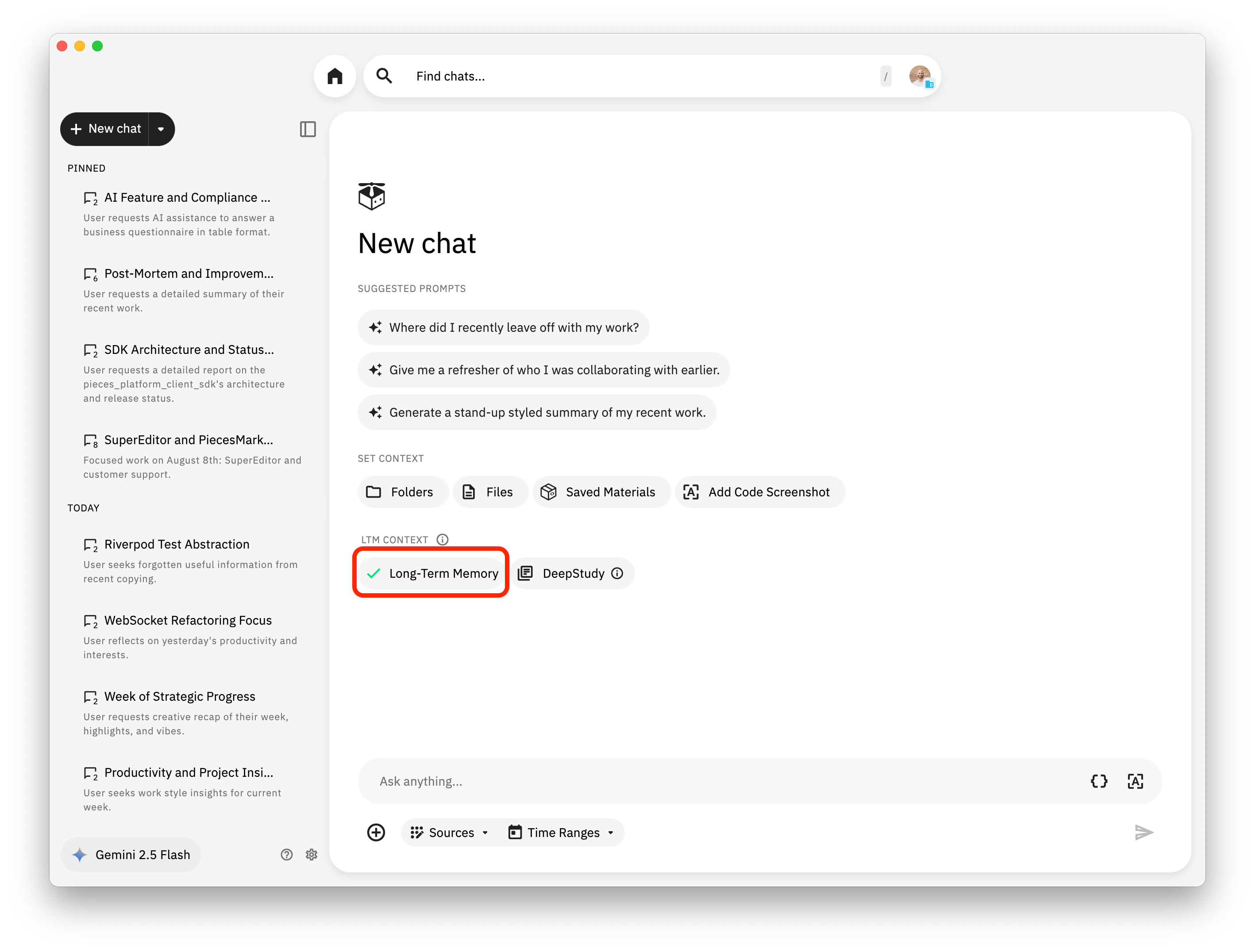
Important: For any given chat, you must activate the "LTM Context" or "Long-Term Memory Context" button in the chat interface to access LTM context. Without activating this button, Pieces Copilot won't be able to search your Long-Term Memory, even if you use the perfect query structure.
Time is the most powerful element you can add to your queries. You can reference anything from "just now" all the way back to months ago. Pieces understands natural language, so you don't need to be exact—just describe when something happened.
- "What was I just working on?"
- "Show me the code I wrote in the last few minutes for the authentication middleware"
- "What did I research just now about AWS IAM role configuration?"
- "What was the last thing I copied from the customer portal security configuration?"
- "What was the cloud security configuration I was researching earlier this morning in Chrome?"
- "Show me the conversation I had yesterday afternoon about the OAuth2 implementation for the customer portal"
- "What files did I edit this morning for the API gateway security policies?"
- "What was the link Sarah sent me yesterday in Microsoft Teams about the SOC 2 compliance audit findings?"
- "Generate a report about the work I did on the customer portal authentication system back in August"
- "How did I solve the cloud security misconfiguration issue in our AWS infrastructure last June?"
- "What was I working on during the week of September 15th for the online portal SSO integration?"
- "Show me all the research I did on PCI DSS compliance requirements for our payment portal in Q3"
- "What was the command from the last few weeks to proxy my localhost tunnel for Pieces with ngrok up to the cloud? I think I did this in early November."
- "What projects did I start working on 6 months ago for the new customer portal security architecture?"
- "Show me the documentation I reviewed back in March about SOX compliance requirements for our financial reporting APIs"
- "What was the architecture decision we made last fall for implementing zero-trust security in our cloud infrastructure?"
- Be specific when you can: "last Tuesday" works better than "recently"
- Use natural language: "earlier today", "yesterday morning", "last week" all work great
- Combine with other details: Adding the source or what you were doing helps a lot
- Use events as anchors: "during the compliance review", "when we were debugging the claims workflow"
- Don't stress about being exact: If you're not sure, Pieces can usually figure it out from context
Tell Pieces which application or platform you were using. This helps narrow down results significantly. But if you don't remember the source, don't worry—Pieces can still find it.
- "What did I search for in Chrome this morning about AWS CloudTrail log analysis?"
- "Show me the code I wrote in VS Code yesterday for the customer portal authentication service"
- "What was discussed in the Teams channel yesterday about the security vulnerability in the online portal?"
- "What documentation did I read in Notion last week about our cloud security policies?"
- "What was the cloud security configuration I was researching earlier this morning in Chrome?"
- "What files did I open in IntelliJ IDEA this afternoon for the portal authentication module?"
- "Show me the Slack messages from the security team channel last Friday about the OWASP Top 10 vulnerabilities"
- Code Editors: VS Code, IntelliJ IDEA, PyCharm, etc.
- Browsers: Chrome, Firefox, Safari, Edge
- Communication: Microsoft Teams, Slack, Discord
- Documentation: Notion, Confluence, GitHub Wiki
- Terminal: Commands you ran, scripts you executed, terminal output
Reference what you were doing—the action or interaction you want to find.
- "What did I copy just now?"
- "Show me everything I copied this morning from the AWS security documentation"
- "What was the last code snippet I copied for the JWT token validation?"
- "What files did I create yesterday for the customer portal authentication service?"
- "Show me the files I modified last week in the cloud security configuration module"
- "What was the last file I opened for the API gateway security policies?"
- "What did I search for in Google earlier about AWS IAM best practices?"
- "Show me my recent searches about PCI DSS compliance requirements"
- "What was I looking up in the documentation about OAuth2 implementation for portals?"
- "What messages did I send in Teams today about the cloud security audit?"
- "Show me the links I shared yesterday about the SOC 2 compliance updates"
- "What was the last thing I replied to in the security team channel?"
Mention the specific project, feature, or theme you were working on. This helps Pieces narrow down results to exactly what you need.
- "What was I working on for the customer portal authentication system?"
- "Show me everything related to the PCI DSS compliance audit"
- "What code did I write for the cloud security monitoring service?"
- "What research did I do about AWS security best practices?"
- "What was I working on for the customer portal SSO integration back in August?"
- "Show me all the research I did on SOC 2 compliance requirements in Q3"
- "What code did I write for the cloud security configuration last week?"
- "What did I search for in Chrome about AWS CloudFormation security templates?"
- "Show me the code I wrote in VS Code for the portal authentication module"
- "What documentation did I read in Notion about PCI DSS compliance requirements?"
- "What files did I create for the customer portal security audit?"
- "Show me everything I copied related to the OAuth2 implementation"
- "What did I search for about the cloud infrastructure security configuration?"
Mention the specific person or team you were interacting with. This is especially useful for finding conversations, shared links, or collaborative work.
- "What was the link Sarah sent me yesterday in Microsoft Teams?"
- "Show me the conversation I had with David about the cloud security vulnerability"
- "What feedback did I receive from the security team on my pull request?"
- "What did Ross share with me about the SOC 2 compliance audit findings?"
- "What was the link Sarah sent me yesterday in Microsoft Teams about the SOC 2 compliance updates?"
- "Show me the conversation I had with David last week about the AWS security misconfiguration"
- "What feedback did I receive from the security team last month?"
- "What did Sarah send me in Teams about the compliance updates?"
- "Show me the Slack messages from Ross about the portal authentication issue"
- "What email did I receive from the security team?"
- "What did Sarah share with me about the PCI DSS compliance audit?"
- "Show me the conversation I had with David about the customer portal security architecture"
- "What feedback did Ross give me on the cloud security configuration?"
The best queries mix time, source, gestures, topic, and people together. Here's how they work in practice. Remember: you don't need all five—even one or two will get you great results.
- "What was the cloud security configuration I was researching earlier this morning in Chrome?"
- "Show me the code I wrote in VS Code yesterday afternoon for the customer portal authentication"
- "What was discussed in Teams during the morning standup about the AWS security audit?"
- "What did I copy just now from the AWS security documentation?"
- "Show me the files I created last week for the portal authentication service"
- "What was the last thing I searched for about PCI DSS compliance?"
- "What did I copy from Chrome about AWS IAM policies?"
- "Show me the files I opened in IntelliJ for the cloud security module"
- "What links did I share in Teams about the SOC 2 compliance updates?"
- "What did Sarah share with me about the PCI DSS compliance audit?"
- "Show me the conversation I had with David about the customer portal security architecture"
- "What feedback did Ross give me on the cloud security configuration?"
- "What did Sarah send me yesterday about the SOC 2 compliance updates?"
- "Show me the conversation I had with David last week about the AWS security misconfiguration"
- "What feedback did I receive from the security team last month on the portal authentication module?"
- "What code did I copy from GitHub this morning for the customer portal authentication that Sarah mentioned?"
- "Show me the files I created in VS Code yesterday for the cloud security configuration module that David reviewed"
- "What links did Sarah share in Teams during the SOC 2 compliance review meeting last week?"
Here are some common scenarios and how to query them. Notice how these combine time references with specific technical details. Use these as inspiration—your actual queries don't need to match these exactly.
- "Generate a report about the work I did on the customer portal authentication system back in August"
- "What was I working on for the cloud security infrastructure migration project?"
- "Show me all context related to the PCI DSS compliance audit we completed last quarter"
- "How did I solve the AWS IAM permission issue in our cloud infrastructure last June?"
- "What was my approach to fixing the OAuth2 token validation bug in the customer portal?"
- "Show me how I debugged the API gateway security policy that was blocking legitimate requests"
- "What was the command from the last few weeks to proxy my localhost tunnel for Pieces with ngrok up to the cloud? I think I did this in early November."
- "What was the AWS CLI command I used to configure the CloudTrail logging for the security audit last month?"
- "Show me the Terraform script I ran to deploy the customer portal security infrastructure last week"
- "What was the API endpoint I used to test the OAuth2 integration with our identity provider yesterday?"
- "What did I research about implementing zero-trust security architecture for our cloud infrastructure?"
- "Show me all the documentation I read about SOC 2 compliance requirements for our customer portal"
- "What articles did I bookmark last month about AWS security best practices and IAM policies?"
- "What was discussed in yesterday's standup about the cloud security audit?"
- "Show me the decisions made in the architecture review meeting for the new customer portal authentication system"
- "What feedback did I receive on my pull request for the API gateway security policies?"
- "What did Sarah share with me about the PCI DSS compliance audit?"
- "Show me the conversation I had with David last week about the AWS security misconfiguration"
- "What feedback did Ross give me on the portal SSO integration?"
Do:
- Write naturally—ask like you'd ask a colleague
- Be specific when you can—include time, source, topic, people, or what you were doing
- Mix strategies—combine multiple elements for best results (time + topic + people works great!)
- Mention the project or theme—"customer portal authentication" is better than "that thing I was working on"
- Include people when relevant—"What did Sarah send me?" is clearer than "What was that link?"
- Use events as anchors—"during the security audit", "when debugging the cloud infrastructure"
- Try again if needed—refine your query if the first result isn't quite right
- Experiment—there's no wrong way to ask
Don't:
- Overthink it—start simple and add details if needed
- Be too vague—"show me stuff" won't work as well as "show me the code I wrote yesterday"
- Assume Pieces knows everything—mention the source or time period when you remember it
- Give up after one try—sometimes a small tweak makes all the difference
If you're not getting what you need, try these:
- Add more details: Include time, source, topic, people, or what you were doing (e.g., "customer portal authentication" vs "the code I wrote")
- Mention the project or theme: "What did I work on for the cloud security configuration?" is better than "What was I working on?"
- Include people: "What did Sarah send me?" is clearer than "What was that link?"
- Try different time words: "yesterday" vs "last Tuesday" might work better
- Name the source: Mention which app or platform you were using (e.g., "in VS Code" or "from Teams")
- Simplify: Break complex questions into smaller parts (e.g., "show me the portal authentication code" instead of "show me everything about the project")
- Use events: Reference meetings, deadlines, or memorable moments as time anchors (e.g., "during the security audit" or "when we were debugging the cloud infrastructure")
Most importantly: don't be afraid to experiment. Sometimes the query that works best is the one you didn't think would work at all.
| Reference | Timeframe |
|---|---|
| "just now" | Last few seconds/minutes |
| "earlier today" | Today, before now |
| "yesterday" | Previous day |
| "last week" | Previous 7 days |
| "last month" | Previous 30 days |
| "in August" | Specific month |
| "last June" | Specific month reference |
| "Q3" | Quarter reference |
| "6 months ago" | Specific duration |
- Code: VS Code, IntelliJ IDEA, PyCharm, Vim
- Browsers: Chrome, Firefox, Safari, Edge
- Communication: Teams, Slack, Discord, Email
- Documentation: Notion, Confluence, GitHub, Wiki
- Copy/Paste
- File operations (create, modify, open)
- Search actions
- Communication (send, receive, share)
- Code commits
- Running commands (terminal, CLI tools)
- Specific projects: "customer portal authentication", "cloud security infrastructure", "online portal SSO"
- Features: "API gateway security", "OAuth2 implementation", "JWT token validation"
- Themes: "PCI DSS compliance", "SOC 2 audit", "AWS security", "zero-trust architecture"
- Colleagues: "Sarah", "David", "Ross"
- Teams: "security team", "cloud infrastructure team", "compliance team", "devops team"
- Roles: "my manager", "the security architect", "the cloud team"
The key to great LTM queries is combining time, source, gestures, topic, and people. Start simple, then add more details as you get comfortable. The more specific you are, the better your results.
Pro tip: If you remember the project or who you were working with, mention that first—it's often the fastest way to find what you need.
Remember: Write your queries naturally, like you're asking a colleague. Pieces understands context, so you don't need to be perfect—just clear about what you're looking for.
The best way to get good at this? Just start asking. Try different phrasings, experiment with time references, and see what works. You'll get the hang of it quickly.
For questions or support, reach out to your Pieces administrator or check out the Pieces documentation.
- 5 Queries To Ask After 2+ Months — Strategic queries once you have a deep work history
- Workstream Activity Timeline — Visual, auto-generated view of your workday as a complement to direct LTM queries
| ← Back to Guides Index | Next: 10 Queries To Ask Pieces LTM (24-48 Hours) → |