
This package provides a z3c.form field and a widget implementing LeafletJS from pat-leaflet to define Latitude / Longitude information.
GeolocationFieldfield included to use in your project.Geolocationcontrol panel included to define the Maps parameters.
After installation, you will find a new behavior available, go to Site Setup > Add-on Configuration > Geolocation as the following screenshot:
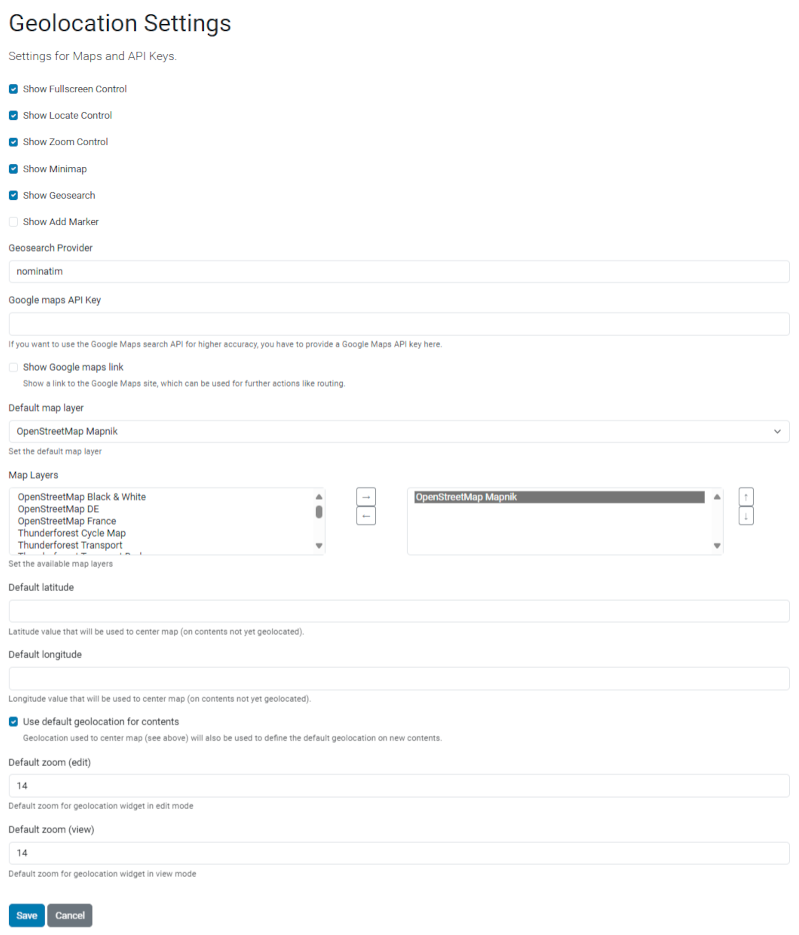
The Geolocation Settings.
This package is used as a dependency in some other Plone add-ons, like collective.geolocationbehavior but can also be used directly in your own content type schema:
from plone.formwidget.geolocation import GeolocationField

...

geolocation = GeolocationField(
    title="Geolocation",
    description="Select the location of this content",
)
The map marker has a popup containing object title / description (by default).
The template and/or the class used to generate the popup content can be overridden
to change it (see @@geolocation-geojson-popup view).
- plone.formwidget.geolocation 4.0.x -> Plone 6.2.x
- plone.formwidget.geolocation 3.0.x -> Plone 6.0.x and 6.1.x
- plone.formwidget.geolocation 2.2.x -> Plone 5.2.x
This add-on can be seen in action at the following add-ons:
- https://github.com/collective/collective.collectionfilter
- https://github.com/collective/collective.contentsections
- https://github.com/collective/collective.venue
- https://github.com/collective/Products.Maps
- https://github.com/collective/collective.maplocbehavior
This product has been translated into
- Dutch
- French
- German
- Spanish
Add the plone.formwidget.geolocation into the file backend/pyproject.toml in the section dependencies.
dependencies = [
    "Products.CMFPlone==6.1.2",
    "plone.api",
    "plone.restapi",
    "plone.volto",
    "plone.formwidget.geolocation",
]
and then running "make backend-build".
- Issue Tracker: https://github.com/collective/plone.formwidget.geolocation/issues
- Source Code: https://github.com/collective/plone.formwidget.geolocation
If you are having issues, please let us know at our issue tracker.
The project is licensed under the GPLv2.