Workshop designed and lead by Grant McKenzie (grant.mckenzie@mcgill.ca)
In this workshop we will step through the process of developing an interactive web map that displays real-time shared mobility data. .
From a practical perspective this will involve the use of javascript and a number of opensource (and one not-so opensource) libraries. Specifically this workshop will make use of the following libraries.
From a shared mobility perspective, we will be displaying available Lime vehicles in the city of Washington, D.C. These data can be accessed through the open application programming interface (API) made available via the District Department of Transportation. The specific URL that we will be using is
Every time that a request is made to this URL, a list of all available vehicles are returned. We will take this data, parse it in real-time, and visualize it on our web every second.
To get us started, I have created a basic leaflet web map template. Click on the index.html file shown above to view the contents.
In your favorite browser (ideally Firefox), navigate to https://codepen.io/pen. CodePen is a (limited) free live html coding platform. You can write HTML and view the results all on the same page. You are welcome to demo CodePen, but I encourage you to create an account so that you can save your work.
Copy the contents of the index.html file and past it into the HTML dialog in CodePen (you can collapse the CSS and Javascript dialogs). Your page should look something like the figure below.
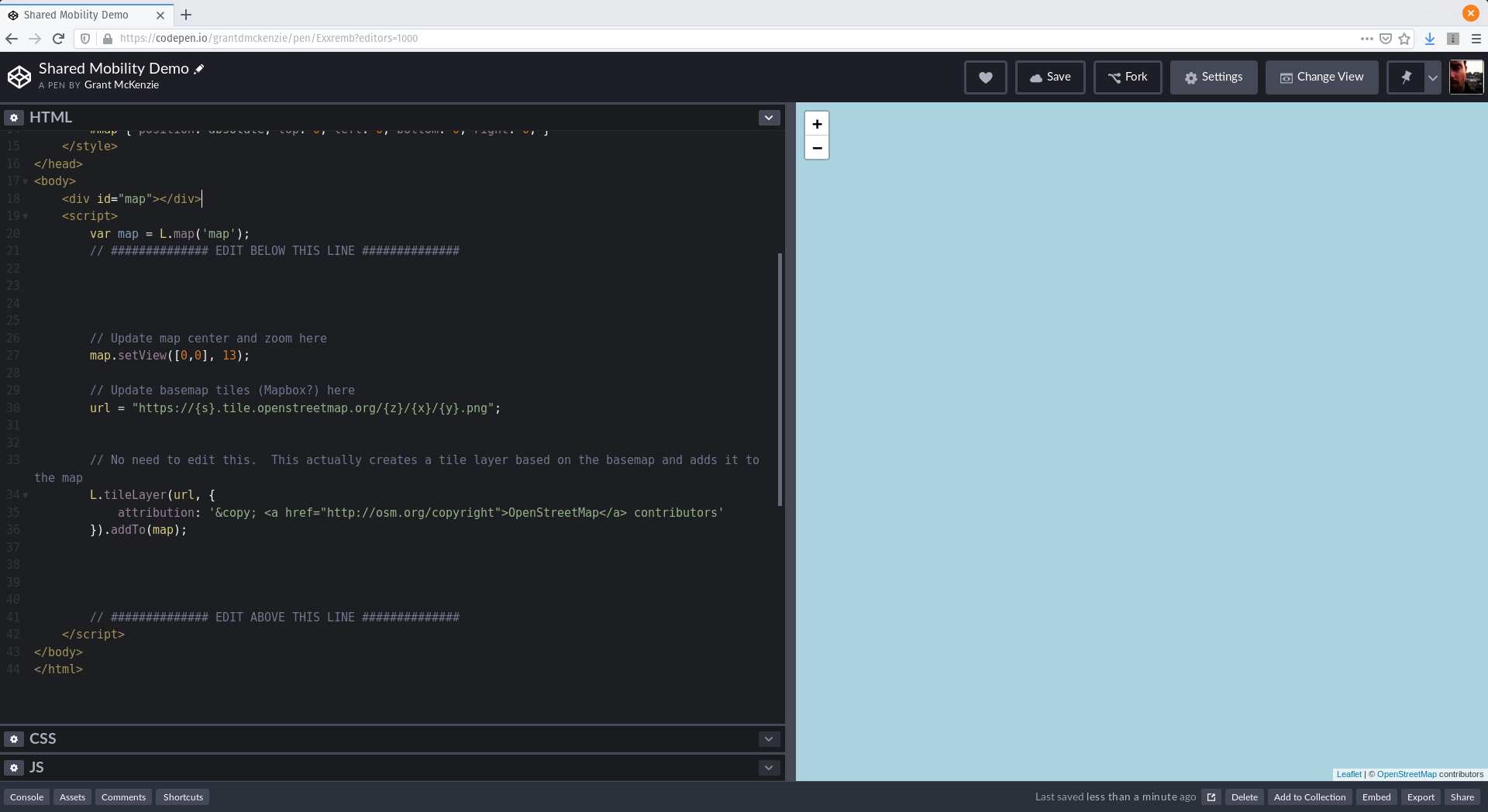
To da! Not very exciting is it? Try zooming out. We now have a very basic web map.
- https://mapbox.com
- Example:
https://api.mapbox.com/styles/v1/mapbox/streets-v9/tiles/{z}/{x}/{y}?access_token=pk.eyJ1IjoiZ3JhbnRkbWNrZW56aWUiLCJhIjoibEhuY0hORSJ9.Ei_gD1WY0dyCQhmK4-6w4w - Other pre-fab tile layers:
- satellite-streets-v9
- light-v9
- dark-v9
- outdoors-v9
- Example:
Copy the code below and paste it directly above the line that reads EDIT ABOVE THIS LINE. I will explain this code in further detail.
// Shared mobility URL
sm_url = "https://lime.bike/api/partners/v1/gbfs/free_bike_status.json";

// A new layer that gets data from the "live data" URL we provide and converts it into GeoJSON format.
// This function also sets the interval (how often this gets updated) as well as the style for the markers
var realtime = L.realtime(function(success, error) {
    fetch('https://platial.science/p.php?url='+sm_url)
     .then(function(response) { return response.json(); })
     .then(function(data) {
        feat = [];
        for(i=0;i<data.data.bikes.length;i++) {
            scoot = {type: 'Feature',properties: {id: i, vehicle: data.data.bikes[i].vehicle_type},geometry: {type: 'Point',coordinates: [parseFloat(data.data.bikes[i].lon), parseFloat(data.data.bikes[i].lat)]}};
                feat.push(scoot);
        }
        success({
            type: 'FeatureCollection',
            features: feat
        });
    })
     .catch(error);
}, {
    interval: 1000,
    pointToLayer: function (feature, latlng) {
        return L.marker(latlng)
    }
}).addTo(map);// Set custom icons
var bikeIcon = L.icon({
iconUrl: 'https://raw.githubusercontent.com/ptal-io/LiveSharedMobility/master/bike.png',
iconSize: [20,20], // size of the icon
iconAnchor: [10,10], // point of the icon which will correspond to marker's location
});
var scooterIcon = L.icon({
iconUrl: 'https://raw.githubusercontent.com/ptal-io/LiveSharedMobility/master/scooter.png',
iconSize: [20,20], // size of the icon
iconAnchor: [10,10], // point of the icon which will correspond to marker's location
});Replace the line return L.marker(latlng) with the code below.
if(feature.properties.vehicle == "bike")
	icon = bikeIcon;
else
	icon = scooterIcon;
return L.marker(latlng, {icon:icon});
Now search the web for your own custom markers to replace URLs shown here. Remember to update the iconSize and iconAnchor parameters to reflect the size of your new icon.
The code below will add pop-up dialogs to your markers so that you can click on one to get more information.
realtime.on('update', function(e) {
	popupContent = function(fId) {
		var feature = e.features[fId],
			c = feature.properties.vehicle;
		return 'Vehicle Type: ' + c;
	},
	bindFeaturePopup = function(fId) {
		realtime.getLayer(fId).bindPopup(popupContent(fId));
	},
	updateFeaturePopup = function(fId) {
		realtime.getLayer(fId).getPopup().setContent(popupContent(fId));
	};
	Object.keys(e.enter).forEach(bindFeaturePopup);
	Object.keys(e.update).forEach(updateFeaturePopup);
});- http://platialanalytics.com/call.php
41.826, -71.415
Change
vehicle: data.data.bikes[i].vehicle_typeto
vehicle: data.data.bikes[i].jump_vehicle_type, battery: parseInt(data.data.bikes[i].jump_ebike_battery_level.slice(0, -1))/100Change
return L.marker(latlng, {icon:icon});to
return L.marker(latlng, {icon:icon}).setOpacity(feature.properties.battery);Change
return 'Vehicle Type: ' + c;to
return 'Vehicle Type: ' + c + "<br/>Battery: " + feature.properties.battery*100+"%";Congratulations, we now have a working real-time, interactive web map of shared mobility service. Play around with the code. See what else you can add/change. How would you add an additional shared mobility service (e.g., Bird)?