
(點擊上方圖片觀看本課程影片)
到目前為止,你已經在這個課程中看到一些核心概念,例如 prompts,甚至有一門完整的學科叫做「prompt engineering」。許多你可以互動的工具,如 ChatGPT、Office 365、Microsoft Power Platform 等,都支援你使用 prompts 來完成任務。
如果你想在應用程式中加入這樣的體驗,你需要了解像是 prompts、completions 等概念,並選擇一個合適的函式庫來使用。這正是你在本章節將學到的內容。
在本章節中,你將會:
- 了解 openai 函式庫及其核心概念。
- 使用 openai 建立一個文字生成應用程式。
- 理解如何使用 prompt、temperature 和 tokens 等概念來建立文字生成應用程式。
完成本課程後,你將能夠:
- 解釋什麼是文字生成應用程式。
- 使用 openai 建立文字生成應用程式。
- 配置你的應用程式以使用更多或更少的 tokens,並調整 temperature,以產生多樣化的輸出。
通常當你建立一個應用程式時,它會有某種介面,例如:
- 基於指令的。命令列應用程式是典型的應用程式,你輸入指令後它會執行任務。例如,
git就是基於指令的應用程式。 - 使用者介面 (UI)。有些應用程式有圖形使用者介面 (GUI),你可以點擊按鈕、輸入文字、選擇選項等等。
與基於指令的應用程式相比,你只能輸入特定的指令:
- 有限制。你不能隨意輸入任何指令,只能使用應用程式支援的指令。
- 語言特定。有些應用程式支援多種語言,但預設是為特定語言設計,即使你可以額外加入語言支援。
那麼文字生成應用程式有什麼不同呢?
在文字生成應用程式中,你有更多彈性,不受限於一組指令或特定輸入語言。你可以使用自然語言與應用程式互動。另一個好處是,你已經在與一個經過大量資料訓練的資料來源互動,而傳統應用程式可能只侷限於資料庫中的內容。
你可以建立很多東西,例如:
- 聊天機器人。一個能回答關於公司及產品問題的聊天機器人會是很好的應用。
- 助手。大型語言模型(LLM)擅長摘要文字、從文字中獲取洞見、產生文字如履歷等。
- 程式碼助理。根據你使用的語言模型,你可以建立幫助撰寫程式碼的助理。例如,你可以使用 GitHub Copilot 或 ChatGPT 來協助寫程式。
你需要找到一種方式與大型語言模型 (LLM) 整合,通常有以下兩種方法:
- 使用 API。你會構造帶有 prompt 的網路請求,並取得生成的文字回應。
- 使用函式庫。函式庫封裝了 API 呼叫,使使用更簡單。
有幾個知名的函式庫用於操作 LLM,例如:
- openai,這個函式庫讓你輕鬆連接模型並傳送 prompts。
還有一些更高階的函式庫,例如:
- Langchain。Langchain 很有名,支援 Python。
- Semantic Kernel。Semantic Kernel 是微軟的函式庫,支援 C#、Python 和 Java。
讓我們看看如何建立第一個應用程式,需要哪些函式庫、需要多少設定等等。
有很多函式庫可以用來與 OpenAI 或 Azure OpenAI 互動。你可以使用多種程式語言,如 C#、Python、JavaScript、Java 等。我們選擇使用 openai Python 函式庫,因此會用 pip 來安裝。
pip install openai你需要完成以下步驟:
-
在 Azure 建立帳號 https://azure.microsoft.com/free/。
-
取得 Azure OpenAI 的使用權限。前往 https://learn.microsoft.com/azure/ai-services/openai/overview#how-do-i-get-access-to-azure-openai 申請使用權限。
[!NOTE] 撰寫本文時,你需要申請 Azure OpenAI 的使用權限。
-
安裝 Python https://www.python.org/
-
建立 Azure OpenAI 服務資源。請參考此指南了解如何建立資源。
此時,你需要告訴 openai 函式庫使用哪個 API 金鑰。前往 Azure OpenAI 資源的「Keys and Endpoint」區域,複製「Key 1」的值。
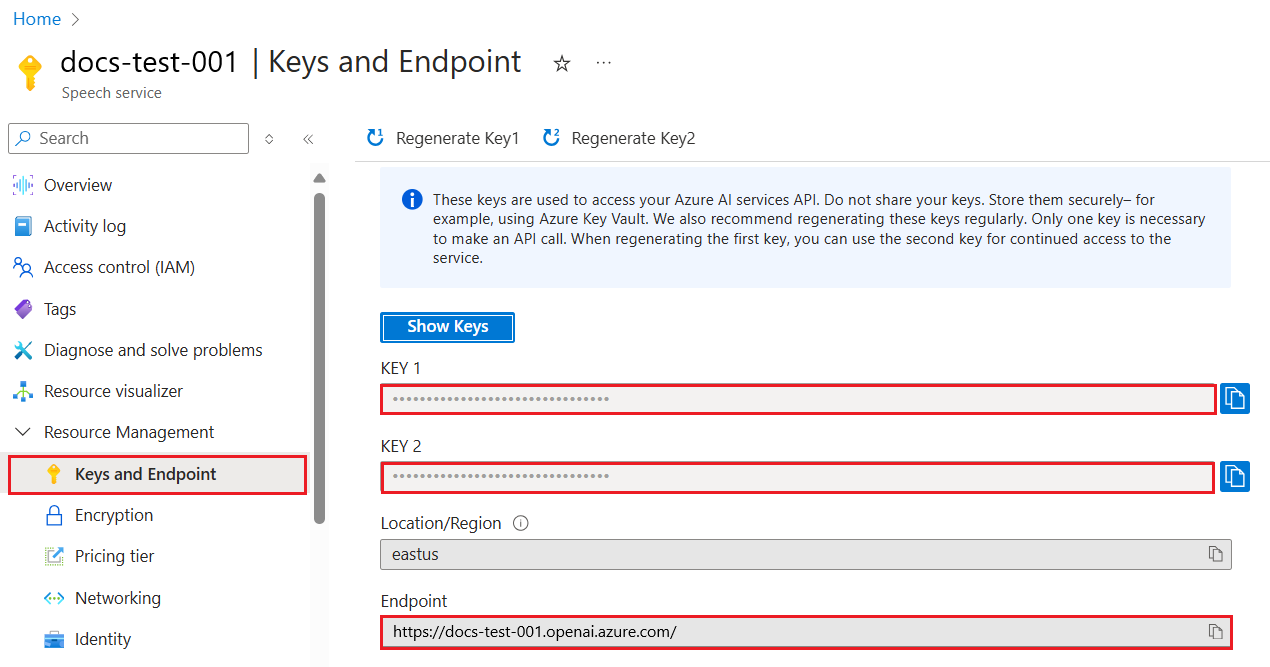
複製好這些資訊後,讓我們指示函式庫使用它們。
Note
建議將 API 金鑰與程式碼分開管理。你可以使用環境變數來達成。
- 設定環境變數
OPENAI_API_KEY為你的 API 金鑰。export OPENAI_API_KEY='sk-...'
如果你使用 Azure OpenAI,設定方式如下:
openai.api_type = 'azure'
openai.api_key = os.environ["OPENAI_API_KEY"]
openai.api_version = '2023-05-15'
openai.api_base = os.getenv("API_BASE")
上述設定了:
api_type為azure,告訴函式庫使用 Azure OpenAI 而非 OpenAI。api_key,這是你在 Azure 入口網站找到的 API 金鑰。api_version,你想使用的 API 版本。撰寫本文時,最新版本是2023-05-15。api_base,API 的端點,你可以在 Azure 入口網站的 API 金鑰旁找到。
Note
os.getenv 是一個讀取環境變數的函式。你可以用它讀取像是 OPENAI_API_KEY 和 API_BASE 等環境變數。請在終端機或使用像 dotenv 的函式庫設定這些環境變數。
產生文字的方法是使用 Completion 類別。範例如下:
prompt = "Complete the following: Once upon a time there was a"

completion = openai.Completion.create(model="davinci-002", prompt=prompt)
print(completion.choices[0].text)
在上述程式碼中,我們建立一個 completion 物件,並傳入想使用的模型和 prompt,然後印出生成的文字。
到目前為止,你已看到我們如何使用 Completion 來產生文字。但還有另一個類別叫做 ChatCompletion,更適合用於聊天機器人。以下是使用範例:
import openai

openai.api_key = "sk-..."

completion = openai.ChatCompletion.create(model="gpt-3.5-turbo", messages=[{"role": "user", "content": "Hello world"}])
print(completion.choices[0].message.content)
關於此功能會在後續章節詳細說明。
現在我們已學會如何設定和配置 openai,是時候建立你的第一個文字生成應用程式。請依照以下步驟:
-
建立虛擬環境並安裝 openai:
python -m venv venv
source venv/bin/activate
pip install openai
[!NOTE] 如果你使用 Windows,請輸入
venv\Scripts\activate,而非source venv/bin/activate。[!NOTE] 你可以在 https://portal.azure.com/ 搜尋
Open AI,選擇Open AI resource,再點選Keys and Endpoint,複製Key 1的值。 -
建立一個 app.py 檔案,並輸入以下程式碼:
import openai

openai.api_key = "<replace this value with your open ai key or Azure OpenAI key>"

openai.api_type = 'azure'
openai.api_version = '2023-05-15'
openai.api_base = "<endpoint found in Azure Portal where your API key is>"
deployment_name = "<deployment name>"

# add your completion code
prompt = "Complete the following: Once upon a time there was a"
messages = [{"role": "user", "content": prompt}]

# make completion
completion = openai.chat.completions.create(model=deployment_name, messages=messages)

# print response
print(completion.choices[0].message.content)
[!NOTE] 如果你使用 Azure OpenAI,請將
api_type設為azure,並將api_key設為你的 Azure OpenAI 金鑰。你應該會看到類似以下的輸出:
 very unhappy _____.

Once upon a time there was a very unhappy mermaid.
現在你已經知道如何使用 prompt 產生文字,並且有一個可運行的程式,可以修改它來產生不同類型的文字。
Prompts 可以用於各種任務,例如:
- 產生特定類型的文字。例如,產生詩歌、測驗題目等。
- 查詢資訊。你可以用 prompt 查詢資訊,例如「CORS 在網頁開發中是什麼意思?」。
- 產生程式碼。你可以用 prompt 產生程式碼,例如開發用來驗證電子郵件的正規表達式,甚至產生整個程式,如網頁應用程式。
想像你家裡有一些食材,想做一道菜。你需要食譜。找食譜的方法可以用搜尋引擎,或者用大型語言模型 (LLM)。
你可以寫一個 prompt 如下:
「請給我 5 道包含以下食材的菜餚食譜:雞肉、馬鈴薯和胡蘿蔔。每道食譜請列出所有使用的食材。」
根據上述 prompt,你可能會得到類似的回應:
1. Roasted Chicken and Vegetables:
Ingredients:
- 4 chicken thighs
- 2 potatoes, cut into cubes
- 2 carrots, cut into cubes
- 2 tablespoons olive oil
- 2 cloves garlic, minced
- 1 teaspoon dried thyme
- 1 teaspoon dried oregano
- Salt and pepper, to taste

2. Chicken and Potato Stew:
Ingredients:
- 2 tablespoons olive oil
- 1 onion, diced
- 2 cloves garlic, minced
- 2 chicken breasts, cut into cubes
- 2 potatoes, cut into cubes
- 2 carrots, cut into cubes
- 1 teaspoon dried oregano
- 1 teaspoon dried thyme
- 1 cup chicken broth
- Salt and pepper, to taste

3. Chicken and Potato Bake:
Ingredients:
- 2 tablespoons olive oil
- 2 chicken breasts, cut into cubes
- 2 potatoes, cut into cubes
- 2 carrots, cut into cubes
- 1 onion, diced
- 2 cloves garlic, minced
- 1 teaspoon dried oregano
- 1 teaspoon dried thyme
- 1 cup chicken broth
- Salt and pepper, to taste

4. Chicken and Potato Soup:
Ingredients:
- 2 tablespoons olive oil
- 1 onion, diced
- 2 cloves garlic, minced
- 2 chicken breasts, cut into cubes
- 2 potatoes, cut into cubes
- 2 carrots, cut into cubes
- 1 teaspoon dried oregano
- 1 teaspoon dried thyme
- 4 cups chicken broth
- Salt and pepper, to taste

5. Chicken and Potato Hash:
Ingredients:
- 2 tablespoons olive oil
- 2 chicken breasts, cut into cubes
- 2 potatoes, cut into cubes
- 2 carrots, cut into cubes
- 1 onion, diced
- 2 cloves garlic, minced
- 1 teaspoon dried oregano
這個結果很棒,我知道要煮什麼了。接下來可能有用的改進是:
- 過濾掉我不喜歡或過敏的食材。
- 產生購物清單,以防我家裡沒有所有食材。
針對上述情況,我們可以加一個額外的 prompt:
「請移除含有大蒜的食譜,因為我過敏,並用其他食材替代。另外,請根據我家已有雞肉、馬鈴薯和胡蘿蔔,產生購物清單。」
現在你會得到新的結果:
1. Roasted Chicken and Vegetables:
Ingredients:
- 4 chicken thighs
- 2 potatoes, cut into cubes
- 2 carrots, cut into cubes
- 2 tablespoons olive oil
- 1 teaspoon dried thyme
- 1 teaspoon dried oregano
- Salt and pepper, to taste

2. Chicken and Potato Stew:
Ingredients:
- 2 tablespoons olive oil
- 1 onion, diced
- 2 chicken breasts, cut into cubes
- 2 potatoes, cut into cubes
- 2 carrots, cut into cubes
- 1 teaspoon dried oregano
- 1 teaspoon dried thyme
- 1 cup chicken broth
- Salt and pepper, to taste

3. Chicken and Potato Bake:
Ingredients:
- 2 tablespoons olive oil
- 2 chicken breasts, cut into cubes
- 2 potatoes, cut into cubes
- 2 carrots, cut into cubes
- 1 onion, diced
- 1 teaspoon dried oregano
- 1 teaspoon dried thyme
- 1 cup chicken broth
- Salt and pepper, to taste

4. Chicken and Potato Soup:
Ingredients:
- 2 tablespoons olive oil
- 1 onion, diced
- 2 chicken breasts, cut into cubes
- 2 potatoes, cut into cubes
- 2 carrots, cut into cubes
- 1 teaspoon dried oregano
- 1 teaspoon dried thyme
- 4 cups chicken broth
- Salt and pepper, to taste

5. Chicken and Potato Hash:
Ingredients:
- 2 tablespoons olive oil
- 2 chicken breasts, cut into cubes
- 2 potatoes, cut into cubes
- 2 carrots, cut into cubes
- 1 onion, diced
- 1 teaspoon dried oregano

Shopping List:
- Olive oil
- Onion
- Thyme
- Oregano
- Salt
- Pepper
這是你的五道食譜,沒有提到大蒜,並且有考慮你家已有食材的購物清單。
既然我們已經模擬了一個場景,接下來寫程式碼來實現這個場景。請依照以下步驟:
-
使用現有的 app.py 檔案作為起點。
-
找到
prompt變數,將其程式碼改成以下內容:prompt = "Show me 5 recipes for a dish with the following ingredients: chicken, potatoes, and carrots. Per recipe, list all the ingredients used"
現在執行程式,你應該會看到類似以下的輸出:
-Chicken Stew with Potatoes and Carrots: 3 tablespoons oil, 1 onion, chopped, 2 cloves garlic, minced, 1 carrot, peeled and chopped, 1 potato, peeled and chopped, 1 bay leaf, 1 thyme sprig, 1/2 teaspoon salt, 1/4 teaspoon black pepper, 1 1/2 cups chicken broth, 1/2 cup dry white wine, 2 tablespoons chopped fresh parsley, 2 tablespoons unsalted butter, 1 1/2 pounds boneless, skinless chicken thighs, cut into 1-inch pieces
-Oven-Roasted Chicken with Potatoes and Carrots: 3 tablespoons extra-virgin olive oil, 1 tablespoon Dijon mustard, 1 tablespoon chopped fresh rosemary, 1 tablespoon chopped fresh thyme, 4 cloves garlic, minced, 1 1/2 pounds small red potatoes, quartered, 1 1/2 pounds carrots, quartered lengthwise, 1/2 teaspoon salt, 1/4 teaspoon black pepper, 1 (4-pound) whole chicken
-Chicken, Potato, and Carrot Casserole: cooking spray, 1 large onion, chopped, 2 cloves garlic, minced, 1 carrot, peeled and shredded, 1 potato, peeled and shredded, 1/2 teaspoon dried thyme leaves, 1/4 teaspoon salt, 1/4 teaspoon black pepper, 2 cups fat-free, low-sodium chicken broth, 1 cup frozen peas, 1/4 cup all-purpose flour, 1 cup 2% reduced-fat milk, 1/4 cup grated Parmesan cheese

-One Pot Chicken and Potato Dinner: 2 tablespoons olive oil, 1 pound boneless, skinless chicken thighs, cut into 1-inch pieces, 1 large onion, chopped, 3 cloves garlic, minced, 1 carrot, peeled and chopped, 1 potato, peeled and chopped, 1 bay leaf, 1 thyme sprig, 1/2 teaspoon salt, 1/4 teaspoon black pepper, 2 cups chicken broth, 1/2 cup dry white wine

-Chicken, Potato, and Carrot Curry: 1 tablespoon vegetable oil, 1 large onion, chopped, 2 cloves garlic, minced, 1 carrot, peeled and chopped, 1 potato, peeled and chopped, 1 teaspoon ground coriander, 1 teaspoon ground cumin, 1/2 teaspoon ground turmeric, 1/2 teaspoon ground ginger, 1/4 teaspoon cayenne pepper, 2 cups chicken broth, 1/2 cup dry white wine, 1 (15-ounce) can chickpeas, drained and rinsed, 1/2 cup raisins, 1/2 cup chopped fresh cilantro
注意,你的 LLM 是非決定性的,因此每次執行程式可能會得到不同結果。
很好,接下來看看如何改進。為了讓程式更有彈性,我們希望能改變食譜數量和食材。
-
我們將程式碼改成以下方式:
no_recipes = input("No of recipes (for example, 5): ")

ingredients = input("List of ingredients (for example, chicken, potatoes, and carrots): ")

# interpolate the number of recipes into the prompt an ingredients
prompt = f"Show me {no_recipes} recipes for a dish with the following ingredients: {ingredients}. Per recipe, list all the ingredients used"
測試執行的程式碼可能長這樣:
No of recipes (for example, 5): 3
List of ingredients (for example, chicken, potatoes, and carrots): milk,strawberries

-Strawberry milk shake: milk, strawberries, sugar, vanilla extract, ice cubes
-Strawberry shortcake: milk, flour, baking powder, sugar, salt, unsalted butter, strawberries, whipped cream
-Strawberry milk: milk, strawberries, sugar, vanilla extract
我們現在有一個能產生食譜的應用程式,且它很有彈性,因為它依賴使用者輸入的食譜數量和食材。
為了進一步改進,我們想加入以下功能:
-
過濾食材。我們希望能過濾掉不喜歡或過敏的食材。為了達成這個改變,我們可以編輯現有的 prompt,並在最後加上過濾條件,如下:
filter = input("Filter (for example, vegetarian, vegan, or gluten-free): ")

prompt = f"Show me {no_recipes} recipes for a dish with the following ingredients: {ingredients}. Per recipe, list all the ingredients used, no {filter}"
上面,我們在 prompt 結尾加上
{filter},並從使用者取得過濾條件。執行程式時的範例輸入可能如下:
No of recipes (for example, 5): 3
List of ingredients (for example, chicken, potatoes, and carrots): onion,milk
Filter (for example, vegetarian, vegan, or gluten-free): no milk

1. French Onion Soup

Ingredients:

-1 large onion, sliced
-3 cups beef broth
-1 cup milk
-6 slices french bread
-1/4 cup shredded Parmesan cheese
-1 tablespoon butter
-1 teaspoon dried thyme
-1/4 teaspoon salt
-1/4 teaspoon black pepper

Instructions:

1. In a large pot, sauté onions in butter until golden brown.
2. Add beef broth, milk, thyme, salt, and pepper. Bring to a boil.
3. Reduce heat and simmer for 10 minutes.
4. Place french bread slices on soup bowls.
5. Ladle soup over bread.
6. Sprinkle with Parmesan cheese.

2. Onion and Potato Soup

Ingredients:

-1 large onion, chopped
-2 cups potatoes, diced
-3 cups vegetable broth
-1 cup milk
-1/4 teaspoon black pepper

Instructions:

1. In a large pot, sauté onions in butter until golden brown.
2. Add potatoes, vegetable broth, milk, and pepper. Bring to a boil.
3. Reduce heat and simmer for 10 minutes.
4. Serve hot.

3. Creamy Onion Soup

Ingredients:

-1 large onion, chopped
-3 cups vegetable broth
-1 cup milk
-1/4 teaspoon black pepper
-1/4 cup all-purpose flour
-1/2 cup shredded Parmesan cheese

Instructions:

1. In a large pot, sauté onions in butter until golden brown.
2. Add vegetable broth, milk, and pepper. Bring to a boil.
3. Reduce heat and simmer for 10 minutes.
4. In a small bowl, whisk together flour and Parmesan cheese until smooth.
5. Add to soup and simmer for an additional 5 minutes, or until soup has thickened.
如你所見,含有牛奶的食譜已被過濾掉。但如果你乳糖不耐症,可能還想過濾含有起司的食譜,因此需要明確說明。
-
產生購物清單。我們希望產生購物清單,考慮到家中已有的食材。
對於這個功能,我們可以嘗試用一個 prompt 解決,或者分成兩個 prompt。這裡我們建議採用後者。也就是說,我們會新增一個 prompt,但為了讓它能運作,我們需要將前一個 prompt 的結果作為上下文,加入到後一個 prompt。
找到程式中印出第一個 prompt 結果的部分,並在其下方加入以下程式碼:
old_prompt_result = completion.choices[0].message.content
prompt = "Produce a shopping list for the generated recipes and please don't include ingredients that I already have."

new_prompt = f"{old_prompt_result} {prompt}"
messages = [{"role": "user", "content": new_prompt}]
completion = openai.Completion.create(engine=deployment_name, messages=messages, max_tokens=1200)

# print response
print("Shopping list:")
print(completion.choices[0].message.content)
請注意:
-
我們透過將第一個 prompt 的結果加入新的 prompt,來構造新的 prompt:
new_prompt = f"{old_prompt_result} {prompt}"
-
我們發出一個新的請求,但同時也考慮到第一次提示中要求的 token 數量,所以這次我們設定
max_tokens為 1200。completion = openai.Completion.create(engine=deployment_name, prompt=new_prompt, max_tokens=1200)
執行這段程式碼後,我們得到以下輸出:
No of recipes (for example, 5): 2
List of ingredients (for example, chicken, potatoes, and carrots): apple,flour
Filter (for example, vegetarian, vegan, or gluten-free): sugar


-Apple and flour pancakes: 1 cup flour, 1/2 tsp baking powder, 1/2 tsp baking soda, 1/4 tsp salt, 1 tbsp sugar, 1 egg, 1 cup buttermilk or sour milk, 1/4 cup melted butter, 1 Granny Smith apple, peeled and grated
-Apple fritters: 1-1/2 cups flour, 1 tsp baking powder, 1/4 tsp salt, 1/4 tsp baking soda, 1/4 tsp nutmeg, 1/4 tsp cinnamon, 1/4 tsp allspice, 1/4 cup sugar, 1/4 cup vegetable shortening, 1/4 cup milk, 1 egg, 2 cups shredded, peeled apples
Shopping list:
-Flour, baking powder, baking soda, salt, sugar, egg, buttermilk, butter, apple, nutmeg, cinnamon, allspice
-
目前為止,我們有一段可運作的程式碼,但還有一些調整可以讓它更完善。我們應該做的事情包括:
-
將機密資訊與程式碼分開,例如 API 金鑰。機密資訊不應該寫在程式碼中,應該存放在安全的位置。為了將機密資訊與程式碼分離,我們可以使用環境變數,並利用像是
python-dotenv這類的函式庫從檔案中載入。程式碼示例如下:-
建立一個
.env檔案,內容如下:OPENAI_API_KEY=sk-...
-
注意,對於 Azure,你需要設定以下環境變數:
 ```bash
 OPENAI_API_TYPE=azure
 OPENAI_API_VERSION=2023-05-15
 OPENAI_API_BASE=<replace>
 ```

 在程式碼中,你可以這樣載入環境變數:

 ```python
 from dotenv import load_dotenv

 load_dotenv()

 openai.api_key = os.environ["OPENAI_API_KEY"]
 ```
-
關於 token 長度的說明。我們應該考慮需要多少 token 來產生想要的文字。token 是有成本的,因此在可能的情況下,我們應該盡量節省使用的 token 數量。例如,我們能否調整提示語,使得使用更少的 token?
若要改變使用的 token 數量,可以使用
max_tokens參數。例如,如果你想使用 100 個 token,可以這樣設定:completion = client.chat.completions.create(model=deployment, messages=messages, max_tokens=100)
-
嘗試調整 temperature。temperature 是我們之前沒提到但對程式表現很重要的參數。temperature 值越高,輸出越隨機;反之,temperature 越低,輸出越可預測。你可以考慮是否希望輸出有更多變化。
若要調整 temperature,可以使用
temperature參數。例如,如果你想設定 temperature 為 0.5,可以這樣做:completion = client.chat.completions.create(model=deployment, messages=messages, temperature=0.5)
注意,越接近 1.0,輸出越多樣化。
這次作業你可以自由選擇要做什麼。
以下是一些建議:
- 調整食譜產生器應用程式,讓它更完善。試著調整 temperature 值和提示語,看看能產生什麼效果。
- 建立一個「學習夥伴」應用程式。這個應用程式應該能回答關於某個主題的問題,例如 Python,你可以設計提示語像是「Python 中某個主題是什麼?」或是「請給我某個主題的程式碼範例」等等。
- 歷史機器人,讓歷史活起來,指示機器人扮演某個歷史人物,並向它提問關於該人物的生平與時代。
以下是一個起始提示語,看看你如何使用並調整它以符合你的需求。
- "You're an expert on the Python language

    Suggest a beginner lesson for Python in the following format:

    Format:
    - concepts:
    - brief explanation of the lesson:
    - exercise in code with solutions"
以下是一些你可以使用的提示語:
- "You are Abe Lincoln, tell me about yourself in 3 sentences, and respond using grammar and words like Abe would have used"
- "You are Abe Lincoln, respond using grammar and words like Abe would have used:

   Tell me about your greatest accomplishments, in 300 words"
temperature 這個概念是什麼?
- 它控制輸出的隨機程度。
- 它控制回應的長度。
- 它控制使用的 token 數量。
在做作業時,試著變化 temperature,設定為 0、0.5 和 1。記得 0 是最不變化,1 是變化最多。哪個值最適合你的應用程式?
完成本課程後,請參考我們的 Generative AI Learning collection,持續提升你的生成式 AI 知識!
接著前往第七課,我們將探討如何建立聊天應用程式!
免責聲明:
本文件係使用 AI 翻譯服務 Co-op Translator 進行翻譯。雖然我們力求準確,但請注意,自動翻譯可能包含錯誤或不準確之處。原始文件的母語版本應視為權威來源。對於重要資訊,建議採用專業人工翻譯。我們不對因使用本翻譯而產生的任何誤解或誤釋負責。