SSR mode Error: Hydration completed but contains mismatches. #10805


-
|
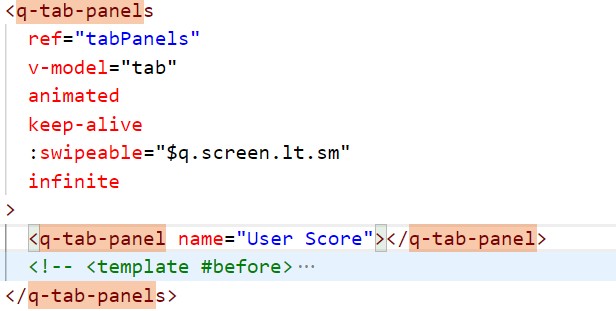
Run the code and report this error. I found that the problem is on the following QTabPanel. How can I solve it? |
Beta Was this translation helpful? Give feedback.
Replies: 2 comments 1 reply

-
I googled other reasons why this error can occur: When does the problem occur? See: |
Beta Was this translation helpful? Give feedback.

-
|
Thank you very much! |
Beta Was this translation helpful? Give feedback.
-
|
Please keep us posted if and how you fixed your problem! |
Beta Was this translation helpful? Give feedback.


@jennyluo0607
I googled other reasons why this error can occur:
When does the problem occur?
If a component is initially mounted or hydrated in the DOM, it needs to precisely correspond to the HTML generated on the server side. Only after this has happened may the HTML change. A suitable point in time for this after hydration would therefore be the mounted lifecycle.
See:
https://www.sumcumo.com/en/understand-and-solve-hydration-errors-in-vue-js