Add segment attribute to q-knob and q-circular-progress #11979
Unanswered
raesche
asked this question in
Ideas / Proposals

Replies: 1 comment 1 reply

-
|
Use |
Beta Was this translation helpful? Give feedback.
1 reply

-
|
Hi
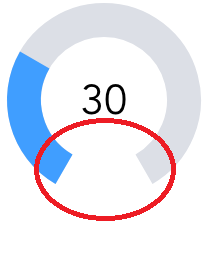
The solution with the angle attribute has the following problems:
Best regards |

Beta Was this translation helpful? Give feedback.
Sign up for free
to join this conversation on GitHub.
Already have an account?
Sign in to comment


Uh oh!
There was an error while loading. Please reload this page.
Uh oh!
There was an error while loading. Please reload this page.
-
Idea
Both the q-knob and q-circular-progress components only provide the full 360° range of a circle. It would be very nice if the range could be reduced to a user defined value so only a segment of a circle can be created. A circle segment is easier to read and modify, because it's very clear where the segment starts and ends. With a full 360° circle, it is also very hard to set the min and max values because the value jumps to the other end when moving just a little bit to far.
Please have a look at this example component to see what I mean:
https://github.com/kramer99/vue-knob-control
Suggestion:
Use the existing angle attribute to define the start angle of the segment
Add a segment attribute to define the size of the segment in degrees.
Examples:
Create a knob similar to the example in the link:
Create a knob similar to the example before, but this time "upside down":
Beta Was this translation helpful? Give feedback.
All reactions