Questions - electron-builder #13880

Replies: 1 comment

-
|
Okay, I've been trying this for hours, and nothing works for windows. The things I have discovered are: 1 - The command to run the quasar build is: quasar build -m electron -P always 2 - Running the build through quasar you can use either electron-packager or electron-builder. The configurations defined in quasar.conf.js will be used for the builds. 3 - It's also possible to run both packager and builder with their own line commands. I've been trying this, but the windows versions 4 - Question: is it possible to use the automatic update features of packager & builder if you run the builds through Quasar? 5 - Question: If you run the builds command-line directly using packager & builder, does it know that I am building a Quasar app? When I try it this way, then try to run on Windows (build from Mac) it's telling me the "paw tap.exe" file is missing, so I am wondering if it's really building my application, or is it just building a blank application from the directory I'm in? 6 - Which is the best way to build the application? Though Quasar using packager or builder? Or through the command line for packager or builder? Which do you like best, package or builder? QUASAR BUILDS: However, when I use the win specifications is not working for me. It doesn't build for Windows: When I run the above, this is what I see output in my Terminal: So I'm assuming that "Detected arm64 process, HFS+ is unavailable" Means that it's reverting to the default and not building windows. I"m also getting this error: |
Beta Was this translation helpful? Give feedback.


Uh oh!
There was an error while loading. Please reload this page.
Uh oh!
There was an error while loading. Please reload this page.
-
*** Please read my comment, it is more straightforward than my original question. ***
I'm confused about how to run the build for my project.
The Quasar docs have instructions to use quasar.conf.js configuration. I want to use electron-builder because I want to use the automatic upgrade feater I have read about.
Anyway, building through Quasar I guess I need to use the correct quasar.conf.js code. They have an example for Windows, but not for Mac. I want to build for both on my Mac.
https://quasar.dev/quasar-cli-webpack/developing-electron-apps/build-commands#publishing-electron-builder-only-
Or... going through electron-builder directly with:
electron-builder --mac
(from this website: https://www.digitalocean.com/community/tutorials/how-to-create-your-first-cross-platform-desktop-application-with-electron-on-macos#step-5-building-your-first-application)
But when I use electron-builder --mac, and try to open the .app I've just created, it gives me an error about my import.
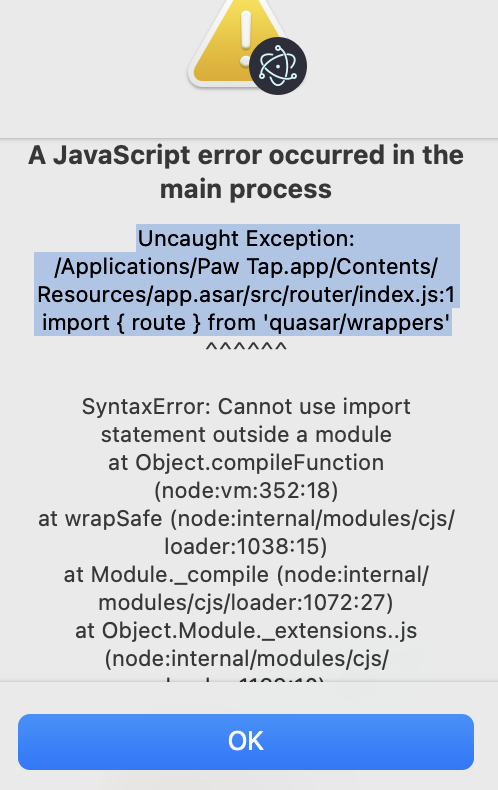
Which is the best way to go, and why?
Thanks!
Beta Was this translation helpful? Give feedback.
All reactions