Load component based on axios response #14214
Unanswered
george-dragnea
asked this question in
CLI - SSR mode

Replies: 1 comment

-
|
do u share your whole preFetch, actions and the MainLayout? but in resume, u can had something like: export default {
namespaced: true,
state: () => ({
design: 0
}),
mutations: {
design (state, value) {
state.design = value;
}
},
actions: {
async fetch ({ commit }) {
const { data } = await axios.get('...')
commit('design', data.design);
}
}
}<component :is="headerDesign" ... />
...
<component :is="footerDesign" ... />import { defineComponent, computed } from 'vue';
import { useStore } from 'vuex';
import HeaderDesign1 from './Header/HeaderDesign1.vue';
import HeaderDesign2 from './Header/HeaderDesign2.vue';
import FooterDesign1 from './Footer/FooterDesign1.vue';
import FooterDesign2 from './Footer/FooterDesign2.vue';
export default defineComponent({
async preFetch ({ store }) {
await store.dispatch('settings.fetch')
},
setup () {
const store = useStore()
const headerDesign = computed(() => {
switch (store.state.settings.design) {
case 1: return HeaderDesign1;
case 2: return HeaderDesign2;
}
})
const footerDesign = computed(() => {
switch (store.state.settings.design) {
case 1: return FooterDesign1;
case 2: return FooterDesign2;
}
})
return {
headerDesign,
footerDesign
}
}
})just make sure all your promises will be resolved inside the preFetch... looking into your code, that look like you aren't respecting that rule (maybe I'm wrong, u didn't posted your whole code). |
Beta Was this translation helpful? Give feedback.
0 replies
Sign up for free
to join this conversation on GitHub.
Already have an account?
Sign in to comment


Uh oh!
There was an error while loading. Please reload this page.
-
Hi,
I use quasar with vite in SSR mode, and vuex.
I want to show a different header and /or footer component based on the response from the API.
Right now I have the following folder structure:
In MainLayout.vue
in I have:
<Component :is="$store.state.settings.templateHeaderFile" />in <script> I have something like this:
For the footer, I have the same thing.
It works, but I don't know if this is the right way. What is the best way to load the header based on axios response?
Also only in production, there is a use case, which I can't reproduce it in development, where it double renders like this:
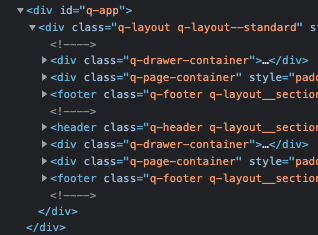
I get the error: Hydration completed but contains mismatches.
I don't know if the bug is from the way I load the components.
Thanks in advance
Beta Was this translation helpful? Give feedback.
All reactions