CodeMetrics.Cli is a .NET global tool for measuring code quality and complexity in C# source files without restoring or compiling the target project.
With a time will give you quick feedback on your project code complexity. It is designed for developers, code reviews, CI gates, and agent-driven workflows that need quick, deterministic complexity metrics from source text alone. Allows AI Agents to verify code they produce, ensuring it meets complexity and maintainability standards keeping code readable and maintainable.
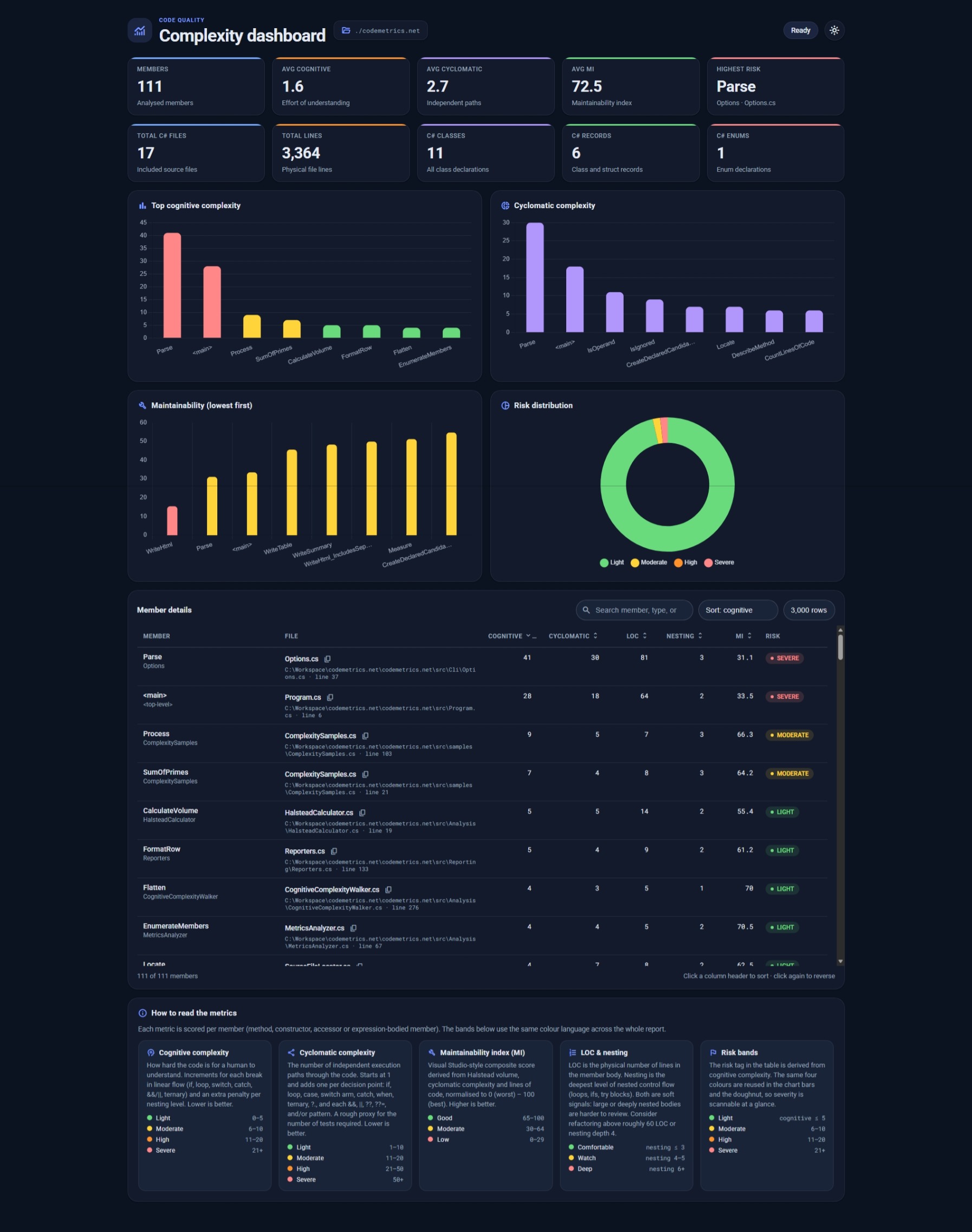
The --format html report: summary tiles, complexity and maintainability charts, risk distribution, and a sortable member table.
dotnet tool install --global CodeMetrics.Clicodemetrics ./src
codemetrics ./src --format json --output metrics.json
codemetrics ./src --format html --output report.html
codemetrics -s src/Checkout.cs
codemetrics ./src --max-cognitive 15 --max-cyclomatic 10The tool inspects C# syntax and reports member-level metrics including:
- Cyclomatic complexity
- Cognitive complexity
- Parameter count
- Nesting depth
- Maintainability index
- Lines of code
- Source summary totals
A report row is produced for each of these, when it has a body:
- Methods, constructors, destructors, operators and conversion operators
- Property, indexer and event accessors (
get,set,init,add,remove) - Expression-bodied properties and indexers
- A top-level statement program, reported once as
<top-level>.<main>
Members without a body, such as abstract or interface declarations and auto-property accessors, are not reported. Lambdas and local functions do not get their own row; they fold into the member that contains them, which is what Visual Studio does.
The number of linearly independent paths through a member. It starts at 1 and adds 1 per decision point, counts over the syntax tree.
| Adds 1 | Adds nothing |
|---|---|
if, while, do, for, foreach |
else, try, finally, goto |
Each case label and switch expression arm |
default: and a discard (case _:, _ =>) |
catch, and a when filter or case guard |
not patterns |
?:, ?., ?[] |
|
Each &&, ||, ??, ??= |
|
Each and and or pattern |
Compound predicates count once per operator, as McCabe specifies, so a && b
is two decisions. Pattern combinators follow the same rule, which keeps
x is 1 or 2 level with x == 1 || x == 2.
McCabe's risk bands are 1-10 simple, 11-20 moderate, 21-50 complex, and over 50
untestable. Microsoft suggests 10 as a starting limit for --max-cyclomatic.
Analysis is syntax-only, so some constructs are counted conservatively:
- Property and recursive patterns are not decomposed.
x is { A: 1, B: 2 }scores 1 wherex.A == 1 && x.B == 2scores 2. - LINQ query clauses are not counted.
- In a case label a bare
_is read as the discard rather than as a constant of that name. Syntax alone cannot tell the two apart. An escaped@_is left as a constant.
Visual Studio counts over Roslyn's operation tree, a semantic model that requires the project to compile. CodeMetrics counts over the syntax tree, which is why it needs no restore or build. Two different methods, so the two numbers will not always agree.
| Construct | CodeMetrics | Visual Studio |
|---|---|---|
and / or pattern |
1 each | 0 |
| Switch expression arm | 1 each | 0 |
??= |
1 | 0 |
default: label |
0 | 1 |
In the operation tree several of these collapse into kinds Visual Studio does
not treat as branches, and default: becomes an ordinary case clause. Neither
tool is wrong; they apply different rules. Equivalent spellings score alike:
x is 1 or 2 matches x == 1 || x == 2, and case 1 or 2: matches
case 1: case 2:. Under Visual Studio's rules those pairs score differently.
- Solution files (
.sln,.slnx) - Project files (
.csproj) - Directories containing C# source files
- Single C# files via
-s/--single
table(default human-readable output)csvjsonhtml
- Analysis is syntax-only.
- No project restore or semantic compile is required.
- Output is deterministic and suitable for CI checks and automation.
- Single-file mode writes the report to stdout and next to the source file as
<name>.codemetrics.<ext>.
codemetrics --help- Project home: https://github.com/quicksln/CodeMetrics.CLI
- Issues: https://github.com/quicksln/CodeMetrics.CLI/issues
- License: MIT
codemetrics ./src --max-cognitive 15 --max-cyclomatic 10This exits with code 1 if any member exceeds the configured threshold, which makes it useful in CI pipelines.