Releases: rojo-rbx/rojo
v0.6.0 Alpha 1

It's that time of year! This release is an alpha release of the latest stuff that Rojo has gained over the past few months.
Everything in this alpha release is considered experimental and may blow up without warning.
Trying the Alpha
This is the first release where you should no longer need to compile the Rojo server yourself on any platform.
Download the attached release for the correct platform below, or use Cargo to build the release yourself from crates.io:
cargo install rojo --version 0.6.0-alpha.1 --forceTo install the Roblox Studio plugin, either copy the attached Rojo.rbxm into your Studio plugins folder, or install it here, from the Roblox website. The Rojo 0.5.x plugin will not work with the Rojo 0.6.x server!
Changes in this Alpha
General
- Added support for nested project files. (#95)
- Added project file hot-reloading. (#10])
- Fixed Rojo dropping Ref properties (#142)
- This means that properties like
PrimaryPartnow work!
- This means that properties like
- Improved live sync protocol to reduce round-trips and improve syncing consistency.
- Improved support for binary model files and places.
Command Line
- Added
--verbose/-vflag, which can be specified multiple times to increase verbosity. - Added support for automatically finding Roblox Studio's auth cookie for
rojo uploadon Windows. - Added support for building, serving and uploading sources that aren't Rojo projects.
- Improved feedback from
rojo serve. - Removed support for legacy
roblox-project.jsonprojects, deprecated in an early Rojo 0.5.0 alpha. - Rojo no longer traverses directories upwards looking for project files.
- Though undocumented, Rojo 0.5.x will search for a project file contained in any ancestor folders. This feature was removed to better support other 0.6.x features.
Roblox Studio Plugin
- Added "connecting" state to improve experience when live syncing.
- Added "error" state to show errors in a place that isn't the output panel.
- Improved diagnostics for when the Rojo plugin cannot create an instance.
v0.5.3
This release includes a fix for Rojo users using Rojo with versions of Roblox that have unreleased kinds of instance, notably engineers at Roblox.
Upgrading
If you're on Windows, download rojo-0.5.3-win64.zip, and extract it somewhere. In previous releases, this file was just rojo.exe, but is now compressed to make the download smaller.
You can also use Rust (1.34+) to install Rojo from the command line:
cargo install rojo --forceTo install the plugin, either install it from Roblox (https://www.roblox.com/catalog/1997686364) or download Rojo.rbxm from this release and put it into your Roblox Studio plugins folder.
Changes Since 0.5.2
- Fixed an issue where Rojo would throw an error when encountering recently-added instance classes.
v0.5.2
This release includes a bugfix aimed at Rojo users that rely on .csv files turning into LocalizationTable instances. Before this release, Rojo's output in projects using these files was not deterministic.
This resulted in minor issues for engineers at Roblox working on Roblox Studio!
Upgrading
If you're on Windows, download rojo-0.5.2-win64.zip, and extract it somewhere. In previous releases, this file was just rojo.exe, but is now compressed to make the download smaller.
You can also use Rust (1.34+) to install Rojo from the command line:
cargo install rojo --forceTo install the plugin, either install it from Roblox (https://www.roblox.com/catalog/1997686364) or download Rojo.rbxm from this release and put it into your Roblox Studio plugins folder.
Changes Since 0.5.1
- Fixed an issue where
LocalizationTableinstances would have their column order randomized. (#173)
v0.5.1
This is release includes a couple maintenance changes and a fix for a bug that has been plaguing many Rojo users, #252.
Upgrading
If you're on Windows, download rojo-0.5.1-win64.zip, and extract it somewhere. In previous releases, this file was just rojo.exe, but is now compressed to make the download smaller.
You can also use Rust (1.34+) to install Rojo from the command line:
cargo install rojo --forceTo install the plugin, either install it from Roblox (https://www.roblox.com/catalog/1997686364) or download Rojo.rbxm from this release and put it into your Roblox Studio plugins folder.
Changes Since 0.5.0
- Fixed an issue where Rojo would drop changes if they happened too quickly (#252)
- Improved diagnostics for when the Rojo plugin cannot create an instance.
- Updated dependencies
- This brings Rojo's reflection database from client release 395 to client release 404.
v0.5.0 (stable!)
This stable release has been in progress for a very long time.
If you're coming from the previous 0.5.0 alpha releases, not a whole lot has changed in this release except its name.
If you're coming from Rojo 0.4.x, check out the 0.5.x Migration Guide in the official docs to get yourself up to date. At this point, Rojo 0.4.x will no longer officially receive any further updates.
Upgrading
To install the Rojo CLI, either download rojo.exe attached here or run (requires Rust 1.34):
cargo install rojo --force
To install the plugin, either install it from Roblox (https://www.roblox.com/catalog/1997686364) or download Rojo.rbxm and put it into your Roblox Studio plugins folder.
The Rojo Visual Studio Code extension should automatically upgrade you from the 0.5.0 alphas onto the 0.5.0 stable release track.
Changes Since 0.4.x
- Brand new project format,
default.project.jsoninstead ofrojo.json - Added support for
rbxmandrbxmxmodels as part of your project - Added new commands:
rojo build,rojo upload,rojo init - Added support for
csvlocalization tables - New plugin that's more efficient and more beautiful!
Changes Since 0.5.0 Alpha 13
- Changed
.model.jsonnaming, which may require projects to migrate ambiguous cases:- The file name now takes precedence over the
Namefield in the model, like Rojo 0.4.x. - The
Namefield of the top-level instance is now optional. It's recommended that you remove it from your models. - Rojo will emit a warning when
Nameis specified and does not match the name from the file.
- The file name now takes precedence over the
- Fixed
Rectvalues being set to0, 0, 0, 0when synced with the Rojo plugin. (#201) - Fixed live-syncing of
PhysicalProperties,NumberSequence, andColorSequencevalues
Known Issues
- #142: Rojo still does not support ref properties, this will be fixed as part of a refactor and release 0.6.0
- #215, #214, #213, #193, #132: Various issues around changes being dropped that we weren't quite able to pinpoint. After #217 merges, we'll be working on fresh foundations, which means fresh bugs!
v0.5.0 Alpha 13
This is a fairly minor release that fixes up behaviors around BrickColor values. This means that SpawnLocation instances can now be correctly represented!
Rojo now also has its own website with fancy branding: https://rojo.space
Upgrading
This release changes the required minimum Rust compiler to 1.34. Please upgrade your Rust installation (rustup update) if you hit build errors when trying to compile Rojo.
To install the Rojo CLI, either download rojo.exe attached here or run:
cargo install rojo --version 0.5.0-alpha.13 --force
To install the plugin, either install it from Roblox (https://www.roblox.com/catalog/1997686364) or download Rojo.rbxm and put it into your Roblox Studio plugins folder.
Changes Since 0.5.0 Alpha 12
- Bumped minimum Rust version to 1.34.0.
- Fixed default port documentation in
rojo serve --help(#219) - Fixed BrickColor support by upgrading Roblox-related dependencies
v0.5.0 Alpha 12
This is a large release with some new features, bug fixes, quality of life improvements, and new branding.
Along with this release, we've launched the new rojo-rbx GitHub organization! It's the home for all official Rojo projects, now including the VS Code Extension and rbxlx-to-rojo, an experimental project for converting existing games to Rojo.
Rojo now also has its own website with fancy branding: https://rojo.space
Upgrading
This release requires Rust 1.32 or newer!
To install the Rojo CLI, either download rojo.exe attached here or run:
cargo install rojo --version 0.5.0-alpha.12 --force
To install the plugin, either install it from Roblox (https://www.roblox.com/catalog/1997686364) or download Rojo.rbxm and put it into your Roblox Studio plugins folder.
Changes Since 0.5.0 Alpha 11
- Added
.meta.jsonfiles - Added support for live-syncing
CollectionServicetags. - Added support for infinite and NaN values in types like
Vector2when building models and places.- These types aren't supported for live-syncing yet due to limitations around JSON encoding.
- Added support for using
SharedStringvalues when building XML models and places. - Added a warning when building binary place files, since they're still experimental and have bugs.
- Added a warning when trying to use Rojo 0.5.x with a Rojo 0.4.x-only project.
- Added a warning when a Rojo project contains keys that start with
$, which are reserved names. (#191) - Rojo now throws an error if unknown keys are found in most files.
- Added an icon to the plugin's toolbar button
- Changed the plugin to use a docking widget for all UI.
- Changed the plugin to ignore unknown properties when live-syncing.
- Rojo's approach to this problem might change later, like with a strict model mode (#190) or another approach.
- Upgraded to reflection database from client release 388.
- Updated Rojo's branding to shift the color palette to make it work better on dark backgrounds.
Meta Files
Meta files replace the functionality of init.model.json files in Rojo 0.4.x and do a lot more!
You can make tools with an init.meta.json:
{
    "className": "Tool"
}
You can create scripts with Disabled set by creating a meta file with the same base name, like foo.meta.json for foo.server.lua:
{
    "properties": {
        "Disabled": true
    }
}
Check out the new Meta Files section of the Sync Details page of the docs for more information on how you can take advantage of them.
Dock Widget Plugin UI!
A fairly long-requested feature, Rojo now sits in a dockable widget that is toggled by the toolbar button.
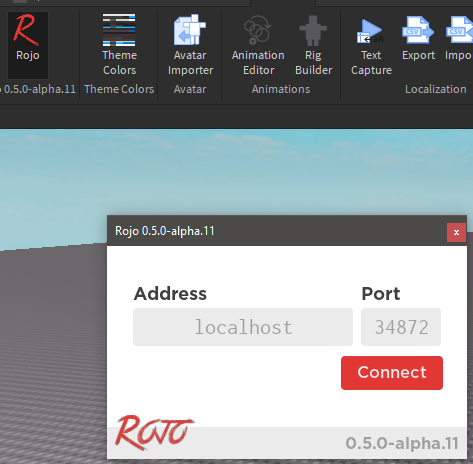
An update in the near future will add proper support for dark theme. Stay tuned!
CollectionService live-syncing
CollectionService tags can now be live-synced! This is part of improved support for lots of property types. If you had trouble live-syncing something before, it might work now in alpha 12!
New branding
There's a new branding repository, https://github.com/rojo-rbx/brand which contains all of the new assets we'll be using going forward.
v0.5.0 Alpha 11
This release brings along a slew of improvements from working on some of Rojo's core components in rbx-dom!
We skipped alpha 10 after a failed release with a pretty bad bug regression.
Upgrading
This release requires Rust 1.32 or newer!
To install the Rojo CLI, either download rojo.exe attached here or run:
cargo install rojo --version 0.5.0-alpha.11 --force
To install the plugin, either install it from Roblox (https://www.roblox.com/catalog/1997686364) or download Rojo.rbxm and put it into your Roblox Studio plugins folder.
Changes Since 0.5.0 Alpha 9
- Added support for implicit property values in JSON model files (#154)
Contentproperties can now be specified in projects and model files as regular string literals.- Added support for
BrickColorproperties. - Added support for properties added in client release 384, like
Lighting.Technologybeing set to"ShadowMap". - Improved performance when working with XML models and places
- Fixed serializing empty
Contentproperties as XML - Fixed serializing infinite and NaN floating point properties in XML
- Improved compatibility with XML models
- Plugin should now be able to live-sync more properties and ignore ones it can't, like
Lighting.Technology.
Implicit Property Values
In .model.json files, it's now possible to specify properties with the handy "implicit" value syntax that has been usable in projects for awhile!
Before 0.5.0-alpha.11:
"Position": {
  "Type": "Vector3",
  "Value": [5, 6, 7]
}
After 0.5.0-alpha.11:
"Position": [5, 6, 7]v0.5.0 Alpha 9
This release brings along significant performance improvements for rojo build and some fairly major fixes for localization tables.
Upgrading
This release requires Rust 1.32 or newer!
To install the Rojo CLI, either download rojo.exe attached here or run:
cargo install rojo --version 0.5.0-alpha.9 --force
To install the plugin, either install it from Roblox (https://www.roblox.com/catalog/1997686364) or download Rojo.rbxm and put it into your Roblox Studio plugins folder.
Changes Since 0.5.0 Alpha 8
- Changed
rojo buildto use buffered I/O, which can make it up to 2x faster in some cases.- Building Road Not Taken to an
rbxlxfile dropped from 150ms to 70ms on my machine
- Building Road Not Taken to an
- Fixed
LocalizationTableinstances being made fromcsvfiles incorrectly interpreting empty rows and columns. (#149) - Fixed CSV files with entries that parse as numbers causing Rojo to panic. (#152)
- Improved error messages when malformed CSV files are found in a Rojo project.
v0.5.0 Alpha 8
This is the 8th alpha for Rojo 0.5.0! We've skipped alpha 7 in order to stop having confusing version numbers.
This release brings along 100% practical coverage for the XML model format with the exception of refs (think Model.PrimaryPart or ObjectValue.Value). This should enable more projects to start being built using only Rojo and never checking a place file into Git.
Upgrading
This release requires Rust 1.32 or newer!
To install the Rojo CLI, either download rojo.exe attached here or run:
cargo install rojo --version 0.5.0-alpha.8 --force
To install the plugin, either install it from Roblox (https://www.roblox.com/catalog/1997686364) or download Rojo.rbxm and put it into your Roblox Studio plugins folder.
Changes Since 0.5.0-alpha.6
- Added support for a bunch of new types when dealing with XML model/place files:
ColorSequenceFloat64Int64NumberRangeNumberSequencePhysicalPropertiesRayRectRef
- Improved server instance ordering behavior when files are added during a live session (#135)
- Fixed error being thrown when trying to unload the Rojo plugin.
- Added partial fix for issue #141 for
Lighting.Technology, which should restore live sync functionality for the default project file.