Capture your WebCam in real time to an ASCII Art renderer in a Qt6 window and to a virtual webcam, all in Python.
Pour la version en français rendez-vous ici
Steps required to install Matrix on your personal computer.
-
Get Python:
-
On Windows: visit the official website python.org.
-
On MacOS: choose between homebrew or the official python.org site.
-
On Linux : install Python3(>=3.6) via your package manager.
-
When installing from the official website only, don't forget to check the box add path or Path variable and that usage will be available to all users of your computer.
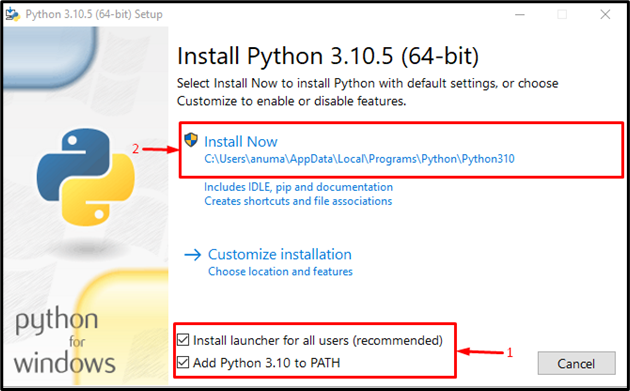
And finally:
-
If you haven't already done so: install Git on your computer, more info here
-
Then open a terminal and enter the following commands:
$ git clone https://github.com/Bit-Scripts/Matrix.git

$ cd Matrix

pip install -r requirements.txt
- On Windows: please follow the instructions to install 'unitycamera' available here
- On Linux :
- Install v4l2loopback via your package manager.
- On Ubuntu/Debian:
sudo apt-get install v4l2loopback - On Arch:
sudo pacman -S v4l2loopback - On Fedora:
sudo dnf install v4l2loopback - On openSUSE:
sudo zypper install v4l2loopback
- On Ubuntu/Debian:
- After installation, ensure that the v4l2loopback module is loaded on your system by running the following command:
$ lsmod | grep v4l2loopback- Then activate the v4l2loopback module
$ sudo modprobe v4l2loopback
- Install v4l2loopback via your package manager.
$ python ascii17.py #the program launches
I advise you to use a venv or anaconda to manage the installation of the necessary packages via pip.
Otherwise, binaries are available for direct download from the project releases.
Here's an example of rendering:

We welcome contributions from the community! To contribute, please follow the steps below:
- Fork the project
- Create a new branch (git checkout -b feature/feature-name)
- Commit your changes (git commit -am 'Add new feature')
- Push the branch (git push origin feature/feature-name)
- Create a pull request
This project is licensed under the GPL V3 - see the file LICENSE for more details.