Azure AI Travel Agents is a comprehensive reference solution developed by Microsoft that demonstrates how to build a multi-agent, AI-powered travel planning application using the Model Context Protocol (MCP), Azure OpenAI, and Azure AI Search. This project showcases best practices for orchestrating multiple AI agents, integrating enterprise data, and providing a secure, extensible platform for real-world scenarios.
- Multi-Agent Orchestration: Utilizes MCP to coordinate specialized agents (e.g., flight, hotel, and itinerary agents) that collaborate to fulfill complex travel planning tasks.
- Enterprise Data Integration: Connects to Azure AI Search and other enterprise data sources to provide up-to-date, relevant information for travel recommendations.
- Secure, Scalable Architecture: Leverages Azure services for authentication, authorization, and scalable deployment, following enterprise security best practices.
- Extensible Tooling: Implements reusable MCP tools and prompt templates, enabling rapid adaptation to new domains or business requirements.
- User Experience: Provides a conversational interface for users to interact with the travel agents, powered by Azure OpenAI and MCP.
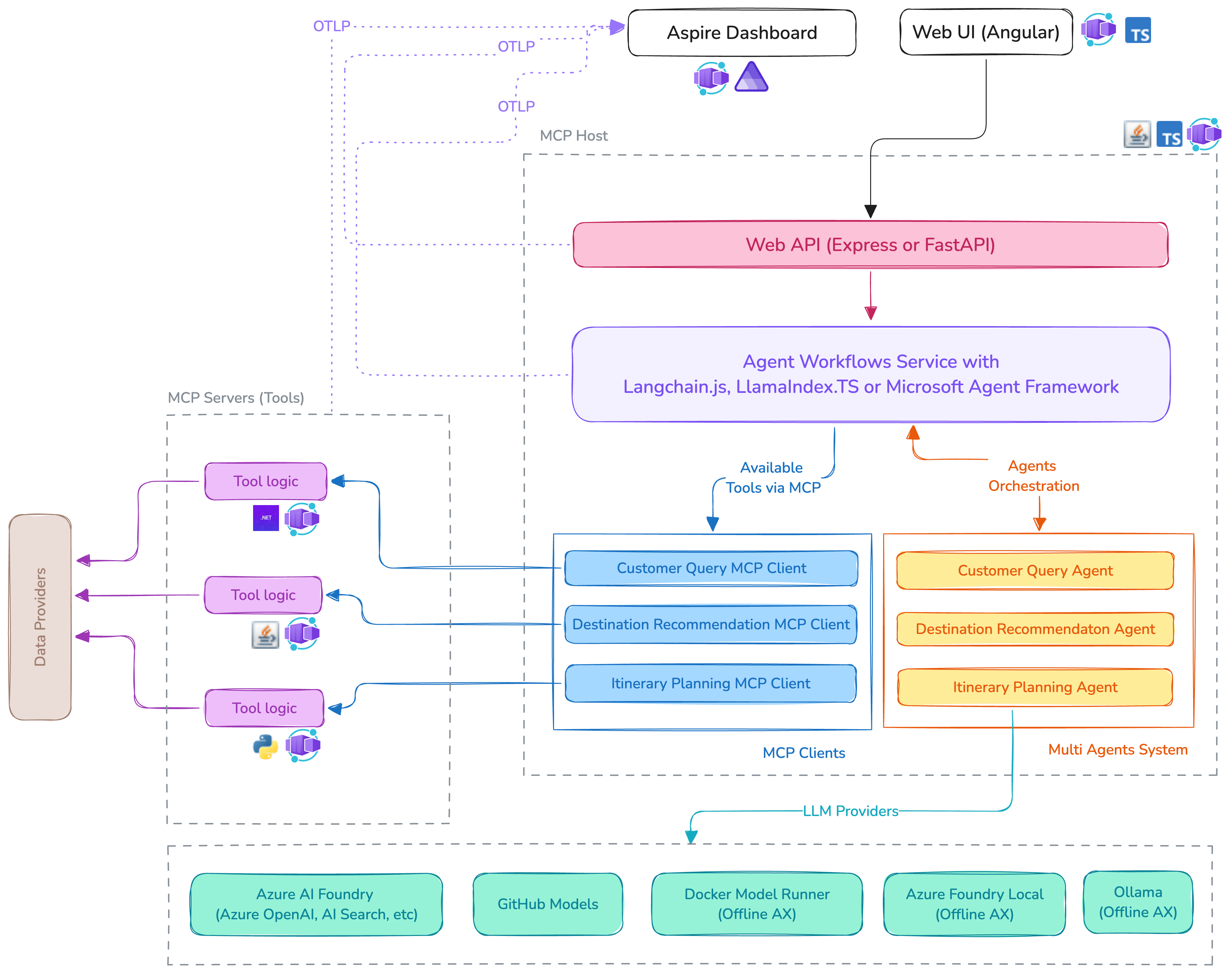
The Azure AI Travel Agents solution is architected for modularity, scalability, and secure integration of multiple AI agents and enterprise data sources. The main components and data flow are as follows:
- User Interface: Users interact with the system through a conversational UI (such as a web chat or Teams bot), which sends user queries and receives travel recommendations.
- MCP Server: Serves as the central orchestrator, receiving user input, managing context, and coordinating the actions of specialized agents (e.g., FlightAgent, HotelAgent, ItineraryAgent) via the Model Context Protocol.
- AI Agents: Each agent is responsible for a specific domain (flights, hotels, itineraries) and is implemented as an MCP tool. Agents use prompt templates and logic to process requests and generate responses.
- Azure OpenAI Service: Provides advanced natural language understanding and generation, enabling agents to interpret user intent and generate conversational responses.
- Azure AI Search & Enterprise Data: Agents query Azure AI Search and other enterprise data sources to retrieve up-to-date information on flights, hotels, and travel options.
- Authentication & Security: Integrates with Microsoft Entra ID for secure authentication and applies least-privilege access controls to all resources.
- Deployment: Designed for deployment on Azure Container Apps, ensuring scalability, monitoring, and operational efficiency.
This architecture enables seamless orchestration of multiple AI agents, secure integration with enterprise data, and a robust, extensible platform for building domain-specific AI solutions.
Imagine planning a big trip and having a team of expert assistants helping you with every detail. The Azure AI Travel Agents system works in a similar way, using different parts (like team members) that each have a special job. Here’s how it all fits together:
Think of this as your travel agent’s front desk. It’s where you (the user) ask questions or make requests, like “Find me a flight to Paris.” This could be a chat window on a website or a messaging app.
The MCP Server is like the manager who listens to your request at the front desk and decides which specialist should handle each part. It keeps track of your conversation and makes sure everything runs smoothly.
Each agent is an expert in a specific area—one knows all about flights, another about hotels, and another about planning your itinerary. When you ask for a trip, the MCP Server sends your request to the right agent(s). These agents use their knowledge and tools to find the best options for you.
This is like having a language expert who understands exactly what you’re asking, no matter how you phrase it. It helps the agents understand your requests and respond in natural, conversational language.
Imagine a huge, up-to-date library with all the latest travel info—flight schedules, hotel availability, and more. The agents search this library to get the most accurate answers for you.
Just like a security guard checks who can enter certain areas, this part makes sure only authorized people and agents can access sensitive information. It keeps your data safe and private.
All these assistants and tools work together inside a secure, scalable building (the cloud). This means the system can handle lots of users at once and is always available when you need it.
You start by asking a question at the front desk (UI). The manager (MCP Server) figures out which specialist (agent) should help you. The specialist uses the language expert (OpenAI) to understand your request and the library (AI Search) to find the best answer. The security guard (Authentication) makes sure everything is safe. All of this happens inside a reliable, scalable building (Azure Container Apps), so your experience is smooth and secure. This teamwork allows the system to quickly and safely help you plan your trip, just like a team of expert travel agents working together in a modern office!
- MCP Server: Hosts the core orchestration logic, exposes agent tools, and manages context for multi-step travel planning workflows.
- Agents: Each agent (e.g., FlightAgent, HotelAgent) is implemented as an MCP tool with its own prompt templates and logic.
- Azure Integration: Uses Azure OpenAI for natural language understanding and Azure AI Search for data retrieval.
- Security: Integrates with Microsoft Entra ID for authentication and applies least-privilege access controls to all resources.
- Deployment: Supports deployment to Azure Container Apps for scalability and operational efficiency.
- Demonstrates how MCP can be used to orchestrate multiple AI agents in a real-world, production-grade scenario.
- Accelerates solution development by providing reusable patterns for agent coordination, data integration, and secure deployment.
- Serves as a blueprint for building domain-specific, AI-powered applications using MCP and Azure services.