



A simple Serilog log viewer for the following sinks:
- Serilog.Sinks.MSSqlServer (Nuget)
- Serilog.Sinks.MySql (Nuget) and Serilog.Sinks.MariaDB Nuget
- Serilog.Sinks.Postgresql (Nuget) and Serilog.Sinks.Postgresql.Alternative (Nuget)
- Serilog.Sinks.MongoDB (Nuget)
- Serilog.Sinks.ElasticSearch (Nuget)
- Serilog.Sinks.RavenDB (Nuget)
- Serilog.Sinks.SQLite (Nuget)
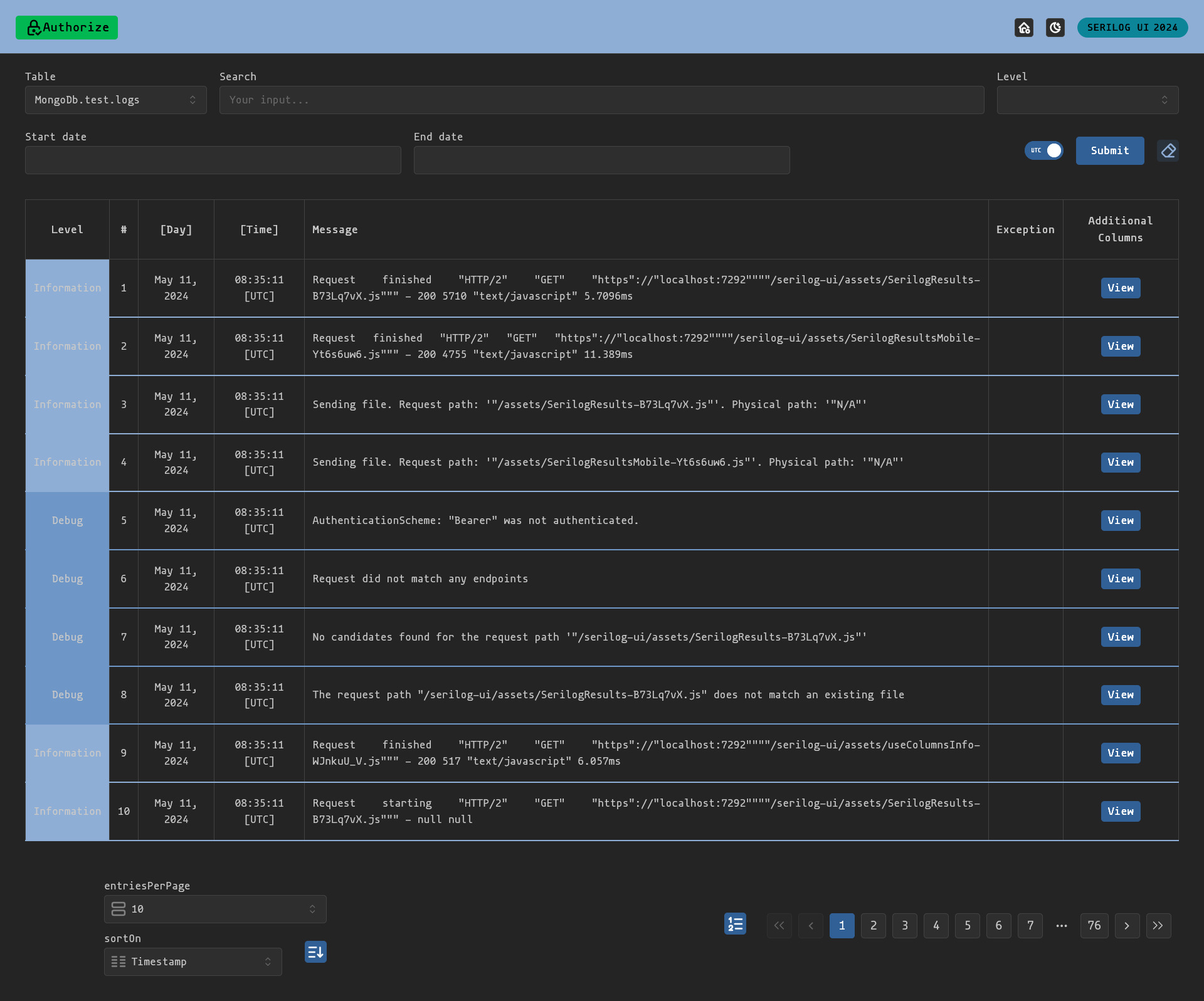
Read the Wiki 📘
Install the Serilog.UI NuGet package:
# using dotnet cli
dotnet add package Serilog.UI

# using package manager:
Install-Package Serilog.UI
Install one or more of the available providers, based upon your sink(s):
| Provider | install: dotnet | install: pkg manager |
|---|---|---|
| Serilog.UI.MsSqlServerProvider [NuGet] | dotnet add package Serilog.UI.MsSqlServerProvider |
Install-Package Serilog.UI.MsSqlServerProvider |
| Serilog.UI.MySqlProvider [NuGet] | dotnet add package Serilog.UI.MySqlProvider |
Install-Package Serilog.UI.MySqlProvider |
| Serilog.UI.PostgreSqlProvider [NuGet] | dotnet add package Serilog.UI.PostgreSqlProvider |
Install-Package Serilog.UI.PostgreSqlProvider |
| Serilog.UI.MongoDbProvider [NuGet] | dotnet add package Serilog.UI.MongoDbProvider |
Install-Package Serilog.UI.MongoDbProvider |
| Serilog.UI.ElasticSearchProvider [NuGet] | dotnet add package Serilog.UI.ElasticSearchProvider |
Install-Package Serilog.UI.ElasticSearchProvider |
| Serilog.UI.RavenDbProvider [NuGet] | dotnet add package Serilog.UI.RavenDbProvider |
Install-Package Serilog.UI.RavenDbProvider |
| Serilog.UI.SQLiteProvider [NuGet] | dotnet add package Serilog.UI.SQLiteProvider |
Install-Package Serilog.UI.SQLiteProvider |
Add AddSerilogUi() to IServiceCollection in your Startup.ConfigureServices method:
public void ConfigureServices(IServiceCollection services)
{
  // Register the serilog UI services
  services.AddSerilogUi(options => options// each provider exposes extension methods to configure.
    // example with MSSqlServerProvider:
    .UseSqlServer(opts => opts
      .WithConnectionString("YOUR_CONNECTION_STRING")
      .WithTable("YOUR_TABLE")));
}
In the Startup.Configure method or on the WebApplication builder, enable the middleware to serve the log UI page.
NOTE: call to the UseSerilogUi middleware must be placed after any Authentication and Authorization middleware!
public void Configure(IApplicationBuilder app, IWebHostEnvironment env)
{
    (...)

    app.UseRouting();
    app.UseAuthentication();
    app.UseAuthorization();

    // Enable middleware to serve log-ui (HTML, JS, CSS, etc.).
    app.UseSerilogUi(opts => [...]);

    (...)
}
For further configuration: ⏩
Do you want to test the package on-the-fly? Try out the samples, with no configuration required!
The URL will automatically update as you change filters in the UI, making it easy to share your current view with others.
Everything is welcome! 🏆 See the contribution guidelines for details.
For details on running the project, start reading from Develop.
See LICENSE.

 Mohsen Esmailpour 💻 📆 |
 Matteo Gregoricchio 💻 📖 |
 sommmen 💻 |
 Israel Gómez de Celis 💻 |
 Osama Bashir 💻 |
 Ricardo 💻 |
 Caleb Hanson 💻 |
 Aleksei 💻 |
 chaadfh 💻 |
 Phill Duffy 💻 |
 Uthman 💻 |
 jorgevp 💻 |
 Tech Garage 💻 |