




Capture and sanitize HAR (HTTP Archive) files with deep PII removal. Perfect for support diagnostics, security reviews, and test fixtures.
- Install Python from the Microsoft Store or python.org
- Open PowerShell and run:
pip install har-capture[full]
python -m har_capture https://example.compip install har-capture[full]
har-capture https://example.compip install har-capture
har-capture sanitize myfile.har --patterns network-deviceChrome DevTools now sanitizes cookies and auth headers, but HAR files contain much more sensitive data: IP addresses, MAC addresses, emails, passwords in form bodies, serial numbers, device names, WiFi credentials, session tokens, and API keys.
How har-capture compares:
| Feature | har-capture | DevTools | Google/Cloudflare |
|---|---|---|---|
| Deep sanitization (IPs, MACs, emails) | ✅ | ❌ | ❌ |
| Correlation-preserving hashes | ✅ | ❌ | ❌ |
| Interactive review | ✅ | ❌ | Varies |
| Custom patterns | ✅ | ❌ | Limited |
| Local + CLI automation | ✅ | No CLI | Varies |
Key benefits:
- Zero dependencies - Core sanitization uses only Python stdlib
- Format-preserving hashes - Track the same device across requests without exposing real values
- One-command workflow - Capture, sanitize, and compress in a single step
- Interactive browser flows preserved - Handle browser auth, popups, and dialogs while still recording the resulting traffic
See detailed comparison with all tools →
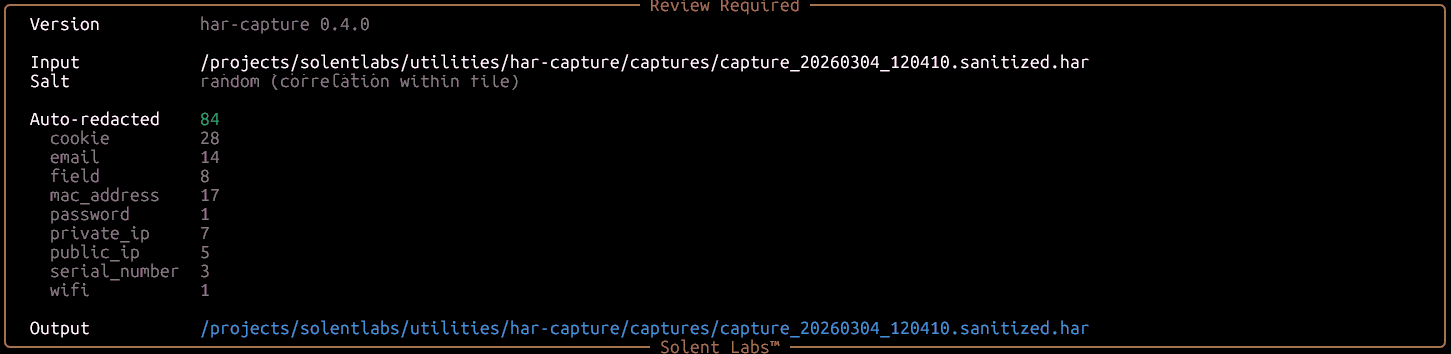
1. Sanitization report — 84 values auto-redacted across 9 PII categories:
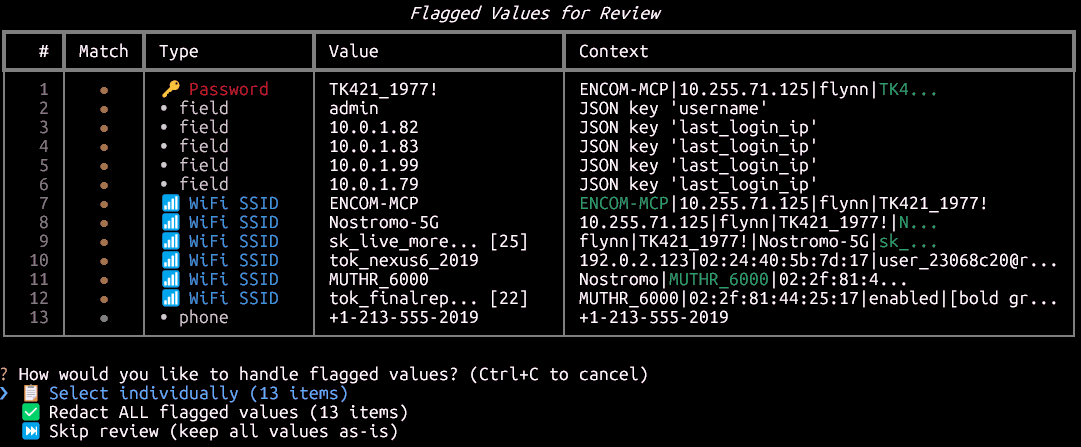
2. Flagged values for review — passwords, fields, WiFi SSIDs, and phone numbers detected automatically:
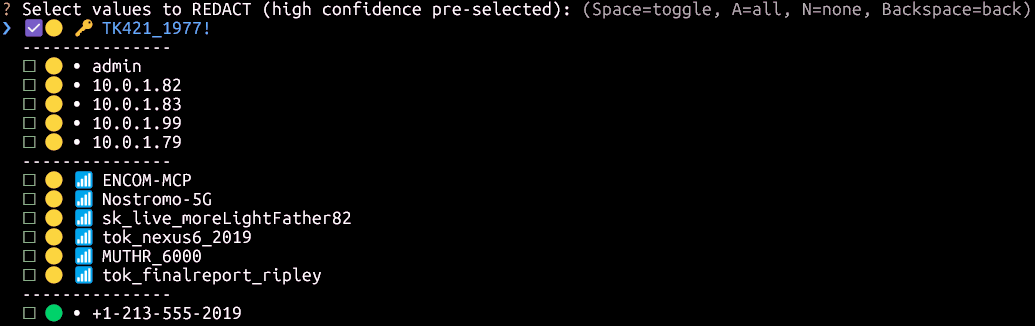
3. Interactive redaction picker — high-confidence items pre-selected, you choose the rest:
# Core only (sanitization - zero dependencies)
pip install har-capture

# With browser capture support
pip install har-capture[capture]
playwright install chromium

# Full installation (recommended)
pip install har-capture[full]# Capture and sanitize a network device (cable modem, router, AP)
har-capture https://192.168.100.1 --patterns network-device
# Sanitize an existing HAR with universal PII rules only (no device domain)
har-capture sanitize capture.har --patterns base
# Validate for PII leaks
har-capture validate capture.har --patterns network-device--patterns is required as of 0.9.0 — pick network-device for cable modems/routers/APs, base for generic web/API
captures, or a custom JSON path. Run har-capture patterns for the full list.
from har_capture.sanitization import sanitize_html, sanitize_har_file
from har_capture.sanitization.report import HeuristicMode

# Sanitize HTML (correlation-preserving by default)
clean_html = sanitize_html(raw_html)

# Sanitize with consistent salt (correlate across captures)
clean_html = sanitize_html(raw_html, salt="my-secret-key")

# Enable heuristic detection for WiFi, SSIDs, device names
clean_html = sanitize_html(raw_html, heuristics=HeuristicMode.REDACT)

# Sanitize HAR file
sanitize_har_file("capture.har")  # → capture.sanitized.har

# Custom patterns (e.g., modem serials, customer IDs)
custom = {"patterns": {"modem_sn": {"regex": r"SN[0-9]{10}", "replacement_prefix": "MODEM"}}}
sanitize_har_file("capture.har", custom_patterns=custom)

# Redact device-specific credential FIELD NAMES (not just value patterns).
# See docs/CUSTOM_PATTERNS.md#extending-sensitive-field-detection.
device_fields = {"fields": {"auto_redact_patterns": ["pws"]}}
sanitize_har_file("capture.har", custom_patterns=device_fields)- Comparison with Other Tools - DevTools, Google, Cloudflare, Edgio
- Correlation-Preserving Redaction - How format-preserving hashing works
- PII Categories - What gets sanitized
- Custom Patterns - Add organization-specific patterns
- CLI Reference - Detailed command documentation
- Interactive Sanitization - Review edge cases manually
- Support diagnostics - Users submit sanitized HAR files without exposing credentials
- Security review - Validate HAR files for PII leaks before sharing
- Test fixtures - Generate reproducible traffic captures
- Modem debugging - Capture router/modem traffic with sensitive data removed
| Category | Examples | Output |
|---|---|---|
| Network | IPs, MACs | 192.168.1.1 → 10.255.42.17 |
| Personal | Emails, phones | user@example.com → user_a1b2@redacted.invalid |
| Credentials | Passwords, tokens | password=secret → password=PASS_a1b2c3d4 |
| Device | Serials, WiFi, SSIDs | SN123456 → SERIAL_a1b2c3d4 |
| HTTP | Auth headers, cookies | Cookie: session=xyz → Cookie: session=TOKEN_a1b2 |
See complete PII categories list →
| Component | Windows | macOS | Linux |
|---|---|---|---|
| Sanitization | ✅ | ✅ | ✅ |
| Validation | ✅ | ✅ | ✅ |
| CLI | ✅ | ✅ | ✅ |
| Capture | ✅ | ✅ | ✅ |
Contributions welcome! See CONTRIBUTING.md for guidelines.
MIT License - see LICENSE for details.