Identifiers not displaying correctly #411


Description

Identifiers not displaying correctly
- Select Notebook Tab
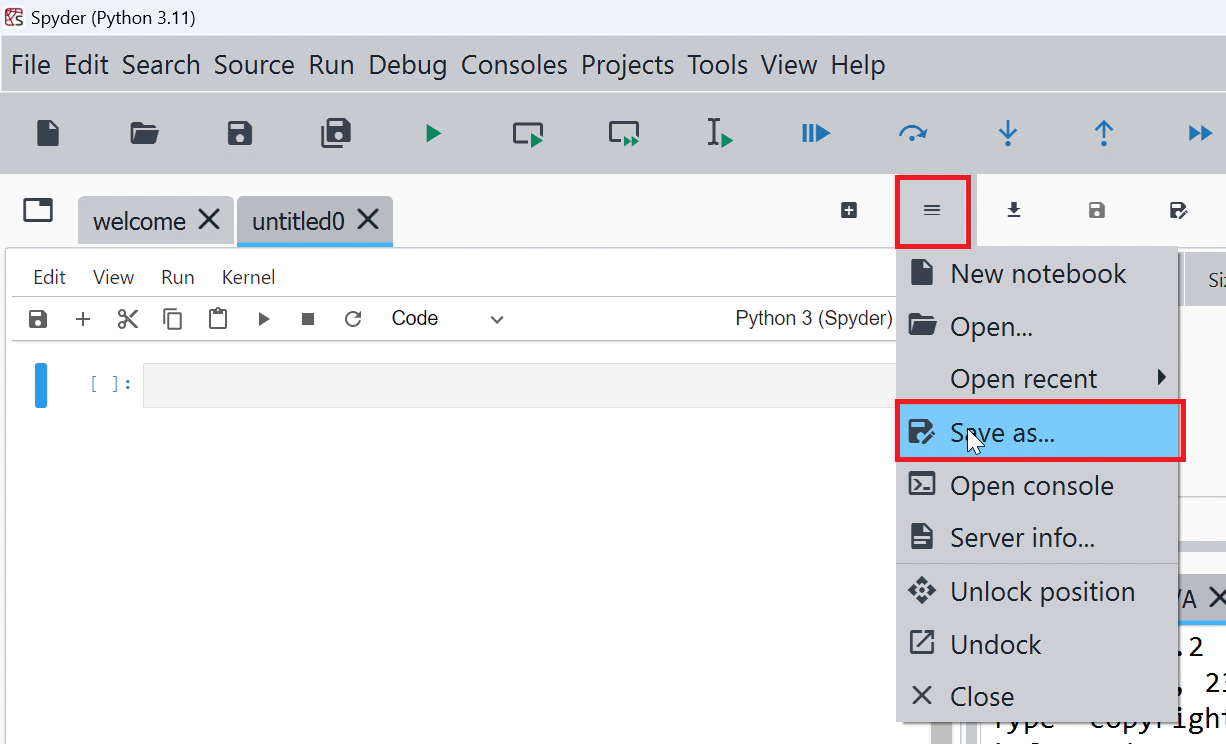
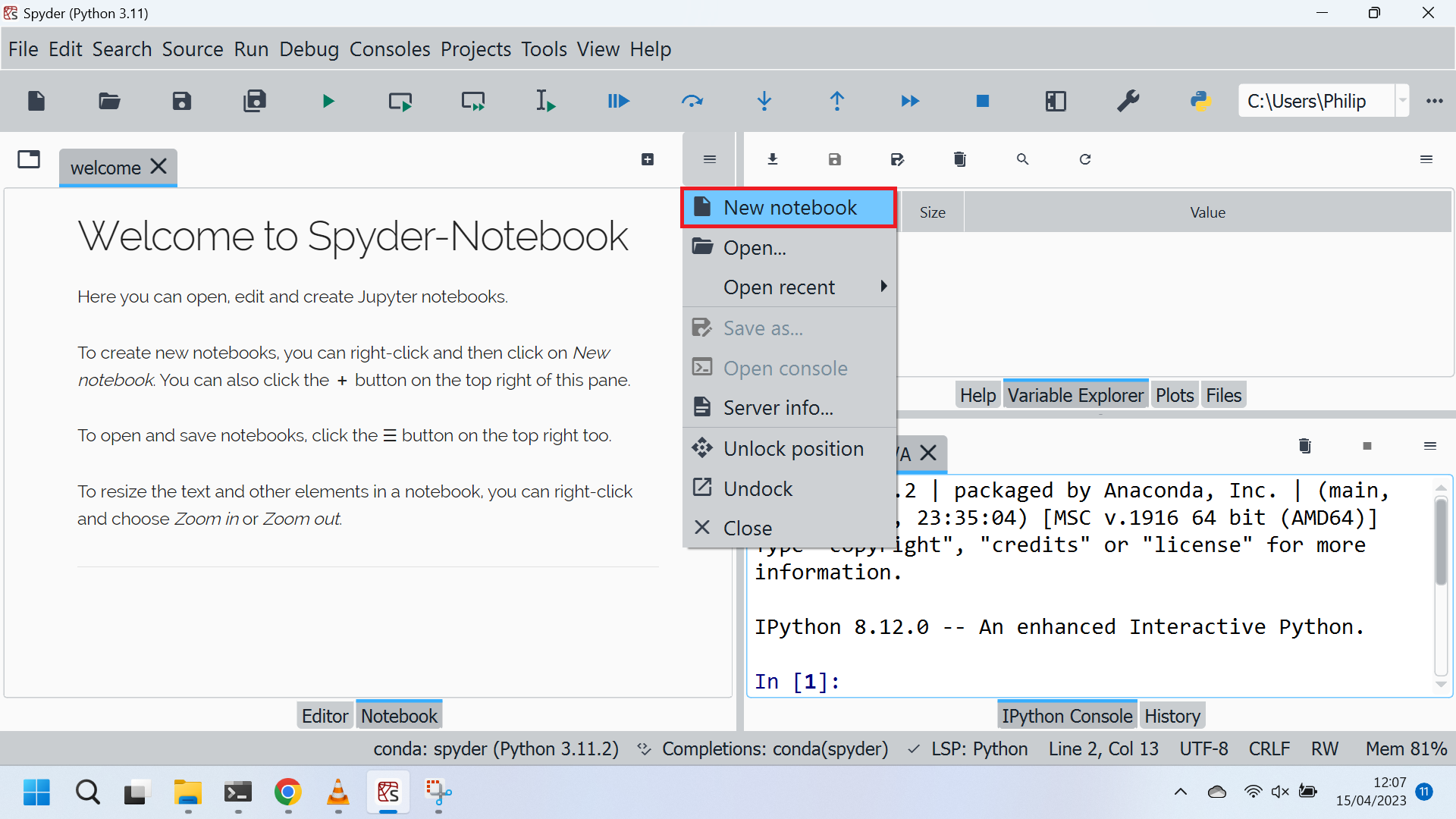
- Select Options -> New Notebook
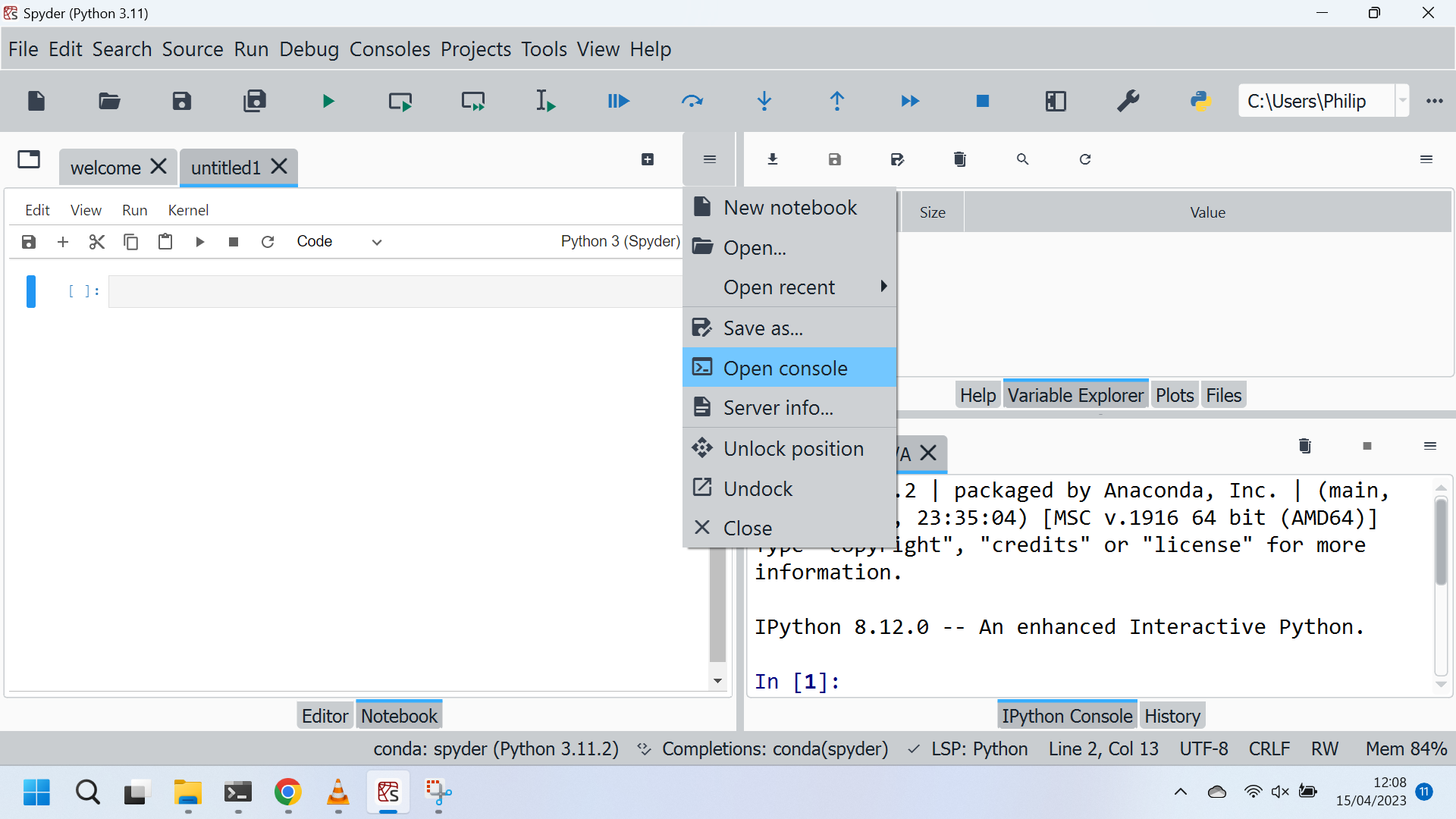
- Select Options -> Open Console
- import builtins and run cell
- Input builtins.↹
What is the expected output? What do you see instead?
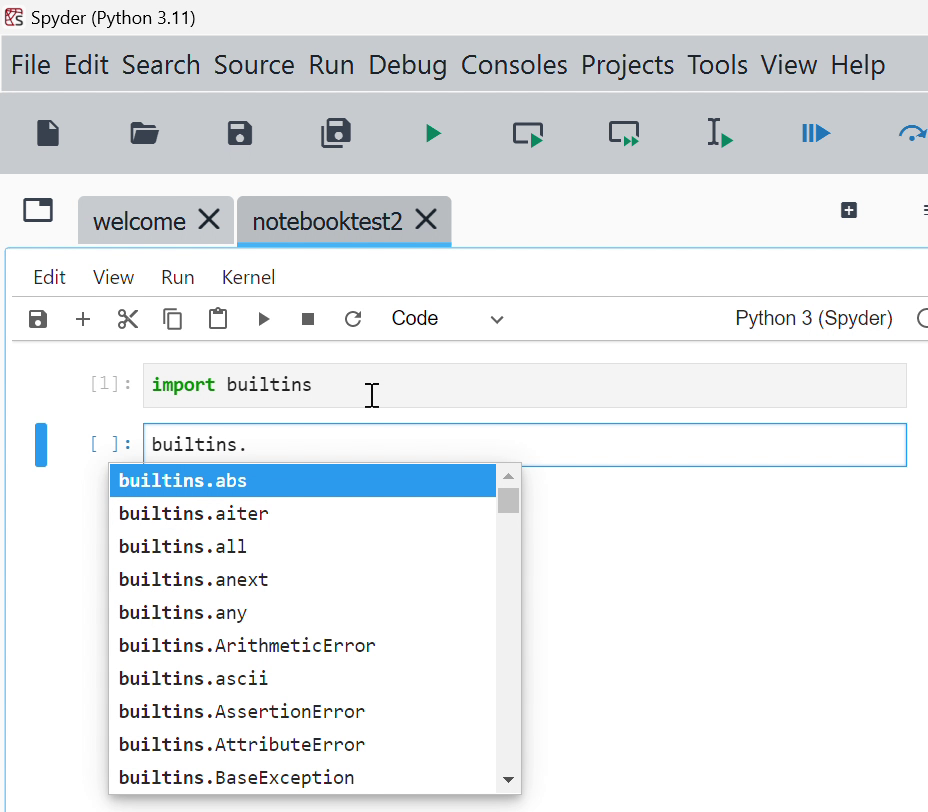
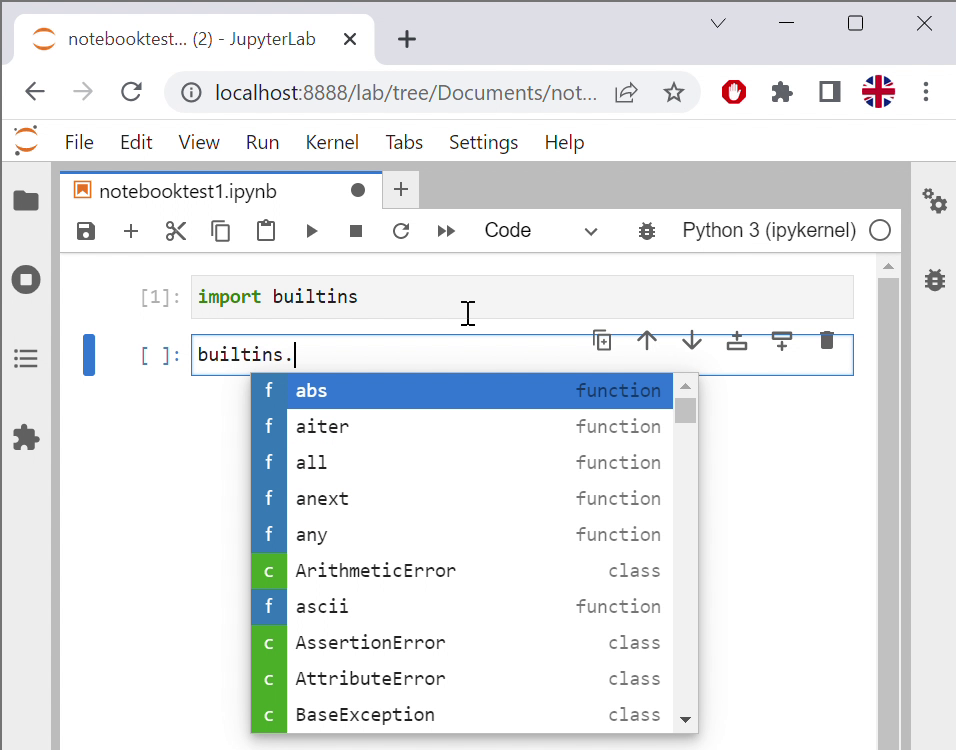
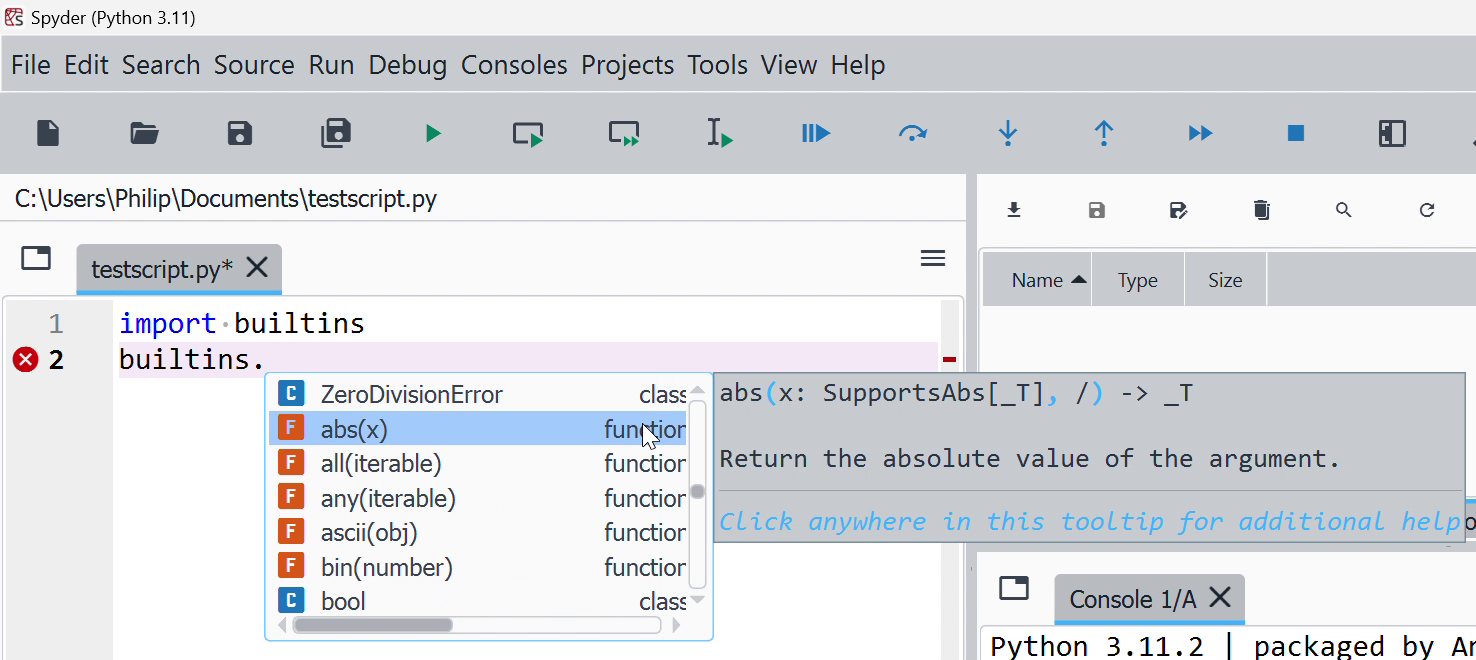
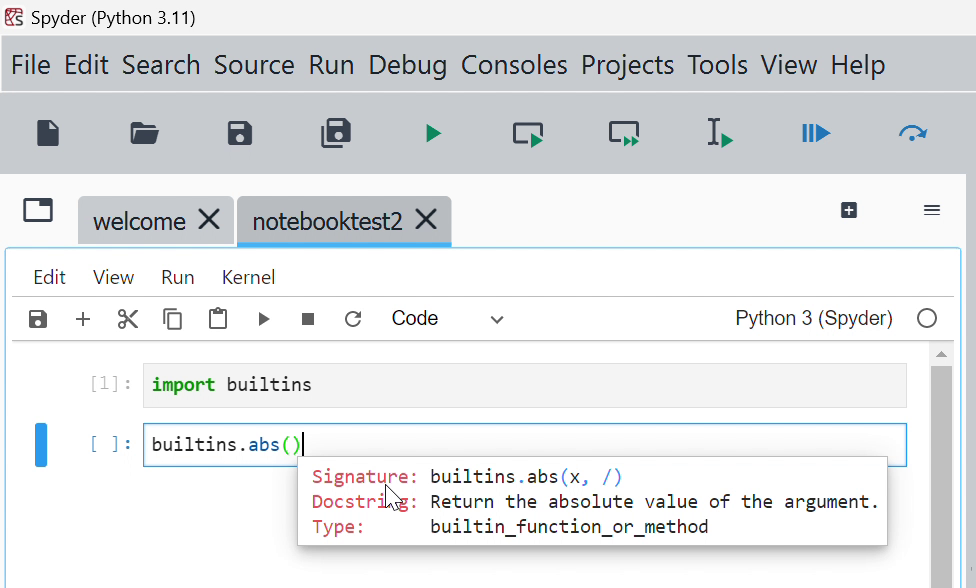
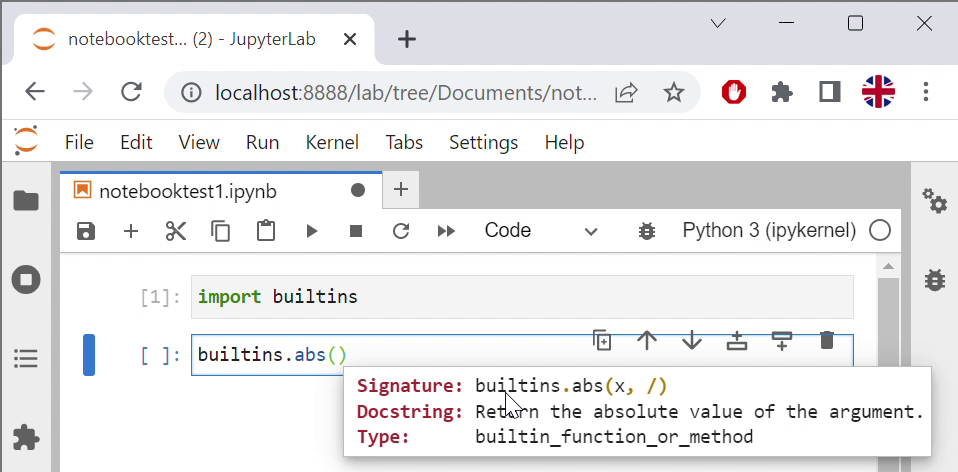
The identifiers should display as a colour-coded list either similar to JupyterLab or to those in Spyder... Not sure what style the notebook aims to follow... Currently the ↹ needs to be selected to view the list of identifiers, ⇧ and ↹ need to be pressed to display the docstring popup balloon. This behaviour is more similar to JupyterLab and the docstring itself uses the style format of JupyterLab.
Personally I prefer the style of identifiers and docstrings in JupyterLab and would rather have the ability to use this style exclusively throughout Spyder in the Script Editor, Notebook and Consoles. They are a bit cleaner and easier to read.
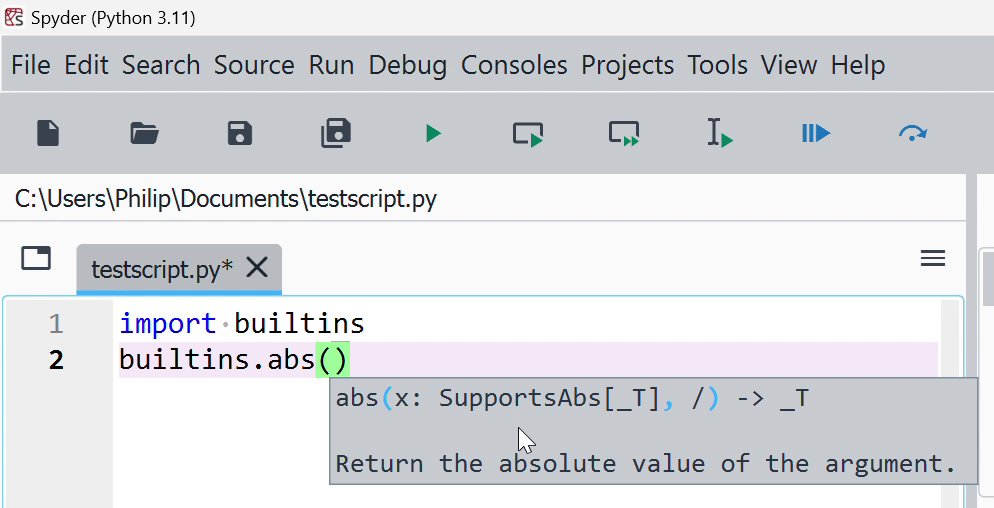
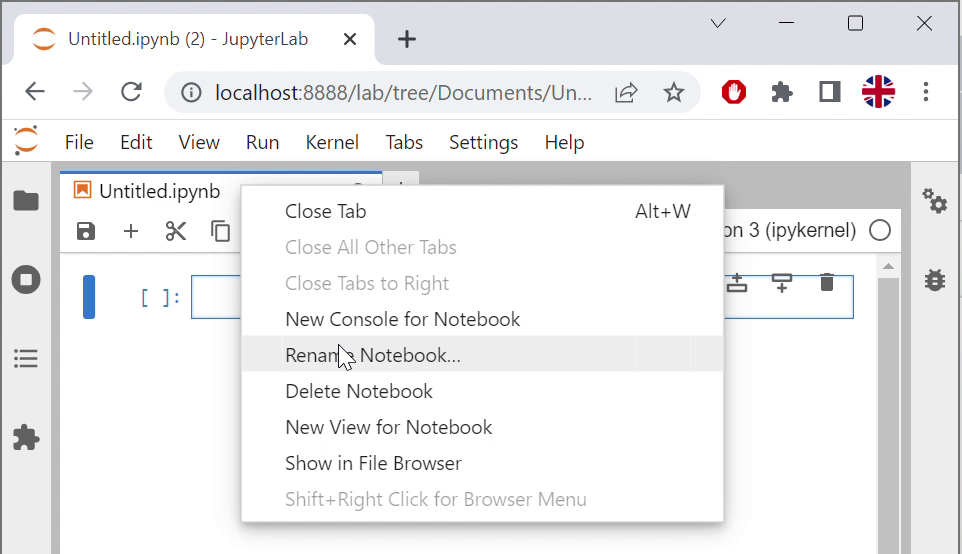
Some other things I noticed were that right clicking the tab gave no file context menu (similar to JupyterLab). A subset of these actions seem to be in a separate Options Menu.
Also usability wise, this was the first time I used the notebook extension itself but have used JupyterLab and Spyder quite extensively. The Welcome to Spyder-Notebook needs a bit more information:
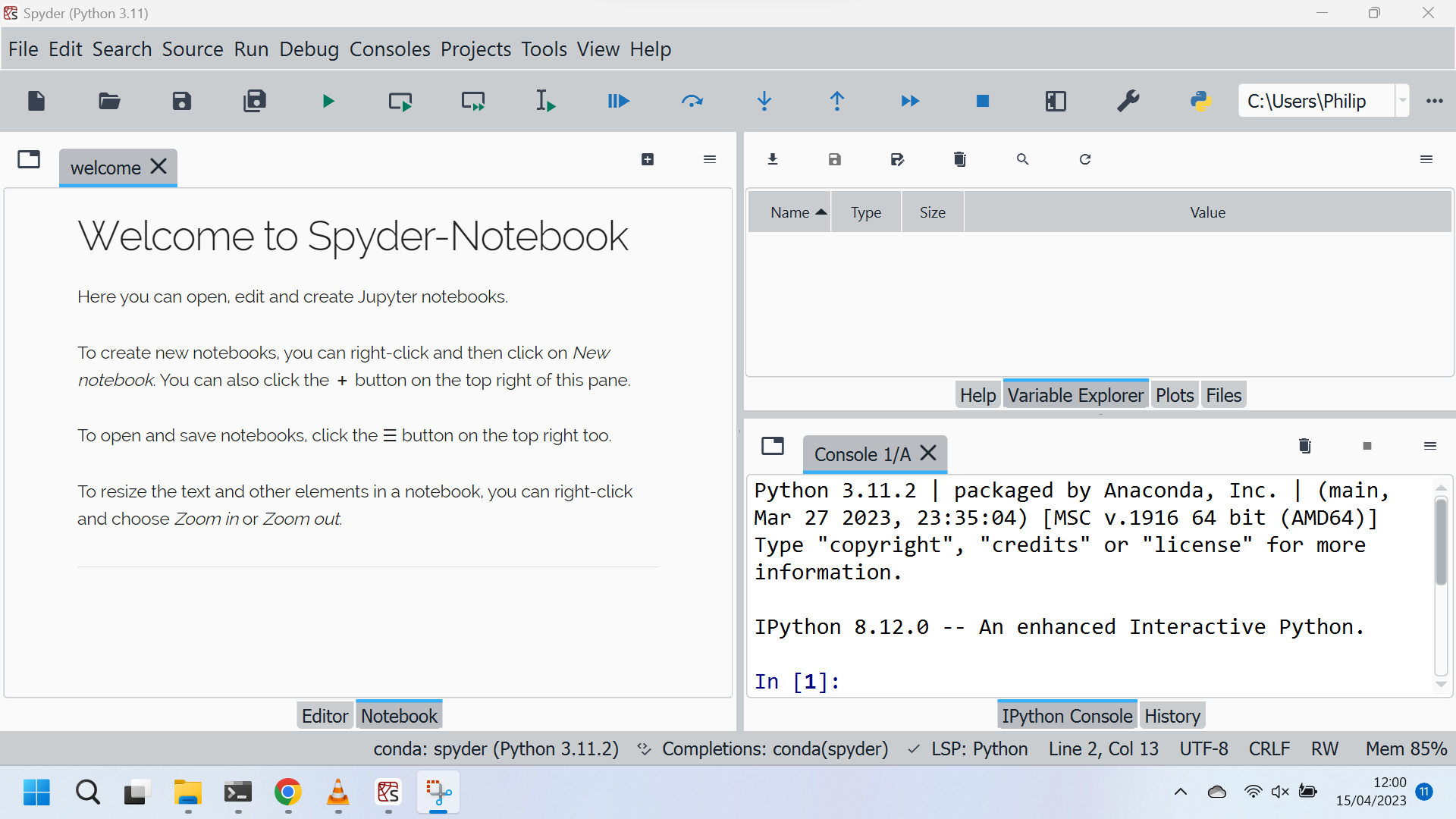
Welcome to Spyder-Notebook
Here you can open, edit and create Jupyter notebooks.

To create new notebooks, you can right-click and then click on New notebook. You can also click the + button on the top right of this pane.

To open and save notebooks, click the ☰ button on the top right too.

To resize the text and other elements in a notebook, you can right-click and choose Zoom in or Zoom out.
This is not enough to figure out that:
- The notebook tab has to be selected.
- Then a new notebook has to be created.
- Then options and open console needs to be selected. Coming to Spyder Notebook from JupyterLab to Spyder Notebook, I expected this to be automatic.
- Then a notebook file can be manipulated.
- Then a blank IPython Console cell needs to be run in order to update variables. Coming to Spyder Notebook from JupyterLab to Spyder Notebook, I expected this to be automatic.
Details about this are on the home page but not enough details are on the welcome tab to figure out this procedure.
Please provide any additional information below (stack trace, screenshots, a gif, etc)
List of Identifiers in Spyder Notebook:
List of Identifiers in JupyterLab:
List of Identifiers in Spyder:
Docstring Popup Balloon in Spyder Notebook:
Docstring Popup Balloon in JupyterLab:
Docstring Popup Balloon in Spyder:
JupyterLab Tab Menu:
Spyder Notebook Option Menu:
Welcome:
New Notebook:
Open Console:
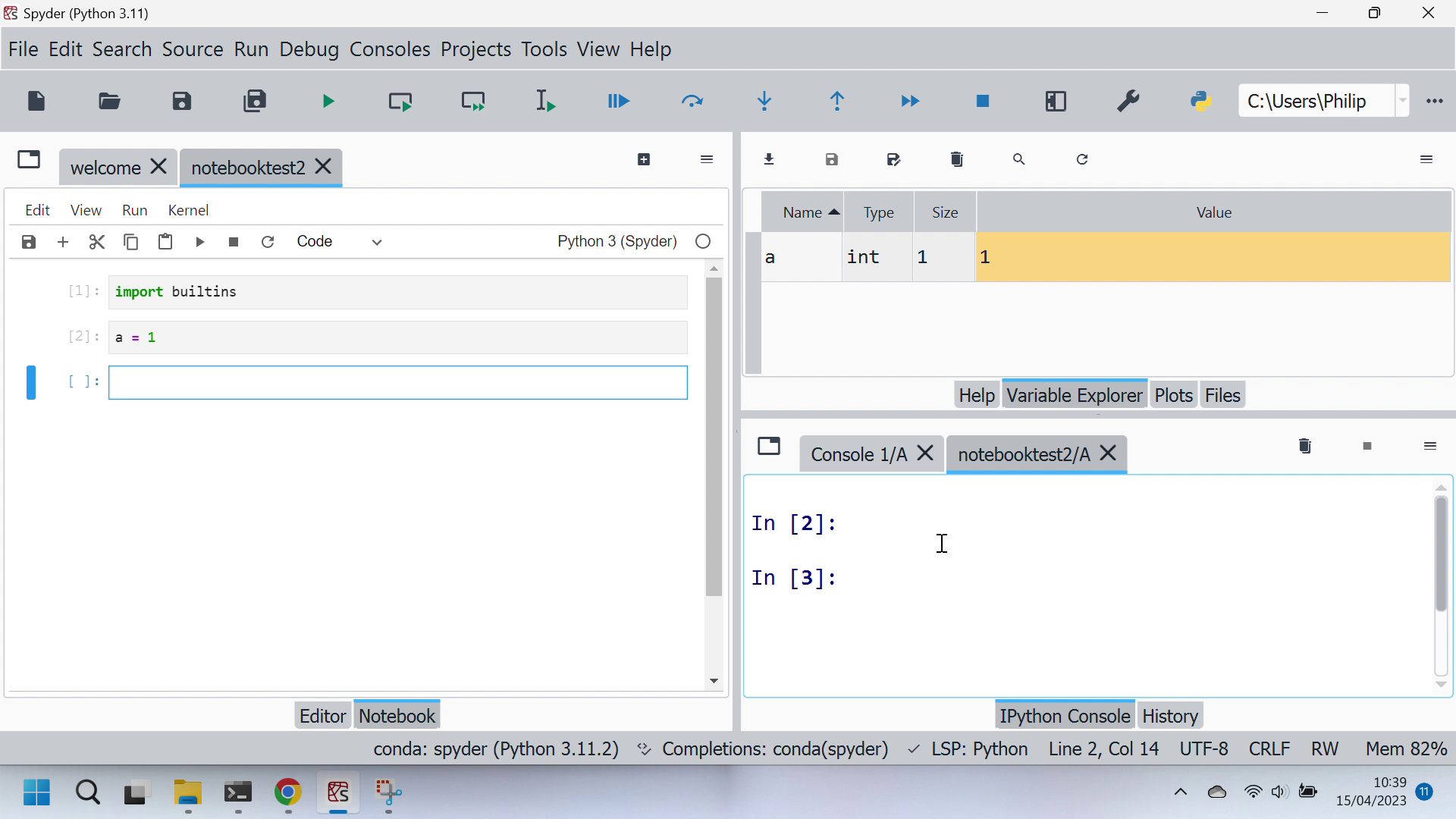
Work with Interactive Notebook:
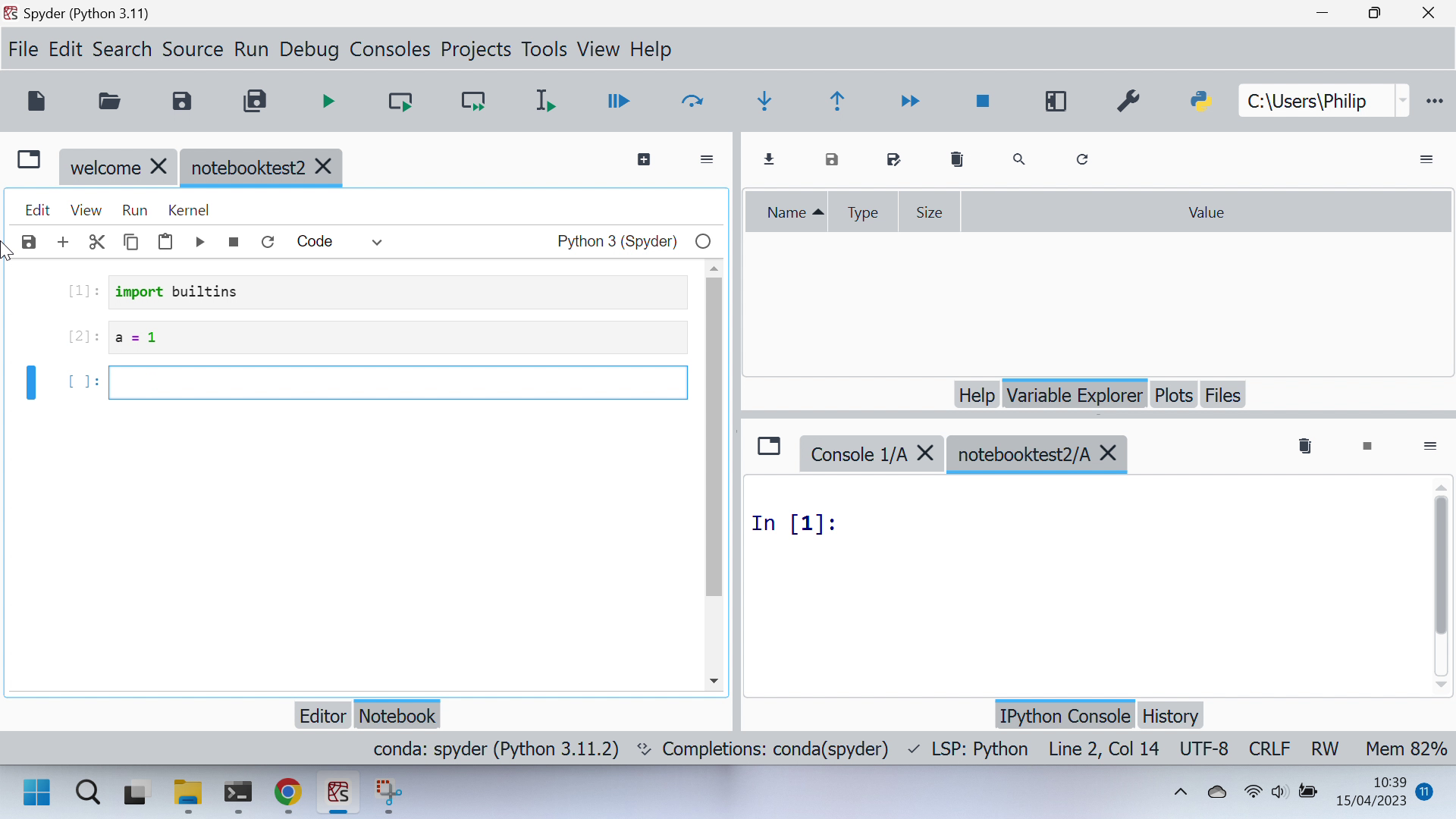
Update IPython Console:
Versions and main components
- Spyder version: 5.4.3 (conda)
- Python version: 3.11.2 64-bit
- Qt version: 5.15.2
- PyQt5 version: 5.15.7
- Operating System: Windows 10
Dependencies
Mandatory:
atomicwrites >=1.2.0 : 1.4.0 (OK)
chardet >=2.0.0 : 4.0.0 (OK)
cloudpickle >=0.5.0 : 2.0.0 (OK)
cookiecutter >=1.6.0 : 1.7.3 (OK)
diff_match_patch >=20181111 : 20200713 (OK)
intervaltree >=3.0.2 : 3.1.0 (OK)
IPython >=7.31.1,<9.0.0,!=8.8.0,!=8.9.0,!=8.10.0 : 8.12.0 (OK)
jedi >=0.17.2,<0.19.0 : 0.18.1 (OK)
jellyfish >=0.7 : 0.9.0 (OK)
jsonschema >=3.2.0 : 4.17.3 (OK)
keyring >=17.0.0 : 23.13.1 (OK)
nbconvert >=4.0 : 6.5.4 (OK)
numpydoc >=0.6.0 : 1.5.0 (OK)
paramiko >=2.4.0 : 2.8.1 (OK)
parso >=0.7.0,<0.9.0 : 0.8.3 (OK)
pexpect >=4.4.0 : 4.8.0 (OK)
pickleshare >=0.4 : 0.7.5 (OK)
psutil >=5.3 : 5.9.0 (OK)
pygments >=2.0 : 2.11.2 (OK)
pylint >=2.5.0,<3.0 : 2.16.2 (OK)
pylint_venv >=2.1.1 : 2.3.0 (OK)
pyls_spyder >=0.4.0 : 0.4.0 (OK)
pylsp >=1.7.2,<1.8.0 : 1.7.2 (OK)
pylsp_black >=1.2.0 : 1.2.1 (OK)
qdarkstyle >=3.0.2,<3.2.0 : 3.0.2 (OK)
qstylizer >=0.2.2 : 0.2.2 (OK)
qtawesome >=1.2.1 : 1.2.2 (OK)
qtconsole >=5.4.2,<5.5.0 : 5.4.2 (OK)
qtpy >=2.1.0 : 2.2.0 (OK)
rtree >=0.9.7 : 1.0.1 (OK)
setuptools >=49.6.0 : 65.6.3 (OK)
sphinx >=0.6.6 : 5.0.2 (OK)
spyder_kernels >=2.4.3,<2.5.0 : 2.4.3 (OK)
textdistance >=4.2.0 : 4.2.1 (OK)
three_merge >=0.1.1 : 0.1.1 (OK)
watchdog >=0.10.3 : 2.1.6 (OK)
zmq >=22.1.0 : 23.2.0 (OK)
Optional:
cython >=0.21 : 0.29.33 (OK)
matplotlib >=3.0.0 : 3.7.1 (OK)
numpy >=1.7 : 1.23.5 (OK)
pandas >=1.1.1 : 2.0.0 (OK)
scipy >=0.17.0 : 1.10.1 (OK)
sympy >=0.7.3 : 1.11.1 (OK)
Spyder plugins:
spyder_notebook.notebookplugin 0.4.1 : 0.4.1 (OK)