High-performance computing (HPC) typically describes the aggregation of complex processes across many different machines, thereby maximizing the computing power of all of the machines. Azure H-series VMs are the latest in HPC VMs. These 8 and 16 virtual CPU VMs built on Intel Haswell processor technology featuring a later generation (DDR4) memory and solid-state drive (SSD)-based temporary storage.
H-series offers diverse options for low-latency Remote Direct Memory Access (RDMA) networking using Fourteen Data Rate (FDR) InfiniBand. RDMA is a technology that provides a low-latency network connection between the processing running on two servers or virtual machines in Azure. instances (H16r, H16mr, A8, and A9) feature a network interface for RDMA connectivity.
Azure Batch a PaaS that manages VMs for large-scale parallel and HPC applications. It process, transform, and analyze large amounts of data either on a schedule or on demand.
The Batch API can handle scaling out an intrinsically parallel workload, such as image rendering, on a pool of up to thousands of compute cores. Instead of having to set up a compute cluster or write code to queue and schedule your jobs and move the necessary input and output data, you automate the scheduling of large compute jobs and scale a pool of compute VMs up and down to run them. You can write client apps or front ends to run jobs and tasks on demand, on a schedule, or as part of a larger workflow managed by tools such as Azure Data Factory.
Messaging is a key strategy employed in many distributed environments, such as the cloud. It enables applications and services to communicate and cooperate and can help to build scalable and resilient solutions. Messaging supports asynchronous operations, enabling you to decouple a process that consumes a service from the process that implements the service.
Asynchronous messaging in the cloud is usually implemented by using message queues. Regardless of the technology used to implement them, most message queues support three fundamental operations:
- A sender can post a message to the queue.
- A receiver can retrieve a message from the queue (the message is removed from the queue).
- A receiver can examine (or peek at) the next available message in the queue (the message is not removed from the queue).
Rather than processing each request synchronously, a common technique is for the application to pass them through a messaging system to another service (a consumer service) that handles them asynchronously. This strategy helps to ensure that the business logic in the application isn't blocked while the requests are being processed.
Azure provides Azure Storage queues and Azure Service Bus queues that both act as mechanisms for implementing this pattern.
As the internet evolved, many applications began implementing “user-defined HTTP callbacks.” In this pattern, the third-party service or data store would contact the application whenever it had changes. This saves your application from having to waste compute cycles polling data. This pattern is referred to as webhooks. When implementing a webhook, you give an external resource a URL for your application. The external resource will then issue an HTTP request to that URL whenever a change is made that requires your application to take action.
SendGrid provides transactional email delivery, scalability based on email volume, and real-time analytics for the sent messages. SendGrid also has a flexible API to enable custom integration scenarios.
https://github.com/sendgrid/sendgrid-csharp.git
An event-driven architecture consists of event producers that generate a stream of events and event consumers that listen for the events.
In an event-driven architecture, events are delivered in nearly real time, so consumers can respond immediately to events as they occur. Producers are decoupled from consumers—that is, a producer doesn't know which consumers are listening. Consumers are also decoupled from each other, and every consumer sees all of the events.
There are a few common implementations of an event-driven architecture that you will commonly see on the Microsoft Azure platform:
- Simple event processing. An event immediately triggers an action in the consumer. For example, you could use Azure Functions with an Azure Service Bus trigger so that a function executes whenever a message is published to a Service Bus topic.
- Complex event processing. A consumer processes a series of events, looking for patterns in the event data, by using a technology such as Azure Stream Analytics or Apache Storm. For example, you could aggregate readings from an embedded device over a time window and generate a notification if the moving average crosses a certain threshold.
- Event stream processing. You use a data streaming platform, such as Azure IoT Hub or Apache Kafka, as a pipeline to ingest events and feed them to stream processors. The stream processors act to process or transform the stream. There may be multiple stream processors for different subsystems of the application. This approach is a good fit for Internet of Things (IoT) workloads.
Azure Event Grid allows you to easily build applications with event-based architectures. You select the Azure resource you would like to subscribe to and give the event handler or webhook endpoint to send the event to. Event Grid has built-in support for events coming from Azure services, like those for storage blobs and resource groups.
Azure Service Bus Relay service facilitates hybrid applications by enabling you to more-securely expose services that reside within a corporate enterprise network to the public cloud—without having to open a firewall connection or require intrusive changes to a corporate network infrastructure. Azure Relay supports a variety of different transport protocols and web service standards. The Azure Relay service supports traditional one-way, request/response, and peer-to-peer traffic. It also supports event distribution at internet scope to enable publish/subscribe scenarios and bidirectional socket communication for increased point-to-point efficiency.
Azure Notification Hubs is a scaled-out push engine that sends notifications to essentially any platform from essentially any back end.
Push notifications are a form of app-to-user communication where users of mobile apps are notified of certain desired information, usually in a pop-up window or dialog box. Users can generally choose to view or dismiss the message. Choosing the former opens the mobile application that communicated the notification. Push notifications are vital for consumer apps in increasing app engagement and usage and for enterprise apps in communicating up-to-date business information. It's the best app-to-user communication, because it is energy efficient for mobile devices, flexible for the notification senders, and available when corresponding applications are not active.
Push notifications are delivered through platform-specific infrastructures called Platform Notification Systems (PNSs). They offer bare-bones push functionalities to deliver a message to a device with a provided handle and have no common interface. To send a notification to all customers across the iOS, Android, and Windows versions of an app, the developer must work with the Apple Push Notification Service (APNs), Firebase Cloud Messaging (FCM), and Windows Push Notification Service (WNS).
At a high level, here are how push notifications work:
The client app decides it wants to receive notifications. The client app stores this handle in the app’s back end or provider. To send a push notification, the app’s back end contacts the PNS using the handle to target a specific client app. The PNS forwards the notification to the device specified by the handle.
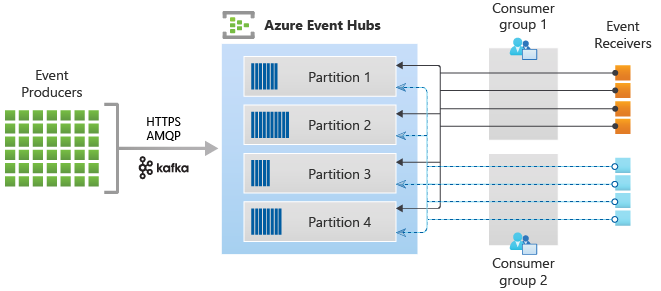
Azure Event Hubs is the big data streaming service of Azure. It is designed for high throughput data streaming scenarios where customers may send billions of requests per day. Key components:
- Event producers. publish events using HTTPS or Advanced Message Queuing Protocol (AMQP) 1.0 or Apache Kafka (1.0 and above).
- Partitions. Each consumer only reads a specific subset, or partition, of the message stream.
- Consumer groups. Views (state, position, or offset) of an entire event hub. Consumer groups enable multiple consuming applications to each have a separate view of the event stream and to each read the stream independently at its own pace and with its own offsets.
- Throughput units. Prepurchased units of capacity that control the throughput capacity of Event Hubs.
- Event receivers. Event handlers read event via the AMQP 1.0 session.

Azure IoT Hub is a managed service, hosted in the cloud, that acts as a central message hub for bidirectional communication between your IoT application and the devices it manages. You can use Azure IoT Hub to build IoT solutions with reliable and encrypted communications between millions of IoT devices and a cloud-hosted solution back-end. You can connect virtually any device to IoT Hub.