Very bare walkthrough for first time users
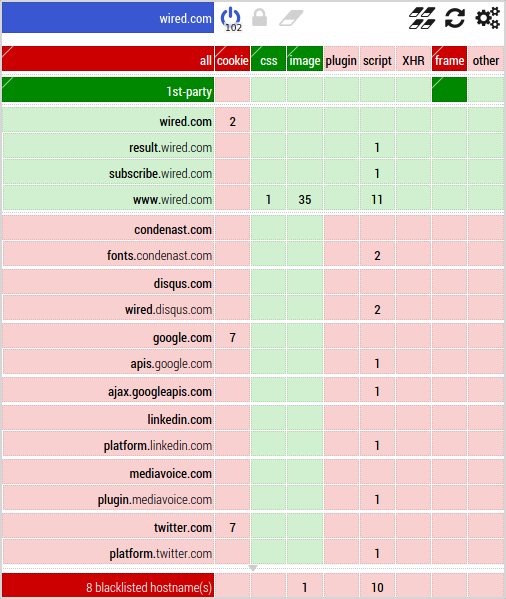
Images are way easier than wall of texts to explain how µMatrix works. So let's visit wired.com.
When you first visit wired.com, open the matrix:
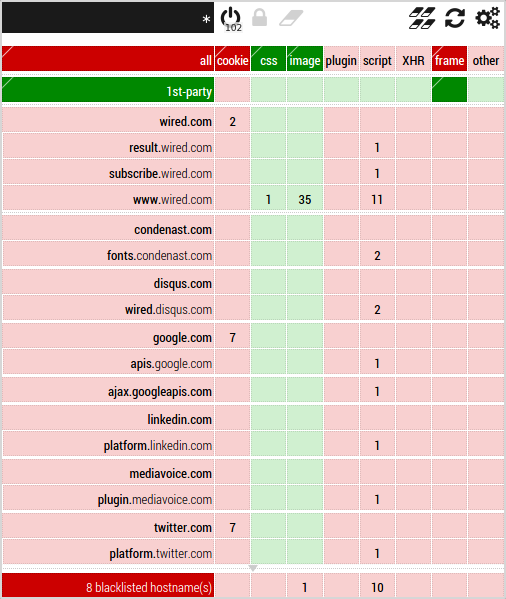
The top-most left-most cell is the currently selected scope. The currently selected scope is just a user interface thing. This allows you to look at, or edit rules in a specific scope. The matrix filtering engine always filter net requests by evaluating rules in the narrowest scope first.
All rules in µMatrix apply to a specific scope. Above in the picture, the * is selected. The * is the global scope. The global scope contains rules which applies everywhere, on every page you visit.
Since µMatrix works in block-all/allow-exceptionally out of the box, pretty much everything is blocked in the global scope, except for CSS-related resources and images.
Let's switch scope to wired.com: click the scope cell, and select wired.com. The matrix looks different now: