Describe the bug
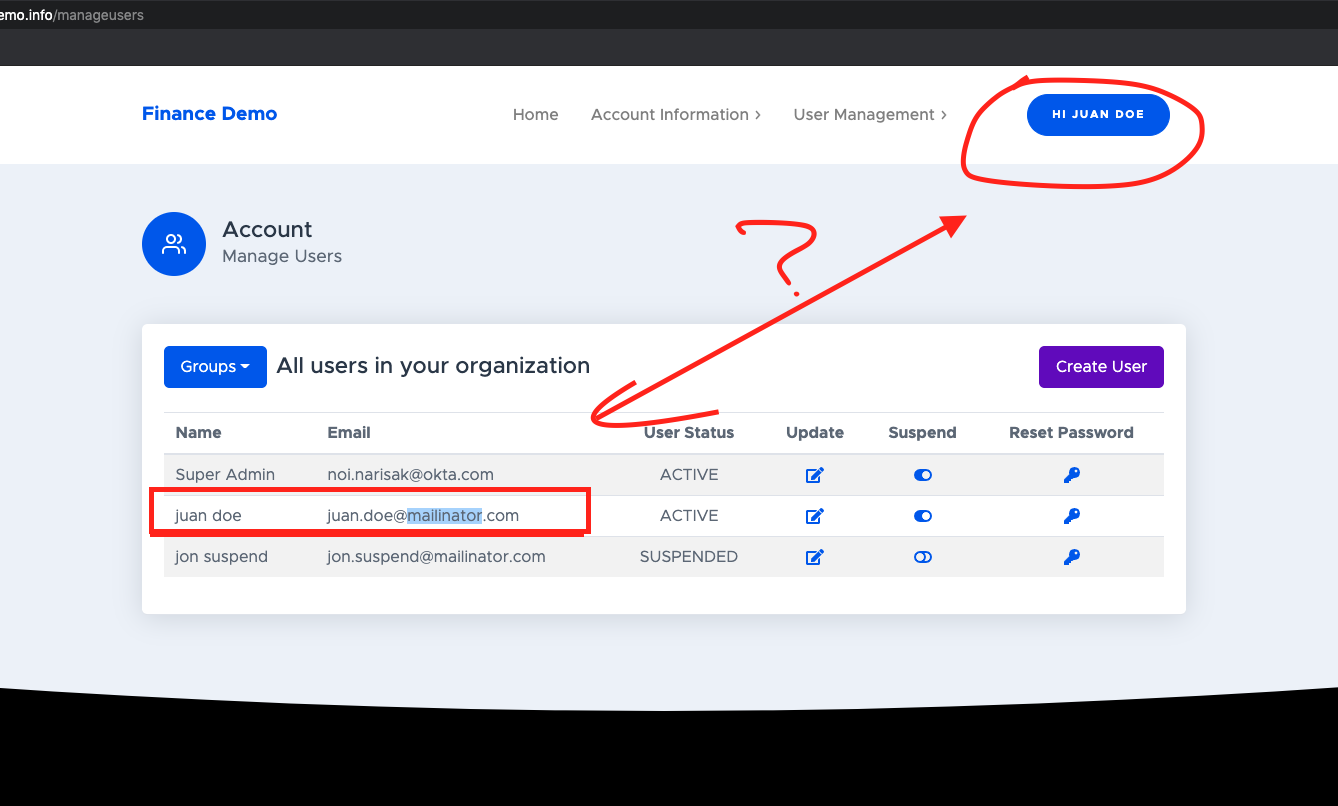
I'm logged in as Juan.Doe and I navigate to Manage User screen. I should not be able to suspend my self!
To Reproduce
Steps to reproduce the behavior:
- Go to self serve registration process.
- On Home > Click Open and Account Today and complete the registration process.
- Log in as the new user and navigate to User Management. Click user > Profile > User Management Manage Users.
- On Account: Manage Users, you are able to
update, suspend, reset password the current logged in user. 👎
Expected behavior
Logged in users should not be able to update, suspend, reset password themselves. Does not make sense.
Screenshots
If applicable, add screenshots to help explain your problem.
Desktop (please complete the following information):
- OS: macOS
- Browser: chrome
- Version: 86
Additional context
n/a

Describe the bug
I'm logged in as Juan.Doe and I navigate to Manage User screen. I should not be able to suspend my self!
To Reproduce
Steps to reproduce the behavior:
update,suspend,reset passwordthe current logged in user. 👎Expected behavior
Logged in users should not be able to
update,suspend,reset passwordthemselves. Does not make sense.Screenshots

If applicable, add screenshots to help explain your problem.
Desktop (please complete the following information):
Additional context
n/a