Arduino provide analog output for some of its digital pin, analog output meaning it is generating a voltage value that is in between 0V and 5V. In actual, Arduino generates Puise-Width-Modulation (PWM) which is essentially turning the voltage on and off very quickly to simulate the analog voltage. By adjusting the duty cycle, we can alter the "analog voltage". PWM is very useful for controlling Servo motor and DC motor. Read this article from Arduino to understand PWM more.
The table below showing all the analog write avaliable pin on various Arduino boards.
| BOARD | PWM PINS | PWM FREQUENCY |
|---|---|---|
| Uno, Nano, Mini | 3, 5, 6, 9, 10, 11 | 490 Hz (pins 5 and 6: 980 Hz) |
| Mega | 2 - 13, 44 - 46 | 490 Hz (pins 4 and 13: 980 Hz) |
| Leonardo, Micro, Yún | 3, 5, 6, 9, 10, 11, 13 | 490 Hz (pins 3 and 11: 980 Hz) |
| Uno WiFi Rev.2 | 3, 5, 6, 9, 10 | 976 Hz |
| MKR boards * | 0 - 8, 10, A3 (18), A4 (19) | 732 Hz |
| MKR1000 WiFi * | 0 - 8, 10, 11, A3 (18), A4 (19) | 732 Hz |
| Zero * | 3 - 13, A0 (14), A1 (15) | 732 Hz |
| Due ** | 2-13 | 1000 Hz |
| 101 | 3, 5, 6, 9 | pins 3 and 9: 490 Hz, pins 5 and 6: 980 Hz |
For Arduino UNO, pins 3, 5, 6, 9, 10, 11 are PWM-available, you can see they have tilde sign next to the pin numbers.


void setup(){
    pinMode(10, OUTPUT);
}

int i = 0;
void loop(){
    analogWrite(13, i++);
    delay(15);
    if (i >= 255) i=0;
}
In this example, I use pin 10 which has PWM output. Note that the same writing of pinMode to let our microcontroller to configure pin 10 to be at output mode. On Arduino UNO, analogWrite slices the voltage into 256 levels, such that analogWrite(10, 0) would be full off and analogWrite(10, 255) will be full on.
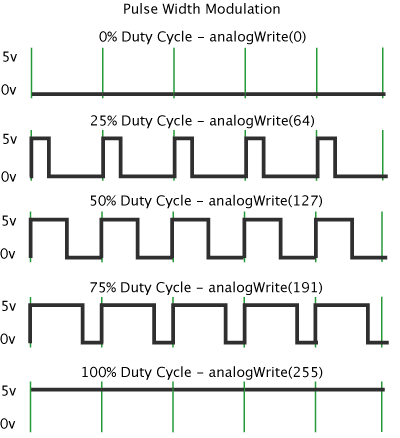
I used variable i to hold my analog level. The line int i = 0; is the declare and initializer of my variable i to be an integer type and has a value of 0. i++ increments the value by one for each pass and if (i >= 255) i=0; is a if-condition that reset my i to be zero once i is greater or equal to 255.
In summary, I ask the microcontroller to increase the brightness of the LED slowly and reset it once it hit the full brightness. In a more verbose writing, see below:
void setup(){
    pinMode(10, OUTPUT);
}

int i = 0;
void loop(){
    analogWrite(13, i);
    i = i + 1;
    delay(15);
    if (i >= 255){
        i=0;
    }
}However, it is more satisfying is the brightness of the LED is fading in and out. Then i should be increasing and then decreasing symmetrically.
void setup(){
    pinMode(10, OUTPUT);
}

int i = 0;
bool FADING_IN = true;
void loop(){
    analogWrite(13, i);
    delay(15);
    if (FADING_IN){
        i++;
        if ( i >= 255 ){
            FADING_IN = false;
    }else{
        i--;
        if ( i <= 0 ){
            FADING_IN = true;
    }
}
Here we add a new type of variable, FADING_IN is a boolean type which it can only hold true or false. In the begining, FADING_IN is true that the if statement will enter the first block which increment the value i one at a time. Once i is greater or equal to 255, it switches FADING_IN into false, such that in the next iteration, the if-statement will enter the second block, which decrement the value i and so on.