Home
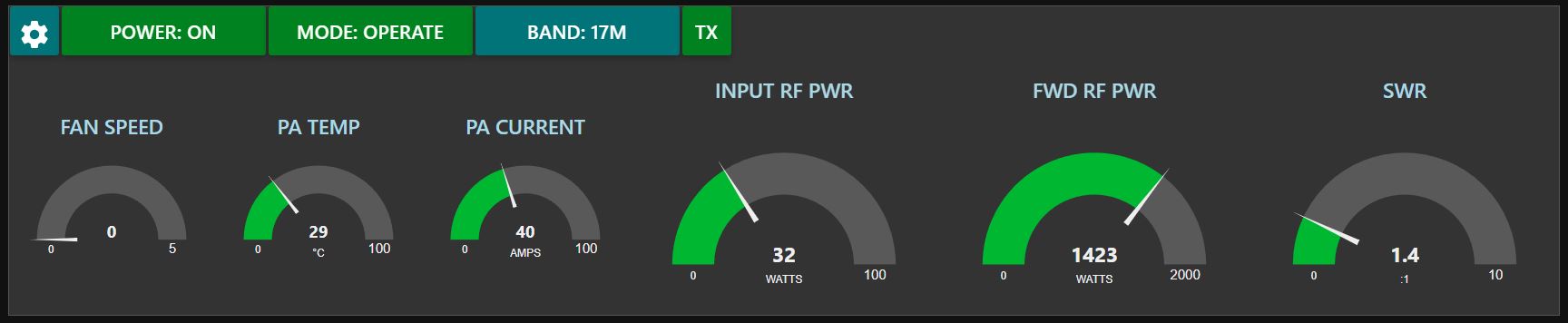

KPA1500 amplifier remote control for node-red on Windows.
The main flow:
This flow presents the command and control interface. The state of the UI is driven wholly by polling the amp and makes no assumptions based on commands issued. This way the true state of the amp is known.
Polling commands are issued at an approximate 20Hz rate, this copies what the Elecraft supplied KPA1500 app does and this update rate is approx. the maximum at which the amp can respond.
There are two polling loops, a high speed (20Hz) loop for things like power and SWR, and a low speed loop (1Hz) for things like fan speed, etc.
The amp is incredibly picky about batches of commands coming in and will often respond with garbled messages when presented with long strings of commands. Therefore the commands are metered out in a closed loop fashion with no command going until the answer to the previous command has been received. Low speed commands are also carefully interspersed with high speed commands so that the various gauges and readouts will be as smooth as possible.
The UI cheats a litle when the amp is in standby. Normally input RF power is not reported on the FWD power gauge in standby, but this is handled in the flow.
All amp fault messages are parsed and displayed as a pop-up should anything occur.
There is a link-in node to accept commands from other flows. These are also metered into the amp stream. This allows other flows to effect control such as for band switching or macro operations.
The settings flow:
The settings flow allows for no hardcoding of network parameters. An IP address must be used, an FQDN may fail, and will fail where MAC lookup is concerned. A MAC is required for remote power control, but this flow conveniently will do the arp table lookup for you, just put in the IP and port, click save, and the flow will take it from there.
No checking is done on the settings inputs, so type carefully! But you shouldn't be able to break anything.
Amp network settings are saved in c:\node-red\kpa_settings.json. The directory will be created if it is missing.
Developed under node 16.12.0 and npm 8.1.0.