Skip to content

Conversation

@itsmeichigo
Copy link
Contributor

Closes: #8586

Description

This PR continues the migration for endpoints to use REST API. Changes include:

  • Updated PaymentGatewayMapper and PaymentGatewayListMapper.
  • Enabled REST API on the payment gateway list fetch and payment gateway update endpoints.

Testing instructions

  • Enable the feature flag applicationPasswordAuthenticationForSiteCredentialLogin and build the app.
  • Log out of the app or skip onboarding if needed.
  • On the prologue screen, select "Enter your site address" and enter the address of your self-hosted store.
  • Proceed to log in with site credentials.
  • After the login succeeds, you should be navigated to the home screen.
  • Navigate to Menu tab and select Payments.
  • Notice on the Payments screen that the correct payment gateways on your site are loaded.
  • Toggle the switch of Pay in person row. The value should be updated correctly without any error.

Screenshots


  • I have considered if this change warrants user-facing release notes and have added them to RELEASE-NOTES.txt if necessary.

@itsmeichigo itsmeichigo added type: task An internally driven task. feature: REST API Authenticating requests using application password and using REST API instead of Jetpack tunnel. labels Jan 9, 2023
@itsmeichigo itsmeichigo added this to the 11.9 milestone Jan 9, 2023
@wpmobilebot
Copy link
Collaborator

You can test the changes from this Pull Request by:
  • Clicking here or scanning the QR code below to access App Center
  • Then installing the build number pr8587-cc8e878 on your iPhone

If you need access to App Center, please ask a maintainer to add you.

Base automatically changed from feat/8582-customer-REST-migration to trunk January 9, 2023 11:01
@selanthiraiyan selanthiraiyan self-assigned this Jan 9, 2023
Copy link
Contributor

@selanthiraiyan selanthiraiyan left a comment

Choose a reason for hiding this comment

The reason will be displayed to describe this comment to others. Learn more.

LGTM 🚢

Copy link
Contributor

@joshheald joshheald left a comment

Choose a reason for hiding this comment

The reason will be displayed to describe this comment to others. Learn more.

I'm struggling to actually test this as my self-hosted sites (via Pressable or Jurassic Ninja) give this error when I try to log in using site creds, even though I've not knowingly got a custom admin URL:
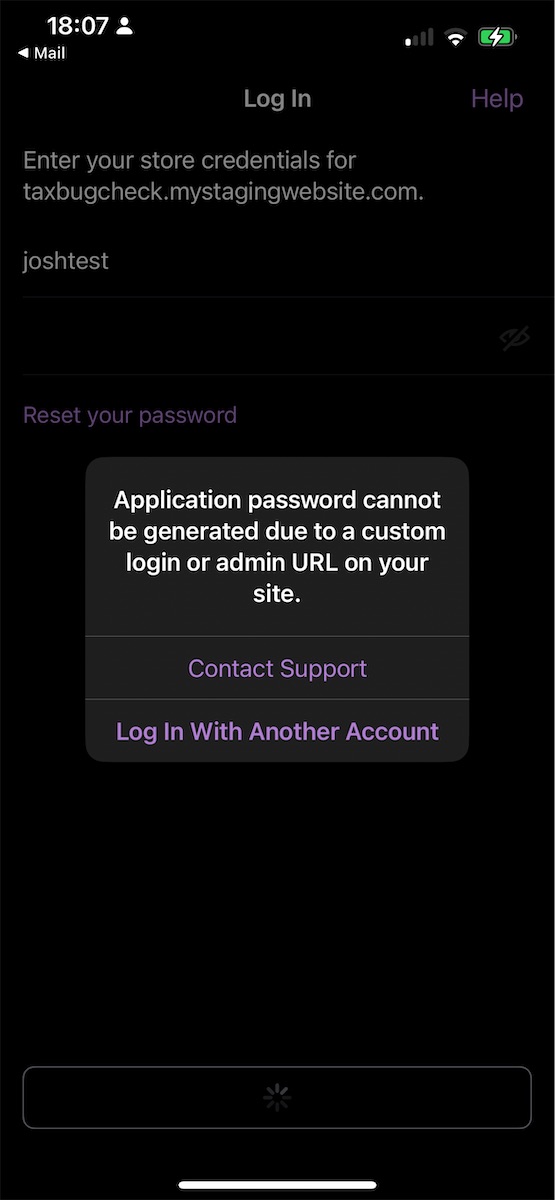
login-error

That said, the code looks fine to me and this is clearly part of a bigger project, so I've nothing to add to @selanthiraiyan's review.

If any of that sounds unexpected, I'm happy to look further: just send me any questions and/or hints about why it doesn't like these sites I'm using and I'll dig in a bit deeper.

@itsmeichigo
Copy link
Contributor Author

itsmeichigo commented Jan 10, 2023

Thanks for the review @joshheald! If possible, could you test again with Proxyman and see which requests failed when you try to log in and what the errors are about?

For now, I'm merging this PR but we can still follow up about the above issue here or on Slack, wherever you prefer.

@itsmeichigo itsmeichigo merged commit 41756a5 into trunk Jan 10, 2023
@itsmeichigo itsmeichigo deleted the feat/8586-payment-gateway-migration branch January 10, 2023 03:02
@joshheald
Copy link
Contributor

Thanks for the review joshheald! If possible, could you test again with Proxyman and see which requests failed when you try to log in and what the errors are about?

No worries @itsmeichigo. I've had another look, and I'm still getting the same error. I think the direct requests to my site's URL are the ones which matter, right? It looks like we get rate-limited.

Here's a timeline:

  1. POST XMLRPC system.listMethods: 200 OK
  2. POST XMLRPC wp.getOptions with my site credentials: 200 OK
  3. POST wp-json/wp/v2/users/me/application-passwords: 401 Unauthorized with code rest_not_logged_in
  4. POST wp-login.php: 302 Found, redirecting to /wp-admin/admin-ajax.php?action%3Drest-nonce
  5. GET wp-admin/admin-ajax.php?action=rest-nonce: 200 OK, response body was 10 hexadecimal characters. Looks potentially like an application password?
  6. GET wp-admin/admin-ajax.php?action=rest-nonce: 429 Too Many Requests

I'm not sure why there are two requests to the admin-ajax.php?action=rest-nonce, it seems like probably the code in the first one would be enough? This happens consistently on my Pressable site, and I saw the same error message on Jurassic Ninja yesterday, though of course the cause may have been different.

I tried with another Pressable site, and it follows exactly the same flow.

Today, my Jurassic Ninja site is logging in correctly, and the timeline is the same as the above, except that it doesn't have number 6: we don't double-request the application password.

I was able to confirm that the Pay in Person toggle works correctly on my Jurassic Ninja site with these changes.

Sign up for free to join this conversation on GitHub. Already have an account? Sign in to comment

Labels

feature: REST API Authenticating requests using application password and using REST API instead of Jetpack tunnel. type: task An internally driven task.

Projects

None yet

Development

Successfully merging this pull request may close these issues.

REST Request: Migrate payment gateway endpoints

5 participants