This sample trains and renders a learned robot-manipulation policy on AWS Deadline Cloud, using a MuJoCo simulation of the Strands Robots so100 arm. It is a single submitted job that runs three dependent steps on managed GPU workers:
 ┌───────────────┐     ┌───────────────┐     ┌───────────────┐
 │  1. Datagen   │ ──▶ │   2. Train    │ ──▶ │   3. Render   │
 │  MuJoCo sim   │     │  ACT (LeRobot)│     │ policy rollout│
 │  → LeRobot    │     │  finetune     │     │ → MP4 + PNG   │
 │    dataset    │     │  → checkpoint │     │               │
 └───────────────┘     └───────────────┘     └───────────────┘
 └──────────── shared OutputDir (job attachment) ────────────┘
You hand it a robot and a task instruction. It generates training data in simulation and finetunes a policy on that data, then renders a video of the learned policy driving the sim.
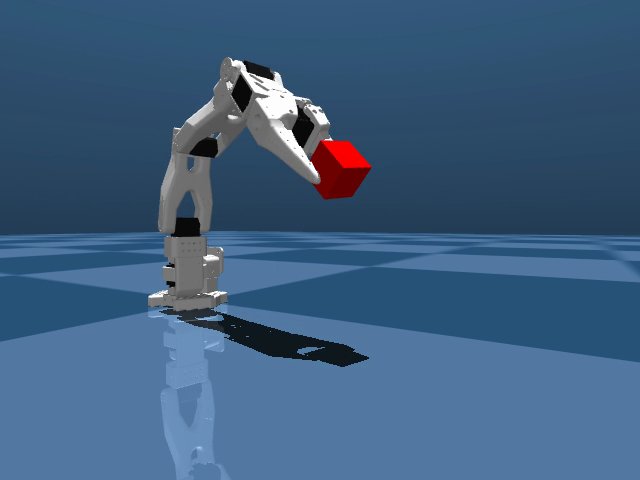
A policy trained on real-robot camera images cannot drive a simulator. The sim renders don't look like the real world (the real→sim appearance gap), so the policy flails. This pipeline closes that gap by training on images rendered from the same simulator the policy will run in. The training data and the deployment target share a renderer, so what the policy learns transfers.
The steps are wired with Open Job Description (OpenJD) dependsOn
dependencies and share one OutputDir that flows INOUT:
| Step | Reads | Writes | What it does |
|---|---|---|---|
| Datagen | (none) | OutputDir/dataset/ |
Scripted joint-space pick of a cube in MuJoCo, recorded as a LeRobot dataset. Each episode is verified by a cube-height check (did the block leave the floor?) and discarded if it fails. |
| Train | OutputDir/dataset/ |
OutputDir/checkpoint/ |
Finetunes a LeRobot ACT policy on the generated dataset (lerobot-train, CUDA). |
| Render | OutputDir/checkpoint/ |
OutputDir/*.mp4, *.png |
Drives a MuJoCo so100 rollout with the finetuned policy and records the result. |
Because the steps are independent and share the work directory, you can re-run a single step. You can re-render with a new camera without re-generating data or re-training.
- Genuine physical grasp. Datagen performs a physical pinch: the arm reaches from home, descends onto the cube with the gripper open, closes, and lifts. The grip is marginal, so each episode is verified. It checks that the cube actually left the floor and discards (then retries) any episode that didn't. Roughly 70 to 80% of randomized attempts hold, and only those reach the dataset, so a slipped grasp doesn't poison the training data.
- Tuned for the learned policy, not the scripted demo. The grasp pose is deliberately error-tolerant. A low, centered, wide-open grip looks cleaner in the scripted rollout, but it is a tighter target: the learned policy's descent has x,y error, and a tight grip turns a near-miss into a knock that shoves the cube away. A slightly higher, more forgiving grip on a stable cube reproduces more reliably once the imperfect learned policy is the one driving.
- Finetune in-env instead of loading a public checkpoint. Public so100
checkpoints on HuggingFace fail to load on the pinned LeRobot due to
config-schema drift (older ACT checkpoints lack the
typefield; newer pi0 checkpoints carry fields the installed config rejects). Finetuning writes a checkpoint with the same LeRobot version we render with, so it always loads. - Reproducible environment. The
CondaPackages/CondaChannelsjob parameters (defaultpython=3.12 pip git ffmpegonconda-forge) are consumed by the Conda queue environment attached to the queue (the same job parameters the repo'sconda_queue_env_*templates read), which solves them into the per-job environment. Each step alsopip installs the Strands package spec at runtime, so every worker gets the same environment.
The Instruction parameter (default pick up the red cube) is recorded as the
language annotation on every frame of the dataset, the ACT policy is conditioned
on it during training, and it is passed to the policy again at render time.
Note that this sample demonstrates a single task. Every training episode carries
the same instruction and the same scripted pick, so the policy learns to
reproduce that one behavior. The instruction annotates and conditions the data,
but it does not select behavior here: submitting with a different Instruction
re-labels the dataset without changing what the robot does. It would still
attempt the pick.
To make the instruction actually steer behavior, you would generate episodes for multiple distinct tasks (each with its own instruction and motion) so the policy learns to map language → behavior. That multi-task extension is a natural next step but is out of scope for this single-task demo.
- A Deadline Cloud farm and queue, with a Linux x86_64 GPU fleet (the steps
render headless via
MUJOCO_GL=egland train on CUDA). - A Conda queue environment
on the queue that consumes the
CondaPackages/CondaChannelsjob parameters (e.g. the repo'sconda_queue_env_*templates). This bundle supplies those parameters; the queue environment solves them into the per-job environment. - The Deadline Cloud CLI
configured (
deadline config showresolves your default farm/queue).
# Submit with an absolute, known output path (so outputs upload correctly):
OUT="$(pwd)/output"; mkdir -p "$OUT"
deadline bundle submit mujoco_sim_to_policy -p "OutputDir=$OUT" --yes
Or review parameters in a GUI before sending:
deadline bundle gui-submit mujoco_sim_to_policyWatch progress and collect the video:
deadline job get --job-id <job-id>
deadline job download-output --job-id <job-id>| Parameter | Default | Notes |
|---|---|---|
Robot |
so100 |
Robot model to load. |
Episodes |
150 |
Target count of verified pick episodes in the dataset. |
TrainSteps |
6000 |
ACT finetuning steps. |
TrainBatchSize |
8 |
Training batch size. |
Randomize |
true |
Per-episode domain randomization (cube position/color). |
Instruction |
pick up the red cube |
Task string recorded with each frame. |
Duration |
12.0 |
Rendered video length (seconds). |
Fps |
30 |
Video frame rate. |
CubeSize |
0.036 |
Cube edge length (m). The grasp recipe is tuned for this size. |
DemoCameraPosition / DemoCameraTarget |
see values | Camera for the demo render. |
CameraPlacements |
JSON | top + wrist camera poses the policy observes. |
StrandsPackageSpec |
strands-robots[sim-mujoco,lerobot] @ git+...@main |
pip install spec. Installed from GitHub main (PyPI 0.3.8 lacks the sim-mujoco extra). |
CondaPackages |
python=3.12 pip git ffmpeg |
Packages for the Conda queue environment. |
CondaChannels |
conda-forge |
Conda channels. |
OutputDir |
output |
Shared work dir; holds dataset/, checkpoint/, and the render output. Pass an absolute path on submit. |
JobScriptDir |
scripts |
Hidden. Directory holding the bundled generate_dataset.py + render_scene.py, staged to the worker as a job-attachment input. |
openjd check   template.yaml
openjd summary template.yaml -p OutputDir=outputThe steps are independent and share the work directory, so you can run part of the flow by re-running individual steps:
- Re-render only: once
OutputDir/checkpoint/exists, re-run theRenderstep (e.g. with a new camera) without re-generating data or re-training. - Re-train only: re-run
Train(andRender) against an existingOutputDir/dataset/without re-runningDatagen. - Datagen only: run only the first step to produce the LeRobot dataset.
Note: the
Datagenstep regenerates from scratch each time it runs. It clearsOutputDir/dataset/before recording. To finetune on a dataset you supply yourself, skipDatagenand place your dataset atOutputDir/dataset/before runningTrain.
A note for engineers on running datagen at scale. Generating data in a batch on a farm surfaces bugs that one-off local testing hides. Example: the arm is teleported back to its home pose between episodes, which resets joint positions but not velocities. A single-episode local render looks perfect, but in a 150-episode batch, residual velocity from episode 1's lift carried into episode 2's grasp, so only the first episode would grip and the rest silently slipped. The fix (zeroing velocity on reset) is in the datagen script; the lesson is that batch-scale generation is where this class of bug shows up.