A lightweight, zero-dependency Neovim plugin that aims to keep you focused while navigating your buffer.
Some setups use set scrolloff=999 to keep the cursor centered and smooth the scrolling experience.
But once you start making small jumps, you'll notice how disorienting it can be.
On vertical monitors especially, having your cursor land at the halfway mark
makes everything above it redundant.
focusline.nvim addresses this by keeping your cursor at a fixed viewport position/line
while you navigate, reducing disorientation and keeping your eyes on one consistent reading line.
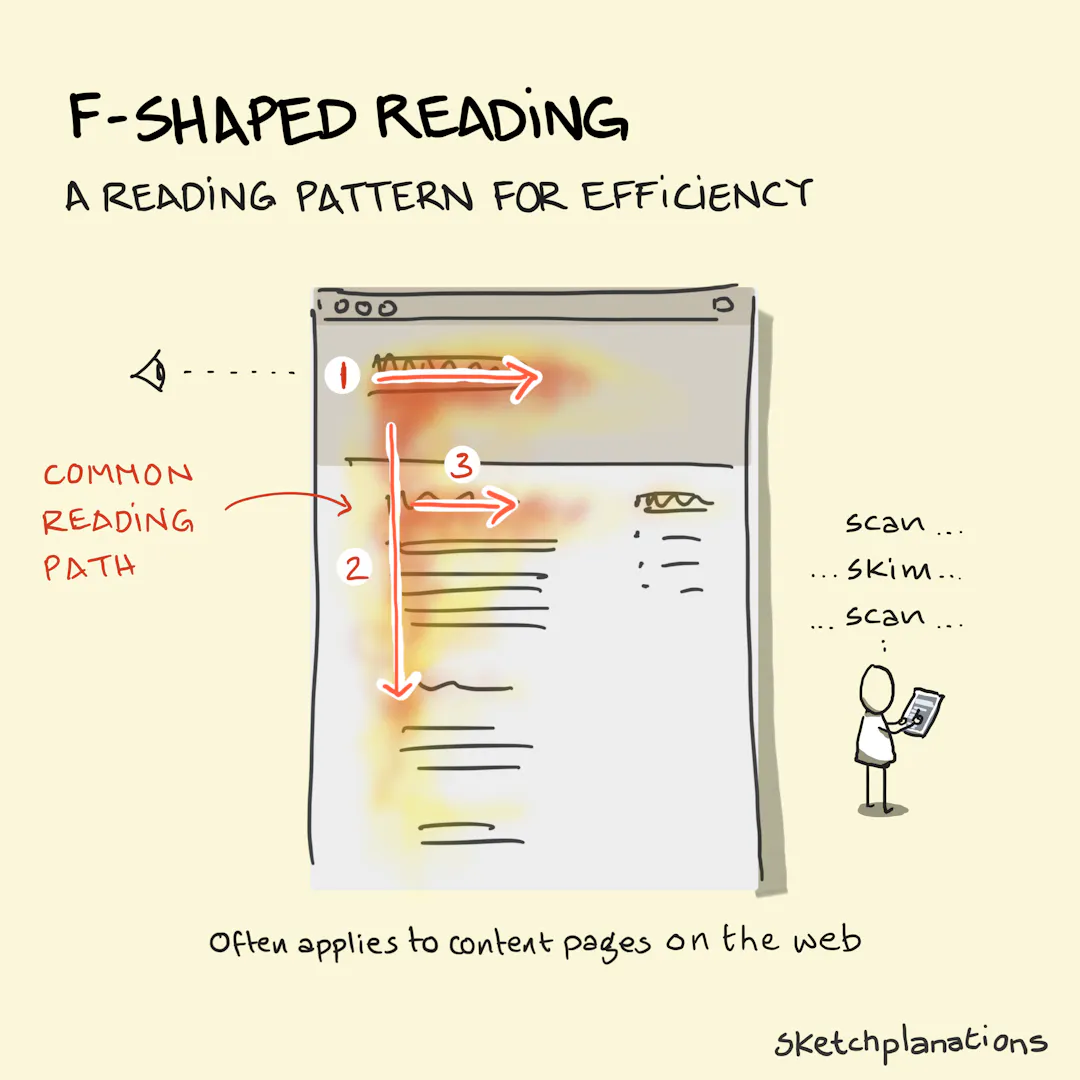
Although the F-Shaped Reading pattern was discovered in webpage design and content layout, it still applies to editors — read it to understand how screen layout affects fast reading.

Requires nvim >= 0.12
vim.pack.add({
  { src = 'https://github.com/ABDsheikho/focusline.nvim' },
})

require('focusline').setup({
  -- focus_target can be a line number (e.g., 15), or a ratio (e.g., 0.25, 1 / 4, "25%").
  focus_target = "30%", -- try it with 30%
  -- which motion to associate focusline with.
  with_motion = {
    "zz",
    "z,", -- you can define your own keymap.
  },
})
Using lazy.nvim
{
  "ABDsheikho/focusline.nvim",
  opts = {
    -- focus_target can be a line number (e.g., 15), or a ratio (e.g., 0.25, 1 / 4, "25%").
    focus_target = "30%", -- try it with 30%
    -- which motion to associate focusline with.
    with_motion = {
      "zz",
      "z,", -- you can define your own keymap.
    },
  },
}focusline.nvim comes with a default implementation of zz as its default and only config.
{
  focus_target = 0.5, -- 0.5 centers the cursor in the viewport
  with_motion = {
    "zz",
  },
}require('focusline').setup({
-- Focus target: where to position the cursor in the viewport
-- Can be:
-- - A line number (e.g., 15)
-- - A ratio between 0.0 and 1.0 (e.g., 0.5 for middle)
-- - A percentage string (e.g., "30%")
focus_target = "30%",
-- Motions that trigger focus alignment
with_motion = {
-- Simple motion: always apply focus
"zz",
-- To map keys like `<C-D>` and `<C-U>`, you can either:
"^D", -- While you're in insert-mode, press the following sequence `<C-V><C-D>`
"\x15", -- or you can use **ASCII control character** directly, such as `\x15` for `<C-U>`
-- see also: [ASCII Codes - NI](https://www.ni.com/docs/en-US/bundle/labview-api-ref/page/vi-lib/string/ascii-codes.html)
-- Motion with keymap description, or any other `vim.keymap.set()` option
-- see `:h vim.keymap.set()`
{ "z,", keymap_opts = { desc = "Focus this line" } },
-- Motion with rules (focus only after N consecutive uses)
--
-- Example:
-- For when you use a motion to make your cursor follow your reading/eyesight.
{ "(", rules = { on_repeat = 5 } },
{ ")", rules = { on_repeat = 5 } },
-- Motion with rules (focus only when count >= N)
--
-- Example:
-- For when you need to _auto-adjust_ your viewport after you reached upper `vim.o.scrolloff`
{ "k", rules = { on_count = 10 } },
-- Motion with rules (wait N ms before applying focus)
--
-- Example:
-- For when you scroll through buffer section, and you settle on a section to read it.
{ "{", rules = { await = 1000 } },
{ "}", rules = { await = 1000 } },
-- Multiple rules (first matching rule wins)
{
"j",
rules = {
{ on_repeat = 20 },
{ await = 0, on_count = 20 },
{ await = 1000, on_count = 5 },
},
},
},
})| Option | Type | Default | Description |
|---|---|---|---|
focus_target |
number or string |
0.5 | Target position in viewport |
with_motion |
List of string|focusline.Motion |
(see below) | List of motions to enhance |
Each entry in with_motion can be:
- A string: motion key that always triggers focus (e.g.,
"zz") - A table with the following fields:
| Field | Type | Default | Description |
|---|---|---|---|
motion |
string |
(required) | The motion key |
mode |
string or string[] |
"n" |
Vim mode(s) for the keymap |
rules |
Rule or Rule[] |
nil |
Rule(s) for conditional focus |
keymap_opts |
vim.keymap.set.Opts |
nil |
Options passed to vim.keymap.set() |
Rules determine when focus is applied:
| Field | Type | Default | Description |
|---|---|---|---|
await |
number |
0 |
Milliseconds to wait before applying focus |
on_count |
number |
0 |
Minimum count prefix required (e.g., 10j) |
on_repeat |
number |
0 |
Minimum consecutive repeats required |
When you navigate using a configured motion, focusline will:
- Execute the motion
- Calculate where the cursor should land relative to your
focus_target - Scroll the viewport to align the cursor at the target position
Rules allow fine-grained control:
await: Useful for fast motions where you want to wait before focusingon_count: Only focus when using a count (e.g.,20jbut notj)on_repeat: Only focus after repeating the motion N times
- When multiple motions are registered for execution after a delay,
the motion with the longest
awaitperiod will be applied. - Trying to combine multiple layers of keymapping (example: using
grdto work asgrdzz) won't work out-of-the-box, and you have to redefine your keymap.
This plugin was written from scratch independently. I am not aware of any existing plugin that solves this problem in the same way. Know of a similar projects? Open an issue to include them.
Licensed under the Apache License, Version 2.0. See LICENSE for details.