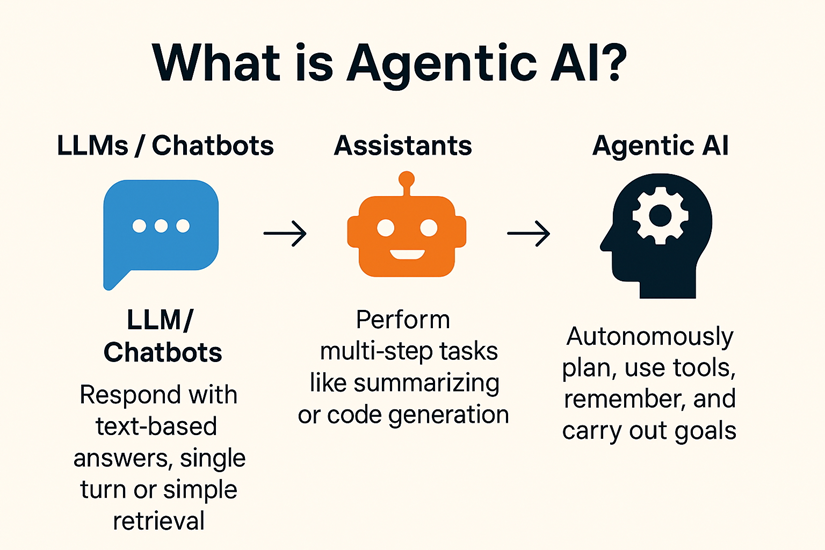
A fully agentic, multi-tool, state-based conversational AI application.
Modular, extensible, and built for rapid tool augmentation.
Demo :- https://multi-tool-agentic-chatbot.onrender.com/
- Agentic Chatbot Core: Interactive chatbot harnessing LLMs and agentic workflows.
- Multi-Tool Support: Integrated tools for tasks like AI news summarization, Wikipedia lookup, PDF/Arxiv parsing, search, and more.
- Plug & Play Tools: Easily add new tools (code, search, summarization, etc.) via declarative architecture.
- Modern Stack: Utilizes LangChain, LangGraph, and a strong Python foundation.
- Web UI & API: Easily expose the chatbot for web or API usage.
Multi-Tool-Agentic-ChatBot/
│
├── app.py # Entrypoint to launch the chatbot app (CLI/server)
├── requirements.txt # Project dependencies
├── LICENSE
├── README.md
├── src/
│ └── langgraph/
│ ├── init.py
│ ├── main.py # Core app orchestration
│ ├── graph/ # Graph logic and flow definition
│ ├── nodes/ # Custom chat nodes (eg. tool routers, selectors, etc)
│ ├── state/ # State management for chat, tool use, etc
│ ├── llms/ # LLM connectors/wrappers
│ ├── tools/ # Individual tool integrations
│ └── ui/ # Web or streamlit UI logic (optional/expandable)
│
├── .vscode/ # VS Code workspace config
- Python >= 3.10
- pip
- API keys (.env) for any enabled LLMs/tools (OpenAI, Groq, Tavily, SerpAPI, etc)
git clone https://github.com/ArpitKadam/Multi-Tool-Agentic-ChatBot.git
cd Multi-Tool-Agentic-ChatBot
pip install -r requirements.txt
Place your API keys in a .env file at the project root as required by your tools/LLMs.
python app.py
By default, this runs the chat app main cycle using the agentic orchestration in src/langgraph/main.py.
If the ui module uses Streamlit (recommended for local demo):
streamlit run app.py
For a full-featured API, adapt app.py to spin up FastAPI or similar if required.
- Add New Tools: Place tool code in
src/langgraph/tools/, wire it into the node/graph logic. - Custom Agents: Edit or build new nodes in
src/langgraph/nodes/. - Workflow: Modify
src/langgraph/graph/ormain.pyfor custom chat/agentic flows. - UI/Backend: Connect to Streamlit, FastAPI, or any relevant frontend in
src/langgraph/ui/.
- Wikipedia Search
- DuckDuckGo or Google Search
- AI News Summarizer
- PDF/Arxiv parsing
- Faiss/Chroma vector search
- OpenAI, Groq, Ollama, Cohere, Nvidia endpoints
- Streamlit, Rich console, etc
(See requirements.txt and the tools/ folder for the full list)
This project is licensed under the Apache 2.0 License. See LICENSE.
- Arpit Kadam (GitHub)
Easily evolve your LLM chatbot with new tools and agentic reasoning… all in Python!