-
-
Notifications
You must be signed in to change notification settings - Fork 2.3k
en platform satori server satori
github-actions[bot] edited this page Mar 9, 2026
·
1 revision
Tip
server-satori is a Koishi plugin that exposes Koishi as a Satori server, so AstrBot can connect to Koishi through Satori.
Make sure you already have a running Koishi instance.
If not, follow official docs first:
- Koishi starter docs: https://koishi.chat/zh-CN/manual/starter/windows.html
- Koishi community: https://koishi.chat/zh-CN/about/contact.html
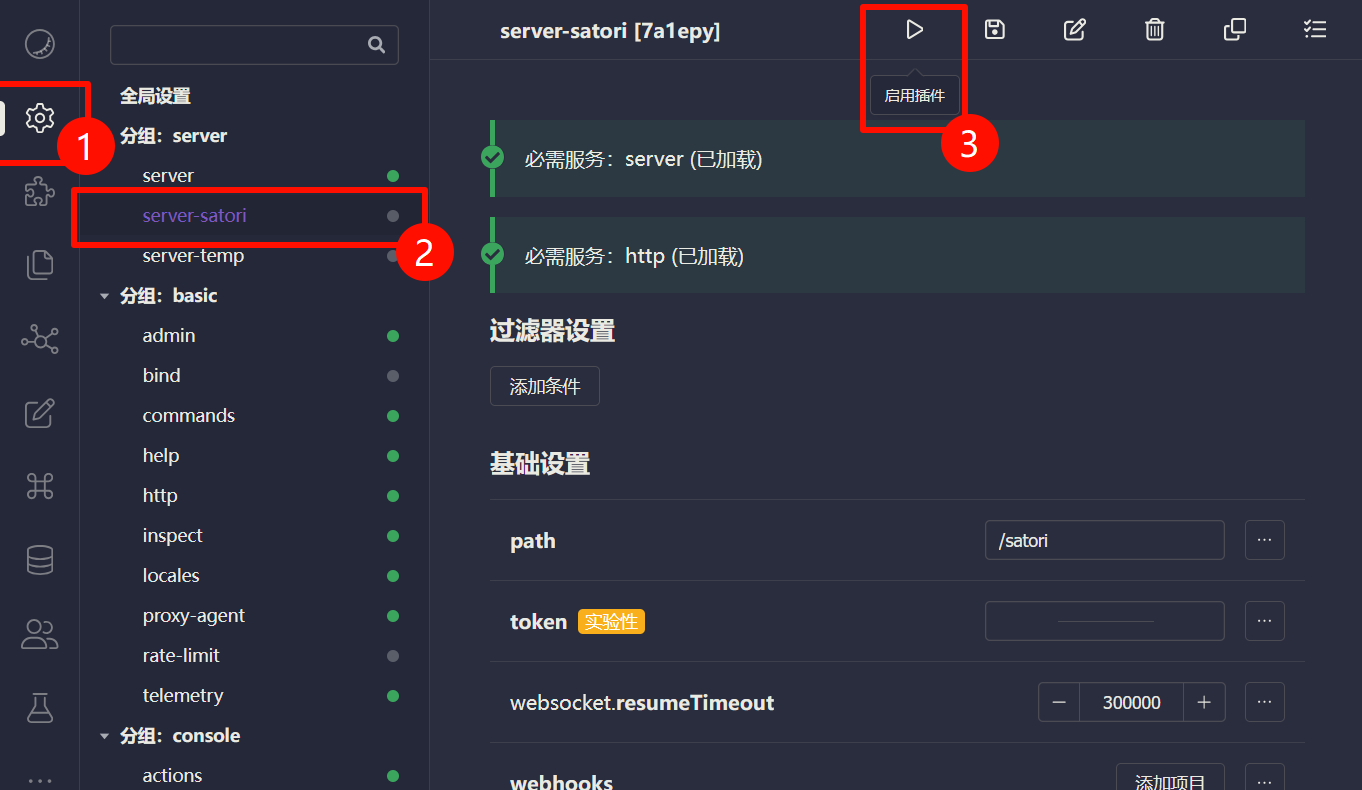
- Open Koishi admin panel.
- Go to
Plugin Config. - Install and enable
server-satori(defaults usually work).
After enabling, server-satori serves Satori API under /satori.
- Open AstrBot Dashboard.
- Click
Bots. - Click
+ Create Bot. - Select
satori.
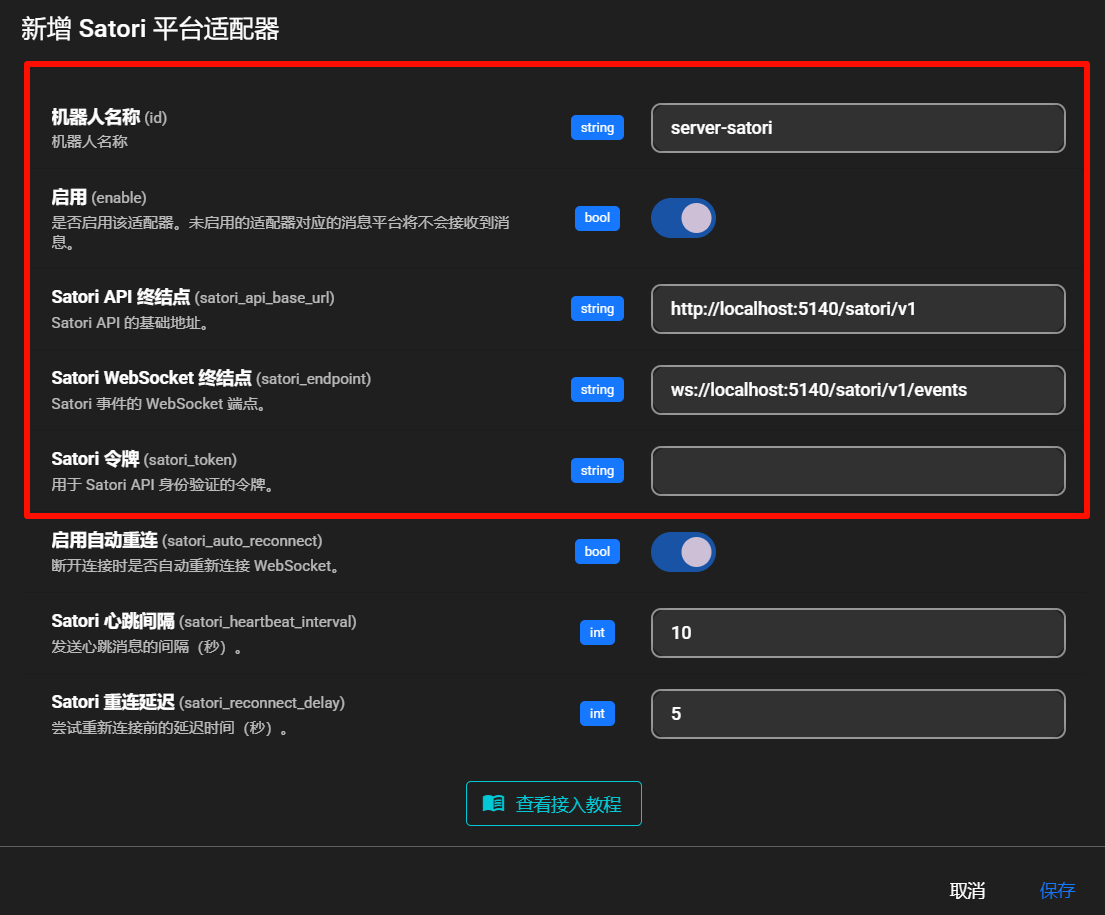
Fill in:
- Bot ID (
id):server-satori - Enable (
enable): checked - Satori API endpoint (
satori_api_base_url):http://localhost:5140/satori/v1 - Satori WebSocket endpoint (
satori_endpoint):ws://localhost:5140/satori/v1/events - Satori token (
satori_token): usually empty unless configured in Koishi
Note
- Koishi default port is
5140. -
server-satoridefault path is/satori. - So the full API base is
http://localhost:5140/satori/v1. - If your Koishi runs on different host/port/path, change accordingly.
Click Save.
AstrBot should now be connected to Koishi via server-satori.
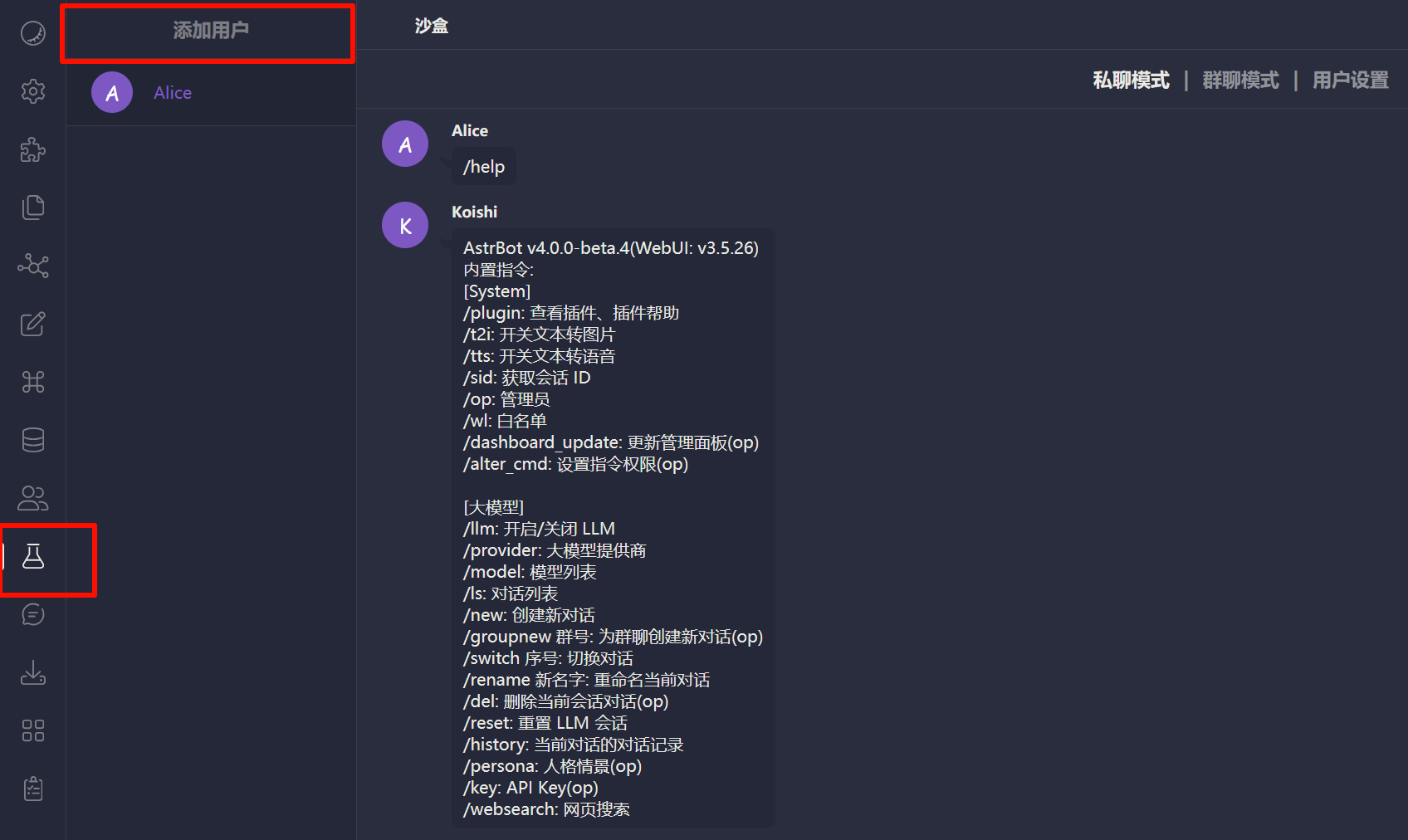
Test by sending an AstrBot command (for example /help) in Koishi sandbox.
If connection fails, check:
- Koishi is running.
-
server-satoriis installed and enabled. - Port/path are configured correctly.
- Firewall is not blocking related ports.
- 首页
- 文档入口
- Top Level
- community events
- deploy
- dev
- others
- platform
- 接入 OneBot v11 协议实现
- 接入钉钉 DingTalk
- 接入 Discord
- 接入 Kook
- 接入飞书
- 接入 LINE
- 接入 Matrix
- 接入 Mattermost
- 接入 Misskey 平台
- 接入 QQ 官方机器人平台
- 通过 QQ官方机器人 接入 QQ (Webhook)
- 通过 QQ官方机器人 接入 QQ (Websockets)
- 接入 Satori 协议
- 接入 server-satori (基于 Koishi)
- 接入 Slack
- 接入消息平台
- 接入 Telegram
- 接入 VoceChat
- AstrBot 接入企业微信
- 接入企业微信智能机器人平台
- AstrBot 接入微信公众平台
- 接入个人微信
- providers
- use
- Home
- Docs Entry
- Top Level
- config
- deploy
- Deploy AstrBot on 1Panel
- Deploy AstrBot on BT Panel
- Deploy AstrBot on CasaOS
- Deploy AstrBot from Source Code
- Community-Provided Deployment Methods
- Deploy via Compshare
- Deploy with AstrBot Desktop Client
- Deploy AstrBot with Docker
- Deploy AstrBot with Kubernetes
- Deploy AstrBot with AstrBot Launcher
- Other Deployments
- Package Manager Deployment (uv)
- Installation via System Package Manager
- Preface
- dev
- AstrBot Configuration File
- AstrBot HTTP API
- Developing a Platform Adapter
- plugin
- AI
- Text to Image
- Handling Message Events
- Plugin Configuration
- Plugin Internationalization
- Plugin Pages
- Sending Messages
- Session Control
- Minimal Example
- Plugin Storage
- AstrBot Plugin Development Guide 🌠
- Publishing Plugins to the Plugin Marketplace
- ospp
- others
- platform
- Connect OneBot v11 Protocol Implementations
- Connect to DingTalk
- Connecting to Discord
- Connect to KOOK
- Connecting to Lark
- Connecting to LINE
- Connecting to Matrix
- Connecting to Mattermost
- Connecting to Misskey Platform
- Connect QQ Official Bot
- Connect QQ via QQ Official Bot (Webhook)
- Connect QQ via QQ Official Bot (Websockets)
- Connect to Satori Protocol
- Connect server-satori (Koishi)
- Connecting to Slack
- Messaging Platforms
- Connecting to Telegram
- Connect to VoceChat
- Connect AstrBot to WeCom
- Connect to WeCom AI Bot Platform
- Connect AstrBot to WeChat Official Account Platform
- Connect Personal WeChat
- providers
- Connect 302.AI
- Agent Runners
- Built-in Agent Runner
- Connect to Coze
- Connect to Alibaba Cloud Bailian Application
- Connect to DeerFlow
- Connect to Dify
- Connect AIHubMix
- coze
- dashscope
- dify
- 大语言模型提供商
- NewAPI
- Connect PPIO Cloud
- Connect LM Studio to Use DeepSeek-R1 and Other Models
- Integrating Ollama
- Connecting to SiliconFlow
- Connecting Model Services
- Connecting to TokenPony
- use
- Agent Runner
- Agent Sandbox Environment ⛵️
- astrbot sandbox
- Docker-based Code Interpreter
- Built-in Commands
- Computer Use
- Context Compression
- Custom Rules
- Function Calling
- AstrBot Knowledge Base
- MCP
- AstrBot Star
- Proactive Capabilities
- Anthropic Skills
- Agent Handoff and SubAgent
- Unified Webhook Mode
- Web Search
- WebUI


