


A library for working with Table Schema in Python.
Tableto work with data tables described by Table SchemaSchemarepresenting Table SchemaFieldrepresenting Table Schema fieldvalidateto validate Table Schemainferto infer Table Schema from data- built-in command-line interface to validate and infer schemas
- storage/plugins system to connect tables to different storage backends like SQL Database
The package use semantic versioning. It means that major versions could include breaking changes. It's highly recommended to specify tableschema version range in your setup/requirements file e.g. tableschema>=1.0,<2.0.
$ pip install tableschemaCode examples in this readme requires Python 3.4+ interpreter. You could see even more example in examples directory.
from tableschema import Table

# Create table
table = Table('path.csv', schema='schema.json')

# Print schema descriptor
print(table.schema.descriptor)

# Print cast rows in a dict form
for keyed_row in table.iter(keyed=True):
print(keyed_row)A table is a core concept in a tabular data world. It represents data with metadata (Table Schema). Let's see how we can use it in practice.
Consider we have some local csv file. It could be inline data or from a remote link - all supported by the Table class (except local files for in-brower usage of course). But say it's data.csv for now:
city,location
london,"51.50,-0.11"
paris,"48.85,2.30"
rome,N/A
Let's create and read a table instance. We use the static Table.load method and the table.read method with the keyed option to get an array of keyed rows:
table = Table('data.csv')
table.headers # ['city', 'location']
table.read(keyed=True)
# [
#   {city: 'london', location: '51.50,-0.11'},
#   {city: 'paris', location: '48.85,2.30'},
#   {city: 'rome', location: 'N/A'},
# ]
As we can see, our locations are just strings. But they should be geopoints. Also, Rome's location is not available, but it's just a string N/A instead of None. First we have to infer Table Schema:
table.infer()
table.schema.descriptor
# { fields:
#   [ { name: 'city', type: 'string', format: 'default' },
#     { name: 'location', type: 'geopoint', format: 'default' } ],
#  missingValues: [ '' ] }
table.read(keyed=True)
# Fails with a data validation error
Let's fix the "not available" location. There is a missingValues property in Table Schema specification. As a first try we set missingValues to N/A in table.schema.descriptor. The schema descriptor can be changed in-place, but all changes should also be committed using table.schema.commit():
table.schema.descriptor['missingValues'] = 'N/A'
table.schema.commit()
table.schema.valid # false
table.schema.errors
# [<ValidationError: "'N/A' is not of type 'array'">]
As a good citizens we've decided to check our schema descriptor's validity. And it's not valid! We should use an array for the missingValues property. Also, don't forget to include "empty string" as a valid missing value:
table.schema.descriptor['missingValues'] = ['', 'N/A']
table.schema.commit()
table.schema.valid # true
All good. It looks like we're ready to read our data again:
table.read(keyed=True)
# [
#   {city: 'london', location: [51.50,-0.11]},
#   {city: 'paris', location: [48.85,2.30]},
#   {city: 'rome', location: null},
# ]
Now we see that:
- locations are arrays with numeric latitude and longitude
- Rome's location is a native Python
None
And because there are no errors after reading, we can be sure that our data is valid against our schema. Let's save it:
table.schema.save('schema.json')
table.save('data.csv')
Our data.csv looks the same because it has been stringified back to csv format. But now we have schema.json:
{
    "fields": [
        {
            "name": "city",
            "type": "string",
            "format": "default"
        },
        {
            "name": "location",
            "type": "geopoint",
            "format": "default"
        }
    ],
    "missingValues": [
        "",
        "N/A"
    ]
}
If we decide to improve it even more we could update the schema file and then open it again. But now providing a schema path:
table = Table('data.csv', schema='schema.json')
# Continue the work
This is a basic introduction to the Table class. To learn more let's take a look at the Table class API reference.
Constructor to instantiate Table class. If references argument is provided, foreign keys will be checked on any reading operation.
source (str/list[])- data source (one of):- local file (path)
- remote file (url)
- array of arrays representing the rows
schema (any)- data schema in all forms supported bySchemaclassstrict (bool)- strictness option to pass toSchemaconstructorpost_cast (function[])- list of post cast processorsstorage (None/str)- storage name likesqlorbigqueryoptions (dict)-tabulatoror storage options(exceptions.TableSchemaException)- raises any error that occurs in table creation process(Table)- returns data table class instance
(str[])- returns data source headers
(Schema)- returns schema class instance
(int/None)- returns the table's size in BYTES if it's already read using e.g.table.read, otherwise returnsNone. In the middle of an iteration it returns size of already read contents
(str/None)- returns the table's SHA256 hash if it's already read using e.g.table.read, otherwise returnsNone. In the middle of an iteration it returns hash of already read contents
table.iter(keyed=Fase, extended=False, cast=True, integrity=False, relations=False, foreign_keys_values=False)
Iterates through the table data and emits rows cast based on table schema. Data casting can be disabled.
keyed (bool)- iterate keyed rowsextended (bool)- iterate extended rowscast (bool)- disable data casting if falseintegrity(dict) - dictionary in a form of{'size': <bytes>, 'hash': '<sha256>'}to check integrity of the table when it's read completely. Both keys are optional.relations (dict)- dictionary of foreign key references in a form of{resource1: [{field1: value1, field2: value2}, ...], ...}. If provided, foreign key fields will checked and resolved to one of their references (/!\ one-to-many fk are not completely resolved).foreign_keys_values (dict)- three-level dictionary of foreign key references optimized to speed up validation process in a form of{resource1: { (foreign_key_field1, foreign_key_field2) : { (value1, value2) : {one_keyedrow}, ... }}}. If not provided but relations is true, it will be created before the validation process by index_foreign_keys_values method(exceptions.TableSchemaException)- raises any error that occurs during this process(any[]/any{})- yields rows:[value1, value2]- base{header1: value1, header2: value2}- keyed[rowNumber, [header1, header2], [value1, value2]]- extended
table.read(keyed=False, extended=False, cast=True, integrity=False, relations=False, limit=None, foreign_keys_values=False)
Read the whole table and returns as array of rows. Count of rows could be limited.
keyed (bool)- flag to emit keyed rowsextended (bool)- flag to emit extended rowscast (bool)- flag to disable data casting if falseintegrity(dict) - dictionary in a form of{'size': <bytes>, 'hash': '<sha256>'}to check integrity of the table when it's read completely. Both keys are optional.relations (dict)- dict of foreign key references in a form of{resource1: [{field1: value1, field2: value2}, ...], ...}. If provided foreign key fields will checked and resolved to its referenceslimit (int)- integer limit of rows to returnforeign_keys_values (dict)- three-level dictionary of foreign key references optimized to speed up validation process in a form of{resource1: { (foreign_key_field1, foreign_key_field2) : { (value1, value2) : {one_keyedrow}, ... }}}(exceptions.TableSchemaException)- raises any error that occurs during this process(list[])- returns array of rows (seetable.iter)
Infer a schema for the table. It will infer and set Table Schema to table.schema based on table data.
limit (int)- limit rows sample sizeconfidence (float)- how many casting errors are allowed (as a ratio, between 0 and 1)(dict)- returns Table Schema descriptor
To save schema use
table.schema.save()
Save data source to file locally in CSV format with , (comma) delimiter
target (str)- saving target (e.g. file path)storage (None/str)- storage name likesqlorbigqueryoptions (dict)-tabulatoror storage options(exceptions.TableSchemaException)- raises an error if there is saving problem(True/Storage)- returns true or storage instance
Creates a three-level dictionary of foreign key references optimized to speed up validation process in a form of {resource1: { (foreign_key_field1, foreign_key_field2) : { (value1, value2) : {one_keyedrow}, ... }}}.
For each foreign key of the schema it will iterate through the corresponding relations['resource'] to create an index (i.e. a dict) of existing values for the foreign fields and store on keyed row for each value combination.
The optimization relies on the indexation of possible values for one foreign key in a hashmap to later speed up resolution.
This method is public to allow creating the index once to apply it on multiple tables charing the same schema (typically grouped resources in datapackage)
Note 1: the second key of the output is a tuple of the foreign fields, a proxy identifier of the foreign key
Note 2: the same relation resource can be indexed multiple times as a schema can contain more than one Foreign Keys pointing to the same resource
relations (dict)- dict of foreign key references in a form of{resource1: [{field1: value1, field2: value2}, ...], ...}. It must contain all resources pointed in the foreign keys schema definition.({resource1: { (foreign_key_field1, foreign_key_field2) : { (value1, value2) : {one_keyedrow}, ... }}})- returns a three-level dictionary of foreign key references optimized to speed up validation process
A model of a schema with helpful methods for working with the schema and supported data. Schema instances can be initialized with a schema source as a url to a JSON file or a JSON object. The schema is initially validated (see validate below). By default validation errors will be stored in schema.errors but in a strict mode it will be instantly raised.
Let's create a blank schema. It's not valid because descriptor.fields property is required by the Table Schema specification:
schema = Schema()
schema.valid # false
schema.errors
# [<ValidationError: "'fields' is a required property">]
To avoid creating a schema descriptor by hand we will use a schema.infer method to infer the descriptor from given data:
schema.infer([
  ['id', 'age', 'name'],
  ['1','39','Paul'],
  ['2','23','Jimmy'],
  ['3','36','Jane'],
  ['4','28','Judy'],
])
schema.valid # true
schema.descriptor
#{ fields:
#   [ { name: 'id', type: 'integer', format: 'default' },
#     { name: 'age', type: 'integer', format: 'default' },
#     { name: 'name', type: 'string', format: 'default' } ],
#  missingValues: [ '' ] }
Now we have an inferred schema and it's valid. We can cast data rows against our schema. We provide a string input which will be cast correspondingly:
schema.cast_row(['5', '66', 'Sam'])
# [ 5, 66, 'Sam' ]
But if we try provide some missing value to the age field, the cast will fail because the only valid "missing" value is an empty string. Let's update our schema:
schema.cast_row(['6', 'N/A', 'Walt'])
# Cast error
schema.descriptor['missingValues'] = ['', 'N/A']
schema.commit()
schema.cast_row(['6', 'N/A', 'Walt'])
# [ 6, None, 'Walt' ]
We can save the schema to a local file, and resume work on it at any time by loading it from that file:
schema.save('schema.json')
schema = Schema('schema.json')
This was a basic introduction to the Schema class. To learn more, let's take a look at the Schema API reference.
Constructor to instantiate Schema class.
descriptor (str/dict)- schema descriptor:- local path
- remote url
- dictionary
strict (bool)- flag to specify validation behaviour:- if false, errors will not be raised but instead collected in
schema.errors - if true, validation errors are raised immediately
- if false, errors will not be raised but instead collected in
(exceptions.TableSchemaException)- raise any error that occurs during the process(Schema)- returns schema class instance
(bool)- returns validation status. Always true in strict mode.
(Exception[])- returns validation errors. Always empty in strict mode.
(dict)- returns schema descriptor
(str[])- returns schema primary key
(dict[])- returns schema foreign keys
(Field[])- returns an array ofFieldinstances
(str[])- returns an array of field names.
Get schema field by name.
Note: use update_field if you want to modify the field descriptor
name (str)- schema field name(Field/None)- returnsFieldinstance orNoneif not found
Add new field to schema. The schema descriptor will be validated with newly added field descriptor.
descriptor (dict)- field descriptor(exceptions.TableSchemaException)- raises any error that occurs during the process(Field/None)- returns addedFieldinstance orNoneif not added
Update existing descriptor field by name
name (str)- schema field nameupdate (dict)- update to apply to field's descriptor(bool)- returns true on success and false if no field is found to be modified
cf schema.commit() example
Remove field resource by name. The schema descriptor will be validated after field descriptor removal.
name (str)- schema field name(exceptions.TableSchemaException)- raises any error that occurs during the process(Field/None)- returns removedFieldinstances orNoneif not found
Cast row based on field types and formats.
row (any[])- data row as an array of values(any[])- returns cast data row
Infer and set schema.descriptor based on data sample.
rows (list[])- array of arrays representing rows.headers (int/str[])- data sample headers (one of):- row number containing headers (
rowsshould contain headers rows) - array of headers (
rowsshould NOT contain headers rows)
- row number containing headers (
confidence (float)- how many casting errors are allowed (as a ratio, between 0 and 1)guesser_cls&resolver_cls- you can implement inferring strategies by providing type-guessing and type-resolving classes [experimental]{dict}- returns Table Schema descriptor
Update schema instance if there are in-place changes in the descriptor.
strict (bool)- alterstrictmode for further work(exceptions.TableSchemaException)- raises any error that occurs during the process(bool)- returns true on success and false if not modified
from tableschema import Schema
descriptor = {'fields': [{'name': 'my_field', 'title': 'My Field', 'type': 'string'}]}
schema = Schema(descriptor)
print(schema.get_field('my_field').descriptor['type']) # string

# Update descriptor by field position
schema.descriptor['fields'][0]['type'] = 'number'
# Update descriptor by field name
schema.update_field('my_field', {'title': 'My Pretty Field'}) # True

# Change are not committed
print(schema.get_field('my_field').descriptor['type']) # string
print(schema.get_field('my_field').descriptor['title']) # My Field


# Commit change
schema.commit()
print(schema.get_field('my_field').descriptor['type']) # number
print(schema.get_field('my_field').descriptor['title']) # My Pretty FieldSave schema descriptor to target destination.
target (str)- path where to save a descriptor(exceptions.TableSchemaException)- raises any error that occurs during the process(bool)- returns true on success
from tableschema import Field

# Init field
field = Field({'name': 'name', 'type': 'number'})

# Cast a value
field.cast_value('12345') # -> 12345
Data values can be cast to native Python objects with a Field instance. Type instances can be initialized with field descriptors. This allows formats and constraints to be defined.
Casting a value will check the value is of the expected type, is in the correct format, and complies with any constraints imposed by a schema. E.g. a date value (in ISO 8601 format) can be cast with a DateType instance. Values that can't be cast will raise an InvalidCastError exception.
Casting a value that doesn't meet the constraints will raise a ConstraintError exception.
Here is an API reference for the Field class:
Constructor to instantiate Field class.
descriptor (dict)- schema field descriptormissingValues (str[])- an array with string representing missing values(exceptions.TableSchemaException)- raises any error that occurs during the process(Field)- returns field class instance
(Schema)- returns a schema instance if the field belongs to some schema
(str)- returns field name
(str)- returns field type
(str)- returns field format
(bool)- returns true if field is required
(dict)- returns an object with field constraints
(dict)- returns field descriptor
Cast given value according to the field type and format.
value (any)- value to cast against fieldconstraints (boll/str[])- gets constraints configuration- it could be set to true to disable constraint checks
- it could be an Array of constraints to check e.g. ['minimum', 'maximum']
(exceptions.TableSchemaException)- raises any error that occurs during the process(any)- returns cast value
Test if value is compliant to the field.
value (any)- value to cast against fieldconstraints (bool/str[])- constraints configuration(bool)- returns if value is compliant to the field
Given a schema as JSON file, url to JSON file, or a Python dict, validate returns true for a valid Table Schema, or raises an exception, exceptions.ValidationError. It validates only schema, not data against schema!
from tableschema import validate, exceptions

try:
    valid = validate(descriptor)
except exceptions.ValidationError as exception:
   for error in exception.errors:
# handle individual errorValidate a Table Schema descriptor.
descriptor (str/dict)- schema descriptor (one of):- local path
- remote url
- object
- (exceptions.ValidationError) - raises on invalid
(bool)- returns true on valid
Given headers and data, infer will return a Table Schema as a Python dict based on the data values. Given the data file, data_to_infer.csv:
id,age,name
1,39,Paul
2,23,Jimmy
3,36,Jane
4,28,Judy
Let's call infer for this file:
from tableschema import infer

descriptor = infer('data_to_infer.csv')
#{'fields': [
#    {
#        'format': 'default',
#        'name': 'id',
#        'type': 'integer'
#    },
#    {
#        'format': 'default',
#        'name': 'age',
#        'type': 'integer'
#    },
#    {
#        'format': 'default',
#        'name': 'name',
#        'type': 'string'
#    }]
#}
The number of rows used by infer can be limited with the limit argument.
Infer source schema.
source (any)- source as path, url or inline dataheaders (int/str[])- headers rows number or headers listconfidence (float)- how many casting errors are allowed (as a ratio, between 0 and 1)(exceptions.TableSchemaException)- raises any error that occurs during the process(dict)- returns schema descriptor
Base class for all library exceptions. If there are multiple errors, they can be read from the exception object:
try:
    # lib action
except exceptions.TableSchemaException as exception:
    if exception.multiple:
        for error in exception.errors:
# handle errorAll loading errors.
All validation errors.
All value cast errors.
All integrity errors.
All relations errors.
All storage errors.
The library includes interface declaration to implement tabular Storage. This interface allow to use different data storage systems like SQL with tableschema.Table class (load/save) as well as on the data package level:
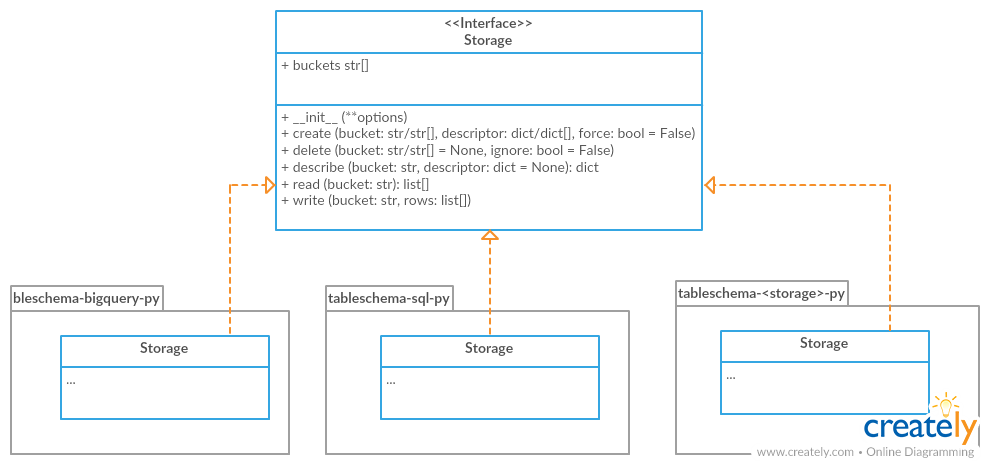
For instantiation of concrete storage instances, tableschema.Storage provides a unified factory method connect (which uses the plugin system under the hood):
# pip install tableschema_sql
from tableschema import Storage

storage = Storage.connect('sql', **options)
storage.create('bucket', descriptor)
storage.write('bucket', rows)
storage.read('bucket')Create tabular storage based on storage name.
name (str)- storage name likesqloptions (dict)- concrete storage options(exceptions.StorageError)- raises on any error(Storage)- returnsStorageinstance
An implementor should follow tableschema.Storage interface to write his own storage backend. Concrete storage backends could include additional functionality specific to conrete storage system. See plugins below to know how to integrate custom storage plugin into your workflow.
Create tabular storage. Implementations should fully implement this interface to be compatible with the Storage API.
options (dict)- concrete storage options(exceptions.StorageError)- raises on any error(Storage)- returnsStorageinstance
Return list of storage bucket names. A bucket is a special term which has almost the same meaning as table. You should consider bucket as a table stored in the storage.
(exceptions.StorageError)- raises on any errorstr[]- return list of bucket names
Create one/multiple buckets.
bucket (str/list)- bucket name or list of bucket namesdescriptor (dict/dict[])- schema descriptor or list of descriptorsforce (bool)- whether to delete and re-create already existing buckets(exceptions.StorageError)- raises on any error
Delete one/multiple/all buckets.
bucket (str/list/None)- bucket name or list of bucket names to delete. IfNone, all buckets will be deleteddescriptor (dict/dict[])- schema descriptor or list of descriptorsignore (bool)- don't raise an error on non-existent bucket deletion from storage(exceptions.StorageError)- raises on any error
Get/set bucket's Table Schema descriptor.
bucket (str)- bucket namedescriptor (dict/None)- schema descriptor to set(exceptions.StorageError)- raises on any error(dict)- returns Table Schema descriptor
This method should return an iterator of typed values based on the schema of this bucket.
bucket (str)- bucket name(exceptions.StorageError)- raises on any error(list[])- yields data rows
This method should read typed values based on the schema of this bucket.
bucket (str)- bucket name(exceptions.StorageError)- raises on any error(list[])- returns data rows
This method writes data rows into storage. It should store values of unsupported types as strings internally (like csv does).
bucket (str)- bucket namerows (list[])- data rows to write(exceptions.StorageError)- raises on any error
Table Schema has a plugin system. Any package with the name like tableschema_<name> can be imported as:
from tableschema.plugins import <name>If a plugin is not installed, an ImportError will be raised with a message describing how to install the plugin.
It's a provisional API excluded from SemVer. If you use it as a part of another program please pin
tableschemato a concrete version in your requirements file.
Table Schema features a CLI called tableschema. This CLI exposes the infer and validate functions for command line use.
Example of validate usage:
$ tableschema validate path/to-schema.json
Example of infer usage:
$ tableschema infer path/to/data.csv
The response is a schema as JSON. The optional argument --encoding allows a character encoding to be specified for the data file. The default is utf-8.
The project follows the Open Knowledge International coding standards.
The recommended way to get started is to create and activate a project virtual environment. To install package and development dependencies into your active environment:
$ make install
To run tests with linting and coverage:
$ make testFor linting, pylama (configured in pylama.ini) is used. At this stage it's already
installed into your environment and could be used separately with more fine-grained control
as described in documentation - https://pylama.readthedocs.io/en/latest/.
For example to sort results by error type:
$ pylama --sort <path>For testing, tox (configured in tox.ini) is used.
It's already installed into your environment and could be used separately with more fine-grained control as described in documentation - https://testrun.org/tox/latest/.
For example to check subset of tests against Python 2 environment with increased verbosity.
All positional arguments and options after -- will be passed to py.test:
tox -e py27 -- -v tests/<path>Under the hood tox uses pytest (configured in pytest.ini), coverage
and mock packages. These packages are available only in tox envionments.
Here described only breaking and the most important changes. The full changelog and documentation for all released versions can be found in the nicely formatted commit history.
- Added an ability to check table's integrity while reading
- Implemented the
table.sizeandtable.hashproperties
- Added
table.index_foreign_keys_valuesand improved foreign key checks performance
- Added
field.schemaproperty
- In
strictmode raise an exception if there are problems in field construction
- Allow providing custom guesser and resolver to schema infer
- Added
schema.update_fieldmethod
- Support datetime with no time for date casting
- Support floats like 1.0 for integer casting
- Added the
confidenceparameter toinfer
- The library has been rebased on the Frictionless Data specs v1 - https://frictionlessdata.io/specs/table-schema/