


Bring your HYMER / Erwin Hymer Group motorhome or caravan into Home Assistant: read ~130 sensors, control lights, heater, fridge, boiler and the 12V main switch — and wrap it all in automations, an energy dashboard, notifications and long-term history the official EHG app can't give you.
New here? Jump straight to the Quick start for the shortest path to a working setup.
🎉 Now in the HACS default store! As of hacs/default #7793 (merged 2026-07-30) HYMER Connect is officially listed in HACS — just search for "HYMER Connect" in HACS and click Download. No custom repository needed anymore.
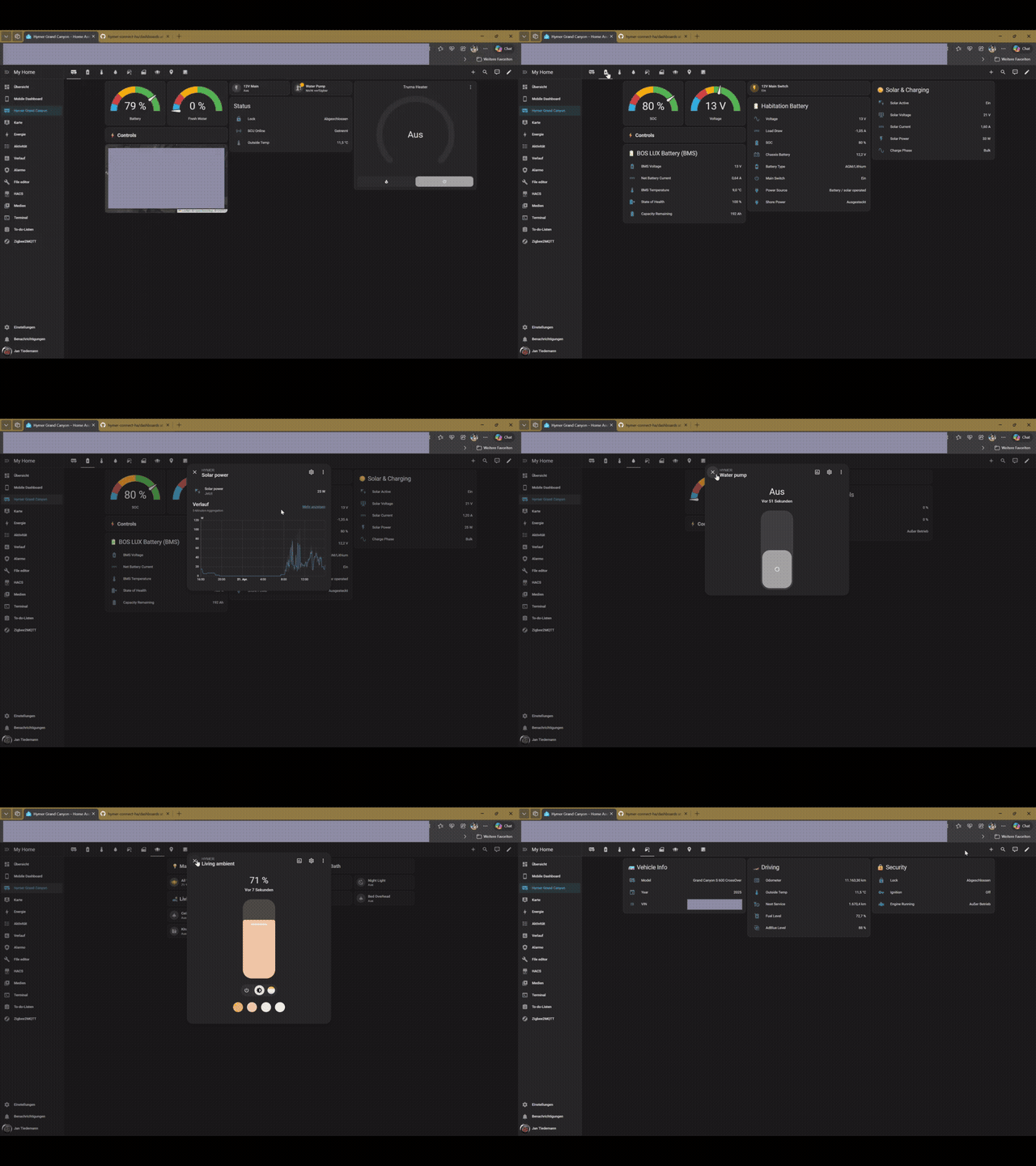
📺 Watch the full video (MP4) · a ready-to-use, mobile + desktop tile dashboard ships with the integration (100% stock HA cards — no HACS frontend needed).
| EHG App | HYMER Connect BLE for HA | |
|---|---|---|
| View sensor data (battery, GPS, temps, water) | ✅ | ✅ |
| Control lights, heater, fridge, boiler | ✅ | ✅ |
| 12V main switch on/off | ✅ | ✅ |
| SCU restart (reboot the control unit remotely) | ✅ | ✅ |
| Automations & scripts (e.g. turn off 12V at 10 PM) | ❌ | ✅ |
| Energy dashboard (solar kWh, battery history, voltage trends) | ❌ | ✅ |
| Notifications (door left open, battery low, SCU offline) | ❌ | ✅ |
| History & statistics (long-term sensor data) | ❌ | ✅ |
| Custom dashboards (desktop + mobile optimized) | ❌ | ✅ |
| Combine with other HA devices (home, weather, calendar) | ❌ | ✅ |
| Template sensors (corrected engine status, computed solar power) | ❌ | ✅ |
| Always-on monitoring (24/7, not just while the app is open) | ❌ | ✅ |
| ~130 entities (vs ~20 in the EHG app) | ❌ | ✅ |
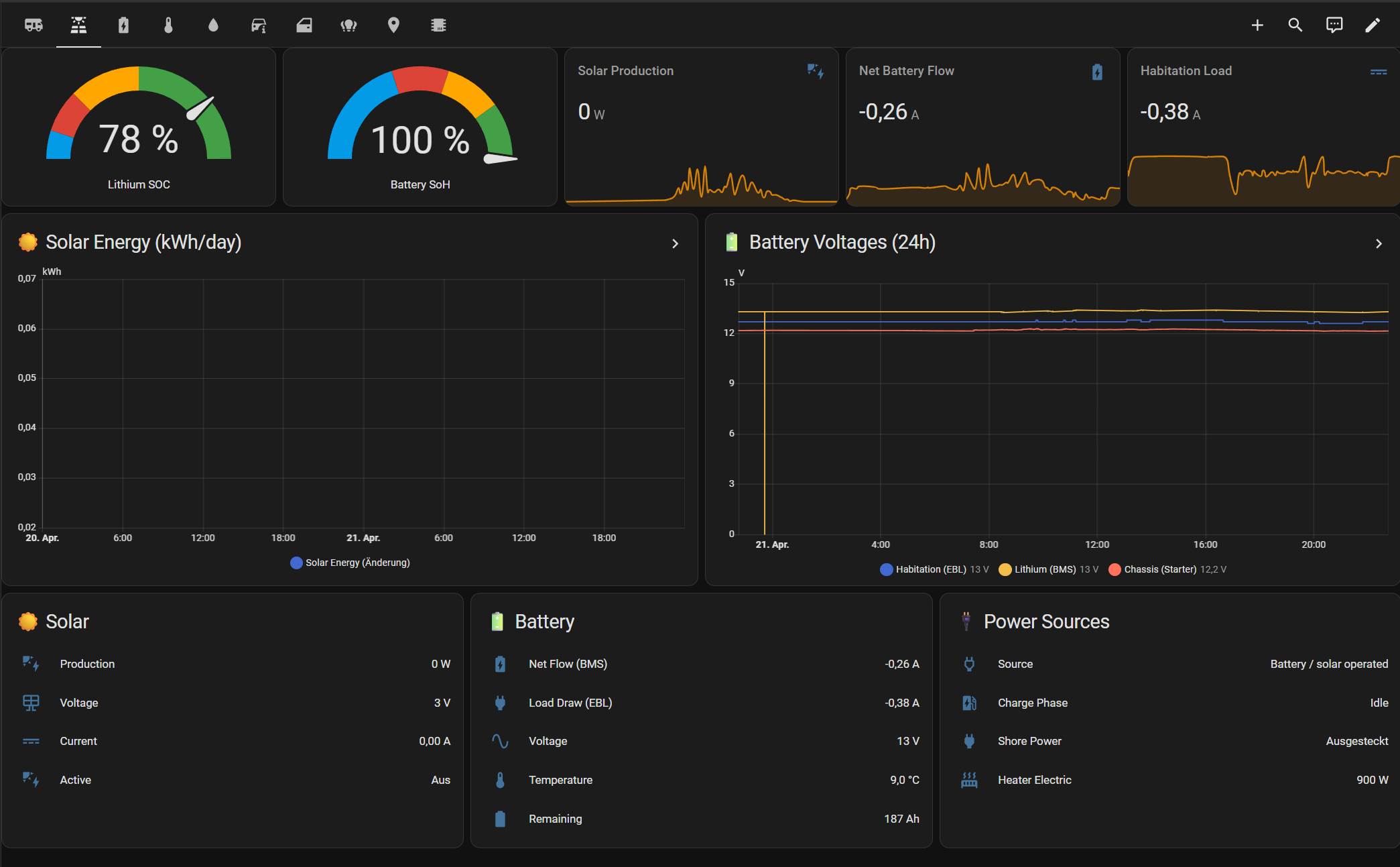
Monitor your motorhome's complete power flow at a glance — solar production, lithium battery state (SOC, SoH, voltage, temperature), habitation load draw, and charging status. All data comes directly from the vehicle's SCU, updated every ~60 s.
Net Battery Flow vs Habitation Load: Net Battery Flow (
bms_current, bus 99) is measured at the BOS LUX LiFePO4 cells — the net of all sources minus all loads (positive = charging, negative = discharging). Habitation Load (battery_current, bus 3) is measured at the CBE EBL402 distribution board — only what the habitation system consumes downstream. During the day, Net Battery Flow can be positive (solar charging) while Habitation Load stays negative.
The vehicle's SCU / SIU (Smart Control / Interface Unit) is a gateway. It bridges the vehicle's physical
buses (CAN, LIN), the PIA-addressed appliances (lights, heater, fridge) and the wireless HYMER Smart Sensors,
and exposes everything through one uniform protobuf API keyed by (bus, slot). Home Assistant talks to that
gateway two ways at once:
flowchart LR
    subgraph veh["🚐 Your vehicle"]
        direction TB
        can["CAN bus<br/>chassis · BMS"]
        lin["LIN bus<br/>habitation · solar"]
        pia["PIA devices<br/>lights · heater · fridge"]
        hss["BLE Smart Sensors<br/>tyre · gas · temp/humidity"]
        scu["🧠 SCU / SIU<br/><b>gateway</b><br/>(PIA API · bus,slot)"]
        can --> scu
        lin --> scu
        pia --> scu
        hss --> scu
    end
    scu -- "BLE (NUS) · ~50 ms<br/>read mirror" --> ha["🏠 Home Assistant"]
    scu -- "Cloud / SignalR<br/>writes + remote reads" --> ha
    ha --> out["Dashboards · Automations<br/>Energy · Notifications"]
- Automatic token capture — no mitmproxy, no patched APK. Press CONNECTION on the SCU touch panel during setup; the integration pairs over Bluetooth, completes a TLS handshake, and extracts the EHG refresh token for you. (No BLE hardware? A pure cloud-only setup works too — see the quick-start guide.)
- Local low-latency reads and writes over BLE, with automatic cloud fallback. When your HA host is within Bluetooth range, sensors stream over BLE at ~50 ms and commands are sent over the local BLE link first (v2.67.0+, on by default) — faster and works without internet. If BLE is not connected or a command is not acknowledged, it falls back to the cloud / SignalR path automatically (see the note below).
- Seamless failover & offline operation. Both paths run concurrently. Drive out of range → cloud continues; park back → BLE reconnects. After the one-time online setup, the BLE read path also works fully offline.
| BLE Direct | Cloud / SignalR | |
|---|---|---|
| Latency | ~50 ms | 500 ms – 2 s |
| Range | ~10 m (inside vehicle) | Worldwide |
| 12V off | ✅ SCU BLE stays active | |
| Internet | Not needed after setup | Always required |
| Writes (commands) | ✅ BLE-first with cloud fallback (v2.67.0+, default) | ✅ All writes (fallback) |
ℹ️ Writes go over BLE first with automatic cloud fallback (v2.67.0+, on by default). The earlier v2.62.24 conclusion that SCU firmware silently drops BLE
setValueswrites turned out to be a client-side encoding bug, not a firmware limit — root cause found by Dan Simms (dan-simms1/hymer-connect-ha): commands were wrapped in the wrong protobuf field over BLE, so the SCU parsed them as responses and ignored them. v2.66.0 corrected the encoding, v2.66.2 applied the same fix to the BLE subscription path, and v2.67.0 turns the local BLE command path on by default. When BLE is connected, writes go over BLE first and fall back to the cloud automatically if the SCU does not acknowledge; if BLE is not connected, everything goes via the cloud as before. You can force cloud-only via Settings → Devices & Services → HYMER Connect BLE → Configure → untick "Send commands over BLE when connected".✅ Confirmed on a Grand Canyon S 600 (SCU firmware 1.13.0.0) — every write returned a real
status=1ACK over BLE, and the automatic cloud fallback was observed working. A fully cloud-isolated (LTE-off) confirmation is still pending, but because BLE writes only fire when BLE is connected and un-ACKed writes fall back to the cloud, the worst case is identical to cloud-only. Deep dive:docs/ble-communication.md.
All Erwin Hymer Group brands equipped with a Smart Interface Unit (SIU):
| Brand | Brand | |
|---|---|---|
| HYMER | Carado | |
| Buerstner | Laika | |
| Dethleffs | Sunlight | |
| Eriba | FreeOnTour | |
| LMC | Niesmann+Bischoff |
🔎 Which buses are mapped for which vehicle? See the Bus coverage by vehicle and Complete bus index tables in
sensor-map.md(Grand Canyon S 600 / S 700, ML-T 570, BMC I 680, Eriba Car 602, Eriba Touring). For the full 128-component EHG catalog, seedocs/ehg-app-metadata.md.
🚐 Not a Grand Canyon S 600 / S 700? It works on all EHG vehicles with an SCU, but sensor mappings were developed on a Grand Canyon S 600. Other models may have unmapped slots. Universal sensors (battery, water, GPS, doors) are in
base.jsonand work immediately; help map the rest via contributing-overlays.md.
⚠️ Shared brand overlays: Each brand overlay (e.g.hymer.json) contains mappings for all known models of that brand. Components your vehicle lacks will show as "unknown" / "unavailable" — simply disable them in Settings → Entities (filter by "hymer"). This is normal; the integration cannot auto-detect your exact build. With debug logging enabled you will also see one informational line per brand-defined control at startup — e.g.Select platform: stepped select '…' on bus …andNumber platform: '…' on bus … slot …. These are DEBUG-level, not errors; they simply reflect that the overlay offers that control for the brand.
| Domain | Entities | Notes |
|---|---|---|
| Switches | 12V main, water pump, fridge ECO (Leise) | With 12V off, lights + pump become unavailable (guard); fridge/boiler/heater stay controllable |
| Lights | 8 interior + outside LED bar + 2 group toggles (Wohnen / Privat) | On/Off, brightness; color temp on ambient lights only (Wohnen bus 12, Privat bus 15) |
| Climate | Truma heater (target temp, Heat/Off), heater energy source, boiler mode, fridge cooling step | Alde 3030 (bus 5, BMC I 680) read-only + writable controls in progress |
| Fuel (computed) | tank liters, consumption (L/100km), estimated range | Derived from CAN odometer + fuel %; tank capacity configurable (default 93 L) |
| Device tracker | GPS location on the HA map | Requires "Find-My-RV" enabled in the EHG app (Mehr → Services und Abonnements) |
| Category | Sensors |
|---|---|
| Vehicle | Odometer, fuel level, AdBlue level, engine hours, distance to service, outside temperature, ignition state, VIN, language, seatbelt warning |
| Battery | Voltage, current, SOC (%), chassis battery, charge phase, charger status, battery type, power source, shoreline connected |
| BMS | Pack voltage, current, temperature, SOC, SoH, capacity remaining, time remaining, charge detected, device failure |
| Solar | Voltage, current, power (W), panel connected, charger active |
| Water | Fresh water (EBL), grey water (EBL), water pump |
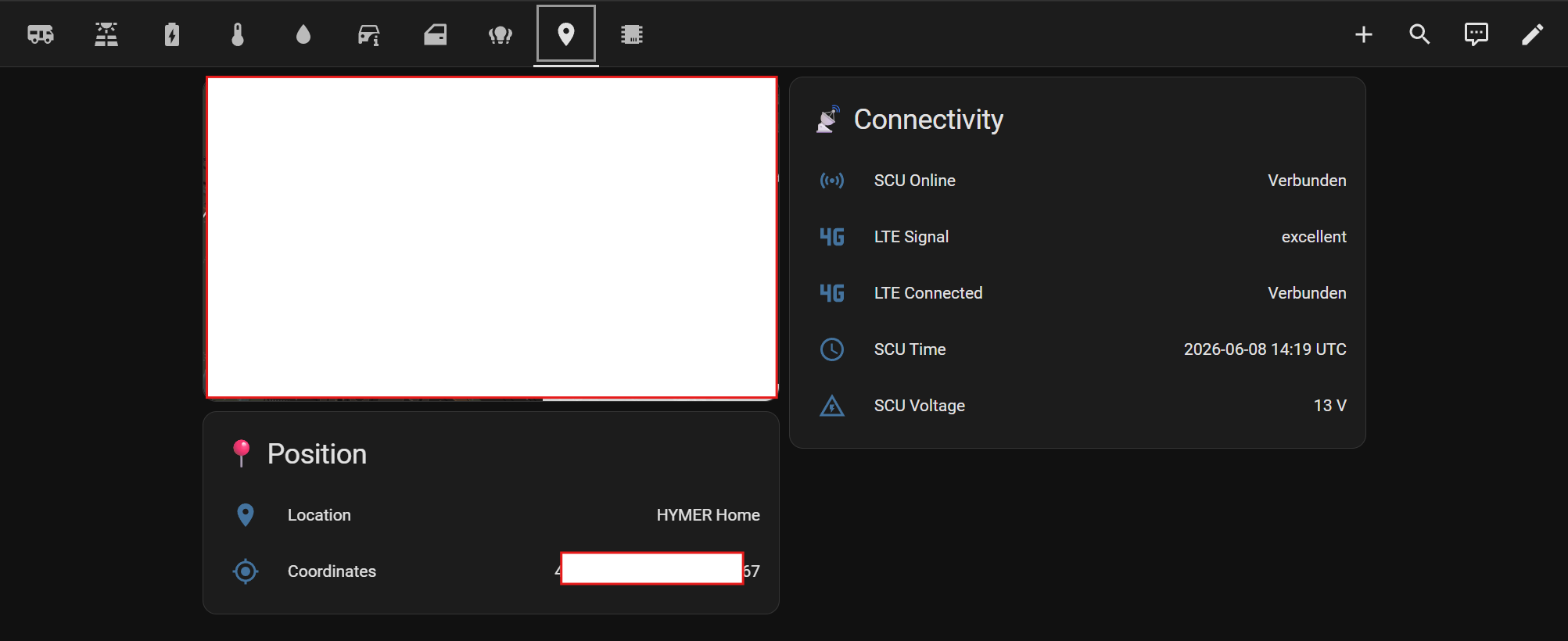
| GPS | Coordinates (lat,lng). Requires "Find-My-RV" enabled in the EHG app. Other bus 30 slots are SCU telemetry (LTE, voltage, BT) — see sensor-map.md |
| Doors | Driver, passenger (open/closed). Sliding/rear doors: CAN-bus only (Mercedes ME / mbapi2020) |
| Security | Lock status, ignition, handbrake, engine running, seatbelt warning |
| Chassis | Parking brake, aux heater available/state, cruise control, downhill assist, coolant/oil warnings, wiping water empty |
| Heating | Truma connected/status/firmware, fan speed, fuel type, electric power (0/900/1800W), setpoint, operating mode |
| Fridge | Mode (cooling step), door status, ECO/Quiet mode, power on/off |
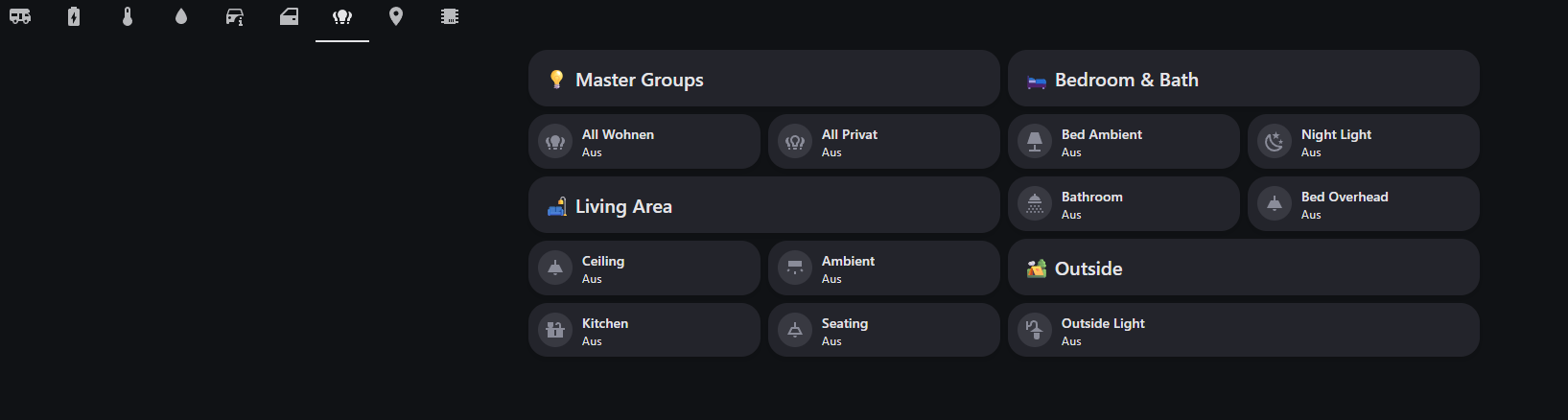
| Lights | 8 interior lights, LED bar, Wohnen group, Privat group |
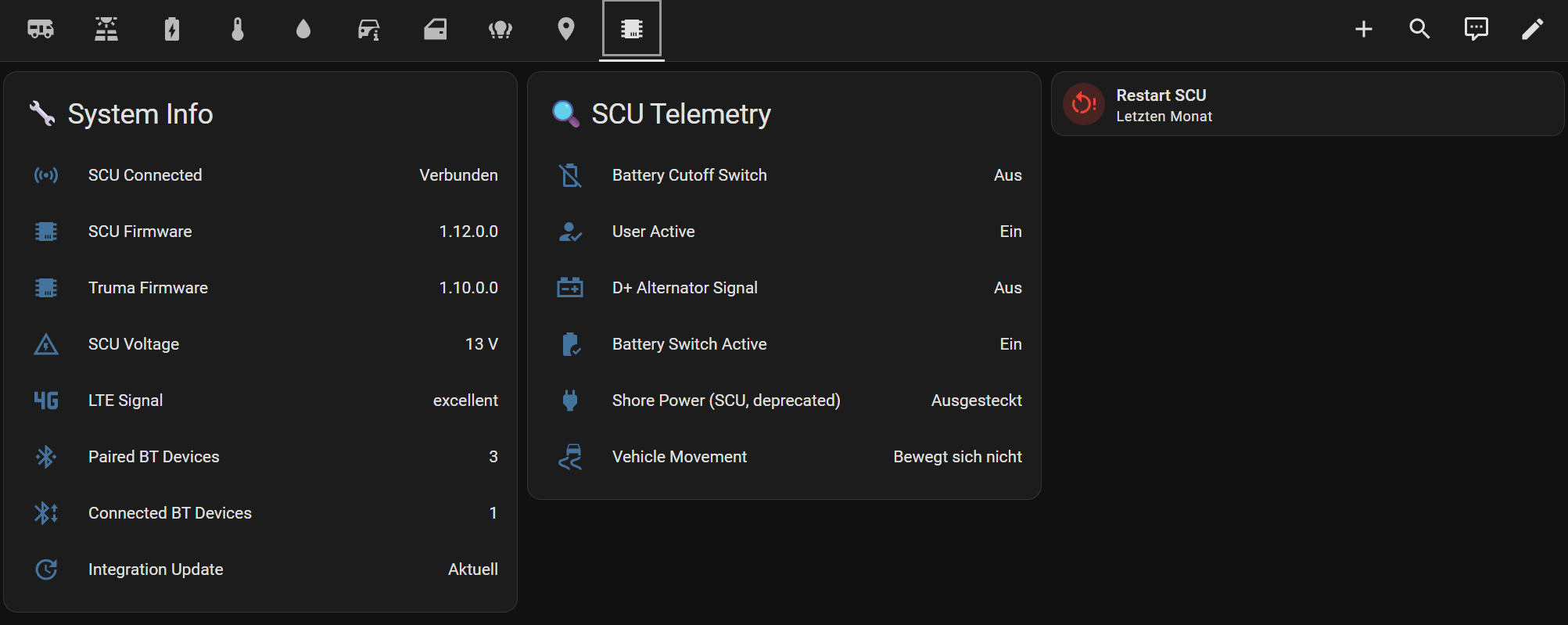
| System | SCU connected/firmware, Truma firmware, LTE connected, paired BT devices, SCU restart button |
| Victron | Inverter/charger, voltages, currents (bus 121 — disabled, non-functional: VE.Bus incompatible with vehicle CAN) |
| Total | ~130 entities (sensors, binary sensors, lights, switches, climate, selects) |
Full slot-by-slot list with units, transforms and per-model differences:
docs/sensor-map.md.
For any (bus_id, sensor_id) the SCU reports that isn't in the sensor map, the integration auto-creates a
diagnostic entity sensor.hymer_discovered_bus{N}_slot_{M} (Diagnostic category, disabled by default). Enable
them under Settings → Devices & Services → HYMER Connect → device → "+N entities not shown" to inspect raw
values while toggling physical controls, then contribute a mapping via
contributing-overlays.md. Existing named entities are never affected.
A ready-to-use tile dashboard optimized for mobile and desktop (HA 2022.11+, 100% stock cards):
| Tab | Content |
|---|---|
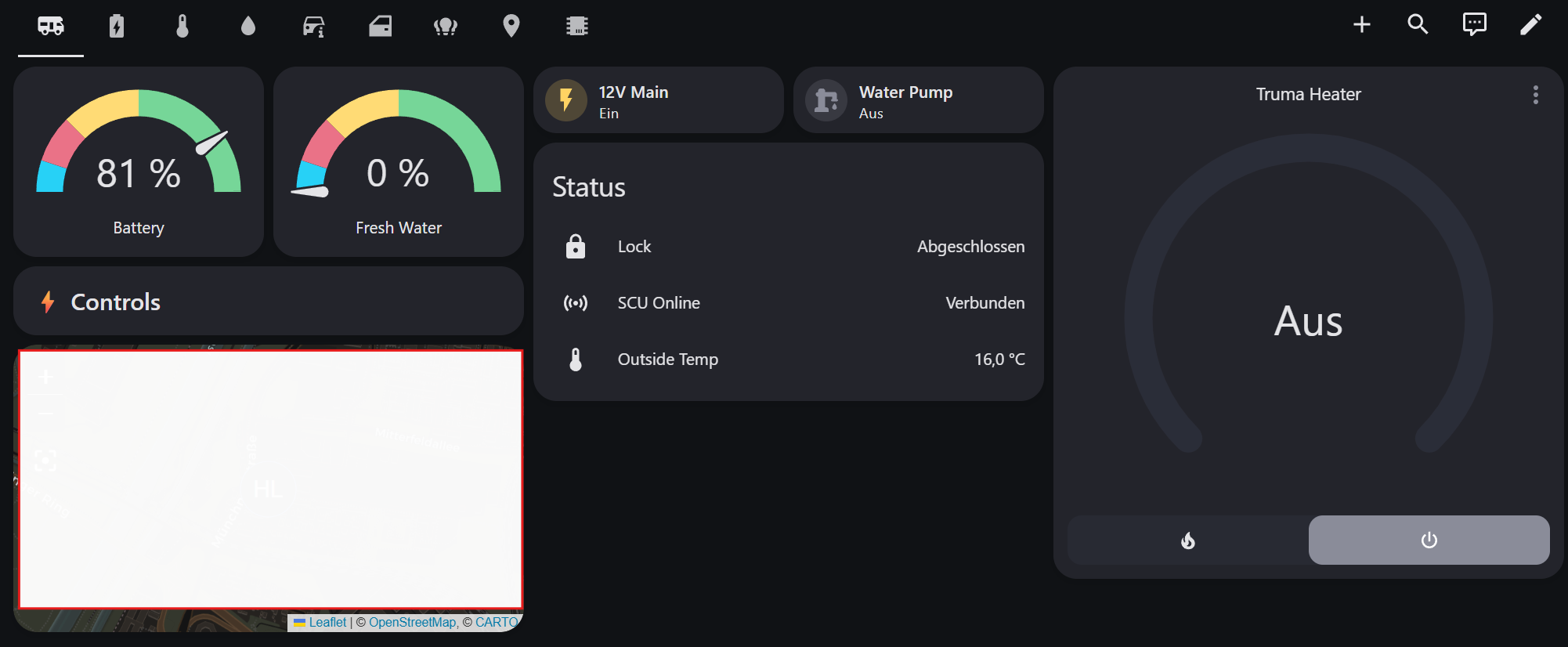
| Overview | Battery + water gauges, quick toggles (12V, pump, lock, SCU), thermostat, map |
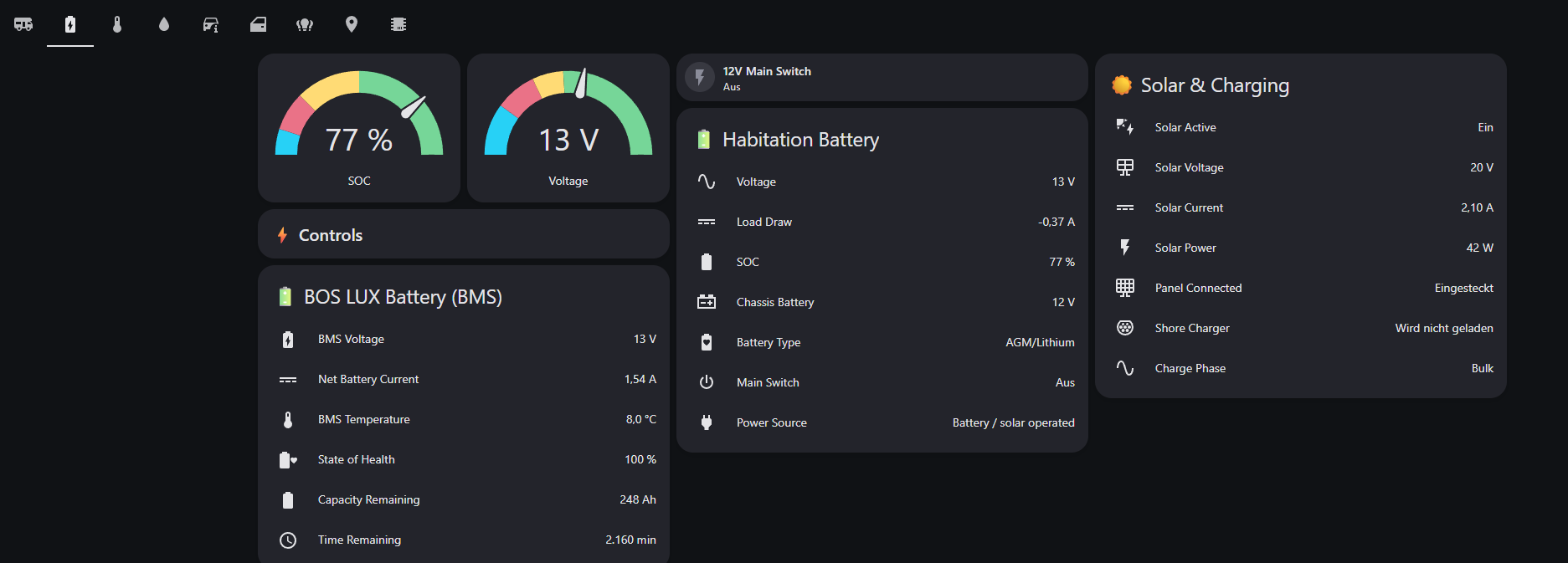
| Power | Battery details, 12V/main switch, solar & charging |
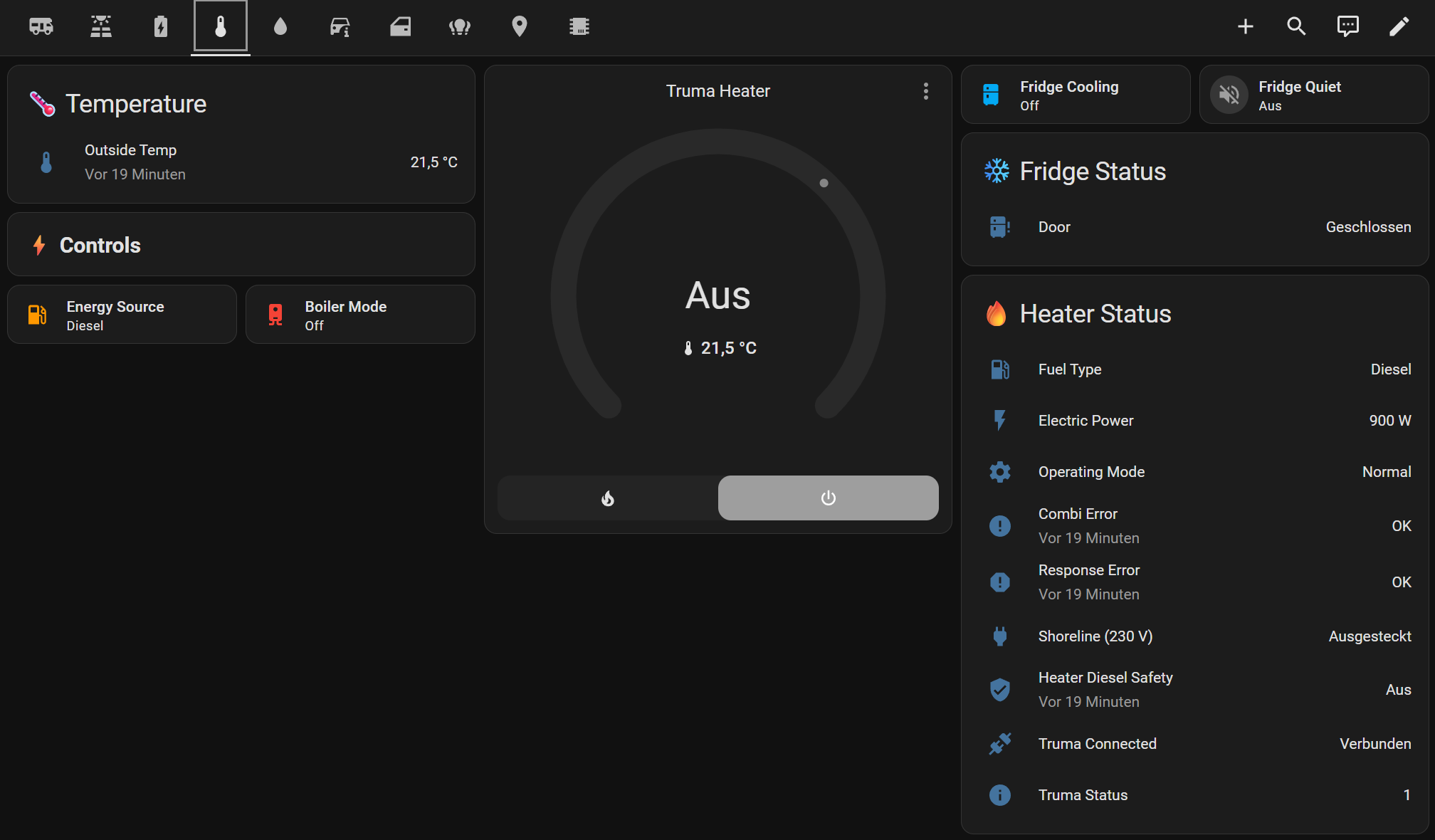
| Climate | Thermostat, heater details, energy source, boiler, fridge |
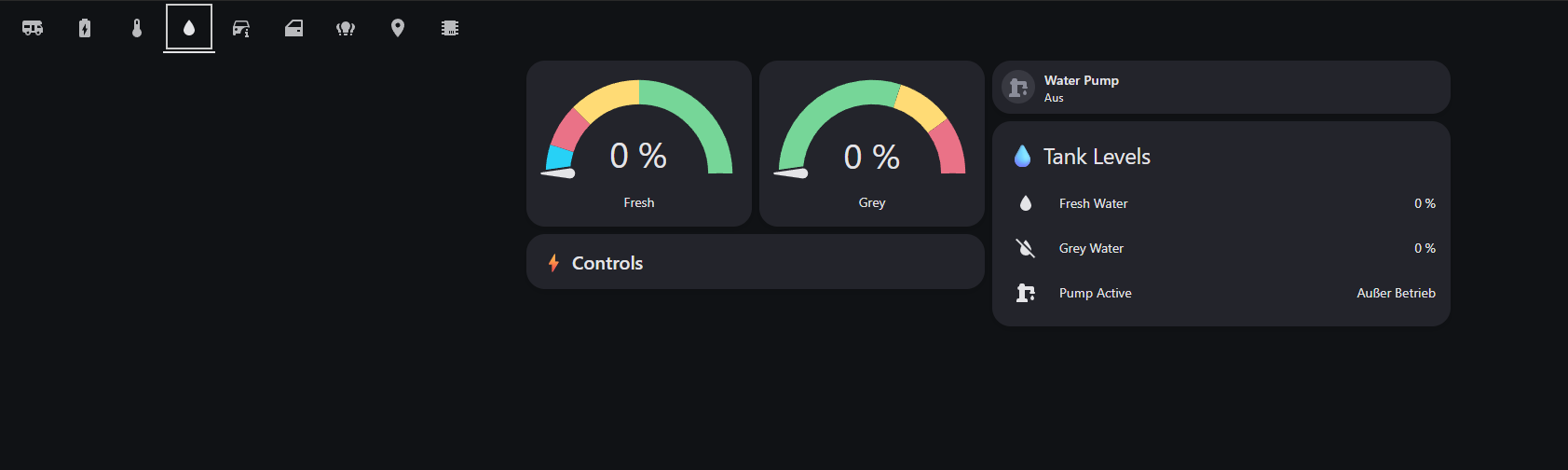
| Water | Fresh/grey water gauges, pump control |
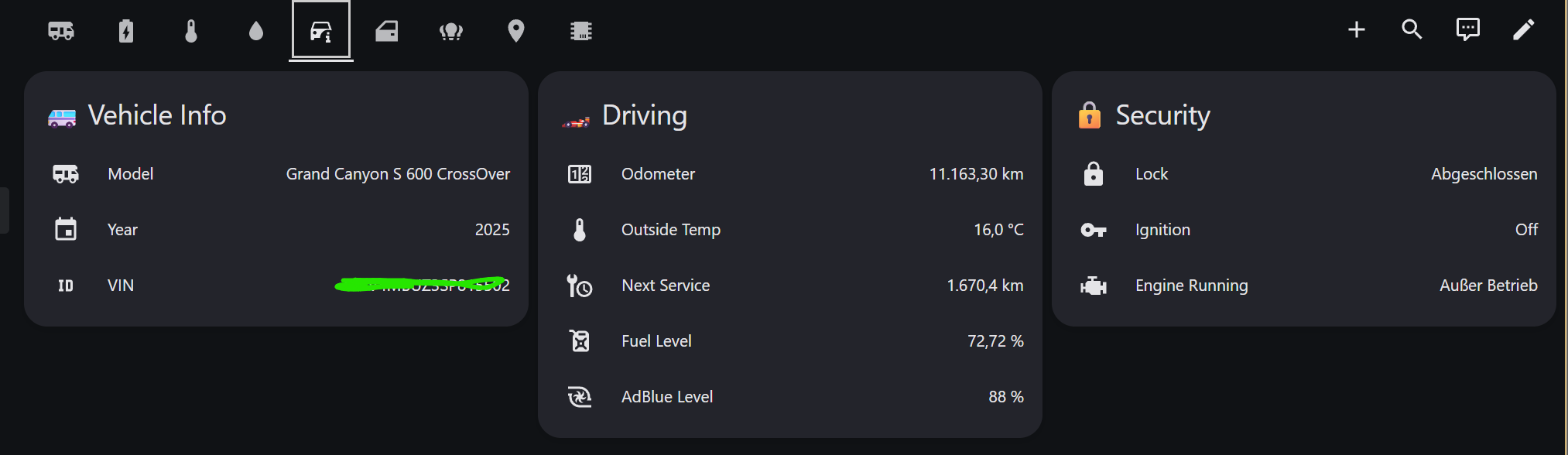
| Vehicle | Model info, driving sensors, fuel/AdBlue, security |
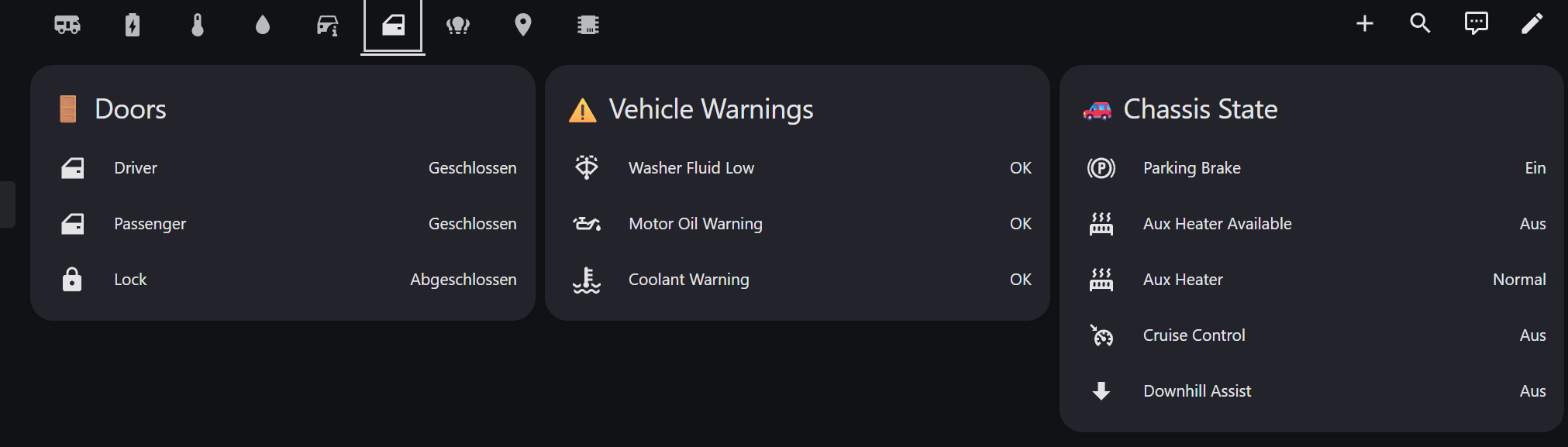
| Doors | Door status, chassis state (parking brake, aux heater, cruise control) |
| Lights | Interior light controls with master groups |
| GPS | Full map, coordinates, SCU connectivity (LTE, voltage) |
| System | SCU/Truma firmware, SCU restart button, tyre pressure |
🚐 Community dashboards for other models live in the
dashboards/folder — e.g.hymer-bmci-680.yamlfor the HYMER BMC I 680 (by @FrankHae) with a Satellit view and Alde 3030 tiles. See the dashboards README.
New to Home Assistant or to this integration? Follow these four steps — the whole thing takes about 15 minutes.
1. Prerequisites → 2. Install (via HACS) → 3. Add & configure → 4. Add the dashboard
- Check the prerequisites below and gather what you need (EHG account + dealer token).
- Install the integration — via HACS (recommended) or manually, then restart HA.
- Add & configure it — Settings → Devices & Services → + Add Integration → "HYMER Connect", then pick a setup path (A–D) and complete the config flow.
- Add the dashboard — paste the included dashboard YAML for an instant, mobile-ready UI.
📖 A guided, screenshot-friendly walkthrough of every step lives in quick-start.md — start there if this is your first Home Assistant integration.
| ✅ Requirement | Why | How to get it |
|---|---|---|
| A running Home Assistant (≥ 2022.11) | The platform the integration runs on | Install Home Assistant |
| HACS installed (recommended install method) | HACS delivers and auto-updates this integration | Install HACS — do this first, before installing HYMER Connect |
| An EHG / HYMER Connect account | Username + password authenticate the cloud connection | Create it in the official HYMER Connect mobile app (App Store / Play Store) and confirm the vehicle already shows up there |
| Your dealer QR activation token | One-time proof of physical access, needed to obtain the long-lived refresh token | From your dealer handover paperwork (a paper document — not the QR sticker on the vehicle). See the token note |
| Physical access to the vehicle (one-time) | You press CONNECTION on the SCU panel to pair | Only needed once, during initial setup |
| A Bluetooth adapter on your HA host (optional) | Enables the fast local BLE read path | Any HA-supported BLE adapter. No BLE? A cloud-only setup works too (paths B–D) |
ℹ️ HACS must be installed first. HACS is what downloads this integration into your
custom_components/folder and keeps it updated. If you don't have HACS yet, install it first, then continue below. (No HACS? Use the manual method.)
HYMER Connect is in the HACS default store, so no custom repository is needed:
-
Open HACS in Home Assistant
-
Search for "HYMER Connect"
-
Click Download
-
Restart Home Assistant
(Or use the one-click button at the top of this README:
)
Older custom-repository install? If you added this repo as a HACS custom repository before it joined the default store, you can safely remove that custom-repository entry — HACS will keep updating the integration from the default store. Your config entry and refresh token are unaffected.
- Copy the
hymer_connectfolder from this repo into your Home Assistantcustom_components/directory - Restart Home Assistant
After restarting, continue with Setup to add and configure the integration.
Once installed, add the integration under Settings → Devices & Services → + Add Integration → "HYMER Connect" and follow the config flow. The full onboarding walkthrough — choosing a path, BLE pairing at the vehicle, cloud-only setup, and first checks — lives in quick-start.md.
| Path | Use when | What you need |
|---|---|---|
| A — BLE + Cloud | HA host has BLE and you are at the vehicle | EHG login, dealer QR token, press CONNECTION on SCU |
| B — Cloud-only (mitmproxy) | No BLE on HA host, capture token manually | EHG login, refresh token |
| C — Cloud-only (Android app) | No BLE, but you have Android + vehicle access | EHG login, dealer QR token, Android phone |
| D — Bootstrap only | Create the config entry now, add token later | EHG login only |
🔑 The dealer QR activation token is NOT the EHG refresh token. Confusing them is the #1 setup mistake. The QR activation token is a code from your dealer handover paperwork (a paper document, not a sticker) — it only bootstraps pairing to prove physical access. The EHG refresh token (
ett=access-refresh, no expiry) is the long-lived token the integration stores for cloud data — and it is obtained for you by the pairing, never pasted from the QR code. Every BLE pairing mints its own personal token; in cloud-only paths you reuse a token from a helper device (uninstall the token-extractor APK once HA has it). Full explanation: quick-start.md.
| Path | How the refresh token is obtained |
|---|---|
| A — BLE + Cloud | The integration pairs over Bluetooth (press CONNECTION) and extracts the token automatically |
| B — Cloud-only (mitmproxy) | Capture the token from EHG app traffic — see tools/README.md |
| C — Cloud-only (Android app) | The token-extractor APK pairs on your phone and shows the token to copy/paste (Android-only; sideload, use once, then uninstall) |
Once obtained, the refresh token is stored in the config entry and survives HACS updates.
More setup references: BLE setup & troubleshooting · Dashboard helpers · Token capture & tools · SignalR internals · BLE internals
Each vehicle's SCU is registered in the EHG cloud during manufacturing. When a device pairs with the SCU over Bluetooth, the cloud issues a long-lived refresh token bound to that device's BLE identity, your account and vehicle. The integration exchanges that refresh token for short-lived access tokens every ~15 minutes and streams sensor data over a SignalR WebSocket (and, when in range, mirrors it locally over BLE).
sequenceDiagram
    participant Factory as Factory
    participant Cloud as EHG Cloud
    participant SCU as SCU (Vehicle)
    participant Phone as Phone (App)
    participant HA as Home Assistant

    Note over Factory,Cloud: Vehicle manufacturing
    Factory->>Cloud: Register SCU (urn:ehg:scu:...)
    Factory->>SCU: Install SCU with cellular modem

    Note over SCU,Phone: One-time BLE pairing (at vehicle)
    Phone->>SCU: BLE connect + authenticate
    SCU->>Cloud: Validate pairing request
    Cloud->>Phone: Refresh token (ett=access-refresh, no expiry)

    Note over Phone,HA: One-time token capture (or direct BLE pairing on Path A)
    Phone-->>HA: Refresh token provided to the integration

    Note over HA,Cloud: Home Assistant integration (automatic)
    HA->>Cloud: POST /oauth/token (username + password)
    HA->>Cloud: POST /remoteAccessToken (refresh token)
    Cloud->>HA: Fresh access token (15 min, auto-refreshed)
    HA->>Cloud: SignalR connect + UpdateTokens
    Cloud->>SCU: Forward via cellular
    SCU->>Cloud: PiaResponse (sensor data)
    Cloud->>HA: Real-time sensor data (~130 entities)
| Token | ett |
Expiry | Source | Purpose |
|---|---|---|---|---|
| OAuth2 access | — | 15 min | Login API | API authentication |
| Remote access refresh | access-refresh |
Never | BLE pairing | Exchange for access token (this is what you capture) |
| Remote access | access |
15 min | /remoteAccessToken API |
SignalR UpdateTokens |
Deep dive: connection lifecycle, token refresh, reconnection logic, traffic budgets — docs/signalr-connection.md.
- Go to Settings > Dashboards > + Add Dashboard
- Open the new dashboard > Edit > three dots > Raw configuration editor
- Paste the contents of
dashboards/hymer_connect.yaml - Save
Some tiles use helper entities (corrected engine state, solar energy Riemann sum) — see Stale CAN Sensor Workarounds below and
dashboards/README.md.
Dashboard Screenshots (click to expand)
| Overview | Power |
|---|---|
 |
 |
| Climate | Water |
|---|---|
 |
 |
| Vehicle | Doors & Lights |
|---|---|
 |
 |
| Interior Lights | GPS |
|---|---|
 |
 |
| System |
|---|
 |
The SCU is the central gateway in the vehicle. It bridges the physical CAN and LIN buses, addresses
appliances over its internal PIA layer, and pairs with wireless HYMER Smart Sensors — exposing everything
through the PIA protobuf protocol keyed by (bus_id, sensor_id). The EHG app (and Home Assistant) reach the SCU
over two transports that both carry the same TLS-encrypted PIA data:
| Path | Transport | When | Latency | Cloud required? |
|---|---|---|---|---|
| BLE direct | Bluetooth Low Energy (Nordic UART Service) | Near the vehicle (BLE range ~10 m) | ~50 ms | No — local only |
| LTE cloud | Cellular → Azure SignalR WebSocket | Away from the vehicle | ~500 ms–2 s | Yes |
graph TB
    subgraph "EHG Cloud (Azure)"
        CLOUD["Azure SignalR Hub<br/>(PIA over WebSocket)"]
    end

    subgraph "Smartphone (EHG App)"
        APP["HYMER Connect App"]
    end

    subgraph "Home Assistant"
        HA["HYMER Connect Integration<br/>(BLE sensor reads · SignalR writes + reads)"]
    end

    subgraph "SCU — Smart Control Unit"
        SCU["SCU / SIU<br/>Bus 45 · FW 1.13.0.0<br/>LTE modem + BLE + GPS"]
    end

    subgraph "CAN Bus"
        CAN0["Bus 1 — can0<br/>Mercedes Sprinter Chassis CAN<br/>Odometer · Fuel · Doors · Ignition<br/>Engine · AdBlue · VIN"]
        CAN2["Bus 99 — can2<br/>BOS LUX LiFePO4 BMS<br/>Pack V/A/°C · SOC · SoH<br/>Capacity · Charge detect"]
    end

    subgraph "LIN Bus"
        LIN1["Bus 3 — lin1<br/>CBE EBL402 Habitation Electrics<br/>12V main · Battery V/A/SOC<br/>Water tanks · Solar · Shore power"]
        LIN2["Bus 8 — lin2<br/>Voltronic MPP260CI MPPT<br/>Solar V/A/W · Charger status<br/>Error · AES · Reduced power"]
    end

    subgraph "PIA-addressed Devices"
        LIGHTS["Lights (8 interior + LED bar)<br/>Bus 11 · 12 · 15 · 16 · 19 · 21 · 43 · 44<br/>ML-T 570: Bus 14 · 66 — BMC I 680: Bus 13 · 17<br/>On/Off · Brightness · Color temp (ambient only)"]
        GROUPS["Light Groups<br/>Bus 24 — Wohnen (all living)<br/>Bus 27 — Privat (all bedroom/bath)"]
        LEDBAR["LED Bar (outside)<br/>Bus 25 (primary) · Bus 22 (duplicate)"]
        FRIDGE["Thetford N4112A Fridge<br/>Bus 34 — Control (power · ECO · step)<br/>Bus 37 — Status (mode · door)"]
        TRUMA["Truma Combi D6E Heater<br/>Bus 49 — LIM module (FW · status)<br/>Bus 58 — Heater (setpoint · fan · fuel)"]
        VICTRON["Victron MultiPlus 12/1600/70<br/>Bus 121 — Inverter · Charger<br/>(disabled — VE.Bus ≠ vehicle CAN)"]
        GPS["SCU Telemetry<br/>Bus 30 — GPS · LTE · BT devices"]
        HSS["HYMER Smart Sensors (BLE)<br/>Bus 70 tyre · 71 gas · 73 contact · 74 temp/humidity"]
    end

    APP -.->|"① BLE direct (near vehicle)<br/>NUS GATT · TLS-encrypted PIA"| SCU
    APP -->|"② LTE cloud (away)"| CLOUD
    CLOUD <-->|"cellular (LTE)"| SCU
    HA -.->|"③ BLE direct (sensor reads only)<br/>NUS GATT · TLS-encrypted PIA"| SCU
    HA -->|"④ SignalR WebSocket<br/>(all writes + sensor reads)"| CLOUD
    SCU <--> CAN0
    SCU <--> CAN2
    SCU <--> LIN1
    SCU <--> LIN2
    SCU <--> LIGHTS
    SCU <--> GROUPS
    SCU <--> LEDBAR
    SCU <--> FRIDGE
    SCU <--> TRUMA
    SCU -.-x VICTRON
    SCU --- GPS
    SCU <-.->|"BLE central<br/>(SCU pairs the sensors)"| HSS
| Bus ID | Internal Name | Physical Bus | Device | Key Sensors |
|---|---|---|---|---|
| 1 | can0 |
CAN | Mercedes Sprinter chassis | Odometer, fuel, doors, ignition, engine, AdBlue, VIN, temperature |
| 3 | lin1 |
LIN | CBE EBL402 | 12V main switch, battery V/A/SOC, water tanks, charge phase, shore power |
| 5 | — | PIA | Alde 3030 heater (BMC I 680) | Inside/outside temp, setpoint, energy priority (Gas/EL), heating on/active — read-only (v2.64.7) |
| 8 | lin2 |
LIN | Voltronic MPP260CI | Solar voltage, current, power, charger status, error flags |
| 10 | — | PIA | TenHaaft satellite dish (BMC I 680) | Selected satellite (writable select, v2.64.9), dish status, signal strength |
| 11–21 | — | PIA | Interior lights | Ceiling, ambient, kitchen, bathroom, nightlight (on/off, brightness; color temp on ambient lights only) |
| 13 | — | PIA | BMC I 680 floor ambient light | On/off, brightness (member of Wohnen group, bus 24) — v2.64.6 |
| 14 | — | PIA | ML-T 570 bedroom ceiling | On/off, brightness (member of Privat group, bus 27) |
| 17 | — | PIA | BMC I 680 shower ceiling light | On/off, brightness (member of Privat group, bus 27) — v2.64.6 |
| 22 | — | PIA | LED bar (duplicate) | Mirrors bus 25 — disabled by default |
| 24 | — | PIA | Wohnen light group | Hardware group toggle for all living area lights |
| 25 | — | PIA | Outside LED bar | On/off, brightness |
| 27 | — | PIA | Privat light group | Hardware group toggle for all private area lights |
| 30 | — | PIA | SCU telemetry | GPS coordinates, altitude, heading, satellites, LTE, Bluetooth |
| 32 | — | PIA | Thetford N4142E+ absorber fridge (BMC I 680) | Power, cooling step 1–5 + power source (Auto/Gas/12V/AC) writable selects, door |
| 34 | heat_ctrl |
PIA | Thetford fridge (control) | Power, ECO, cooling step, setpoint |
| 37 | fridge |
PIA | Thetford fridge (status) | Operating mode, door state |
| 43–44 | — | PIA | Overhead lights | Seating overhead, bedroom overhead |
| 45 | scu |
PIA | SCU module | Connected flag, firmware version |
| 49 | truma |
PIA | Truma LIM module | Connected flag, status, firmware |
| 58 | heater |
PIA | Truma Combi D6E | Setpoint, fan speed, fuel type, electric power, operating mode |
| 60 | — | PIA | Dometic compressor fridge (Eriba Car 602 + HYMER Dometic) | Power, cooling level (Off/1–5), user mode, door — read + writable controls; original read map by @mvondemhagen (#54) |
| 66 | — | PIA | ML-T 570 dinette pendant lamp | On/off, brightness (member of Wohnen group, bus 24) |
| 70 | — | PIA (BLE) | HYMER Smart tyre sensors (auto-slot) | Status, pressure, temperature, battery per sensor |
| 71 | — | PIA (BLE) | HYMER Smart gas-bottle sensors (auto-slot) | Level (%), height, battery, status per bottle |
| 73 | — | PIA (BLE) | HYMER Smart contact sensors (auto-slot) | Status, battery per sensor |
| 74 | — | PIA (BLE) | ML-T 570 SIU Smart Sensor | Temperature (°C), humidity (%) — first SIU external sensor mapped |
| 76 | — | PIA | ML-T 570 water tanks | Fresh water level (%), grey water level (%) — distinct from bus 3 EBL |
| 99 | can2 |
CAN | BOS LUX LiFePO4 BMS | Pack V/A/°C, SOC, SoH, capacity, charge detect, device failure |
| 114 | — | PIA | ML-T 570 Thetford Compressor T2120C fridge | Power, silent/night mode, cooling step 1–5, freezer level 0–3, door, warning |
| 121 | — | PIA | Victron MultiPlus | Inverter/charger state, V/A/Hz, shore input (disabled — non-functional, VE.Bus incompatible with vehicle CAN) |
Note: "PIA-addressed devices" are not necessarily on a separate physical bus — PIA is a logical addressing layer; the SCU may route them over LIN, SPI, BLE or proprietary wiring. What matters for the integration is the
(bus_id, sensor_id)address. Full slot-by-slot reference:docs/sensor-map.md.
Primary development vehicle: HYMER Grand Canyon S 600 CrossOver (2025, Mercedes Sprinter, Truma Combi D6E, Thetford N4112A fridge, Voltronic MPP260CI solar). Also field-validated: HYMER ML-T 570 / 580 (incl. external smart sensors) and HYMER BMC I 680 (MY2024 — first Alde 3030, TenHaaft dish and Thetford N4142E+ fridge). Sensor maps are shared at brand level, so bus/slot behavior can differ by model year and installed equipment.
| What | Works? | Details |
|---|---|---|
| Login & SignalR | ✅ Yes | OAuth2 + SignalR are identical across all EHG brands |
| REST API (model, VIN, year) | ✅ Yes | Brand-agnostic endpoints |
| GPS (bus 30) | ✅ Likely | Slots (30,1)/(30,2) carry coordinates; other bus 30 slots are LTE/SCU/BT telemetry |
| Habitation sensors (bus 3) | ✅ Yes | CBE EBL402 habitation electrics — in base.json, confirmed on every EHG SCU |
| Chassis CAN (bus 1 — odometer, fuel, AdBlue, doors, locks, outside temp) | Confirmed on Mercedes-Sprinter models (S 600 / S 700 / ML-T 570 / BMC I 680); VW-Crafter Eriba reports its chassis on a different, not-yet-mapped bus | |
| Lights | Light bus IDs are specific to each floorplan; your vehicle may differ | |
| Heater (bus 58 Truma / bus 5 Alde / bus 59 Aventa) | Truma Combi on bus 58; Alde 3030 on bus 5 (read-only mapped, confirmed BMC I 680); Truma Aventa AC on bus 59 (Eriba) | |
| Fridge (bus 34 / 32 / 114 / 60) | Thetford N4112A absorber (34), N4142E+ absorber (32), T2120C compressor (114), Dometic compressor (60) | |
| Solar (bus 8) | Mapped for Votronic MPP260CI/MPP250Duo; other chargers may differ | |
| Battery / BMS (bus 99 / 29) | BOS LUX LiFePO4 BMS on bus 99 (S 600 / S 700); habitation battery SoC on bus 29 (BMC I 680). Slot meanings vary by model |
Missing sensors are harmless: entities for components your vehicle lacks simply show "Unavailable" — no
errors. The same applies to writable controls (stepped-switch selects and numbers): the overlay creates one for every
brand model, and with debug logging on each logs a single Select platform: stepped select '…' on bus … /
Number platform: '…' on bus … slot … line at startup. These are informational (DEBUG), not errors — disable
the unused entities in Settings → Entities to tidy the UI. To add mappings for your brand/model, see
contributing-overlays.md.
The Mercedes Sprinter CAN bus goes silent when the engine is turned off — without a final "off" update. The SCU
caches the last value, so binary_sensor.hymer_engine can show "On" while parked.
Create this template sensor to fix the stale engine state. The dashboard YAML already references the corrected entity.
Via HA UI: Settings > Helpers > + Create Helper > Template > Template a binary sensor
- Name: Hymer Engine Running (Corrected) · Device class: Running · Icon:
mdi:engine - State template:
{% set ignition = states('sensor.hymer_ignition') %}
{% set moving = is_state('binary_sensor.hymer_vehicle_movement', 'on') %}
{% set locked = is_state('binary_sensor.hymer_lock', 'on') %}
{% set engine_raw = is_state('binary_sensor.hymer_engine', 'on') %}
{% if moving %}
  true
{% elif ignition in ['Off', 'Accessory'] or locked %}
  false
{% else %}
  {{ engine_raw }}
{% endif %}- Availability template: leave empty / do not set one
Via configuration.yaml
template:
  - binary_sensor:
      - name: "Hymer Engine Running (Corrected)"
        unique_id: hymer_engine_running_corrected
        device_class: running
        icon: mdi:engine
        state: >
          {% set ignition = states('sensor.hymer_ignition') %}
          {% set moving = is_state('binary_sensor.hymer_vehicle_movement', 'on') %}
          {% set locked = is_state('binary_sensor.hymer_lock', 'on') %}
          {% set engine_raw = is_state('binary_sensor.hymer_engine', 'on') %}
          {% if moving %}
            true
          {% elif ignition in ['Off', 'Accessory'] or locked %}
            false
          {% else %}
            {{ engine_raw }}
{% endif %}| Condition | Result |
|---|---|
| Vehicle movement is "On" | Engine forced to On |
| Ignition is "Off" or "Accessory" | Engine forced to Off |
| Vehicle is locked | Engine forced to Off |
| Otherwise | Uses the raw engine_running value |
The HA Energy dashboard needs a cumulative kWh sensor. Create a Riemann Sum helper to convert
sensor.hymer_solar_power (W) into sensor.hymer_solar_energy (kWh): Settings > Helpers > + Create Helper >
Integration - Riemann sum integral sensor (Left Riemann sum, prefix k, time unit Hours). See
dashboards/README.md.
The SCU does not expose vehicle speed, RPM or engine torque via PIA on any Mercedes-based EHG model (verified by
@dan-simms1 on a Grand Canyon S700 — the bus 1 slots are fuel_level,
distance_to_service etc.). For driving data, use the Mercedes ME integration
(mbapi2020).
| Guide | For | What it covers |
|---|---|---|
| Quick start | New users | Shortest path to a working setup |
| Sensor map | Users & contributors | Canonical (bus, slot) reference, units, transforms, per-vehicle coverage |
| BLE setup & troubleshooting | Users | BLE path, adding BLE to a cloud-only setup, debug logging, reading the pairing log |
| Contributing overlays | Contributors | Discover your vehicle's slots + author a sensor_maps/<brand>.json overlay |
| Translations | Contributors | When to edit strings.json / translations/en.json |
| SignalR internals | Maintainers | Cloud connection lifecycle, token refresh, reconnection, traffic budgets |
| BLE internals | Maintainers | NUS GATT, TLS-over-BLE handshake, PIA read mirror, protocol layering |
| EHG app metadata · BLE protocol · External sensors | Advanced | Decompiled EHG app catalog, BLE protocol, SIU smart-sensor ecosystem |
| Tools | Contributors | Token capture, sensor discovery, converter |
| Docs index | — | Full documentation map |
The SCU rejected the PairMobileRequest because a device name is already in its paired-devices list. Since
v2.40.0-alpha.2 the integration uses a unique device name (ha-{timestamp}) per attempt, which largely eliminates
this. If it persists, the SCU's pairing slots may be full.
Fix: 1) Restart the SCU (12V off → 30 s → on). 2) Clear the BlueZ bond (HA: Configure → check "Clear BLE bond",
or SSH bluetoothctl remove <SCU_MAC>). 3) Delete + re-add the integration. 4) Press CONNECTION, then submit the
config flow.
Important: The EHG app has no UI to manage individual paired BLE devices. "Disconnect vehicle" removes the whole vehicle from your account — last resort only.
The SCU received the request but didn't answer within 60 s — usually CONNECTION was not pressed or its ~2-minute pairing window expired. Press CONNECTION on the SCU first, then immediately trigger the config flow / Reconfigure.
The SCU is rejecting OS-level bonding — CONNECTION was not pressed. The integration retries up to 12 times over 2 minutes; press CONNECTION at any point in that window.
No token stored → SignalR connects but can't authenticate (0 fields updated). Fix: trigger BLE pairing via
⋮ → Reconfigure to obtain the token, or provide a token captured via mitmproxy.
Removal auto-clears the BlueZ bond via D-Bus. For integrations deleted with a version before v2.40.0-alpha.2, clear
it manually: bluetoothctl remove <SCU_MAC_ADDRESS>.
- HA: Configure → check "Clear BLE bond" → Save. 2) Delete the integration. 3) Optionally restart the SCU. 4) Press CONNECTION. 5) Add the integration fresh (QR token + BLE address + BLE enabled). You do not need to change anything in the EHG app.
| Limitation | Details | Workaround |
|---|---|---|
| GPS requires satellite fix | Slot (30,1) returns status 2 (no fix) without sky visibility |
Drive to an open area; fix takes 30–60 s with clear sky |
| SCU pairing slots are limited | ~4–5 slots; each ha-{timestamp} pairing consumes one; not viewable in the app |
If pairing fails empty, "Disconnect vehicle" in the EHG app clears all slots (all devices must re-pair) |
| Victron MultiPlus (bus 121) non-functional | VE.Bus (RS-485) is incompatible with the vehicle CAN bus | Use a Victron Cerbo GX / VenusOS to monitor separately |
| 12V OFF → no passive sensor updates via cloud | SCU standby stops pushing doors/temps/water (commands still work) | Use the BLE path (works in standby) or keep 12V on |
| MTU stays at 23 on some HAOS setups | BlueZ may not expose the D-Bus MTU property; writes are paced to compensate | No action needed — pacing handles it (slightly slower TLS handshake) |
| TLS 1.0/1.1 only | SCU firmware 1.13.0.0 only supports legacy TLS (AES128-SHA/AES256-SHA) |
No action needed — the integration lowers the OpenSSL security level automatically |
| No iOS token capture | mitmproxy capture and the extractor APK are Android-only | Use BLE pairing (Path A), or borrow an Android device for the one-time capture |
| Brand sensor maps may be incomplete | Mappings are based on the Grand Canyon S 600/S 700 | Use Dynamic Slot Discovery and contribute findings — contributing-overlays.md |
Contributions are welcome! The complete guide to discovering your vehicle's slots and authoring a brand overlay is in docs/contributing-overlays.md.
- Report sensor mappings — run the Sensor Discovery Tool or enable Dynamic Slot Discovery and share findings in a GitHub issue.
- Add a brand overlay — copy
sensor_maps/hymer.json→sensor_maps/<your-brand>.json, adjust mappings, test from your fork via HACS, open a PR. Strip_generated_by/_source_vehicle_idheaders from converter output. - Fix bugs / add features — feature branch, atomic conventional commits (
fix:,feat:,docs:), reference related issues. See CONTRIBUTING.
Big thanks to everyone who contributed sensor mappings, debugging time, or APK metadata:
- @dan-simms1 — corrected Mercedes bus 1 chassis sensor labels on Grand Canyon S700 (#37) and built the upstream EHG runtime-metadata extractor that powers the brand-overlay bootstrap.
- @mvondemhagen — Dometic compressor fridge mapping (bus 60) on Eriba Car 602 (#54).
- @mcfly1969 — first HYMER ML-T 570 CrossOver mappings (bus 14 bedroom ceiling, bus 66 dinette pendant, bus 114 Thetford Compressor T2120C fridge), discovered via the dynamic-discovery diagnostic sensors and confirmed at the vehicle (#7, #8).
- @FrankHae — first HYMER BMC I 680 (MY2024) mappings and the first Alde heater in the project: bus 13 (floor ambient) and bus 17 (shower ceiling) lights, plus the Alde 3030 heater (bus 5), TenHaaft satellite dish (bus 10) and Thetford N4142E+ fridge (bus 32) (#9).
- Steve Förster — extensive on-device testing of the EHG Token Extractor on a Samsung Galaxy S20 FE 5G, whose detailed handshake logs drove the legacy-TLS fixes for modern Android (BouncyCastle JSSE switch,
peerNetBufferread-mode fix, incoming PIA-frame reassembly in v2.65.9–v2.65.14) — and who verified the working extractor on-device with v2.65.14.
| Term | Description |
|---|---|
| SIU / SCU | Smart Interface Unit / Smart Control Unit — central vehicle gateway |
| EHG | Erwin Hymer Group |
| PIA | Platform Integration API — protobuf-based sensor protocol |
| DataHub | SignalR hub for real-time cloud communication |
| Connected Component | Any device on the vehicle bus (heaters, fridges, sensors, etc.) |
MIT License — see LICENSE for details.
This project is not affiliated with or endorsed by Erwin Hymer Group. Use at your own risk.