
Using the autopilot feature violates Mahjong Soul's Terms of Service. Automated gameplay is explicitly prohibited. Your account may be permanently banned if detected.
- The analysis overlay (manual use only) is a grey area — use at your own discretion
- The autopilot is a clear ToS violation — you use it entirely at your own risk
- The authors take no responsibility for any bans, account loss, or other consequences
- Do not use this on an account you care about
A Chrome extension that adds a real-time hand analysis overlay and autopilot to Mahjong Soul. Reads live game state directly from the game's JavaScript objects and provides smart discard recommendations, danger reading, and optional auto-play.
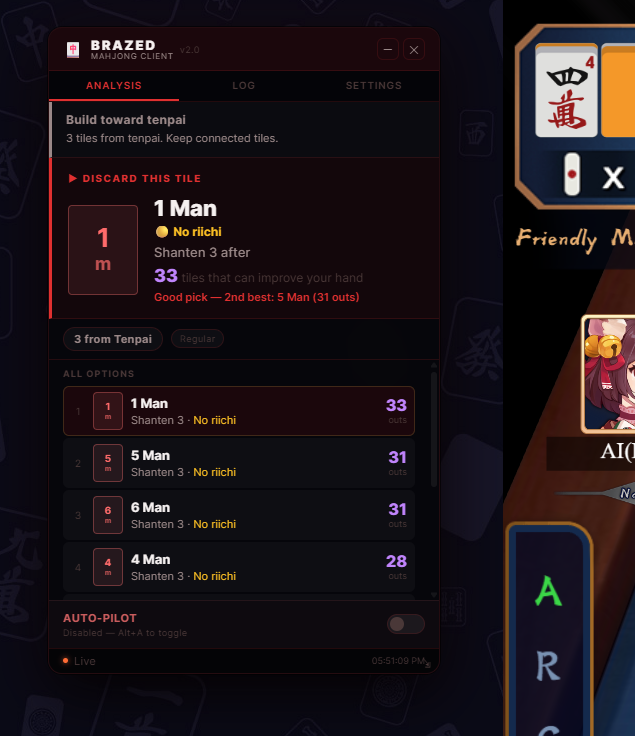
- Live hand analysis — shanten count, best discard, ukeire (outs) calculation
- Value-weighted discards — prefers high-han paths (Honitsu, Chinitsu) over raw efficiency
- Defence mode — detects opponent riichi, switches to safe tile priority automatically
- Genbutsu tracking — tiles already discarded by a riichi player are marked 100% safe
- Suji reading — moderate safety inference from opponent discard patterns
- Furiten warning — alerts when your tenpai wait is in your own discard pile
- Autopilot — fully automated play with humanised timing and thinking pauses
- Draggable HUD — resizable crimson-themed overlay, stays out of your way
- Google Chrome (or any Chromium-based browser: Edge, Brave, Opera)
- No Node.js, no build step — just load the folder
-
Download the extension
- Click the green Code button on GitHub → Download ZIP
- Extract the ZIP anywhere on your computer
-
Open Chrome extensions page
- Type
chrome://extensions/in the address bar and press Enter
- Type
-
Enable Developer Mode
- Toggle Developer Mode on in the top-right corner of the extensions page
-
Load the extension
- Click "Load unpacked"
- Navigate to and select the
mahjong-assistant/folder (the one containingmanifest.json)
-
Open Mahjong Soul
- Go to mahjongsoul.game.yo-star.com
- Log in and start or join a match
- The Brazed overlay will appear automatically in the top-right corner
If the overlay doesn't appear: Open DevTools (F12) → Console and run:
MJSDetector.stopPolling(); MJSDetector.startPolling();
| Action | How |
|---|---|
| Show / hide overlay | Press Alt+M, or click the 🀄 extension icon → Toggle Overlay |
| Move overlay | Drag the BRAZED header bar |
| Minimize | Click ─ in the top-right of the overlay |
| Toggle autopilot | Press Alt+A, or use the toggle switch at the bottom of the overlay |
Discard Now box — the tile the engine recommends discarding. Shows:
- Tile name and suit
- Safety rating (✅ Genbutsu → 🔴 Danger) — how safe it is against riichi opponents
- Whether discarding it reaches tenpai or improves shanten
- How many outs (tiles that improve your hand) remain in the wall
- Confidence: "Strong pick" = clearly best, "Marginal" = close call
Defence Mode banner — appears in red/orange when an opponent is in riichi. The engine switches to safe tile priority.
Furiten warning — appears in yellow if you've discarded your winning tile and can't win by Ron.
All Options list — full ranked list of every possible discard with outs count and safety label.
Value Potential — estimated han count and detected yaku paths (Tanyao, Riichi, Honitsu, etc.)
| Setting | What it does |
|---|---|
| Fastest / Slowest | Time range autopilot waits before acting |
| Declare win automatically | Calls Ron / Tsumo when available |
| Call Pon | Steals discards to make a triplet |
| Call Chi | Steals left player's discard to make a sequence |
| Chi aggression | How much Chi needs to help before calling |
| Call Kan | Makes a quad (risky — off by default) |
Open DevTools (F12) → Console while on Mahjong Soul:
MJS.autopilot(true)       // Enable autopilot
MJS.autopilot(false)      // Disable autopilot
MJS.toggle()              // Show/hide overlay
MJS.analyze()             // Force fresh analysis
MJS.getState()            // Dump detected game state
MJS.debugOp()             // Dump current oplist + game state
MJS.debugState()          // Full autopilot state dump
MJS.setDelays(1000, 3000) // Set autopilot delay range (ms)mahjong-assistant/
├── manifest.json # Chrome extension manifest (MV3)
├── popup.html # Extension popup (toolbar icon)
├── mjs-assistant.user.js # Tampermonkey userscript alternative
├── icons/
│ ├── icon16.png
│ ├── icon48.png
│ └── icon128.png
└── src/
├── main.js # Entry point — wires all modules together
├── tile-detector.js # Reads live game state from JS objects
├── utils/
│ ├── constants.js # Tile codes and lookup tables
│ └── tile-utils.js # Tile manipulation helpers
├── analysis/
│ ├── shanten.js # Shanten number calculation (regular/chiitoi/kokushi)
│ ├── ukeire.js # Outs calculation and discard ranking
│ ├── hand-analyzer.js # Strategy engine — value weighting, defence integration
│ └── defense.js # Danger reading — genbutsu, suji, furiten, riichi detection
├── overlay/
│ ├── overlay-ui.js # Floating HUD — rendering and event handling
│ └── overlay.css # Brazed dark theme styles
└── autoplayer/
└── autoplayer.js # Autopilot — action sequencing and humanisation
Calculates how many tiles you need to reach tenpai (shanten = -1 means tenpai). Covers all three hand types: regular (4 sets + pair), Chiitoitsu (7 pairs), and Kokushi.
For each possible discard, counts how many tiles in the remaining wall would improve your hand. Higher outs = more chances to improve.
Multiplies outs by hand value potential so the engine doesn't sacrifice a 4-han Honitsu path for 2 extra outs toward a 1-han hand. Detects: Tanyao, Pinfu, Honitsu, Chinitsu, Chiitoitsu, dragons, winds, riichi potential.
- Reads each opponent's
during_liqiflag live - Genbutsu — tiles in a riichi player's discard pile score 100 (always safe)
- Suji — if they discarded 4, tiles 1 and 7 score higher (partial safety inference)
- Defence mode — triggered when opponent riichi detected and you're 2+ shanten away
- Won't call Pon/Chi during active opponent riichi
| Problem | Solution |
|---|---|
| Overlay not appearing | Check chrome://extensions/ — extension must be enabled |
| Hand not detected | Run in console: MJSDetector.stopPolling(); MJSDetector.startPolling(); |
| Autopilot not discarding | Run MJS.debugOp() and MJS.debugState() in console to see what state is detected |
| Analysis shows wrong info | Run MJS.getState() to see what tiles were detected |
| Extension stopped after browser update | Reload it at chrome://extensions/ → click the reload icon |
AlphaJong by Jimboom7 https://github.com/Jimboom7/AlphaJong
The confirmed game API call patterns used in this project (inputOperation, inputChiPengGang, NetAgent.sendReq2MJ) and the approach to oplist-based turn detection were researched with significant reference to AlphaJong's source code. AlphaJong is an open source Mahjong Soul coder! Thank you for the help.
This project is released for educational and research purposes only.
The autopilot feature interacts with Mahjong Soul's game client in ways that explicitly violate the Terms of Service. Automated gameplay is prohibited. Using it risks a permanent account ban. The authors take zero responsibility for any consequences including but not limited to account suspension, bans, or data loss.
The analysis overlay used manually is a grey area — you are still responsible for how you use it.
No warranty is provided. Use entirely at your own risk.
MIT