

Ein moderner, browserbasierter Arbeitszeitrechner, der präzise Berechnungen nach dem deutschen Arbeitszeitgesetz (ArbZG) durchführt. Das Tool ist optimiert für die mobile Nutzung und bietet eine automatische Speicherung der Eingaben.
Hinweis: Diese App stellt für mich eine Übung im Umgang mit JavaScript dar und ist ein persönlicher Ausflug ins Webdesign. Sie wird daher ohne Gewährleistung für die Richtigkeit der Ergebnisse bereitgestellt.
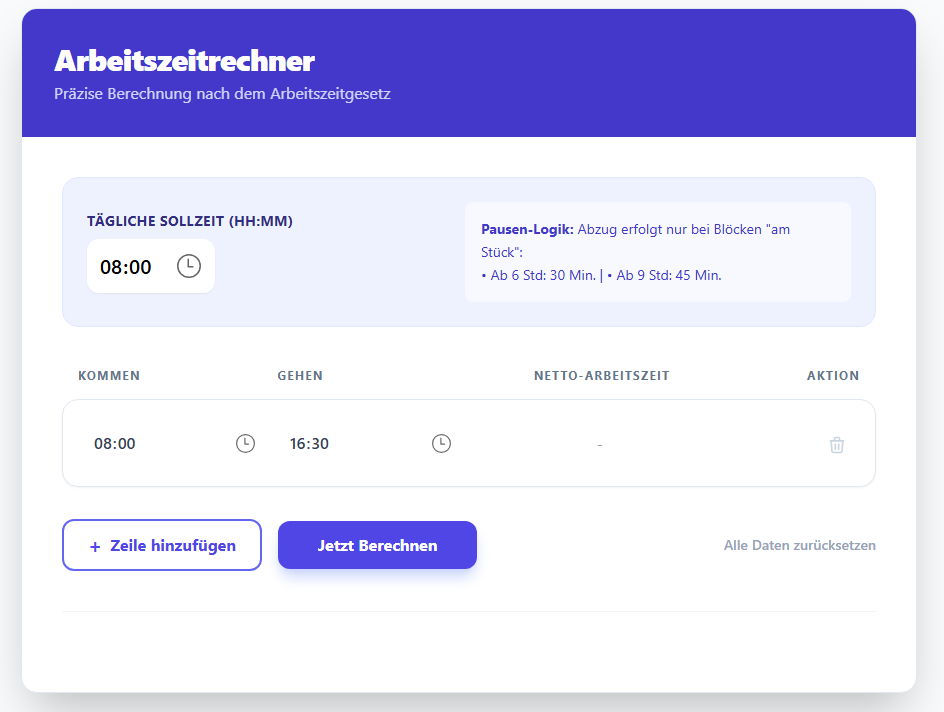
- Pausenautomatik: Automatische Berechnung der gesetzlichen Pausenzeiten pro Arbeitsblock gemäß § 4 ArbZG:
-
6 Stunden am Stück: 30 Minuten Abzug
-
9 Stunden am Stück: 45 Minuten Abzug
-
- Soll-Ist-Vergleich: Sofortige Anzeige von Überstunden oder Minderarbeit basierend auf einer einstellbaren täglichen Sollzeit.
- Persistence: Speichert Sollzeit und Zeitblöcke lokal im Browser (
localStorage). Die Daten bleiben auch nach dem Schließen des Tabs erhalten. - PWA-Support: Als App auf dem Smartphone installierbar (Add to Homescreen).
- Responsive Design: Dank Tailwind CSS optimiert für alle Endgeräte.
Die App ist direkt im Browser nutzbar unter: 👉 https://chrberinger.github.io/arbeitszeitrechner/
Scanne diesen Code mit deiner Handy-Kamera, um die App sofort zu öffnen:
- Öffne den Link oder scanne den QR-Code.
- iOS: Tippe auf das "Teilen"-Icon und wähle "Zum Home-Bildschirm".
- Android: Tippe auf die drei Punkte und wähle "App installieren".
- Klone das Repository:
git clone [https://github.com/ChrBeringer/arbeitszeitrechner.git](https://github.com/ChrBeringer/arbeitszeitrechner.git)
#ENGLISH VERSION:
A modern, browser-based work time calculator that performs precise calculations according to the German Labor Hours Act (ArbZG). The tool is optimized for mobile use and features automatic data persistence.
Note: This app serves as an exercise in JavaScript and a personal exploration of web design. It is provided "as is" without any guarantee regarding the accuracy of the results.
- Automated Break Logic: Automatic calculation of legal break times per work block according to § 4 ArbZG:
-
6 consecutive hours: 30-minute deduction
-
9 consecutive hours: 45-minute deduction
-
- Target vs. Actual Comparison: Instant display of overtime or deficit hours based on a customizable daily target time.
- Persistence: Saves target time and work blocks locally in the browser (
localStorage). Data remains available even after closing the tab. - PWA Support: Installable as an app on your smartphone (Add to Homescreen).
- Responsive Design: Optimized for all devices using Tailwind CSS.
The app is ready to use in your browser at: 👉 https://chrberinger.github.io/arbeitszeitrechner/
Scan this code with your smartphone camera to open the app instantly:
- Open the link or scan the QR code.
- iOS: Tap the "Share" icon and select "Add to Home Screen".
- Android: Tap the three dots (menu) and select "Install App" or "Add to Home Screen".
- Clone the repository:
git clone [https://github.com/ChrBeringer/arbeitszeitrechner.git](https://github.com/ChrBeringer/arbeitszeitrechner.git)