

Tool to retrieve protein-protein interactions and calculate protein/gene symbol ocurrence in the scientific literature (PubMed & PubMedCentral). Contains two python modules (core and report), and a python script (ppaxe).
Available for python 2.7 and python 3.x, and also as a standalone docker image.
from ppaxe import core as ppcore
from ppaxe import report

# Perform query to PubMedCentral
pmids = ["28615517","28839427","28831451","28824332","28819371","28819357"]
query = ppcore.PMQuery(ids=pmids, database="PMC")
query.get_articles()

# Retrieve interactions from text
for article in query:
    article.predict_interactions()

# Iterate through predictions
for article in query:
    for sentence in article.sentences:
        for candidate in sentence.candidates:
            if candidate.label is True:
                # We have an interaction
                print("%s interacts with %s in article %s" % (candidate.prot1.symbol, candidate.prot2.symbol, article.pmid ))
                print(candidate.to_html())

# Print html report
# Will create 'report_file.html'
summary = report.ReportSummary(query)
summary.make_report("report_file")# Will read PubMed ids in pmids.txt, predict the interactions
# in their fulltext from PubMedCentral, and print a tabular output
# and an html report
ppaxe -p pmids.txt -d PMC -v -o output.tbl -r report
# Or with docker image
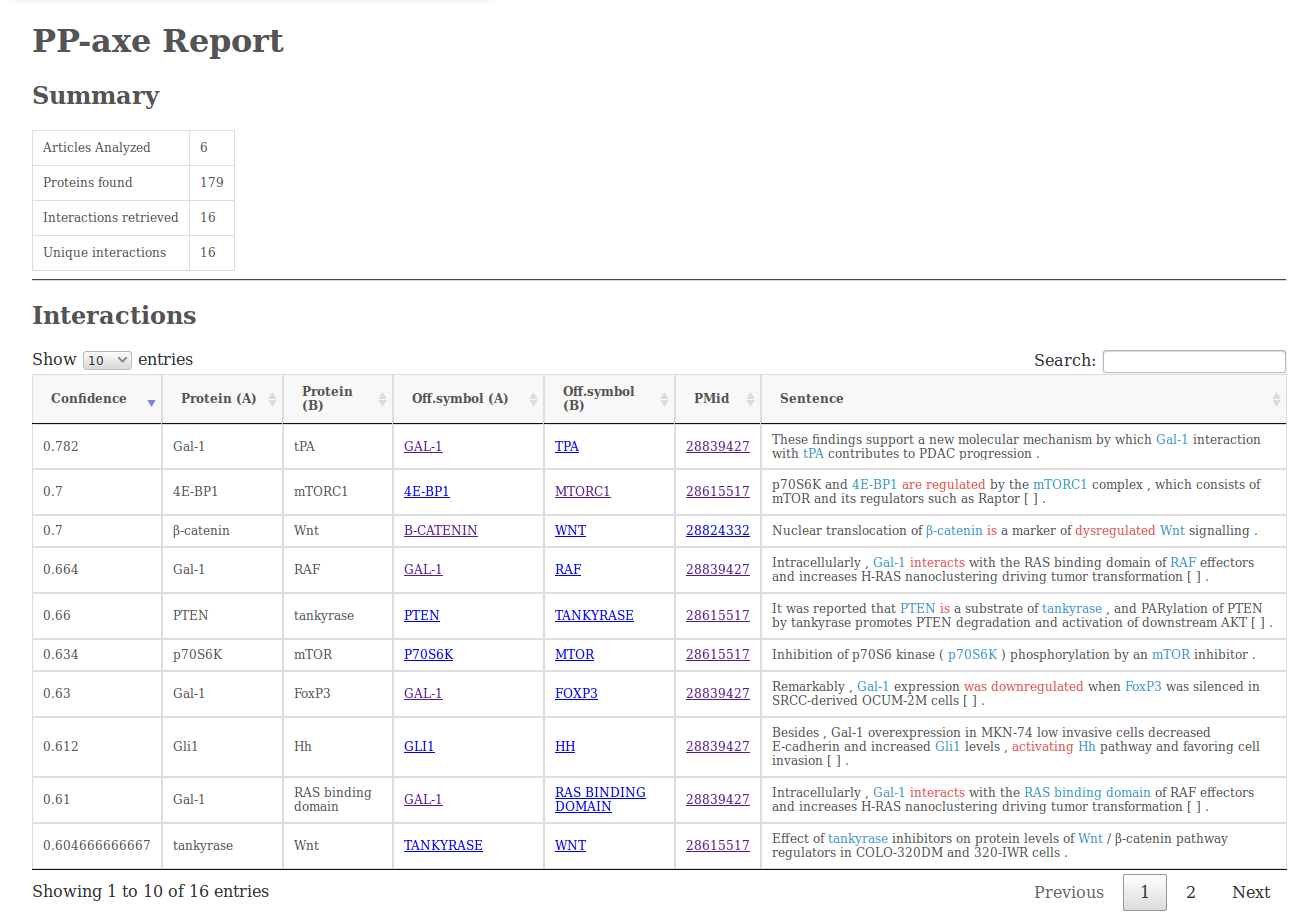
docker run -v /local/path/to/output:/ppaxe/output:rw compgenlabub/ppaxe -v -p pmids.txt -o output.tbl -r reportThe report output (option -r) will contain a simple summary of the analysis, the interactions retrieved (including the sentences from which they were retrieved), a table with the protein/gene counts and a graph visualization made using cytoscape.js.

To download and use the ppaxe Docker image:
docker pull compgenlabub/ppaxe:latest
docker run -v /local/path/to/output:/ppaxe/output:rw \
compgenlabub/ppaxe -v -p ./papers.pmids -o ./output.tbl -r ./report- Prerequisites
xml.dom
numpy
pycorenlp
cPickle
scipy
You can install this package manuallly using pip. However, before doing so, you have to download the Random Forest predictor and place it in ppaxe/data.
# Clone the repository
git clone https://github.com/scastlara/ppaxe.git

# Download pickle with RF
wget https://www.dropbox.com/s/t6qcl19g536c0zu/RF_scikit.pkl?dl=0 -O ppaxe/ppaxe/data/RF_scikit.pkl

# Install
pip install ppaxe- Download StanfordCoreNLP
In order to use the package you will need a StanfordCoreNLP server setup with the Protein/gene Tagger.
 # Download StanfordCoreNLP
 wget http://nlp.stanford.edu/software/stanford-corenlp-full-2017-06-09.zip
 unzip stanford-corenlp-full-2017-06-09.zip

 # Download the Protein tagger
 wget https://www.dropbox.com/s/ec3a4ey7s0k6qgy/FINAL-ner-model.AImed%2BMedTag%2BBioInfer.ser.gz?dl=0 -O FINAL-ner-model.AImed+MedTag+BioInfer.ser.gz

 # Download English tagger models
 wget http://nlp.stanford.edu/software/stanford-english-corenlp-2017-06-09-models.jar -O stanford-corenlp-full-2017-06-09/stanford-english-corenlp-2017-06-09-models.jar

 # Change the location of the tagger in ppaxe/data/server.properties if necessary
 # ...

 # Start the StanfordCoreNLP server
 cd stanford-corenlp-full-2017-06-09/
java -mx1000m -cp ./stanford-corenlp-3.8.0.jar:stanford-english-corenlp-2017-06-09-models.jar edu.stanford.nlp.pipeline.StanfordCoreNLPServer -port 9000 -serverProperties ~/ppaxe/ppaxe/data/server.properties
Once the server is up and running and ppaxe has been installed, you are good to go.
By default, ppaxe will assume the server is available at localhost:9000. If you want to change the address, set up the server with the appropiate port and change the address in ppaxe by assigning the new address to the variable ppaxe.ppcore.NLP:
- Start the server
# Change the location of the ner tagger in server.properties manually
java -mx10000m -cp ./stanford-corenlp-3.8.0.jar:stanford-english-corenlp-2017-06-09-models.jar edu.stanford.nlp.pipeline.StanfordCoreNLPServer -port your_port -serverProperties ppaxe/data/server.properties- Use the ppaxe package
from ppaxe import core as ppcore
from pycorenlp import StanfordCoreNLP

ppcore.NLP = StanfordCoreNLP(your_new_adress)

# Do whatever you wantRefer to the wiki of the package.
To run the tests:
python -m pytest -v tests
- Sergio Castillo-Lara - at the Computational Genomics Lab
This project is licensed under the GNU GPL3 license - see the LICENSE file for details