The shell
To create the shell of the application we will also use Domino-cli. the shell will be activated in regard of the token, and should be a singleton, with only route once, and should register two slots left-panel and content.
-
In the root folder of the project open a terminal and execute the following command
dominokit gen module -n shell -p shell -sp shell -
This will create a shell module in the project with a shell proxy
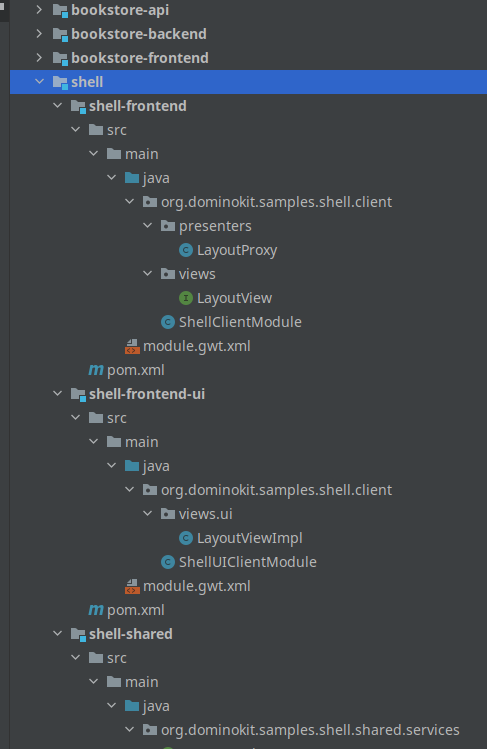
Now we will edit the shell module before test and run our application :
-
In the
shell-sharedmodule delete theShellServiceinterface as we won't use it in this tutorial. -
In the
ShellProxyremove the import of theShellServiceFactory. -
In the
@AutoRouteremove the argumenttokenand addrouteOnce = true. -
Add
@Singletonannotation. -
Remove the
implements ShellView.ShellUiHandlerspart -
Delete the method
onShellInit. -
Delete the content of the method
onShellRevealedbut keep the method. -
Now back to the
shell-sharedmodule and add a classSlotswith 2 constants as the followingpackage org.dominokit.samples.shell.shared; public class Slots { public static final String LEFT_PANEL="left-panel"; public static final String CONTENT="content"; }
-
Now back to the
ShellProxyclass, add the annotation@RegisterSlots({Slots.LEFT_PANEL, Slots.CONTENT})The shell proxy should look like this after those changes
package org.dominokit.samples.shell.client.presenters;

import org.dominokit.domino.api.client.annotations.presenter.AutoReveal;
import org.dominokit.domino.api.client.annotations.presenter.AutoRoute;
import org.dominokit.domino.api.client.annotations.presenter.OnReveal;
import org.dominokit.domino.api.client.annotations.presenter.PresenterProxy;
import org.dominokit.domino.api.client.annotations.presenter.RegisterSlots;
import org.dominokit.domino.api.client.annotations.presenter.Singleton;
import org.dominokit.domino.api.client.annotations.presenter.Slot;
import org.dominokit.domino.api.client.mvp.presenter.ViewBaseClientPresenter;
import org.dominokit.domino.api.shared.extension.PredefinedSlots;
import org.dominokit.samples.shell.client.views.ShellView;
import org.dominokit.samples.shell.shared.Slots;
import org.slf4j.Logger;
import org.slf4j.LoggerFactory;

@PresenterProxy(name = "Shell")
@AutoRoute(routeOnce = true)
@Singleton
@Slot(PredefinedSlots.BODY_SLOT)
@AutoReveal
@RegisterSlots({Slots.LEFT_PANEL, Slots.CONTENT})
public class ShellProxy extends ViewBaseClientPresenter<ShellView> {

    private static final Logger LOGGER = LoggerFactory.getLogger(ShellProxy.class);

    @OnReveal
    public void onShellRevealed() {
    }
}
-
Open the
ShellViewinterface and deletewelcomeMessagemethod. -
delete the
ShellUiHandlersinner interface. -
Remove the extends of
HasUiHandlers.The
ShellViewclass should look like the following after those changes :package org.dominokit.samples.shell.client.views; import org.dominokit.domino.api.client.mvp.view.ContentView; public interface ShellView extends ContentView { }
-
In the
shell-frontend-uiopen theShellViewImplclass. -
Remove the
uiHandlersfield and its setter method. -
Remove the
welcomeMessagemethod. -
Now we will use Domino-ui to implement a simple layout.
-
Add a
layoutfield and implement theinitmethod like the following :package org.dominokit.samples.shell.client.views.ui; import elemental2.dom.HTMLDivElement; import org.dominokit.domino.api.client.annotations.UiView; import org.dominokit.domino.ui.layout.Layout; import org.dominokit.domino.view.BaseElementView; import org.dominokit.samples.shell.client.presenters.ShellProxy; import org.dominokit.samples.shell.client.views.ShellView; @UiView(presentable = ShellProxy.class) public class ShellViewImpl extends BaseElementView<HTMLDivElement> implements ShellView{ private Layout layout= Layout.create("Book store"); @Override public HTMLDivElement init() { layout.autoFixLeftPanel(); return layout.element(); } }
-
Now try to build the project, and we should get an error saying something like this
java: cannot find symbol
symbol:   method getLeftPanelSlot()
location: variable view of type V
This is because the proxy is registering slots, but these slots are not implemented by the view, we will fix them next.
-
Open the
ShellViewinterface and make it extend fromShellProxySlotsgenerated interfacepackage org.dominokit.samples.shell.client.views; import org.dominokit.domino.api.client.mvp.view.ContentView; import org.dominokit.samples.shell.client.presenters.ShellProxySlots; public interface ShellView extends ContentView, ShellProxySlots { }
-
Open the
ShellViewImpland make it implement the two new methods like the following :@Override public IsSlot<?> getLeftPanelSlot() { return SingleElementSlot.of(layout.getLeftPanel()); } @Override public IsSlot<?> getContentSlot() { return SingleElementSlot.of(layout.getContentPanel()); }
If we build again, the error should be gone.
-
Now in the project root folder open a terminal and run
mvn clean install.
For Intellij Idea users this should be just picking the Development run configuration then click run
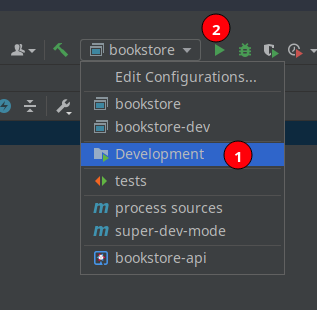
but we can also run from the terminal, following the instructions in the readme file.
In project root folder :
- In one terminal run
mvn gwt:codeserver -pl *-frontend -amThis will run the code-server that will incrementally build the project and compile it to javascript as we make changes
- In another terminal
cd bookstore-backend - execute
mvn exec:javaThis will run the server that serves out index page the javascript being compiled out of our application and any other static resources.
- In the browser open
http://localhost:8080 - The code server will start compiling the application and will show a message saying
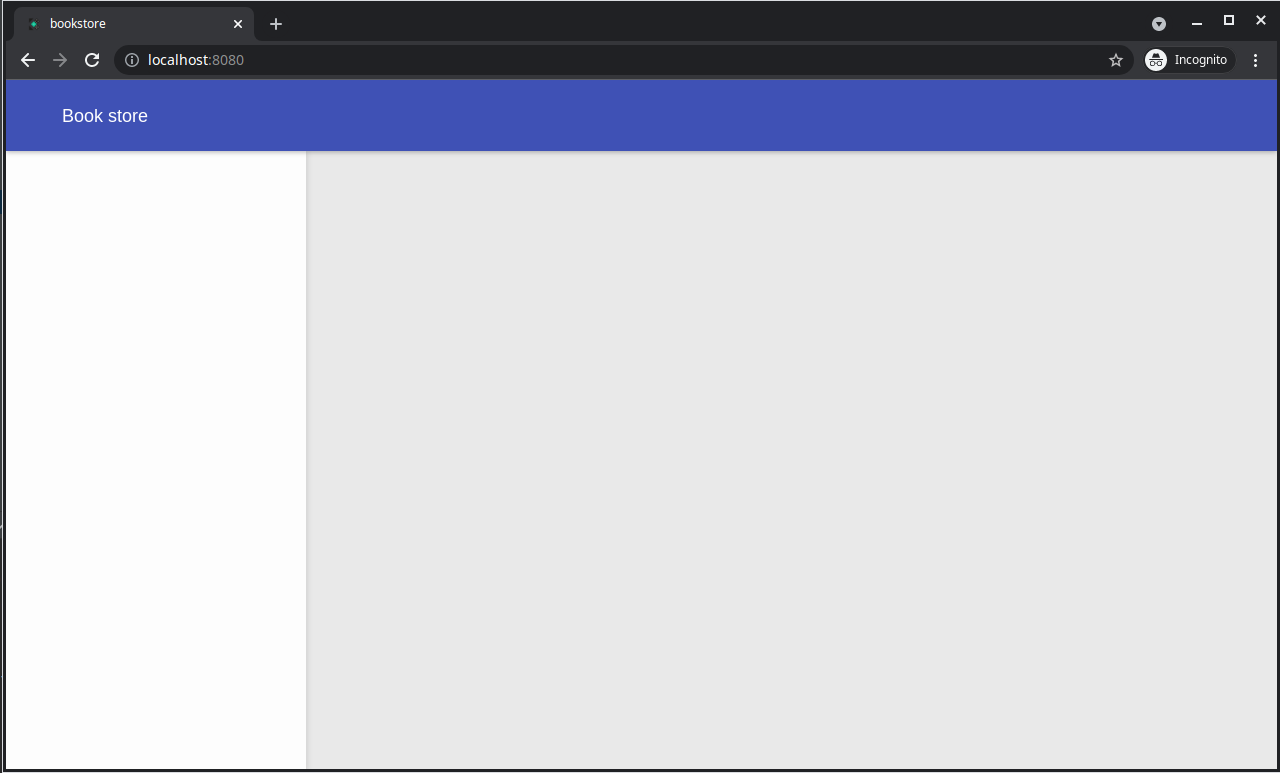
Compiling bookstore - Wait until it finish, and you should see the application layout.