Moonglade is a personal blogging platform built for developers, optimized for seamless deployment on Microsoft Azure. It features essential blogging tools: posts, comments, categories, tags, archives, and pages.
Moonglade provides a self-hosted blog with a public reading experience and an authenticated admin portal. The core workflow is authoring posts and pages, organizing them with categories and tags, publishing immediately or on a schedule, and exposing the published content through web pages, feeds, sitemap, Webmention, and search-engine notification protocols.
Key business areas include:
- Content publishing: posts, drafts, scheduled posts, pages, featured/outdated flags, archives, recycle bin behavior, and route links for published posts.
- Reader interaction: comments, replies, Webmentions, comment moderation, view counts, and optional email notifications.
- Site management: runtime blog settings, widgets, themes, custom CSS, menus, image storage, account settings, and data import/export.
- Discovery and interoperability: RSS, Atom, OPML, OpenSearch, FOAF, sitemap, robots.txt, IndexNow, reader-friendly markup, and health checks.
The main solution file is src/Moonglade.slnx.
| Path | Purpose |
|---|---|
src/Moonglade.Web |
ASP.NET Core web host, Razor Pages, API controllers, endpoint mapping, filters, middleware wiring, and static assets. |
src/Moonglade.Features |
Blog feature commands and queries for posts, pages, comments, categories, tags, assets, dashboard data, and recycle bin behavior. |
src/Moonglade.Data |
EF Core BlogDbContext, entities, DTOs, mappings, and import/export primitives. |
src/Moonglade.Data.SqlServer, src/Moonglade.Data.PostgreSql |
SQL Server and PostgreSQL provider registration and provider-specific EF Core behavior. |
src/Moonglade.Configuration |
Persisted blog settings models, defaults, loading, and update commands. |
src/Moonglade.Auth |
Local account and Microsoft Entra ID authentication support. |
src/Moonglade.BackgroundServices |
Scheduled publishing, update checks, and fire-and-forget background work. |
src/Moonglade.* |
Supporting projects for image storage, email, IndexNow, moderation, Webmention, syndication, themes, widgets, setup, utilities, and middleware. |
src/Tests/Moonglade.*.Tests |
xUnit test projects aligned with the production projects. |
Deployment, Dockerfile, compose.yaml |
Azure and Docker deployment assets. |
This blogging system must not be used to serve users in mainland China or to publish content prohibited by Chinese law or any applicable regulations.
- Stable Code: Always use the Release branch. Avoid deploying from
master. - Security: Enable HTTPS and HTTP/2 on your web server for optimal security and performance.
- Deployment Options: While Azure is recommended, Moonglade can run on any cloud provider or on-premises.
Get started in 10 minutes with minimal Azure resources using our automated deployment script.
For local testing or small-scale use, deploy Moonglade using Docker:
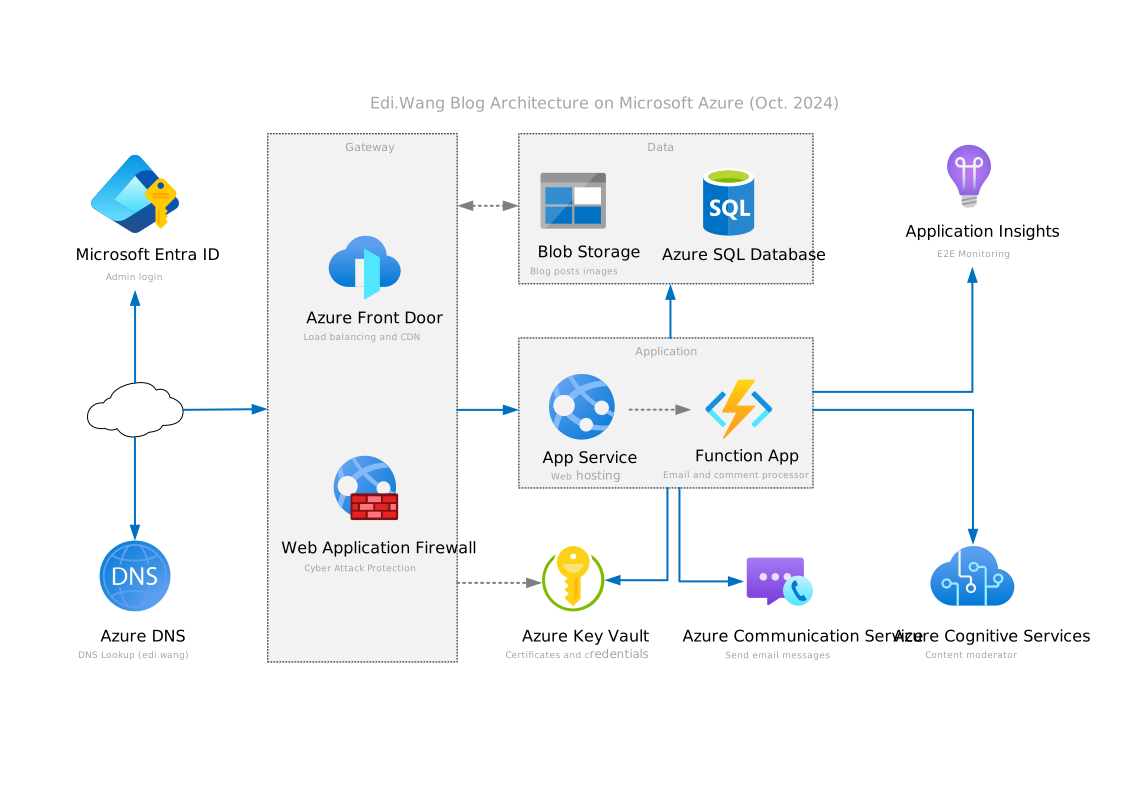
docker compose up -dThis mirrors how edi.wang is deployed, utilizing a variety of Azure services for maximum speed and security. No automated script is provided—manual resource creation is required.
| Tools | Alternatives |
|---|---|
| Visual Studio 2026 | VS Code + .NET 10.0 SDK |
| SQL Server 2025 | LocalDB or PostgreSQL |
Tip: SQL Server Express (free) is sufficient for most production uses.
| Database | Example Connection String (appsettings.json > ConnectionStrings > MoongladeDatabase) |
|---|---|
| SQL Server | Server=(local);Database=moonglade;Trusted_Connection=True; |
| PostgreSQL | User ID=***;Password=***;Host=localhost;Port=5432;Database=moonglade;Pooling=true; |
Change ConnectionStrings:DatabaseProvider in appsettings.json to match your database type.
- SQL Server:
SqlServer - PostgreSQL:
PostgreSql
The commands below are derived from the project files and launch settings:
dotnet restore src/Moonglade.Web/Moonglade.Web.csproj
dotnet build src/Moonglade.Web/Moonglade.Web.csproj
dotnet run --project src/Moonglade.Web/Moonglade.Web.csproj
Focused tests can be run from the matching test project, for example:
dotnet test src/Tests/Moonglade.Features.Tests/Moonglade.Features.Tests.csproj
dotnet test src/Tests/Moonglade.Web.Tests/Moonglade.Web.Tests.csproj- Build and run
./src/Moonglade.slnxorsrc/Moonglade.Web/Moonglade.Web.csproj - Access your blog:
- Home:
https://localhost:10210 - Admin:
https://localhost:10210/admin- Default username:
admin - Default password:
admin123
- Default username:
- Home:
Most settings are managed in
appsettings.json. For blog settings, use the/admin/settingsUI.
- By default: Local accounts (manage via
/admin/settings/account) - Microsoft Entra ID (Azure AD) supported. Setup guide
Please update the default key in appsettings.json:
"CaptchaSettings": {
  "SharedKey": "<your value>"
}
To generate a shared key, please see this document
Configure the ImageStorage section in appsettings.json to choose where blog images are stored.
Create an Azure Blob Storage container with appropriate permissions:
{
  "Provider": "azurestorage",
  "AzureStorageSettings": {
    "ConnectionString": "YOUR_CONNECTION_STRING",
    "ContainerName": "YOUR_CONTAINER_NAME"
  }
}- Enable CDN in admin settings for faster image delivery.
Windows:
{
  "Provider": "filesystem",
  "FileSystemPath": "C:\\UploadedImages"
}
Linux:
{
  "Provider": "filesystem",
  "FileSystemPath": "/app/images"
}
When using the file system, ensure the path exists and has appropriate permissions. If the path does not exist, Moonglade will attempt to create it.
Leave the FileSystemPath empty to use the default path (~/home/moonglade/images on Linux or %UserProfile%\moonglade\images on Windows).
Moonglade comment moderation runs locally and does not call a remote moderation API. Configure the word filter and keyword list from /admin/settings/comment.
For notifications on new comments, replies and webmentions, use Moonglade.Email Azure Function:
"Email": {
  "ApiEndpoint": "",
  "ApiKey": ""
}
Enable notifications in the admin portal.
| Name | Feature | Status | Endpoint |
|---|---|---|---|
| RSS | Subscription | Supported | /rss |
| Atom | Subscription | Supported | /atom |
| OPML | Subscription | Supported | /opml |
| Open Search | Search | Supported | /opensearch |
| FOAF | Social | Supported | /foaf.xml |
| Webmention | Social | Supported | /webmention |
| Reader View | Reader Mode | Supported | N/A |
| u-card | SEO | Supported | N/A |
| IndexNow | SEO | Supported | N/A |
| Dublin Core | SEO | Basic | N/A |
| RSD | Discovery | Deprecated | N/A |
| MetaWeblog | Blogging | Deprecated | N/A |
| Pingback | Social | Deprecated | N/A |
To ensure your Moonglade instance is running, you can use the health check endpoint:
GET /health
This endpoint returns a simple JSON response indicating the status of your Moonglade instance.