Releases: Electron7-7/graphx
Release list
GraphX Alpha Seven - External References & More!

External References (and a GraphXTheatre Overhaul!)
What's New?
External References
You can now use external .obj model files for custom Mesh objects! Yes, this means that when making a .gt file, you can import whatever models you like, as long as they're in the .obj format! Oh, also all the vertex positions have to be between -1 and 1; I'm planning on writing some custom code to scale vertex positions automatically as well as avoiding floating point errors, but for now that's your responsibility. An easy way to do this in Blender is to make a default cube and then make sure your model is scaled down to be inside that cube (then, of course, delete the cube before exporting, lol).
An Upgrade to the GraphXTheatre File Format
Some major changes happened under the hood, but only some of those changes directly affect how you make .gt files. Those changes include:
- The aforementioned "external reference" variable type, which is a file path written between double-quotes (
""). File paths can be either absolute or relative to the executable file. Absolute paths start with/on Linux, or any drive letter on Windows (C:/,D:/,Z:/, etc.). Relative file paths are relative to the folder that the executable is in. You can use../to navigate out of that folder in the path, but files won't get processed unless their extension is supported, which should hopefully stop any exploits using this feature.- Currently, only
.objfiles are supported, but I plan on supporting textures, shaders, and more later on down the line. In the meantime, try setting aMesh'sMeshDatato an external.objfile!
- Currently, only
- When copying a variable from another object using a Theatre reference (i.e: using
<>), it no longer matters which object comes first! This does still apply, however, when referencing an object as a variable.- For example, when using a Theatre reference like this:
Position <SomeThing>or this:Color <SomeOtherThing>, you don't need to care about where "SomeThing" or "SomeOtherThing" are in relation to the object that's referencing them. - But when using a Theatre reference like this:
Mesh <MeshThing>or this:Material <MaterialThing>, then "MeshThing" and "MaterialThing" need to be above whatever object is referencing them.
- For example, when using a Theatre reference like this:
- Sandwiches can now be of any size and any variable type!
- For example, this is now possible:
Mesh:MeshData:Material <NotACube>:[GRAPHX_CUBE]:<Material_1>
- For example, this is now possible:
- Single-line, C++-style comments are now a thing!
- The parser & interpreter will completely ignore anything that comes after
//for the entire line- Be careful not to comment out variable values! That variable still needs to get set and it'll gobble up whatever value comes next!
There might be a few smaller things that I'm forgetting, but every detail on the syntax will be written down in the Wiki! Check it out!
- Be careful not to comment out variable values! That variable still needs to get set and it'll gobble up whatever value comes next!
- The parser & interpreter will completely ignore anything that comes after
GraphX Alpha Six
Keys You Can Press!
- Left and Right to load new Theatres (including custom Theatres loaded externally)
- F turn your flashlight on and off (if the current Theatre has a
LightFlashlightActor)- Q toggle the color of your flashlight to a pure red and back to the original color
- R reset all
PhysicsActorsto their initial orientation (use this to watch the cubes fall again!) - Tab to open and close the debug menu
- [ and ] to cycle between the Blinn-Phong and Phong shaders
- 1-5 to switch to different debugging shader outputs
- 1 will isolate the diffuse output (flat colors and brightness)
- 2 will isolate the specular output (the "shiny" reflection of light sources on surfaces)
- 3 will isolate the ambient output (a simple, flat version of "global illumination")
- 4 will show all the outputs combined (this is the default, and how the shader is supposed to look)
- 5 will show the normal values for every mesh as different colors
- I converted the range from -1 -> 1 to 0 -> 1 (resulting in desaturated colors)
- G toggle ambient lighting on/off
- J if you're debugging GraphX, this should toggle Jolt's asserts on and off
- Esc to exit GraphX
What's New?
- New Blinn-Phong shading now used by default
- Use [ and ] to cycle between the Blinn-Phong and Phong shaders
- More details in the debug menu
- Actors and Devices now show the settings supplied to them via the GraphXTheatre file
- Actors can now handle inputs directly (e.g: GraphXPlayer now handles mouse and keyboard input itself, instead of through the GLFW key callback function)
- New template functions for finding any instance of a specific Actor/Device sub-class in a Theatre
- Keep in mind, these functions will only return the first instance they find or, if none exist, a new instance (to avoid crashing)
- The functions
getCurrentPlayerandgetCurrentEnvironmentwill create a newGraphXPlayerorEnvironment, respectively, if none exist in the current Theatre- They are also much safer and have much better printouts
- Safeguarded multiple crash points when loading a new Theatre
- Various bug-fixes and minor additions
GraphX Alpha 5
External Theatres Support
Yes, you read that right, GraphX now supports custom maps!
If you make a custom .gt file and place it in a theatres/ folder right next to the GraphX executable, it will load your map into the queue!
It does this every time you switch Theatres (using Right Arrow or Left Arrow), so if you make changes to your Theatre, you don't even have to close and re-launch GraphX to see those changes come to life!
Oh, also, ImGui Integration
Hit Tab for a little debug menu that shows the currently loaded Theatre's name and a list of all its Actors and Devices and their respective names, UIDs, and typenames! Nifty!
Oh, yeah, ImGui will automatically generate a imgui.ini file, but don't worry about it. You can delete it if you want, I'll be finding a way to get rid of it soon.
GraphX Fourth Alpha
Well, more like "Third and a Half"...
What's New
Theatre loading + switching has gotten a gigantic overhaul; I used to store each Theatre in a map as they were loaded. This was very bad and very dumb and I only did it because I'd not thought about why levels in video games need to be loaded in the first place: because keeping every level you've opened up in your RAM is a bad idea. In the current version of GraphX, you can sift through the existing Theatres with the right arrow key; there are only two embedded Theatres, but that external Theatre file update is coming soon, I promise.
So, any new keys to press when I launch this puppy?
Yes! The Right Arrow key will load the next Theatre (or the first one if you're already in the last one). Currently, there are only two Theatres, so you'll loop back after one.
GraphX Third Alpha
Yeah, I can't figure out a good naming scheme for the Github releases' titles
New Stuff!
- GraphXTheatre
.gtfile format - Better Jolt physics integration
- Including a better GraphXPlayer controller
- New
Deviceclass to help group up things like colliders, materials, meshes, etc. - More debugging helpers! (mostly in src/sanity.hpp)
- Uhhhhhhhhhhh, I don't remember but a shit ton of refactoring
Upcoming Stuff!
- External Theatre loading (using
.gtfiles) - Native Windows compiling
- A game(?)
What you can do in these executable files
- Walk around
- Bump into physics objects
- Turn the flashlight on and off (using F)
- Make the flashlight red! (using Q)
- Reset all PhysicsActors to their initial orientation (using R)
- Get your mouse cursor back! (using Tab
GraphX Alpha 2
GraphX Second Alpha
Introducing:
- Custom Phong shader
- Support for multiple lights of various types (point, spot, and directional)
- Theatres (GraphX version of game scenes/levels/maps)
- Better rendering pipeline
Shortcomings:
- Forward-rendering
- OpenGL only
- As far as I know, GPU code is single-threaded
- Phong lighting instead of Blinn-Phong lighting
Upcoming:
- Actors should use Mesh pointers instead of Meshes
- Theatres might use a custom filetype to store data for creating and adding Actors, Meshes, Materials, etc.
- Blinn-Phong lighting
- Either deferred-rendering (which is far too complex for me right now) or better forward-rendering (preferable, currently)
- Removing as much OpenGL specific code from the main file as possible
- On that note, abstracting rendering functions to isolate OpenGL code and allow for different API usage
Building Notes:
If you want to compile the engine for yourself, here are some things to make note of:
- I did not initially program this with Windows in mind, but you can build an executable using CMake, clang, and the Microsoft Windows SDK/build tools/whatever the hell DLLs and shit you need. I specifically designed the CMakeLists to not use Visual Studio because I have a petty vendetta against it, as a Linux snob (sorry, but Sublime Text is based). Your mileage shouldn't vary by much, but it might.
- You might notice
make linux_testandmake windows_testcan be run, but will fail at the very end. All the "test" rule does is compile the code like normal, run the program with a custom Zsh script, before finally deleting the program after being run (which probably isn't necessary and might change immediately after me writing this). The custom script I wrote just runs the game using GameMode and MangoHud, and takes in a number parameter as input to set the FPS cap in MangoHud. You don't have that script, which is why it will fail. If you want that script, it's only one line so here you go:
MANGOHUD_CONFIG="fps_limit=${1}, gl_vsync=0, vsync=2, gamemode" gamemoderun mangohud --dlsym $2
Preword:
When publishing this release, I wrote a few paragraphs of information that I would end up adding to the README. However, since I did initially write it up for this release, I'll keep it down below as well.
Rant:
When I started this journey, I had very little programming experience; a few basic Python programs (like, command-line output basic), some shell scripting, a bit of web-design, and some fun ventures in Blitz3D (which I highly recommend to anyone interested in the programming side of gamedev). Needless to say, I was in no position whatsoever to think to myself, "hmm, you know what? I want to learn C++ and OpenGL/Graphics Programming at the same exact time! Surely, nothing will go wrong". I am here to tell you I am lucky that I have autism and an autistic intrigue and passion for programming, because if I didn't, this project would have permanently died before a week's time.
DO NOT DO WHAT I DID.
If you want to learn something, especially learn how to make something, don't fucking jump into the deep end. You'll burn out so quickly that you'll never want to touch that thing ever again. I know this because I did just that with Blender, Unity, UE5, programming, video creation, video editing, working out, voice acting, animation, drawing, and so much more. It took years for me to pick some of those things back up, and some of them I still haven't tried since I burnt out on them. I am lucky that game engine programming just so happened to be an autistic hyperfixation of mine. That's quite literally the only thing that kept me going while essentially learning the most difficult three things you can ever learn: coding, C++, and graphics programming. Thank god I didn't try this on Windows.
Oh yeah, my final word of advice:
DO NOT USE WINDOWS TO LEARN HOW TO PROGRAM!!!!!!
Holy fuck is Windows just the worst for beginners; Visual Studio, the Windows libraries, and shit like VisualC++ are all fucking awful for beginners. When you have to learn how to fucking open up and configure Visual Studio before even writing "Hello World!", you know there's a problem. Fuck Visual Studio, fuck solution files, fuck what it does to your beautiful project folder, fuck Microsoft and their stupid unique required libraries for executable compilation, and fuck the NT filesystem for existing.
Rant over, you can all return to your desks.
Special Thanks:
Big shout out to LearnOpenGL, StackOverflow, and Desmos for teaching me everything I need to know.
Huge thank you to the Game Engine Black Book on DOOM, and autistic thank you to John Carmack for programming DOOM; ID, Valve, and their game engines were some of the biggest sources of inspiration for me doing this whole thing.
Kudos to sadmansk and his game engine for being a helpful reference during the first few days of this project.
Thank you to UE5 and Unity for making me annoyed, passionate, and foolish enough to say "this sucks, I dislike this, and I could do better".
Thank you to Godot for being a potentially helpful reference once I understand more about what the hell I'm doing, but mainly for being open-source, well made (mostly), and having a clear and concise chart detailing their graphics rendering pipeline.
Finally, but most importantly, thank you to my dad for giving me his love of problem solving, a passion for knowledge, and "Algorithms in C: Third Edition" which is a very good read (that I have yet to finish).
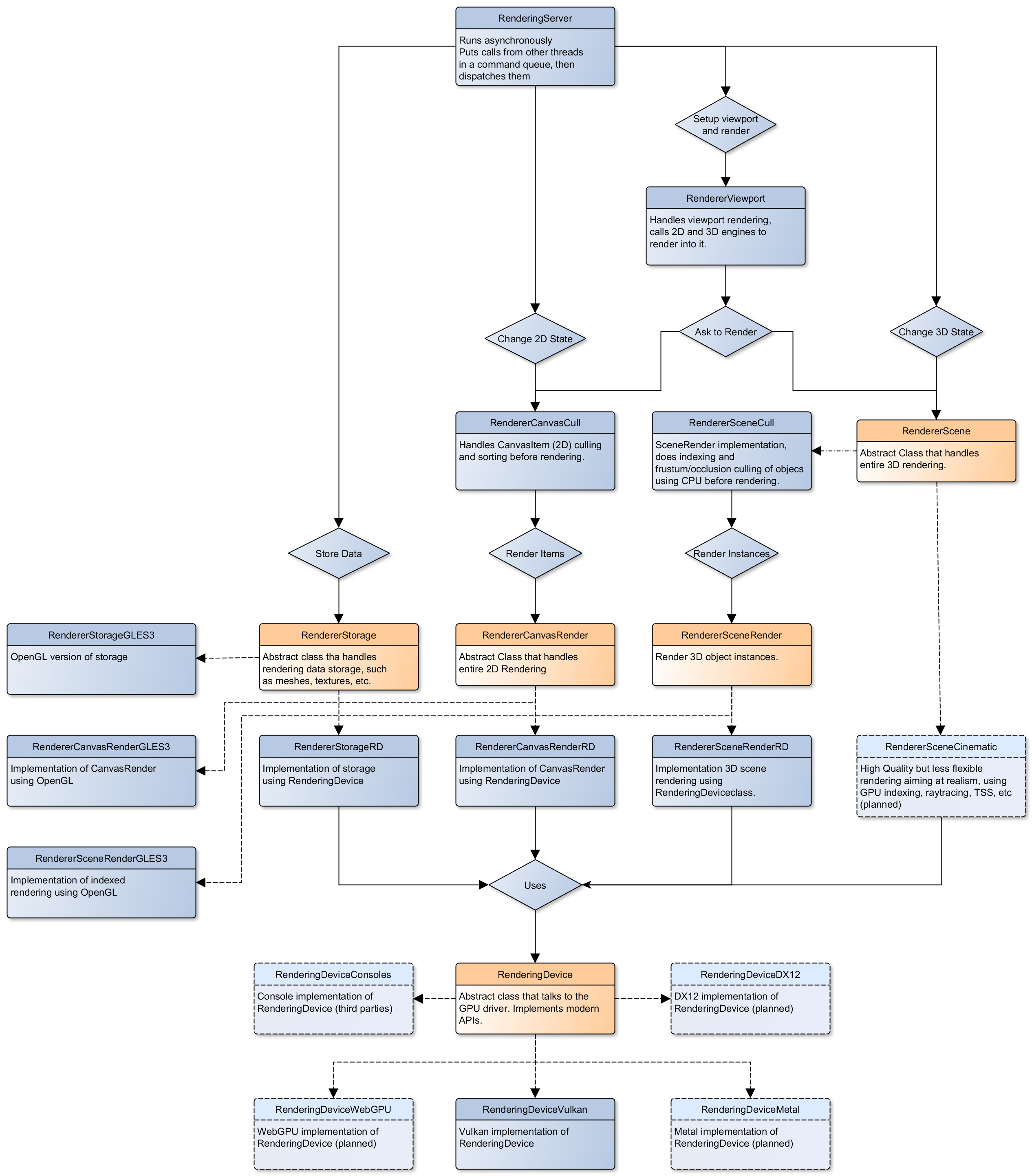
GraphX First Official Alpha
GraphX v0.0.0-a.1
(or, "it's finally unique enough that I feel okay with giving it an official name and number")
Yup
:3
FullyFromScratch: Cleaned up and ready to move on (right before gutting the Cube class, lol)
I've figured out the naming conventions for files and a bit of the scope moving forward, but I want to save this build to look back on before I gut some of its features.
Functional Code Before Starting Fully From Scratch
Includes the cool vertex data compression and a really sick more efficient camera movement system. This is all before I decided to completely scrap everything and try and use DOOM's source code as inspiration for my project framework.
Vertex Data Compression
Compressed vertex data for a cube from the given 108 floats to only 24, using indices to remove redundant vertices. I plan on making this fully programmatic (i.e: no hard-coded vertices) but I am proud of this compression so I wanted to save the source code.