Home
Tela is a canvas user interface.
After instalation Tela will appear on the canvas itself without any docker activation as it is an Extension.

-
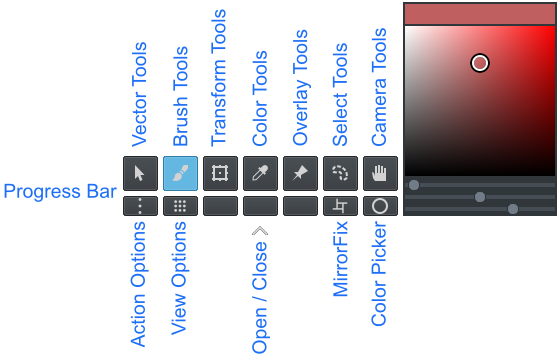
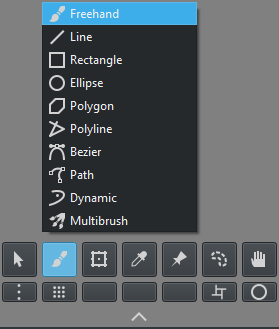
Toolbox : Tela Options
- Vector Tools : Vector toolbox options
- Brush Tools : Brush toolbox options
- Transform Tools : Transform toolbox options
- Color Tools : Color toolbox options
- Overlay Tools : Overlay toolbox options
- Select Tools : Select toolbox options
- Camera Tools : Camera toolbox options
-
Extras : Extra options
- Action Options : Python action options
- View Options : Python view options
- MirrorFix : Mirror fix script
- Color Picker : Toggle Color Picker on canvas
- Open / Close : Open and Close User Interface
Note: Currently 3 buttons are unsassigned without scripts to run
- LMB ( Click ) : Select the highlighted tool
- LMB ( Hold ) : Open the group menu options




MirrorFix is a script that helps correcting asymmetry errors. The center of the document is the axis of the mirror operation. It can operate with or without a selection and applied onto multiple layers. When no selection is present the script will select half of the document as the Source and apply it to the other side. Available Sources can be LEFT, RIGHT, TOP, DOWN and a Selection. Before the script runs it will show a message with the current settings, and if Accepted it will run and warn when it is done.
- LMB ( Click ) : Display a pop-up instruction on canvas
- LMB ( Swipe LEFT or Swipe RIGHT or Swipe UP or Swipe DOWN ) : Run the Mirror Fix script, considering the swipe direction upon release


Color picker is locked unless the plugin Pigment.O is installed. If it is present the button will allow a picker to spawn on the canvas. This picker uses Pigment.O's color engine to calculate and display HSV, HSL, HCY, ARD color spaces. Each slider will correspond to each component in that color space. If you want another color space inside Tela go into Pigment.O's settings and change the wheel color space option. Pressing the button will spawn the picker next to Tela, but if the shortcut "Picker to Cursor" is used it will spawn under the cursor for more convinence and will remain there until dismissed by tapping the shortcut again. If the Picker is not in sync with the color in Krita just hover the cursor over the picker to update it.
- Display : Display the Foreground Color selected
-
Panel : Panel surface options
- LMB : Select slider 2 and slider 3 values
- Ctrl + LMB : Select slider 1 values ( Hue )
- Sliders : Edit the values in each slider individualy